
Google processes about 8.5 billion searches every day. Despite the rise of AI tools like ChatGPT, users still use Google to obtain information, navigate website pages, and perform transactions.
If you’re looking to drive more online traffic to your business, SEO is a non-negotiable. In this article, we’ll explore the basics of SEO, how SEO works, the different types of SEO, and the best practices for seamless Search Engine Optimization.
What is SEO in Digital Marketing?
Digital marketing is a huge umbrella, encompassing social media, email, paid advertising, video marketing and even web design. However, most experts regard Search Engine Optimization (SEO) as the most important digital marketing method.
SEO is the methodology of ranking web pages organically without requiring ad spend. The higher your website ranks, the more free traffic your site can drive. If done right, SEO can bring sustainable and exponential growth to your business.
How Does SEO Work?
Now, how exactly does SEO work? The basics of SEO can actually be more complicated than it looks. It’s not just about keywords, backlinks, and content. There are a lot more moving parts and nuances that are happening in the background.
Types of SEO
To properly break down the scope of SEO, it’s best to mention the different types of SEO and how each category contributes to the bigger picture:
1. On-page SEO
Also called on-site SEO, on-page SEO is all about optimizing your site’s pages for both users and search engines. This involves creating high-level content to boost shareability and dwell time; crafting great titles and meta descriptions for better click-through rate, and making sure that web crawlers can easily understand and index your site. Other specific on-page SEO elements include:
- Using target keywords in the right places– naturally within the URL, page title, meta description, headers, alt text, and throughout the article.
- Structuring content using header tags (H1-H6)
- Using structured data markup
- Doing image compression
- Ensuring SEO internal linking
- Maintaining the best practices for site integrity
2. Off-page SEO
While on-page SEO concerns everything done within the website to boost discoverability and visibility, off-page SEO focuses on the activities done off your website like link building, email outreach, local citations, guest blogging, and more.
The main goal of off-page SEO is to gather backlinks, which are inbound or incoming links created when another website links to your website. Search engines consider them votes from other websites that make you appear more credible and authoritative.
3. Technical SEO
Simply put, technical SEO refers to the behind-the-scenes optimizations that support better crawling, indexing, and search performance. That’s basically technical SEO explained at its core: building a technically healthy website that search engines can navigate efficiently.
4. Local SEO
Local SEO involves more specialized measures that help your site connect with searchers in specific target areas. Brick-and-mortar businesses should employ local SEO strategies in order to effectively reach their local audience.
To learn more about the best SEO practices for each type mentioned above, check out our comprehensive guide on the most effective SEO strategies.
There are other specific types of SEO such as ecommerce SEO, YouTube SEO, Image SEO, Voice Search SEO, International SEO, and even social SEO. It’s all about knowing what your core business goals are and tailoring your SEO strategy to align with those goals.
SEO Tools You Need
Even if you can afford to hire a team of SEO experts, the basics of SEO are still worth learning in order to make informed decisions and communicate effectively with your team. To do that, these SEO tools can be a great starting point:
1. Google Search Console
GSC provides accurate and direct data straight from Google. You can get comprehensive insights, identify technical issues, and monitor indexation all for free.
2. Keyword Research Tools
You can’t find the right keywords to target for SEO without doing keyword research. Keyword research tools allow you to discover the exact terms people are using to find information online along with their search volume and keyword difficulty.
You can start with Keywords Everywhere to uncover keyword ideas directly inside Google and see search volume data as you browse.

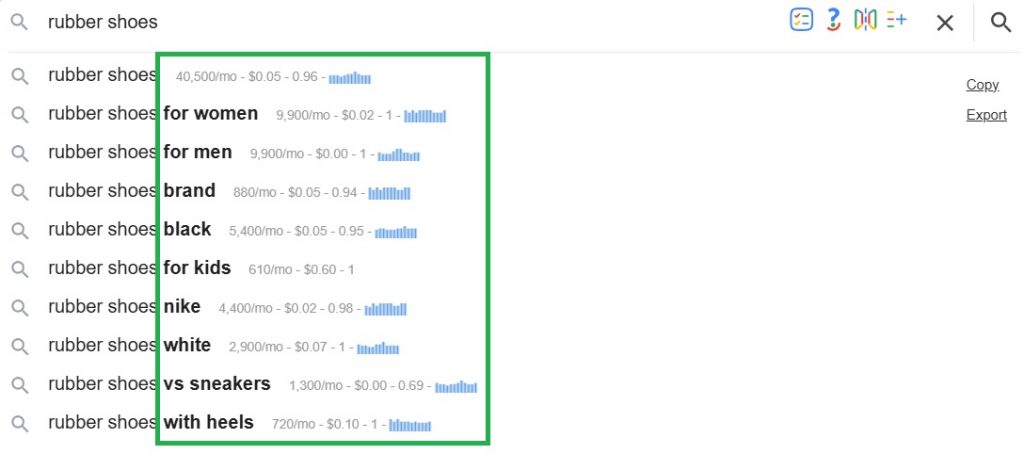
For extra keyword research support, we also offer free tools that help you dig into gaps, volume, trends, and opportunities:
- Keyword Gap Analysis – Discover the keywords your competitors rank for that you do not, across up to 10 competitors at once.
- Search Volume Checker – Get monthly search volume, CPC, competition, and 12-month trends for any list of keywords.
- Keyword Volume Checker – Compare a single keyword’s monthly volume, CPC, and trend side by side across multiple countries.
- CPC Checker – Check the Google Ads cost-per-click for any list of keywords, alongside search volume, competition, and trend data.
- Organic Ranking Checker – Check the Google keywords any page or domain ranks for, along with SERP position, estimated traffic, search volume, CPC, competition, and trend data, with single and bulk check options.
- Trend Tracker – Track fast-growing trends so you can monitor topics with rising search demand over time.
- Free Keyword Finder – Find buyer-intent and question keywords for any seed, with real search volume, CPC, and 12-month trend data.
- Google Keyword Tool – Works similarly, helping you find real Google search phrases for any seed keyword, along with monthly search volume, CPC, and competition data.
3. On-page SEO tools
WordPress plugins like Yoast and RankMath can help with on-page optimization. Google Analytics itself is also a great source of insights into user behavior and traffic sources.
If you want more focused checks, we also have free on-page SEO tools that help with specific fixes:
- Redirect Checker – Trace the full redirect chain on any URL and catch loops, broken links, and cloaking issues.
- Schema Markup Generator – Generate valid JSON-LD schema markup for Article, Product, FAQ, Event, Local Business, Recipe, and more.
- Schema Markup Validator – Validate your schema markup after generation, so you can catch missing fields or incomplete JSON-LD before publishing.
- Description Generator – Generate SEO meta descriptions in different styles, optimized for desktop and mobile search results.
- Keyword Density Checker – Measure phrase density on any page or pasted content to see if you are over- or under-using target keywords.
- Alt Text Generator – Generate accessible, SEO-friendly alt text for every image on a page or for images you upload.
- SEO Content Checker – Audit any page or draft against a target keyword and see what to add, edit, or remove.
- H1 Checker – Audit H1 headings on one URL or up to 200 at once, with AI rewrites for structural issues.
- Open Graph Generator – Build Open Graph and Twitter Card tags with live previews for major platforms.
- FAQ Generator – Generate FAQs using real People Also Ask questions and valid FAQ schema.
- Title Length Checker – Check whether your page title fits Google’s pixel budget on desktop and mobile, with AI rewrite suggestions.
- Title Tag Generator – Generate SEO meta titles in different styles, optimized for Google’s desktop and mobile result snippets.
- CTR Calculator – Enter clicks and impressions to instantly calculate your click-through rate as a percentage.
- Conversion Rate Calculator – Enter conversions and visitors to instantly calculate your conversion rate as a percentage.
4. Backlink Analysis Tools
Tools like Ahrefs, Semrush, Moz, and Ubersuggest have backlink analysis features that allow you to track, evaluate, and optimize your backlink strategy.
If you want free backlink tools to support your link-building work, we also have:
- Backlinks Checker – See every backlink pointing at any domain or URL, along with anchor text and source domain authority.
- Inbound Link Checker – Find inbound links pointing to any domain or URL, including anchor text and source domain authority.
- Domain Authority Checker – Check Moz Domain Authority, spam score, and linking domains for any domain you enter.
- Website Authority Checker – Get a single Website Authority score for any domain you enter.
- Spam Score Checker– Check Moz Spam Score for any domain and see if a backlink source may be too risky.
- Backlink Gap Analyzer– Find backlinks pointing at your competitors but not at you, so you can uncover outreach and link-building opportunities.
- Backlink Counter – Count how many backlinks and referring domains any website has at a glance, for one site or a bulk list.
5. Site Audit Tools
If you want a comprehensive site audit tool, SEO Checker can help you perform SEO, Speed, and Security audits instantly.
We also have other free site audit and research tools you can use depending on what you want to check:
- Website Traffic Checker – Estimate monthly organic traffic and total ranking keywords for any website or page.
- SEO Analyzer – Score any URL across 49 SEO checks and find out what may be hurting your rankings.
- SEO Optimizer – Get a prioritized list of page-level SEO fixes, so you know what to tackle first.
- Website Health Checker – Get a quick overview of any website’s authority, spam risk, backlink trends, estimated organic traffic, and on-page SEO health.
- Website Worth Calculator – Estimate what a website is worth from its organic traffic, with a clear breakdown of the numbers behind the value.
6. Rank Tracking Tools
The big SEO tools like Ahrefs, Semrush, and Ubersuggest all have rank tracking tools, but you can also just use Google Search Console to check which queries show your website, the number of impressions, and how often searchers click through those queries.
It’s rare to find a genuinely useful free rank tracking tool, but Website Ranking Checker gives you a solid way to track keyword rankings and make sense of your Search Console data. You can also use it to spot quick wins, CTR gaps, rising keywords, and pages that may be losing traffic.
7. Content Optimization Tools
One of the best SEO practices is to ensure that you’re doing keyword research before developing your content, but there also are certain Content Optimization tools that allow you to scan your content afterwards and make further tweaks and enhancements to boost SEO. Some of these tools include SurferSEO, Clearscope, and Yoast SEO. Certain tools may not optimize your content directly for SEO but would help you generate high-quality and original content– these tools include Copyscape, Grammarly, and Hemmingway Editor.
We also have free content tools that can help with different parts of the writing and optimization process:
Content Writing and Ideas
- AI Text Generator – Generate ready-to-paste text in 12 formats, including paragraphs, tweets, SMS, meta descriptions, ad copy, and more.
- Paragraph Generator – Write a single paragraph for blog intros, product descriptions, conclusions, and other common structures.
- AI Idea Generator – Generate content ideas you can rank for, with monthly search volume and 12-month trend data.
- Content Idea Generator – Generate content ideas across the marketing funnel, formatted for blogs, YouTube, LinkedIn, and other channels.
- Outline Generator – Generate a complete content outline in multiple formats, with search volume and competitor headings for context.
- Headline Generator – Enter your article topic, pick a headline style, and get a batch of headline ideas, each scored for the ingredients of a strong headline.
- Hook Generator – Generate stronger hooks for TikTok, Reels, YouTube, LinkedIn, X, email, blogs, and ads.
- Conclusion Generator – Paste your draft and get a conclusion that connects naturally to what you wrote, in different styles.
Rewriting and Refining Content
- Sentence Rewriter – Rewrite any sentence in 15 different tones to match your target audience and writing style.
- Paraphrasing Tool – Reword any text in eight modes, from Fluency to Academic, with changed words highlighted and a readability score.
- Paragraph Rewriter – Rewrite paragraphs for clarity, tone, or length in eight styles, with every change highlighted.
- Text Rewriter – Rewrite text, emails, posts, and documents in eight styles with changed words highlighted.
- Article Rewriter – Refresh and rewrite your own articles section by section while keeping their meaning and structure intact.
- Sentence Shortener – Tighten long sentences and wordy paragraphs without losing their meaning, with the cuts highlighted.
- Sentence Expander – Expand thin sentences and paragraphs with relevant detail rather than unnecessary padding, with additions highlighted.
- AI Summarizer– Summarize any text, web page, PDF, or YouTube video into six different formats in one click.
Grammar, Proofreading, and Readability
- AI Grammar Checker– Check any text, URL, or PDF for grammar, spelling, punctuation, clarity, style, and tone.
- Spell Checker – Catch misspellings and typos in your text and copy the corrected version in one click.
- Proofreader – Catch grammar, spelling, punctuation, clarity, and style issues in one pass, with a corrected draft ready to copy.
- Punctuation Checker – Fix commas, apostrophes, quotation marks, hyphens, and end punctuation, then copy the corrected text.
- Readability Checker– Score any text, URL, or PDF across eight readability formulas and pinpoint sentences that may confuse readers.
Content Length and Text Analysis
- Word Counter – Count words, characters, sentences, paragraphs, and reading time as you type, with a live keyword-density breakdown.
- Character Counter – Count characters with and without spaces and check your text against X, Instagram, meta description, and SMS limits.
- Sentence Counter – Count sentences live and see each one listed with its length so overlong sentences stand out.
- Syllable Counter – Count syllables live, with per-line counts for checking poetry, lyrics, and other writing with a specific meter.
- Reading Time Calculator – See how long your text takes to read at different reading speeds, plus speaking time for scripts and speeches.
- Words to Pages Converter – Turn a word count into a page estimate using standard fonts, font sizes, and spacing presets.
- Text Similarity Checker – Compare two texts and see how much they overlap as a percentage, with matching passages highlighted in both.
- Text Compare – See the differences between two texts side by side, down to the exact words that changed.
Formatting and Publishing Helpers
- Case Converter – Switch text between uppercase, lowercase, title case, sentence case, capitalized, alternating, and inverse case.
- Title Case Converter – Capitalize headlines correctly in AP or Chicago title case, or sentence case, live as you type.
- Citation Generator – Build APA, MLA, Chicago, Harvard, IEEE, and Vancouver citations, or paste a URL to auto-fill the details.
- Lorem Ipsum Generator – Create placeholder paragraphs, sentences, words, or list items and copy them as text or ready-made HTML.
- Pre-Publish Checker – Paste your draft, plus its title and focus keyword if you have them, and get five checks in one pass. The stats and readability land instantly, while the AI proofread and meta descriptions follow seconds later.
8. Link Building Tools
There are lots of tools that can help with link building, PR, and content promotion. Explore tools like BuzzStream, Hunter, CisionOne, and Respona to streamline your link-building efforts.
9. Technical SEO Tools
Try SEO Checker, a powerful SEO, Speed, and Security optimizer that not only detects SEO issues, speed bottlenecks, and security vulnerabilities but also gives thorough guidance on how to fix each. Even if you aren’t tech-savvy, SEO Checker guides you through each fix with simple, easy-to-understand instructions.
10. Local SEO Tools
Your Google Business Profile can definitely make or break your local SEO game. Make sure that it’s fully optimized and make use of Google Analytics and Google Search Console to obtain more local SEO insights. There are also other tools like BrightLocal and Localo that can help with review management and citation tracking and building.
11. Social SEO Tools
While social signals may not be a direct ranking factor, a strong social media presence allows your content to gain more traction, authority, social proof, and reach. Plus, more and more users, especially the Gen Z, are now using social media to search and find answers to questions. Tools like BuzzSumo, Hootsuite, Hubspot, and Sprout Social can be of help.
We also have free social media tools that can help you create and optimize content for different platforms:
- Instagram Bio Generator – Generate Instagram bio ideas that clearly communicate who you are, what you do, and what your profile is about.
- Instagram Name Generator – Generate Instagram name and username ideas for personal profiles, brands, businesses, and niche accounts.
- Instagram Caption Generator – Generate captions for Instagram posts based on your topic, style, and audience.
- Instagram Hashtag Generator – Generate relevant Instagram hashtags to help categorize your posts and improve their discoverability.
- Social Media Post Generator – Generate ready-to-use social posts for different platforms, topics, and content goals.
- Hashtag Generator – Generate relevant hashtags for your topic to make social content easier to discover.
- Tweet Generator – Generate posts for X in different styles and tones based on your topic or message.
- TikTok Hashtag Generator – Generate TikTok hashtags relevant to your video topic, niche, or audience.
- YouTube Tag Generator – Generate relevant YouTube tags based on your video topic to help describe and categorize your content.
- YouTube Title Generator – Generate attention-grabbing YouTube title ideas based on your video topic.
- YouTube Description Generator – Generate YouTube video descriptions that clearly explain your content and provide useful context for viewers and search engines.
- YouTube Thumbnail Downloader – Download thumbnails from YouTube videos for research, reference, or competitive analysis.
- LinkedIn Headline Generator – Generate LinkedIn headline ideas that clearly communicate your role, expertise, or professional value.
Takeaway
Like it or not, SEO is the foundation of online visibility. And if you’re not tapping its potential yet, you’re missing out on a lot. It’s never too late to double down on your SEO efforts. Invest in the right tool, follow the right strategy, and hold the line until you drive a steady stream of organic traffic that works for you around the clock.
Need powerful SEO tools? Get in touch and we’ll help you get it. Whether you need an easy-to-use keyword research tool or a powerful SEO performance analyzer, Keywords Everywhere has got you covered.

