

If your website is live but barely getting visitors, you’re not alone. Plenty of websites start that way. The key is understanding how organic traffic works, then using the right steps to build real traction over time.
What is Organic Traffic in SEO?
Organic traffic is the stream of visitors your site receives from natural rankings on search engines like Google and Bing. No ads involved, just earned visibility driven by strong content and effective SEO.
That said, getting organic SEO traffic today is more competitive than it used to be. Search results are now more crowded, zero-click searches are more common, and new content is constantly being published. That makes it harder to stand out unless your content is genuinely useful, targeted, and worth clicking.
Organic SEO Traffic vs Paid Traffic vs Direct Traffic
To put organic traffic into context, it’s useful to compare it with the other main traffic sources. Organic traffic is earned through SEO and shows up in unpaid search listings. Paid traffic comes from advertising, where visibility is bought rather than earned. Direct traffic happens when users go straight to your website, often because they already know your brand.
While all three can drive visitors, organic SEO traffic tends to be the most scalable once it starts gaining traction.
Measuring Organic Traffic in SEO
If you want to start really growing organic SEO traffic, you need to track it properly first. It sounds obvious, but a lot of sites just look at total visits and call it a day. Instead, set up Google Search Console and Google Analytics so you can see what’s really going on behind the scenes.
Here are the main things to watch:
- Organic traffic by source tells you how much traffic is coming from search engines specifically.
- Clicks and impressions show SERP performance. They show just how well your snippet competes in the search results.
- Engagement rate shows whether visitors are actually interacting with your site or just leaving right away.
- Top pages reveal what content is pulling its weight, and these are the pages you can double down on.
- Conversions matter most if your site is tied to business results. More traffic is nice, but traffic that converts is what really counts.
At the end of the day, it’s not just about getting more traffic. It’s about getting the right traffic and making sure it actually does something once it lands on your site.
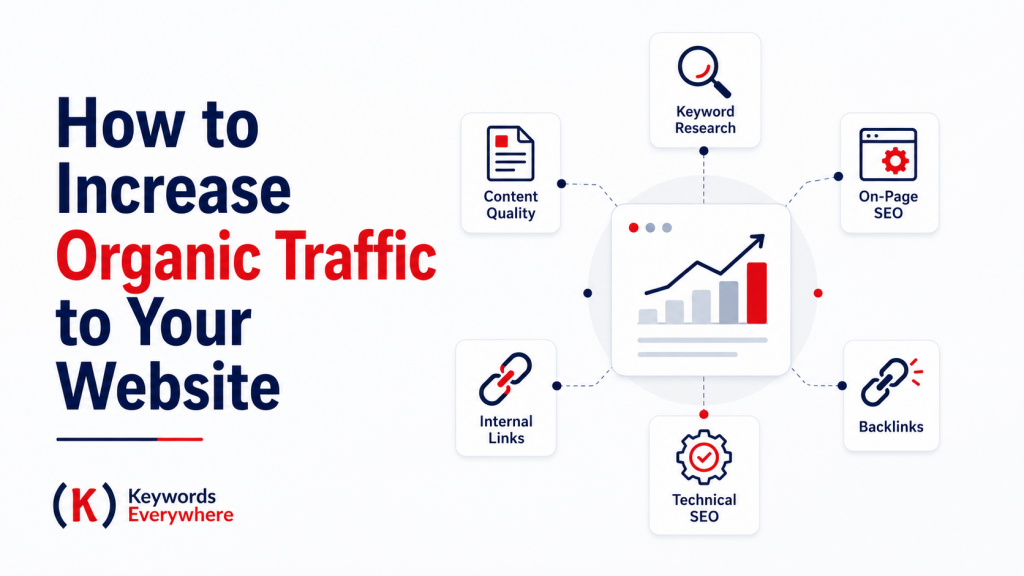


How to Increase Organic Traffic to Your Website
Whether you’re building your own site or managing one for a client, organic SEO traffic eventually becomes part of the conversation. Some focus on ads early on, but organic is what keeps things growing in the background.
Here are the key SEO strategies that help boost organic traffic and build long-term visibility:
1. Get to Know Your Audience First
Everything starts here. If you don’t understand what your audience is searching for, it’s hard to create content that actually brings in the right traffic. Look at customer questions, forums, social media, and your own analytics to figure out what people care about. For sure you have a decent sense of your target audience already, but digging a bit deeper gives your SEO a much clearer direction.
2. Tighten Keyword Research
If you want to increase organic SEO traffic, keyword research is what makes your content discoverable. Without it, you’re basically publishing into the void. With it, you’re creating content around things people are already searching for.
Start with seed keywords, which are broad terms tied to your business, then expand into long-tail keywords that are more specific and easier to rank for. These tend to bring in more targeted traffic because the intent is much clearer.
At the end of the day, organic traffic only happens when your content matches real searches. The better your keywords line up, the easier it is to create pages people can actually find.
Also Read: Keyword Research for Beginners: Step-by-Step Guide
3. Match Search Intent
Keywords get you in the game, but intent is what gets you the traffic. If your page does not match what the searcher wants, it will not perform well even if it ranks.
Look at the SERP and take cues from it. Are the top results tutorials, listicles, or product pages? That tells you what kind of content Google is actually rewarding. Build your page around that same intent.You can speed this up with Keywords Everywhere’s Search Intent report. Just search your target keyword on Google, find our Run SEO Report widget, open the first dropdown, then click an AI model of your choice–ChatGPT, Claude, or Gemini– to run the report. It will show the intent behind the top-ranking pages, so you can quickly see whether Google is leaning informational, commercial, or transactional.
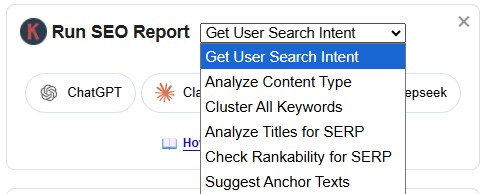
For example, if the results are mostly beginner guides, a hard-sell product page will probably feel out of place. If the results are comparison posts, users likely want help weighing options before they decide. The more closely your content format, angle, and depth match the intent, the easier it is to earn the click and keep the visitor on the page.
4. Spy on Your Competitors
Look at what’s already ranking before you build your own page. Your competitors can show you what Google is already rewarding for that topic, including page format, content depth, keyword angles, headings, visuals, and internal links.
Start by checking their top pages and the keywords they rank for. You can use our free Website Traffic Checker to help you estimate their organic traffic and total ranking keywords, making it easier to identify which competitors are driving the most search visibility before you dive deeper into their content strategy.
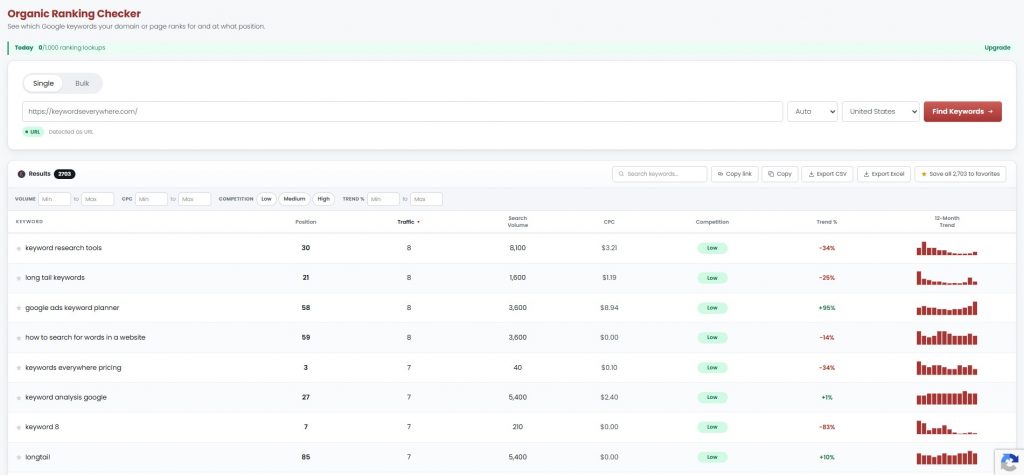
You can also visit our Organic Ranking Checker directly if you want to dig into the keywords behind those pages. It lets you run single or bulk checks for any page or domain, so you can see which Google keywords competitors rank for and use that data to spot stronger content opportunities.
For broader competitor comparison, you can also use our Keyword Gap Analysis tool to compare your site against up to 10 competitors and find the keywords they rank for that you don’t. This helps you spot missed keyword opportunities before you build or refresh your content.

And if you want to see what’s actually pulling traffic for your competitors, you can also use our free Top Pages Finder to see which of their pages are doing the heavy lifting. This helps you quickly spot their strongest content assets, whether that’s long guides, comparison posts, product pages, templates, or local landing pages.
From there, study the patterns behind their performance. Are they winning with long guides, comparison posts, product pages, templates, or local landing pages? Look for gaps you can improve on. Maybe their content is outdated, too thin, missing examples, hard to read, or not specific enough for your audience.
The goal is not to copy them. It’s to understand the standard you need to beat, then create something clearer, more useful, and better aligned with what searchers actually want. Always study what ranks, then make yours 3-10x better.
Also Read: How to Find Competitor Keywords (Spy Like a Pro & Boost Traffic)
5. Create Helpful, High-Quality Content
If you want steady organic SEO traffic, helpful content is non-negotiable. Search engines are getting better at spotting what’s actually useful, so your content needs to go beyond surface-level and deliver real value.
Here are the main ways to make your content actually perform:
6. Optimize Your Pages (On-Page SEO)
On-page SEO is about optimizing the elements right on your page, so it can rank and perform better. The most important on-page elements usually include:
- Title tag – make it clear, keyword-focused, and worth clicking. If you’re stuck, our free Title Tag Generator and Headline Generator can help you find a better hook.
- Meta description – give searchers a quick reason to visit the page. Our Meta Description Generator can also help draft punchier copy faster.
- Headings – use H1s, H2s, and H3s to organize the page clearly. You can make the most of our Free H1 Checker for a quick way to audit heading structure, from the main H1 down to the supporting H2s and H3s.
- Keyword placement – include your main keyword naturally in the title, intro, headings, and body.
- Content structure – use short paragraphs, clear sections, bullets, internal links, and visuals where useful.
You can also run your pages through SEO Checker to quickly spot common on-page issues, including missing or duplicate titles, weak meta descriptions, heading problems, thin content, broken links, redirect issues, and other SEO, speed, or security problems that could hold your pages back.
Done well, on-page SEO gives your content a much stronger chance to pull in more traffic.
7. Refresh Old Content
Refreshing old content is one of the quickest ways to boost organic traffic, especially since the page already has some visibility to build on. The most important things to update usually include:
- Outdated info – swap out old stats, examples, and screenshots.
- Thin sections – add more depth where the content feels lacking.
- Search intent – check what’s ranking now and adjust your angle if needed.
- Keywords – naturally add relevant long-tail terms and missing subtopics.
- Internal links – connect it to newer, related pages on your site.
Done right, a simple refresh can bring a page back to life and make it competitive again.
Also Read: Content Refresh 101: What to Update (and Why It Works)
8. Perform a Content Audit
If you want to grow organic traffic efficiently, a content audit is one of the best places to start. It helps you find what’s already working, what’s slipping, and what’s worth improving.
To find the biggest opportunities, focus on:
- Top-performing pages – double down on what’s already bringing in traffic
- Pages close to page 1 – small improvements can unlock big gains
- Content decay – pages that are slowly losing rankings or clicks
- Outdated content – anything with old info, stats, or recommendations
- Thin or incomplete pages – content that does not fully answer the query
- Low CTR pages – pages getting impressions but not enough clicks
- Cannibalization – multiple pages targeting the same keyword or intent
- Internal linking gaps – pages that are not well connected to the rest of your site
- Content relevance – pages that no longer align with your audience or goals
Done well, a content audit helps you focus on the fixes that can actually move traffic, instead of spreading effort across everything. Instead of manually hunting these opportunities down, you can use tools that automate different parts of the audit process.
- Website Ranking Checker– automatically pulls ranking and traffic opportunities into ready-made reports, so you can skip the digging and go straight to the fixes.
- SEO Analyzer– scores any URL across key SEO checks, including content, technical SEO, performance, mobile usability, structured data, and authority signals, so you can quickly see what may be hurting the page.
- SEO Optimizer– turns those findings into a prioritized checklist, with specific page-level fixes like missing schema, Open Graph issues, metadata gaps, and social preview problems, so you know what to work on first.
- SEO Content Checker – audits a page or draft against a target keyword and highlights content-level issues, including keyword usage, keyword placement, content quality, page structure, and SERP snippet opportunities.
A good audit should leave you with more than a list of problems. It should give you a clear action plan for improving the pages that have the best chance of bringing in more organic traffic.
9. Boost Pages with Internal Links
Internal linking is one of the easiest ways to improve organic SEO traffic without creating new content. It helps search engines crawl your site better and helps users discover more pages.
The most useful internal links usually include:
- Links from strong pages – pass authority to important pages
- Links between related topics – strengthen your overall content structure
- Keyword-relevant anchor text – give context without relying on exact-match anchors
- Links to pages close to ranking – help push them higher
- In-content links – pass authority and relevance through meaningful context
A stronger internal link structure also helps prevent orphan pages, which are pages with no internal links pointing to them. Because crawlers follow links to discover and index pages, internal linking should always be a part of your regular optimization process. It’s one of the fastest ways to make your site easier to crawl while giving priority pages a better shot at visibility.
10. Build Authority (E-E-A-T)
E-E-A-T helps your content stand out as something users and search engines can trust. The key authority signals usually include:
- Author expertise – highlight who wrote the content
- Real experience – add original insights or examples
- Accurate information – keep content updated and fact-checked
- Trust signals – include reviews, testimonials, and clear business details
- Credible sources – support your points with solid references, and use our tools like a Citation Generator to keep those citations properly formatted.
Stronger authority makes it easier for your content to rank, earn clicks, and stay competitive over time.
Also Read: Google E-E-A-T Guidelines: an Overview
11. Build Backlinks
Backlinks are links from other websites pointing to your pages, and they’re still one of the strongest signals search engines use to rank content. When reputable sites link to you, it tells Google your content is worth trusting—and that can directly impact your organic SEO traffic.
The most effective ways to earn backlinks usually include:
- Link-worthy content – publish original guides, data, or resources people want to reference
- Guest posts – contribute to relevant sites and link back naturally
- Partnerships – collaborate with others in your space for mentions and links
- Digital PR – share insights or data that can get picked up by publications
- Relevant listings – get featured on trusted directories or resource pages
The stronger your backlink profile, the easier it is for your pages to rank and bring in consistent traffic.
12. Improve User Experience (UX)
Getting traffic is one thing. Keeping people on your site is another. If your pages are slow, cluttered, or hard to navigate, visitors will likely exit before even engaging.
The most important UX elements usually include:
- Clear navigation – help users find what they need quickly
- Readable layout – use spacing, headings, and short sections
- Fast load times – avoid making users wait
- Mobile usability – make sure every page works well on phones
- Clear CTAs – show users the next step
Better UX keeps visitors engaged and gives your organic traffic a better chance to turn into results.
13. Improve Core Web Vitals
Core Web Vitals measure how smooth your page feels to users. They focus on speed, responsiveness, and visual stability, which all affect how easy your site is to use.
The main areas to improve usually include:
- Loading speed – make sure the main content appears quickly.
- Responsiveness – reduce delays when users click, tap, or interact.
- Visual stability – prevent buttons, images, or text from jumping around as the page loads.
- Image optimization – compress large images and use proper sizing.
- Cleaner code – reduce heavy scripts, plugins, and anything slowing the page down.
Faster, smoother pages create a better experience and give your organic traffic a stronger chance to stay, engage, and convert.
14. Implement Schema Markup
Schema markup helps search engines understand your content beyond just keywords. It adds structure, which can improve how your page appears in search results.
Common schema types for richer SERP results include:
- Article schema – can help show article details like headline, image, author, or publish date.
- FAQ schema – can make questions and answers easier for Google to identify and potentially display.
- Product schema – can show product details like price, availability, ratings, and reviews.
- Review schema – can highlight star ratings and review counts in search results.
- How-to schema – can help step-by-step content appear with clearer instructions or rich result formatting.
If you want to add schema without the technical headache, our free Schema Markup Generator can create valid JSON-LD for common types like Article, FAQ, Product, Review, Local Business, Event, Breadcrumb, Video, and more.
Once your schema is in place, run the page through our free Schema Markup Validator to catch missing required or recommended JSON-LD properties. This gives you a quick final check before publishing or updating the page.
15. Ensure Your Site Is Mobile-Friendly
Your site should feel just as easy to use on a phone as it does on a desktop. If it doesn’t, visitors may leave before your content gets a fair shot.
The most important mobile usability factors usually include:
- Responsive design – layout adjusts automatically
- Readable content – clear text without zooming
- Touch-friendly controls – easy taps and clicks
- Quick load times – speed matters more on mobile
- Clean navigation – simple and intuitive menus
A smoother mobile experience helps your pages perform better across the board.
16. Optimize for Voice Search
Voice searches are usually longer, more conversational, and often phrased as questions. Instead of typing “teeth whitening price,” someone might ask, “How much does teeth whitening cost?” If your content doesn’t match that natural phrasing, you can miss out on those queries.
The most important voice search optimizations usually include:
- Question-based content – include common questions your audience asks
- Conversational keywords – use natural, spoken language instead of stiff phrasing
- Short, direct answers – answer key questions clearly and early on the page
- FAQ sections – group related questions to capture more variations
- Local intent – many voice searches include “near me” or location-based queries
Optimizing for voice search helps you capture more long-tail queries and increases your chances of showing up in featured snippets and voice assistant results.
17. Promote Your Content Strategically
Creating content is great, but getting eyes on it is what really moves the needle. A little promotion helps your content get discovered faster.
The most useful promotion channels usually include:
- Social channels – post where your audience is active
- Email – keep your subscribers in the loop
- Communities – Reddit, groups, forums, or niche spaces
- Collabs – work with others for more reach
- Repurposing – stretch one piece of content further
You don’t need to promote on every platform. Focus on the channels where your content can get the most attention and engagement. Before sharing, you can also use our Free Open Graph Generator to create and preview Open Graph and Twitter Card tags, so your links look clean and clickable on platforms like Facebook, X, LinkedIn, Slack, Discord, and even WhatsApp.
Also Read: Content Marketing 101: Strategy & Examples
18. Use Social Media Wisely
Social media can help drive traffic, but only when you use it with a bit of strategy. Instead of posting everywhere just to stay active, focus on the platforms where your audience already spends time and share content that actually adds value.
The most effective ways to use social media usually include:
- Matching the platform to your audience – LinkedIn for B2B, Instagram or TikTok for visual brands, Facebook groups for local/community niches
- Sharing content with context – explain why the post is useful before linking
- Joining conversations – engage with comments, questions, and posts in your niche
- Testing formats – try carousels, short videos, polls, text posts, and threads
- Repurposing blog content – pull tips, stats, examples, or FAQs into smaller posts
- Tracking what gets clicks – see which topics actually send people back to your site
Used well, social media can turn one piece of content into multiple touchpoints and help more people discover your site.
19. Use LLMs to Capture New Traffic
AI tools like ChatGPT, Perplexity, and other answer engines are becoming new discovery channels. More and more people are turning to them for answers, recommendations, comparisons, and quick decision-making. So instead of just improving SEO ranking, your goal is to be the content or the brand these tools choose to reference.
Here are some of the most effective ways to make your content LLM-friendly:
- Direct answers – answer questions clearly and early, not buried deep in the page
- Simple structure – use headings, lists, and short sections that are easy to parse
- Question-based content – include common queries your audience asks
- Clear explanations – avoid fluff and get straight to the point
- Topical coverage – fully cover a topic so your content is seen as a reliable source
Content that’s easy to extract, summarize, and trust is more likely to be surfaced or cited by these tools. And as AI-driven search grows, optimizing for LLMs can help you capture traffic beyond traditional search results.
20. Track, Learn, and Adjust
SEO is not a one-time setup. If you want consistent organic traffic, you need to keep an eye on performance and adjust as you go.
The most important things to monitor usually include:
- Clicks and impressions – see which pages are getting seen and visited
- Rankings – track movement up or down in search results
- CTR – find pages that rank but don’t get enough clicks
- Engagement – see if users are actually staying and reading
- Conversions – check if traffic is turning into results (e.g. sales, signups, downloads)
How to Increase Organic Traffic to Your Blog
If you want more organic traffic to your blog, you need a mix of smart content, proper SEO, and consistency. Blogs that grow traffic usually focus on solving real problems and making their content easy to discover.
Here are the basics that actually move the needle:
1. Blog regularly (with a plan)
Let’s be real: a lot of websites blog just to tick a box. But random posts will not help you build meaningful traffic. The win comes from publishing content that answers real questions, solves real pain points, and gives people a reason to trust you.
You don’t need to post daily. For most sites, 1–2 well-targeted posts per week is more than enough if each one is built around a clear keyword and intent. Plan your content around clusters (not one-offs), focus on long-tail topics, and keep your posting rhythm steady and manageable.
2. Write headlines that earn the click
Your headline is your first impression on the SERP, so it needs to do some work. If it’s too vague or too generic, people will scroll right past. A clear, specific title gives you a much better shot at earning the click.
Here are some clickable headline examples:
- How to Increase Organic Traffic to Your Blog
- How to Get More Blog Traffic Without Paid Ads
- Why Is Your Blog Not Getting Traffic?
- 7 Ways to Increase Blog Traffic (Without Publishing Daily)
- How to Write Blog Posts That Actually Rank
- Blog Traffic Not Growing? Here’s What to Fix
- Blog SEO Guide (For More Organic Traffic)
- How to Get More Clicks From Your Blog Posts
- Blog SEO Checklist: What to Fix First
- How to Improve Blog Rankings With Internal Links
- Want More Blog Traffic? Start With These SEO Fixes
- How to Grow Blog Traffic (Even With a Small Website)
- Blog Not Ranking? 9 Fixes That Actually Help
Stick to simple, recognizable formats and lead with a clear reason to click. Use phrases like “how to,” “best,” or “guide,” keep your focus keyword near the front, and add a specific angle where you can. Notice how the samples above do more than just name the topic. They add a clear angle, pain point, or outcome.
This helps more than you’d think as Google often shows a mix of result types and angles, so a more specific headline can help your page feel more useful, relevant, and different enough to stand out. Just don’t make it clickbaity. A good headline should grab attention and still accurately match what the post delivers.
3. Vary content formats and depth
Not every post needs to be a massive long-form guide. In fact, publishing only one type of content can make your blog feel repetitive and harder to scale. Feel free to mix in how-tos, listicles, comparisons, FAQs, templates, checklists, short explainers, and deeper guides depending on what the topic actually needs.
The key is to match the format to the search intent. If people want quick answers, don’t bury them in a 3,000-word article. If the topic needs depth, don’t rush through it with a thin post. Over time, you’ll start to see which formats bring in the most traffic, clicks, and engagement for your niche.
4. Make content easy to read and scan
Nobody wants to land on a wall of text. Even if your advice is useful, people may leave if the page feels too heavy or hard to follow. Break up your content with clear subheadings, short paragraphs, bullet points, images, and enough white space to make the page feel easier to move through.
Think of your content as something people should be able to skim first, then read deeper if they want. Use visuals like screenshots, infographics, charts, or short videos when they help explain a point faster than text alone. The easier your content is to consume, the more likely people are to stay, scroll, and actually absorb what you’re saying.
5. Focus on education first
Your blog should help before it sells. People usually land on your content because they have a question, problem, or goal, not because they’re ready to buy right away. If every post feels like a sales pitch, readers are more likely to bounce.
Focus on answering questions clearly, solving real pain points, and giving people something useful they can act on. You can still mention your product or service when it naturally fits, but the main goal should be to educate. When your content genuinely helps, trust builds over time, and conversions tend to follow more naturally.
6. Use blog-related structured data (schema)
Structured data, or schema, helps search engines understand what your content is about. For blog posts, this usually means adding schema like Article, FAQ, or HowTo, depending on the type of content you’re publishing.
For example, use Article schema for standard blog posts, FAQ schema when you answer common questions, and HowTo schema when you walk readers through a process. This can help your pages qualify for richer search results, which may make them more noticeable on the SERP and improve click-through rates.
7. Link your blog posts together
Don’t treat your posts like one-offs. Use internal links to connect related articles so readers can easily move from one topic to the next. This keeps people on your site longer and helps them find more of what they need without having to search again.
From an SEO standpoint, internal links also help search engines understand your site structure and how your content fits together. Link to relevant posts using natural anchor text, and build content clusters around key topics. Over time, this makes your site feel more organized, more authoritative, and easier to rank.
8. Update and expand older posts
Some of your best traffic opportunities are already on your site. Refresh older posts with updated information, new examples, stronger internal links, and better on-page optimization to keep them relevant and competitive.
This is especially useful for posts that used to perform well but have started losing clicks or slipping in rankings. Sometimes you do not need a brand-new article. You just need to make an existing one more complete, more current, and more useful than what is ranking now.
You can automate the process of finding content refresh opportunities using tools like Website Ranking Checker. Instead of guessing which pages to update, you can quickly spot Content Decay (pages losing clicks), Quick Wins (keywords close to page 1), and CTR opportunities (pages getting impressions but missing clicks). You can then turn those into actual tasks, prioritize them, and work through them one by one within the platform. That way, you’re not updating pages at random. You’re efficiently improving pages that are closest to bringing in more traffic.
At the end of the day, blog traffic grows when you consistently publish helpful content, present it well, and keep improving what is already working.
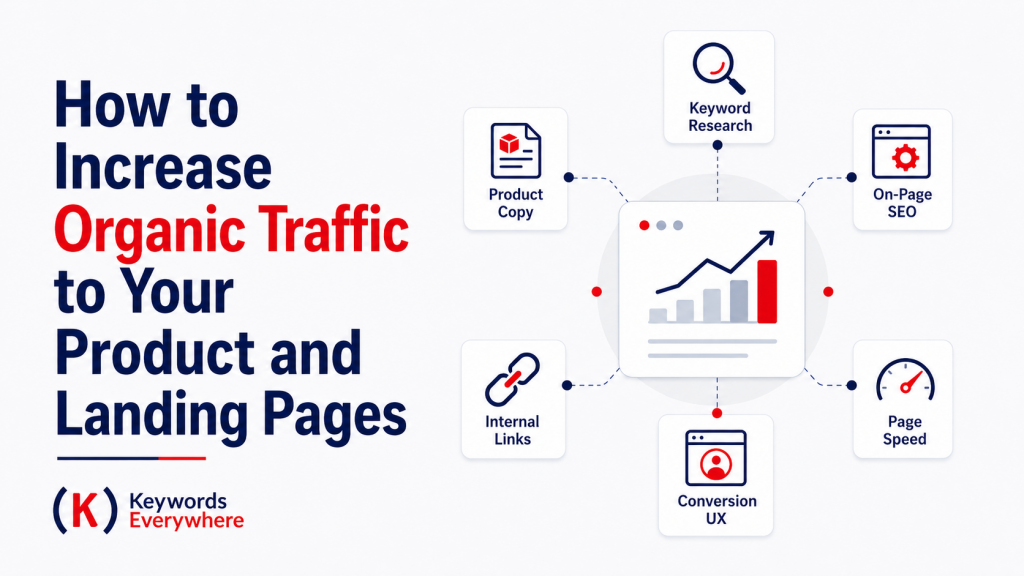
How to Increase Organic Traffic to Your Product and Landing Pages
Product and landing pages play by slightly different rules. You’re not just trying to attract traffic but also capture visitors who are ready to compare, evaluate, or take action. That means focusing on keywords with stronger intent, refining your messaging, and building pages that do not just rank, but also convert.
Here are a few ways to increase organic SEO traffic to those pages:
1. Align pages with search intent
Start with what the user is trying to do. Are they comparing options, looking for pricing, or ready to buy? Your page should reflect that. For example, “best CRM for small business” needs comparison content, while “buy CRM software” needs a dedicated product page with clear pricing, product benefits, and strong CTAs.
2. Use clear, benefit-driven copy
Once intent is aligned, your copy needs to do the heavy lifting. Product and landing pages do not have much room for fluff, so your value should be clear within seconds.
Start with the problem your visitor cares about, then connect it directly to the outcome your product helps them achieve. Instead of just saying what the product has, show why it matters. For example, “automated reports” is a feature. “Save hours on monthly reporting” is the benefit.
Keep your copy easy to scan, too. Use a strong headline, short supporting sections, benefit-led bullets, and clear CTAs. Add trust signals where they naturally fit, like reviews, guarantees, customer logos, case studies, or security notes. The goal is to make the page answer three questions fast: what is this, why should I care, and what should I do next?
3. Create video content
Some products are easier to show than explain. That’s where video helps. A quick demo, feature walkthrough, or use-case example can make your page more engaging and easier to understand.
You do not need high-end production. Simple demos, walkthroughs, and explainers can already go a long way. Plus, these can rank in video results and also keep users on your page longer, which is a strong engagement signal.
To get more SEO value from the video, add a clear title, description, captions, and a short transcript or summary below it. This gives search engines more context, makes the page more accessible, and helps visitors who prefer to skim before watching.
4. Invest in high-quality visuals
High-quality visuals can make a big difference in how users engage with your page. They break up text, make the content easier to scan, and help explain your product faster.
Show real examples where possible. Screenshots, product flows, or side-by-side comparisons tend to work well. Avoid visuals that are just there to fill space. Every image should support the message, build trust, or help the visitor understand why your product is worth considering. Also, make sure they load fast and include descriptive alt text to add SEO value.
5. Optimize for product-related SERP features
Product and landing pages can get more organic traffic when they take up more space in search results. Instead of relying on a standard blue link, optimize for features like product snippets, review stars, FAQs, and “People Also Ask.”
Make the page easy for Google to understand. Clearly show product specs, pricing, availability, benefits, use cases, FAQs, and reviews. Then add structured data, or schema markup, so search engines can read those details properly.
This helps your page become eligible for richer search results. More SERP visibility means more chances to attract qualified clicks from users who are already close to making a decision.
6. Target long-tail and comparison keywords
Product and landing pages usually have a better shot at bringing in organic SEO traffic when they target specific, high-intent searches instead of broad, generic keywords. A term like “project management software” is competitive and vague, but “project management tool like jira” or “Monday.com alternatives” is more specific and usually easier to rank for.
Plus, these keywords often come from people who are already comparing options, checking features, looking at pricing, or narrowing down their shortlist. That makes the traffic more qualified, even if the search volume is lower. Use these long-tail terms to build focused comparison pages, alternative pages, use-case pages, or industry-specific landing pages that match what users are actively searching for.
7. Create dedicated landing pages for use cases
If you want more targeted traffic, build pages around how people actually search. For example, “CRM for real estate,” “CRM for startups,” or “CRM for freelancers” all speak to different searchers with different needs.
This makes your messaging stronger. Think about it, a real estate agent does not want the exact same pitch as a startup founder or freelancer. Plus, it helps you target more long-tail keywords that are easier to rank for.
When the page speaks directly to their problem, workflow, and desired outcome, it feels more relevant and more valuable than a generic page. Just make sure each landing page is genuinely unique. Avoid duplicating the same copy and swapping out the industry name. Add specific examples, benefits, testimonials, FAQs, and use cases so each page earns its own reason to rank.
8. Build local landing pages (if applicable)
If you serve specific locations, create dedicated pages for each area, even within the same city. For example:
“Dental clinic in Austin, TX”
“Dental clinic in Dallas”
“Dental clinic in Houston Texas”
These pages can capture local, high-intent searches that a general service page might miss. Hyper-local searches often come from users ready to compare providers, check reviews, or book an appointment nearby.
Before building the page, you can also use our SERP Local Rank Checker to see what Google shows for that keyword in your target city, state, or country. This helps you review the local pack, ranking pages, and SERP features you’re actually competing against.
To make these pages work, go beyond just changing the location name. A common mistake is creating location pages with the exact same copy and only swapping out the city. Instead, add real local details like your address, map embed, nearby landmarks, service areas, local testimonials, and location-specific FAQs. This makes the page feel more relevant and helps both users and search engines understand that you actually serve that area.
Again, keep each page unique and useful. The more specific and localized the page feels, the better your chances of ranking and attracting the right traffic.
9. Improve internal linking to key pages
Use your blog and other high-traffic pages to send readers toward your most important product and landing pages. If someone is already reading a helpful guide, comparison, or how-to article, that’s a perfect opportunity to point them to the next logical step.
Add internal links naturally where they make sense. For example, a blog post about “how to choose CRM software” can link to your CRM product page, pricing page, demo page, or a use-case landing page. This helps users move from learning to taking action without feeling forced.
Internal links also help search engines understand which pages matter most on your site. When you consistently link to key product pages from relevant supporting content, you pass authority, improve crawlability, and give those money pages a stronger chance of ranking. Just make sure the anchor text is clear and useful. Instead of vague links like “click here,” use descriptive phrases that tell users exactly what they’ll find, like “CRM software for small teams” or “Keywords Everywhere pricing.”
Just think of internal links as a way to spread value around your site. They pass authority, reinforce relevance, and help search engines understand which pages matter most. More importantly, they make it easier for readers to move from useful content to the pages where they can actually take the next step.
10. Optimize images (not just text)
It’s easy to focus on copy, but your images can pull their weight too. They can help you show up in image search and add more context to your content. Start with clear, descriptive file names before uploading. Instead of something like IMG_2048.jpg, use a file name that actually says what the image is, like crm-dashboard-lead-tracking.jpg. Then add helpful alt text that describes the image naturally.
This helps search engines understand your content and improves accessibility at the same time. Keep it natural and relevant; no need to force keywords in.
11. Use trust badges and guarantees
Sometimes all it takes is a little reassurance to tip someone over the edge. Trust badges like secure payment icons or certifications help build credibility at a glance, especially when placed near CTAs. Add a clear guarantee—like a refund policy or free trial—and you lower the perceived risk even more. It’s a simple way to make your product feel safer and easier to say yes to.
12. Reduce distractions
Your product and landing pages should have one clear goal, and everything on the page should support that. Too many links, buttons, or competing messages can pull users in different directions and make it harder for them to take action.
Keep the layout focused. Trim unnecessary navigation, limit outbound links, and avoid stacking multiple CTAs that compete with each other. Instead, guide users toward a single next step, whether that’s starting a trial, booking a demo, or making a purchase. It all makes the page easier to follow, which means fewer people drop off halfway through.
13. Double down on “money” keywords (high intent)
Not all traffic is equal. Some keywords bring curious readers, while others bring people who are ready to compare options or make a decision. That’s where “money” keywords come in.
Focus on terms with clear buying intent. Use words like “pricing,” “reviews,” “best,” “vs,” “alternatives,” or “near me.” These searches usually come from users who are further down the funnel and actively looking for a solution. You might get less volume compared to broad informational keywords, but the traffic is much more likely to convert.
Build dedicated pages around these queries. For example, create comparison pages (“X vs Y”), pricing pages, or “best tools for [use case]” lists where your product naturally fits. But make sure the content is genuinely helpful and not overly salesy.
When you target high-intent keywords the right way, you get traffic that has a real chance of turning into leads or sales.
14. Use comparison sections (vs pages)
“Vs” and alternatives pages help you show up right when users are weighing their options. Create pages that compare features, pricing, and real-world use cases in a straightforward way. Add side-by-side comparisons, FAQs, and short takeaways so users can get what they need fast. The goal is to turn comparison traffic into conversion traffic by making the decision feel clear, informed, and low-risk. You can do this by comparing the options honestly, highlighting where your product fits best, and lowering friction with a free trial, refund policy, or starter plan.
15. Add FAQs directly on the page
FAQs are great for handling last-minute doubts. If someone is wondering “How much does it cost?”, “Can I cancel anytime?”, “Does it work with Shopify?”, or “How long does setup take?”, answer those directly on the page. It keeps people from bouncing just to look for answers somewhere else. Plus, with FAQ schema, those answers can also support your SEO.
16. Optimize above-the-fold content
The first screen of your product or landing page is prime real estate. Use it to tell users exactly why they should stay. While above-the-fold content is mostly about conversions, it can also support organic traffic when done right.
Search engines use page content to understand relevance, and the top of the page is one of the clearest places to reinforce what the page is about. That means your headline, subheading, and intro copy should naturally include your primary keyword or core product phrase.
Keep it clear and specific. Instead of a vague headline like “Grow your business faster,” use something concrete like “Track rankings, clicks, and SEO opportunities in one dashboard.”
You can also add a product screenshot, trust badge, short testimonial, or quick proof point. You don’t have to cram everything above the fold. Just help users get it fast, trust it enough, and keep moving.
17. Use strong CTAs (but not too many)
Use direct, action-focused language like “Start Free Trial,” “Get a Quote,” or “Book a Demo.” Avoid vague buttons like “Learn More” when the intent is to convert. Place your main CTA in key spots– above the fold, mid-page, and near the bottom– so it’s always easy to find.
At the same time, keep it focused. Too many CTAs can pull users in different directions and hurt conversions. Stick to one primary action per page, and make everything else support that goal.
While CTAs do not directly improve rankings, they do improve what happens after the click. Better engagement and conversions from organic traffic signal that your page is useful, which supports long-term performance.
18. Show social proof early
Social proof is mostly about conversions, but it can also support SEO in a few technical ways.
First, strong social proof can improve engagement signals. When users see testimonials, ratings, or recognizable client logos early, they’re more likely to stay on the page, scroll, and interact. This can lead to better dwell time and lower bounce rates, which are often used as quality signals in modern search systems.
Second, reviews and ratings can tie into structured data. If you include review content and mark it up with Review or AggregateRating schema, your page may become eligible for rich results like star ratings in search. That can improve CTR from the SERP, which does influence overall organic performance.
Third, social proof supports trust and credibility, which aligns with Google’s focus on E-E-A-T (Experience, Expertise, Authoritativeness, Trustworthiness). While E-E-A-T is not a direct ranking factor, it influences how content is evaluated, especially for product and commercial pages.
So while social proof does not directly boost rankings on its own, it improves engagement, CTR, and trust– all of which feed into stronger organic performance over time.
19. Create dedicated pages for each product/service
Do not put every product or service on one broad page. Create a separate page for each main offer so every page has one clear topic, one target keyword, and one search intent.
For example, instead of one general “Services” page, create specific pages like “SEO Audit Services,” “Local SEO Services,” and “Content Marketing Services.” For a software product, you could create pages like “CRM for Real Estate,” “CRM for Startups,” or “CRM with Email Automation.”
This makes it easier for Google to understand what each page is about, and it makes the page more useful for visitors because the content matches exactly what they searched for. Once the pages are live, keep testing headlines, CTAs, layouts, and visuals so each page can attract better traffic and turn more clicks into actual sign-ups or sales.
20. Track conversion paths, not just traffic
Getting traffic is only half the picture. What really matters is what users do after they land on your site.
Look at how people move through your pages. Where do they drop off? Which pages do they visit before converting? Which blog posts or landing pages assist conversions, even if they’re not the final step? This helps you understand what’s actually working, not just what’s getting clicks.
For example, a blog post might not convert directly, but it could be a key step before users visit your pricing or product page. On the flip side, a page with high traffic but low engagement might need better messaging, internal links, or a clearer CTA.
This kind of data helps you improve both SEO and UX. You can double down on pages that drive conversions, fix weak points in the funnel, and make sure your organic traffic is not just growing but actually turning into results.
21. Align SEO with conversion goals
It’s easy to chase traffic numbers, but traffic alone does not mean much if it never leads anywhere. A smarter approach is to connect SEO efforts to actual business goals.
Bring users in with educational or informational content, then funnel them toward product and landing pages through relevant internal links and CTAs. Focus more attention on keywords with commercial intent, especially searches around pricing, comparisons, alternatives, and reviews.
Just think in terms of the full funnel. Over time, this helps you optimize for qualified traffic instead of chasing vanity metrics.
How to Get Traffic to Your Website Fast
If you’ve been putting in the work but still not seeing results, it can feel frustrating. The reality is, organic SEO traffic takes time, but there are ways to speed things up and start getting visitors while your SEO efforts build in the background.
Here are a few faster ways to bring visitors in:
1. Get listed in directories and review sites
This is one of the quickest wins. Platforms like Google Business Profile, Bing Places, Yelp, and niche directories can send immediate traffic and improve your visibility. Plus, many of these listings link back to your site, which further support SEO.
2. Encourage reviews
Reviews are a major ranking factor for local search, especially in the map pack. It’s not just about having reviews. It’s about having enough, having them recently, and having them on the right platforms.
A steady stream of reviews on Google Business Profile can improve both your visibility and your click-through rate. When users see a business with more reviews and higher ratings, they’re more likely to choose it, even if it’s not the very first listing.
Reviews also help with relevance. The words people use in their reviews (e.g., “great dental clinic in Texas” or “fast SEO service”) can reinforce what your business is about, which can indirectly support your rankings for those terms.
Make it easy for customers to leave reviews. Send a follow-up email, include a direct link, or ask right after a good experience. And always, always respond. This shows activity, builds trust, and signals that your business is engaged.
In the short term, reviews can bring more clicks and inquiries. In the long term, they help you rank higher in local results and stand out in the map pack, which can drive consistent, high-intent traffic.
Also Read: Local SEO: The Ultimate Guide to Ranking First
3. Use social media to distribute content
Do not just publish– promote. Hitting “publish” is only half the job. If you want traffic fast, you need to actively push your content out where people already spend time.
Share your blog posts, guides, and landing pages on platforms like Facebook, LinkedIn, and Instagram. But do not just drop a link; make sure to add context. Pull out a key insight, stat, or takeaway to give people a reason to click.
Repurpose your content into different formats to get more reach. Turn a blog post into a short LinkedIn post, a carousel, a quick video, or a few tweet-style snippets. This helps you reach different audiences without creating something new from scratch.
If your content is genuinely useful or relatable, it can travel beyond your immediate audience through shares, comments, and reposts. That’s where you start to see spikes in traffic.
This does not directly boost rankings, but it helps you get visibility fast. More people seeing your content means more clicks, more engagement, and even a higher chance of earning backlinks, which does support SEO over time.
4. Engage consistently
Do not just post and disappear. Stay active by replying to comments and participating in discussions. Even small interactions can boost visibility and keep your content in front of more people. You can also jump into relevant conversations and share useful insights. Over time, this builds familiarity and drives more clicks to your site.
5. Join niche communities
Niche communities can be a fast source of targeted traffic because people there are already asking questions, comparing options, and looking for help.
Look for relevant spaces on Reddit, Quora, Facebook groups, Slack communities, Discord servers, or industry forums. Then focus on being useful first. Answer questions, share practical advice, and join discussions without immediately dropping links.
When your content genuinely adds value, you can share it naturally. For example, if someone asks how to choose an SEO tool, you can give a helpful answer first, then link to your full guide or comparison page as an extra resource.
The key is to avoid spamming. Communities can drive high-quality visitors, but only if people trust that you’re there to help, not just promote.
6. Leverage guest posts and collaborations
Guest posting lets you tap into existing audiences instead of building from zero. Partner with bloggers, creators, or industry experts in your niche through guest posts, interviews, roundups, or co-created content.
Done well, these collaborations can expose your site to new audiences, drive referral traffic, and often earn backlinks that strengthen your SEO over time. You can also use our Backlinks Checker or Inbound Link Checker to review which sites are already linking to you or your competitors, including anchor text, source URLs, domain authority, page rank, and spam score.
To find even more outreach prospects, use our free Backlink Gap Analyzer to compare your site against competitor domains and spot websites linking to them but not to you. These are often good targets for guest posts, expert contributions, partnerships, or other collaboration pitches because they already link to businesses or content in your space.
7. Use email marketing
If you already have an email list, use it as a direct way to bring people back to your site. Share new blog posts, guides, product updates, offers, or helpful resources, but package them in a way that gives people a reason to click.
Start with a strong subject line that teases the benefit, not just the topic. Instead of “New Blog Post,” try something like “5 SEO fixes that can lift traffic this month.” Then use a short email intro that explains why the content is useful and what the reader will get from clicking.
Keep the email focused on one main action. If you want people to read a guide, make that the clear CTA. If you want them to check out a landing page, point them there directly. You can also add curiosity-driven snippets, quick takeaways, or “read the full breakdown” links to pull people in.
Email works well because you’re not waiting for search engines or social algorithms to surface your content. You can reach people directly, drive repeat visits, and send traffic to important pages whenever you publish something worth sharing.
Your email list is your hard-earned asset, so make sure to use it to push your best content directly to people who already know your brand.
8. Partner with influencers
Influencer partnerships can drive organic traffic fast because you’re tapping into an audience that’s already warmed up. Plus, you don’t need celebrity-level creators. In fact, smaller niche influencers often drive better traffic because their audience is more targeted and tuned in. The key is fit: a small creator with the right audience beats a huge creator with random reach.
9. Tap into Reddit, Quora, and forums strategically
Use these platforms to be helpful, not spammy. Answer questions in detail, include practical advice, and link to your guide or page only when it supports the answer. The best answers can get upvotes, rank in search, and keep sending targeted traffic over time.
10. Run giveaways or contests
Giveaways can create a quick traffic spike because they give people a reason to visit, share, and engage right away. But the prize matters.
Choose something your target audience actually wants. For example, a software company could give away free access, a strategy session, templates, or a tool bundle. Avoid generic prizes like cash or gadgets unless they directly fit your audience, because those tend to attract people who just want free stuff.
Keep the entry action tied to your goal. Ask people to visit a landing page, sign up for your email list, share the post, or submit a simple form. This helps turn the giveaway into more than a short burst of attention. It can build an audience you can reach again later.
11. Use paid traffic if needed
Paid traffic is useful when you don’t want to wait months for organic results. Google Ads, Facebook Ads, LinkedIn Ads, or other platforms can send visitors almost instantly. The trick is to target the right people and avoid sending them to a weak page. Paid clicks only work if the landing page can actually turn that attention into leads or sales.
12. Create simple tools or resources
Tools can rank on their own, separate from your blog content. For example, a free checklist or calculator can bring in people searching for something practical, like “SEO audit template” or “ROI calculator.” If it saves them time or helps them get something done, they’re more likely to bookmark it, share it, or come back later.
We’ve done this ourselves with plenty of free tools across different categories, and our ROI Calculator is just one of them. It gives users a quick way to calculate ROI and net profit without having to do the math manually.
That kind of utility can also give other sites a stronger reason to link to you. And with AI making simple tools much easier to build, creating resources like these is now far more realistic even for smaller teams.
13. Learn from your data
Use Google Analytics to see what is working. Check traffic sources, top pages, and user behavior so you can double down on what drives results.
Your analytics can show you what’s actually moving the needle. Look at top-performing pages, traffic sources, and user paths. Then make small changes like better CTAs, clearer messaging, stronger links. The key is to build on what already works.
Likewise, pay attention to conversion paths and drop-off points. Identify where users exit before completing an action—whether it’s a form, pricing page, or checkout step. Small friction points like unclear pricing, weak trust signals, or too many steps can cause users to leave.
Fixing these bottlenecks often has a bigger impact than trying to get more traffic. Simply improving how existing visitors move through your site is one of the fastest ways to get better results.
FAQs
What is the main reason my website is not getting organic SEO traffic?
The most common reason is mismatch with search intent. You might be targeting keywords people don’t search for, or your content isn’t what they expect. Weak SEO basics, thin content, or low authority can also hold your pages back.
How soon can I expect results after optimizing my site for traffic?
It depends, but most sites see early movement in a few weeks and more noticeable traffic in 2–3 months. Bigger gains usually take longer, especially in competitive niches. SEO builds over time, not overnight, so consistency matters more.
What are some of the quickest ways to increase organic traffic?
Update older posts, improve titles and meta descriptions for better clicks, and push page 2 keywords closer to page 1. Add internal links to key pages and fix obvious SEO issues. These tweaks can move traffic faster than starting new content.
Is organic SEO traffic better than paid traffic?
Organic traffic is more sustainable and cost-effective long term, while paid traffic is faster but tied to ongoing spend. Ideally, use both. Organic builds steady growth, while paid can fill gaps or drive quick results when needed.
How often should I publish content to grow organic traffic?
You don’t need to post daily. One or two solid, well-targeted posts per week is usually enough. What matters more is consistency and quality. It’s better to publish useful content regularly than push out random posts just to stay active.
Can I get organic SEO traffic without backlinks?
Yes, especially if you target low-competition or long-tail keywords. But backlinks still help a lot, especially as you grow. Strong content and good internal linking can get you started, while backlinks help you compete and scale faster over time.
What type of content gets the most organic traffic?
Content that solves real problems tends to win. Think how-to guides, comparisons, “best” lists, templates, and FAQs. The key is matching what people are searching for and making the content clear, useful, and easy to act on.
How do I know if my organic traffic strategy is working?
Look at clicks, impressions, rankings, and engagement in tools like Google Search Console and Analytics. But don’t stop there. Check if traffic leads to sign-ups, inquiries, or sales. If it’s not driving action, something needs adjusting.
Takeaway
Having a good website is only half the battle. If no one is landing on it, it’s not doing much for your business. To get organic traffic, focus on helpful content, smart SEO, strong internal links, and a site experience that makes people want to stay.
Start with a few high-impact strategies, measure what works, and keep improving. Organic SEO traffic compounds when you create useful content, earn trust, and refine your pages based on real data. Over time, that’s what turns your website from a static asset into a real and sustainable growth engine.