

CTR is not driven by just one factor. It is a mix of visibility, relevance, and how your result stacks up against everything else on the page. Even if you rank well, things like SERP features, search intent, and snippet quality can all influence whether you actually earn the click.
In this article, we’ll look at why people click (or don’t), and what you can do to make your search listings more compelling.
What is an organic click-through rate?
Before we dive in, let’s first break down what organic CTR is. Organic click-through rate (CTR) measures how often people click your unpaid (organic) search result after seeing it on Google. It’s calculated as the number of organic clicks divided by the number of impressions (how many times your listing appeared), expressed as a percentage.
If your page shows up 100 times in search results and gets 10 clicks, your organic CTR is 10%. CTR is a big deal because rankings alone don’t paint the full picture. You can rank well and still get underwhelming traffic if your snippet doesn’t earn the click. Organic CTR is basically a reality check on how compelling your listing is—your title tag, meta description, URL, and how it looks alongside everything else on the SERP.
How do you know your CTR?
If you want to improve CTR, you first need visibility into your data. That means looking at real impressions, real clicks, and how your pages perform across different queries. Here are the best places to check your organic CTR:
1. Google Search Console
This is your source of truth for organic CTR since it’s based on real impressions and clicks from Google Search.
To find it:
- Go to Performance → Search results
- Turn on CTR (along with Clicks and Impressions)
- Switch between Queries and Pages to see CTR by keyword or by URL
- Use filters like page, country, or device if you want to narrow it down
If you’re trying to improve CTR, the Queries view is usually where the best clues are.
2. Google Analytics (GA4)
GA4 doesn’t calculate organic CTR on its own, but it’s useful for what happens after the click. If Search Console is connected, you can view Search Console reports inside GA4 and pair CTR with engagement and conversion data.
A quick path is:
- Go to Reports → Acquisition
- Open the Search Console reports (Queries / Organic Search Traffic)
Used together, Search Console and GA4 give you the full picture, from impressions and clicks to actual on-site behavior.
3. CTR Optimization and Reporting Tools
If you want a free tool that automatically highlights weak spots in your CTR, Website Ranking Checker is worth using. It plugs into Google Search Console and automatically displays CTR optimization opportunities, particularly keywords where you’re already in the top 10 but getting fewer clicks than you’d expect.
Instead of hunting through raw tables, you get a ready-made CTR Optimization report that puts the biggest CTR wins front and center.
Also Read: Check Keyword Rankings for Free (And Find Quick Wins!)
Once you have a clear view of your CTR, the next step is figuring out what’s shaping it because that’s where real optimization happens.
What Affects Organic CTR?
A lot can affect organic CTR, but it really comes down to how visible you are and how clickable your listing looks compared to everything else on the SERP. Here are the biggest levers:
1. Ranking position
Position is still the biggest driver. The higher you rank, the more eyeballs (and usually more clicks) you get. Once you drop out of the top few results, CTR typically falls off as well, especially on mobile where fewer results are visible above the fold.
2. SERP features and layout
Even if you rank well, clicks can drop if the SERP is crowded. Common CTR suppressors include:
- AI answers / featured snippets that satisfy the query instantly
- Ads pushing organic results down
- “People Also Ask,” video carousels, local packs, shopping results
Sometimes you’re competing less with other blue links and more with the SERP itself.
3. Search intent and query type
CTR really depends on what the searcher is trying to do. Some queries naturally get fewer clicks because Google can answer them right on the SERP, like quick fact searches. Branded queries are different too, since clicks usually pile onto the official site. But for commercial queries like “pricing,” “best,” “vs,” or “review,” CTR tends to be higher because people are actively comparing options and want to double-check before they commit.
4. SERP Snippet Quality
One big factor that affects organic CTR is your SERP snippet; that is, how your listing looks in the search results. Most people decide in a split second based on the title tag, meta description, and even the URL/breadcrumb, so small improvements here can lift CTR even if your ranking doesn’t change.
If your title or description isn’t clicking, our free Title Tag Generator, Headline Generator, and Meta Description Generator can help you explore stronger options.
5. Rich results and snippet enhancements
Rich results and rich snippets can improve CTR because they make your listing look bigger, richer, and more trustworthy in a crowded SERP. Depending on the query and eligibility, that might mean review stars, FAQ snippets, product info, sitelinks, or other enhancements powered by structured data.
6. Freshness cues
Freshness matters more than people think, especially for fast-changing topics. A visible year like “2026,” a fresh “Updated” note, or simply looking more current than competing results can make users pick you even when you’re not in the very top spot.
Once you know what’s affecting CTR, improving it gets a lot more straightforward. Tighten your snippet, match intent more clearly, and use rich results where possible. And if the SERP is crowded with AI answers and features, just focus on being the most compelling next click.
What is a Good CTR?
There’s no universal number that applies to every site. What’s considered good depends on the keyword, the intent behind it, the industry, and what the SERP looks like that day.
Some keywords are basically zero-click nowadays because AI overviews, featured snippets, and other SERP features are now giving answers right away, so a low CTR can be totally normal. Plus, Google may rewrite your snippet depending on the search, which can change CTR without you touching anything.
The easiest benchmark is average Google CTR by position. Top rankings usually get the lion’s share of clicks, and there’s a steep drop after the first few results. One benchmark shows the top organic positions pulling roughly 39.8% (pos 1), 18.7% (pos 2), and 10.2% (pos 3) on average, with further drop-off below that.
Also worth noting, “good” CTR benchmarks for paid ads are usually much lower than organic because ads compete for limited placements and many users trust organic results more.
SERP Click-Through Rate: Does It Affect Rankings?
In SEO, CTR and rankings have a push-and-pull relationship. Ranking higher usually gives you better CTR because you’re seen first and you take up prime real estate. Still, being visible is only half the equation. If users are not clicking, that exposure does not turn into organic SEO traffic, leads, or any real outcome. A high-ranking page with low CTR is often a sign that something is off– maybe the intent is mismatched, the snippet is weak, or the competition simply looks more compelling.
On the flip side, when a page earns unusually strong clicks for its position, it often means the result stands out. It may align better with what users expect through clearer messaging, stronger relevance, or better perceived value.
This is where user behavior enters the conversation. If a page sitting in position 10 consistently earns more clicks than expected, it can signal that the content is doing a better job satisfying search intent than higher-ranked results. Many SEOs believe that patterns like this may influence how Google evaluates and reorders results over time.
This is also why RankBrain often comes up in the discussion. RankBrain is part of Google’s ranking systems that helps it interpret queries and better match results to intent, and many SEOs have long associated it with the idea that user interaction signals, including click patterns, may help Google assess whether a result is meeting expectations.
This idea has been discussed for years. Google’s former Search Quality Chief, Udi Manber, once said:
“The ranking itself is affected by the click data. If we discover that, for a particular query, hypothetically, 80 percent of people click on Result No. 2 and only 10 percent click on Result No. 1, after a while, we figure Result 2 is probably the one people want. So we’ll switch it.”
Udi Manber – Google’s former Search Quality Chief
That perspective makes intuitive sense, but it’s not enough on its own to settle the debate. After all, it comes from a former Google employee, and search systems have definitely evolved a lot since then.
Also, the example itself mainly deals with results that are already near the top, where they are visible enough to earn meaningful click data in the first place. It does not really explain whether a result sitting much lower on the page could climb purely because of strong CTR. There’s also the issue of consistency. Click patterns can shift because of trends, seasonality, or changes in the SERP itself, so Google would need to separate genuine relevance from temporary spikes.
That’s why Google has repeatedly pushed back on the idea of CTR being a direct ranking factor.
As John Mueller pointed out:
“If CTR were what drove search rankings, the results would be all clickbait. I don’t see that happening.”
– (@JohnMu) November 4, 2021
In reality, rankings are largely determined before most clicks happen, based on relevance, content quality, and a wide range of other signals.
The more realistic conclusion is this: CTR likely plays a supporting role rather than a decisive one. It helps Google evaluate and refine search results, not define them outright. A page that ranks well and earns strong clicks is usually one that genuinely matches intent. And over time, that alignment is what tends to drive sustained performance.
How to Improve CTR in SEO
Once your page is ranking, the next step is getting people to actually click it. That’s where CTR optimization comes in. A few focused improvements to your snippet and positioning can turn the same visibility into better traffic.
1. Optimize your title tag
Your title tag does a lot of the heavy lifting. It’s usually the first thing people notice, so it needs to be clear, relevant, and easy to scan. If the title feels like a close match to the query and quickly tells users what they will get, it already has a better shot at earning the click.
This is where a bit of copywriting helps. Numbers, dates, specificity, and benefit-driven phrasing can all make a title more clickable. Freshness can help too, especially for topics where recency matters. But simple usually wins.
When people scan the SERP, they’re not reading line by line. They’re skimming and making snap decisions. Your title only has a second or two to answer one question: “Is this worth my click?” These small tweaks can help:
➤ Make the outcome obvious
People click when they know what they’re getting.
Example:
❌ Understanding Google Click-Through Rate (CTR)
✅ How to Improve Organic CTR (With Real Examples)
➤ Use numbers for clarity and structure
Numbers signal quick, digestible content.
Example:
✅ 7 Ways to Increase CTR Without Ranking Higher
➤ Add parentheses for extra context
These act like a “bonus detail” that catches the eye.
Example:
✅Why Your CTR Is Low (And How to Fix It)
✅ How to Improve CTR (Even If You’re Not #1)
➤ Use a question when it matches intent
Works especially well for informational queries.
Example:
✅ Why Is My CTR So Low?
➤ Highlight a benefit or pain point
People are drawn to results or problems they relate to.
Example:
✅ Not Getting Clicks From Google? Here’s What to Fix
➤ Lean into specificity
Vague titles get skipped. Specific ones feel more useful.
Example:
❌ How to Get Better CTR From Google
✅ How to Improve CTR for Pages Already Ranking in the Top 10
➤ Use freshness when it matters
Signals that the content is up to date.
Example:
✅ What a Good Organic CTR Looks Like in 2026
➤ Front-load the important part
People scan left to right, so lead with the main topic.
Example:
✅ Organic CTR: How to Get More Clicks From Search
➤ Avoid sounding like clickbait
If it feels exaggerated, people hesitate or skip.
Example:
❌ This ONE Trick Will Skyrocket Your CTR!!!
✅ Proven Strategies to Boost Organic Click-Through Rate (CTR)
The goal is not just to stand out, but to feel like the right choice. That also means you should try to match the overall tone of the SERP. Users compare results side by side. If everyone else is clear and direct, overly playful titles can feel out of place. You want enough spark to earn the click, without drifting into sheer clickbait.
2. Write stronger meta descriptions
Meta descriptions are not a direct ranking factor, but they can absolutely help with CTR. Think of them as a mini pitch. Once your title gets attention, the description helps close the gap by adding a bit more context.
This is your chance to clarify what the page covers, who it is for, or what kind of value it offers. The best meta descriptions are specific, searcher-focused, and built to complement the title rather than repeat it. Done well, they make your listing feel more complete, more relevant, and much more worth clicking.
Take note that Google does not always show the meta description you write. It sometimes rewrites the snippet to better match the query, often pulling in on-page text it thinks is more relevant at that moment. Google itself says it may use your meta description when it gives users the most accurate summary, but it can also generate a different snippet from page content when that seems more helpful.
Independent studies have found this happens a lot, with rewrite rates landing around roughly 63% to 70% of the time. That said, it’s still worth writing meta descriptions because they can shape how your page is presented when Google does use them and also give Google a stronger starting point for generating useful snippets.
3. Clean up your URLs
URLs are not the biggest CTR lever, but they still affect how polished and trustworthy a result looks. A short, readable URL is easier to process than one packed with random parameters or repeated keywords.
In most cases, shorter and more descriptive is better. Including the target keyword can help reinforce relevance, but there’s no need to cram every variation in there. A clean URL supports the rest of the snippet and helps the result feel more relevant at a glance.
4. Match search intent better
A lot of low-CTR pages have an intent problem. You can rank well for a specific keyword and still get skipped if your result does not look like what searchers actually want.
Say the SERP is full of product pages, but your page is a long educational article. Even if the content is solid, users may pass it by because it does not match what they came for. Same the other way around. If people want information and your result looks too salesy, that can hurt clicks too. So one of the best ways to improve CTR is to look at the actual search results and make sure your title, description, and page angle line up with the dominant intent.
If you’re a Keywords Everywhere user, you can automate this process by using the Run SEO Report widget. It analyzes the top results and surfaces their intent in one place, which saves a ton of time and guesswork. Rather than checking each page one by one, you get a quick breakdown of the SERP so you can quickly match the dominant search intent and align with what’s actually ranking.
Learn More: SERP Analysis Through AI SEO Reports: Keywords Everywhere
5. Use rich results and structured data
Rich results can make your listing stand out a lot more in the organic SERPs. Review stars, FAQs, prices, breadcrumbs, dates, and similar enhancements all add extra context and take up more visual space.
Structured data does not guarantee rich results, but it can improve your eligibility for them. And when those enhancements do show up, they often make a result look more useful, more complete, and more clickable than a plain blue link.
6. Focus on striking-distance keywords
Pages that are already hovering near page one often offer some of the most practical CTR opportunities. If a keyword is ranking in positions 11 to 30, Google already sees the page as somewhat relevant. That means you may not need a huge overhaul to get better results. A more compelling snippet and a clearer match to intent can sometimes lift both clicks and rankings together.
Website Ranking Checker also helps fast-track this process with its Quick Wins report, which automatically surfaces high-impression keywords ranking in positions 11 to 15, giving you a ready-made list of pages that are closest to a solid traffic bump.
7. Lean into longer, more specific queries
Longer search queries often come with clearer intent. And when intent is clearer, clicks tend to follow more easily. Searchers using detailed queries usually know what they want, so they’re more likely to click a result that closely matches it.
That is one reason long-tail keywords can be so useful for CTR. Long keywords get 1.76% more clicks than regular single-word terms. They may not always bring the biggest raw volume, but they often attract more qualified clicks. If your titles and descriptions reflect those more specific searches, your result can feel like a much better fit right away.
8. Try list-style content when it fits the topic
People tend to like lists because they’re easy to scan and feel less mentally demanding. So when a query suits that format, using a listicle-style title can sometimes improve click appeal.
This is especially true for how-to topics, comparisons, tools, tips, and roundups. A title that promises a clear structure like “7 Ways,” “10 Tips,” or “Best Tools for…” can feel more approachable than something vague or overly abstract. On top of that, list-style content can sometimes improve your chances of appearing in featured snippets, which can give CTR another lift.
9. Avoid keyword cannibalization
When multiple pages on your site target the same keyword or intent, they can end up competing with each other and dragging down CTR, authority, and conversion potential. Instead of one strong page getting the click, keyword cannibalization ends up splitting relevance across several similar URLs.
This is also something Website Ranking Checker can catch for you automatically. Its Cannibalization report flags keywords linked to multiple URLs, so you can find internal competition much faster. Once you spot those conflicts, you can decide whether to merge pages, retarget them, tighten internal links, or make each page’s role more distinct.
10. Test, measure, and keep refining
CTR improvements are not really a one-and-done thing. Once you change a title, meta description, or page angle, you need to watch what happens. Testing and monitoring CTR changes is vital for optimizing search results over time.
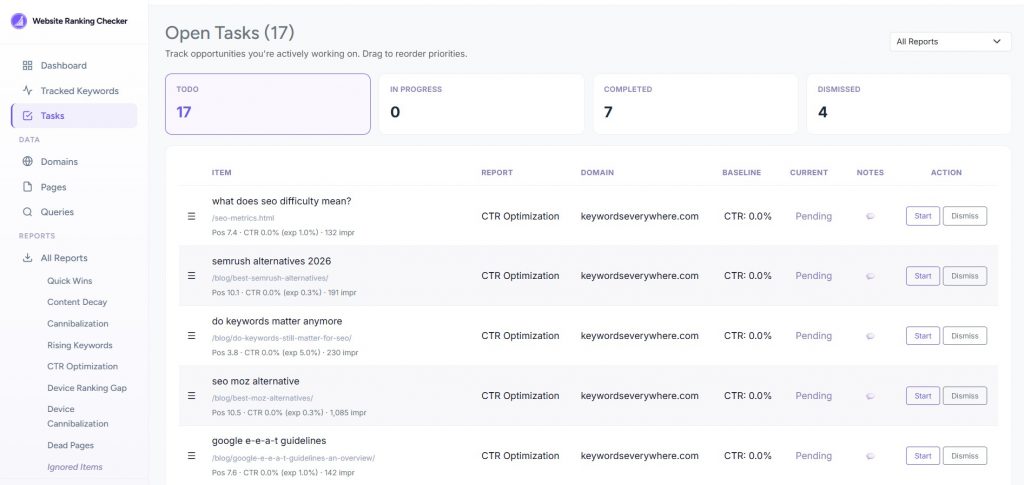
Google Search Console is a solid place to track clicks, impressions, and CTR over time. But if you want to make the whole process easier, connect GSC to Website Ranking Checker. It automatically flags CTR weak spots for you, so you don’t have to go hunting through the data yourself, and best of all, it’s free.
There’s even a dedicated task page where you can move items through to-do, in progress, and complete stages, then track whether the target metric begins to trend upward.


You can also use SEO Analyzer to review the page for other SEO issues and SEO Optimizer to find additional improvement opportunities that may support better performance.
Using the right tools makes CTR optimization and general SEO a lot more manageable. From there, you can just keep testing and improving. The more you iterate, the easier it is to find weak spots and turn them into better-performing pages.
Bonus Tips to Improve CTR
Once you’ve covered the basics like title tags, meta descriptions, intent match, and rich results, there are still a few extra ways to squeeze more CTR out of your pages.
These are not always the first tactics people think about, but they can give you useful insight and sometimes an easy edge.
• Use paid search data to improve SEO CTR
If you’re running Google Ads, you already have a pretty useful source of CTR data sitting right in front of you. Paid search gives you faster feedback on which headlines, value props, and calls to action actually get people to click.
That makes PPC a good testing ground for SEO messaging. If certain ad copy consistently performs well, it can give you ideas for stronger title tags and meta descriptions. You’re not copying ads word for word, of course, but you’ll be learning what kind of language your audience responds to. Sometimes the phrases that win clicks in paid search can also help shape better organic snippets.
• Review email and social media campaigns
SEO is not the only place where clicks tell you something valuable. Email subject lines and social post copy can also reveal what gets your audience’s attention.
Email is especially useful because it’s easy to test. If certain subject line styles keep earning opens and clicks, that may tell you something about the wording, tone, or emotional triggers your audience responds to.
The same goes for social media. Posts that consistently perform well can highlight which hooks, angles, and phrases make people curious enough to engage. All of that can feed back into how you write titles and descriptions for search. Tools like our free Hook Generator can help you experiment with curiosity-driven angles, benefit-led phrasing, and sharper wording that you can later reuse in your search snippets.
Before sharing the content on social, you can also fine-tune your social preview and use our Open Graph Generator to preview how your links will appear, so your titles, descriptions, and images look more clickable before they go live.
• Use images to stand out more in the SERP
Images inside your content can sometimes improve CTR indirectly, especially when they help you earn richer SERP features like featured snippets. A search result that includes an image naturally stands out more and can pull more attention than a plain text listing.
To improve your chances, make sure your images are actually optimized. Good file names, descriptive alt text, and relevant visuals can all help search engines understand and surface them more effectively. If writing alt text across multiple images feels tedious, our free Alt Text Generator can create descriptive, SEO-friendly alt text from either uploaded images or an entire page URL.
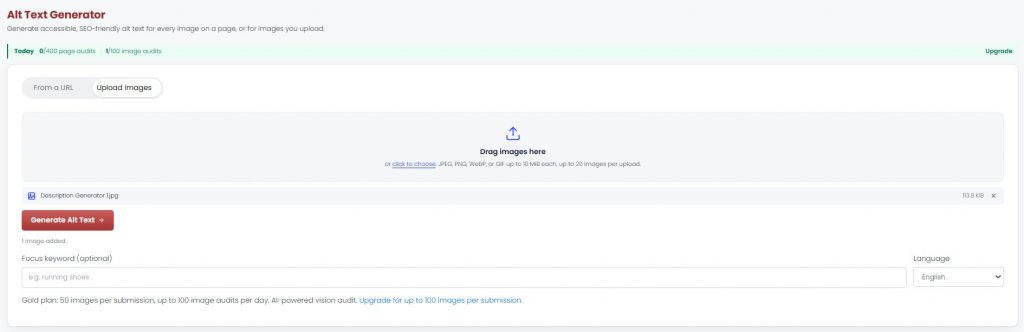
This is not a guaranteed CTR boost, but it gives your images a better chance of being understood, indexed, and surfaced in the right search results.
• Keep the landing page experience in mind
A high CTR is great, but it’s only really valuable if the page delivers after the click. If users land on the page and immediately feel let down, confused, or misled, that initial click is not doing much for you.
So while the goal is to make your result more clickable, it still has to line up with what users expect and actually deliver.
All of these small signals add up. The more you pay attention to what actually gets people to click across different channels, the easier it becomes to refine your messaging in search.
CTR is not just about writing better titles. It’s about understanding what catches attention, what builds trust, and what makes someone choose your result over everything else on the page. Keep testing, keep learning from real data, and keep tightening the connection between what you show in the SERP and what users actually want.
FAQs
• What are the most common reasons for a low CTR?
Low CTR usually comes from weak titles, vague meta descriptions, poor intent match, or strong competition. Sometimes the wrong page ranks, or SERP features push listings down. Even small mismatches between what users expect and what your snippet shows can hurt clicks.
• Which pages should I optimize first for CTR?
Start with high-impression pages ranking just outside top positions, especially positions 5–15. These are closest to gaining more clicks. Also prioritize pages tied to important keywords, conversions, or revenue, where CTR gains have the biggest impact.
• What’s the difference between Organic CTR vs. Paid CTR?
Organic CTR comes from unpaid search results and depends on rankings and snippet appeal. Paid CTR comes from ads and is influenced by bidding, targeting, and ad copy. Paid CTR is easier to test quickly, while organic CTR builds over time.
• Is collective CTR bound to drop due to AI Overviews and other SERP features?
Yes, in many cases. AI Overviews, featured snippets, and other SERP features can reduce clicks by answering queries directly. That said, strong positioning, compelling snippets, and targeting the right intent can still help you capture a meaningful share of clicks.
• Why is my page getting impressions but not clicks?
This usually means your page is visible but not compelling enough to earn clicks. Common causes include weak titles, poor intent match, or stronger competing results. It can also happen if your ranking is low or SERP features dominate attention.
• How long does it take to see CTR improvements after updating a title tag or meta description?
You can start seeing changes within a few days to a couple of weeks, depending on how often Google recrawls the page and how much traffic it gets. For a more reliable read, it’s better to look at a few weeks of data.
• Can rich results really improve CTR?
Rich results like images, ratings, FAQs, and other visual SERP features help your listing take up more space, look more useful, and stand out from plain blue links. They do not appear every time, but when they do, they can definitely improve click appeal.
• How often should I test and update title tags?
There is no fixed schedule, but reviewing every few months or when performance drops is a good approach. Avoid constant changes. Make updates based on data, then give enough time to measure results before testing again.
• What tools can you use to track and improve organic CTR?
Google Search Console is the main tool for tracking clicks, impressions, and CTR. There are also free tools like Website Ranking Checker that can also highlight CTR opportunities, quick wins, and cannibalization issues to guide where to optimize next.
• Why is CTR different on mobile vs desktop?
Mobile and desktop SERPs look different. Mobile has less screen space, more scrolling, and often more SERP features, which can affect visibility and clicks. User behavior also differs, with mobile users often scanning faster and clicking differently.
• Does a higher CTR always mean better performance?
Not always. A high CTR is good, but only if the page delivers after the click. If users bounce quickly or do not convert, the clicks are not very valuable. Thus, CTR should be viewed alongside engagement and conversion metrics.
Final Thoughts
CTR is one of the clearest signs of whether your SEO is working on the SERP. Improving SEO rankings can get you in front of people, but CTR shows whether they actually want to click. If they’re not, that usually points to something fixable, like weaker copy, poor intent match, or a snippet that is not standing out enough. That’s why CTR is more important than it sometimes gets credit for. It’s not just a metric to track. It’s actually one of the easiest levers you can pull for quick SEO gains.