
See Search Volume on Google Play
Does any tool really have Google Play search volume?
Here is something most ASO and keyword tools will not admit: no tool has genuine Google Play search-volume data, including this one. Google Play has never released its search counts to anyone.
So when a tool shows you a "Google Play search volume", that number is not coming from the Play Store, it cannot be, because Google Play does not share it. It is an estimate the tool has modelled and shown to you as if it were fact.
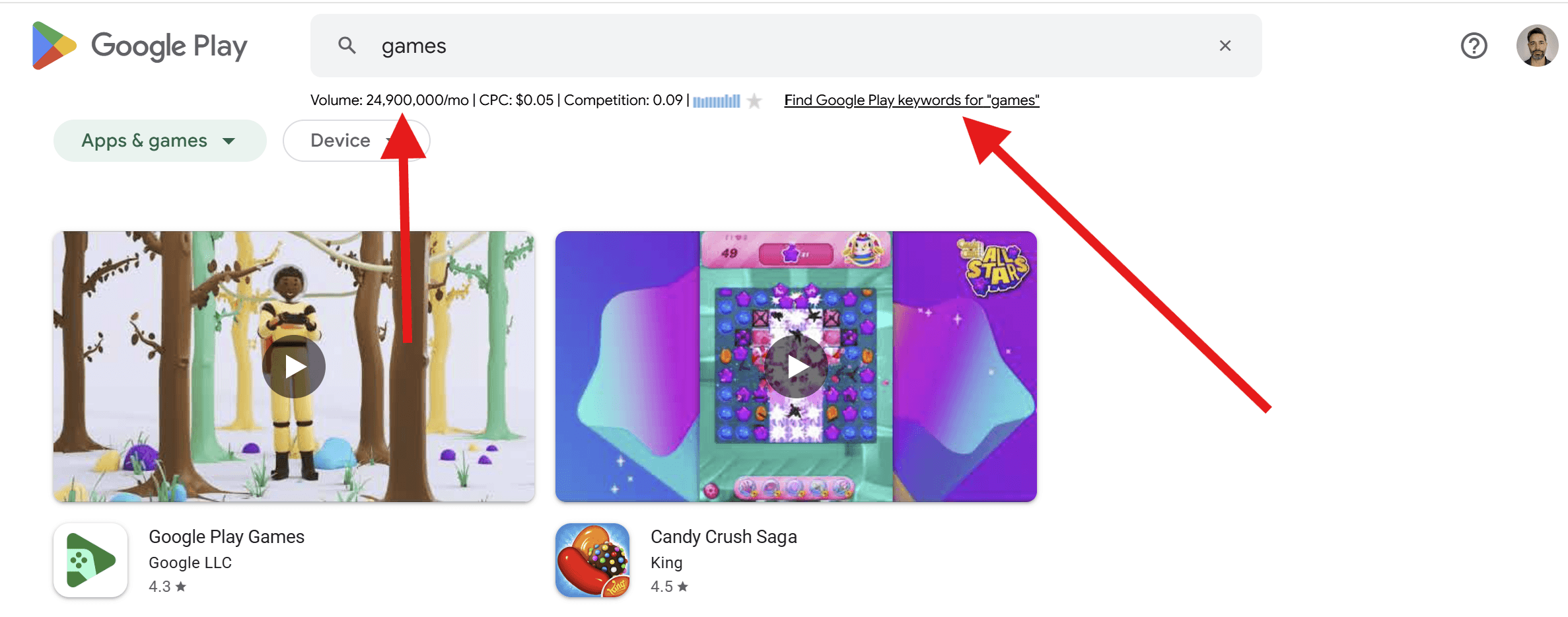
Keywords Everywhere does something more honest. Rather than dress up a guess as Play Store data, it shows you the Google search volume for each term right under the Google Play search bar, and tells you exactly what it is: the number of searches on Google itself, from Google Keyword Planner, not the Play Store's own.
App stores like Google Play, along with Amazon, YouTube and Etsy, all keep their search counts private, so no tool can show their true numbers. We would rather give you a published Google figure, clearly labelled, than a number disguised as the Play Store's own.
So why is a Google number worth having on Google Play? Because a consistent figure for every keyword lets you compare demand between keywords: a term searched 40,000 times a month clearly has more pull than one searched 300 times, and that gap is a useful guide for the words you put in your app title, short description and long description.
You do not have to install anything to try this. Our free Search Volume Checker looks up the Google search volume, CPC and competition for a whole list of keywords right in your browser.
Here is what changes once the extension is installed.
What Google Play shows vs what Keywords Everywhere adds
| On Google Play by itself | With Keywords Everywhere you also see |
|---|---|
| A list of apps and games ranked by Play Store relevance, with no demand numbers attached. | The Google search volume, CPC and competition for that exact term. |
| An autosuggest dropdown of popular completions, with nothing to separate the big terms from the small ones. | The Google volume beside each suggestion, so high-demand keywords stand out as you type. |
| No keyword discovery, you have to brainstorm seed terms yourself. | Hundreds of long-tail keywords from the Find Google Play Keywords tool, ranked by Google volume. |
three features added to Google Play
GKP Search Volume, CPC, Competition & 12 month trend
Keywords Everywhere shows the Google Keyword Planner search volume, CPC, competition and 12-month trend right under every search you make on Google Play.

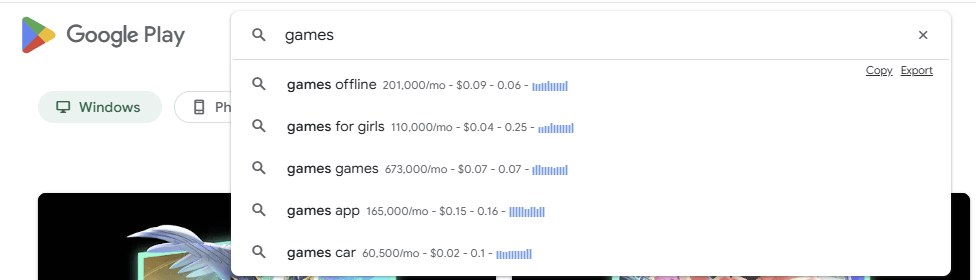
Search volumes in Google Play's auto-suggest drop down
You can see the search volume data in the auto-suggest drop down as you type your search into Google Play.
It is a fast way to run several searches in a row and spot the high-volume terms as they appear.
Long-tail search queries from Google Play with GKP search volume data
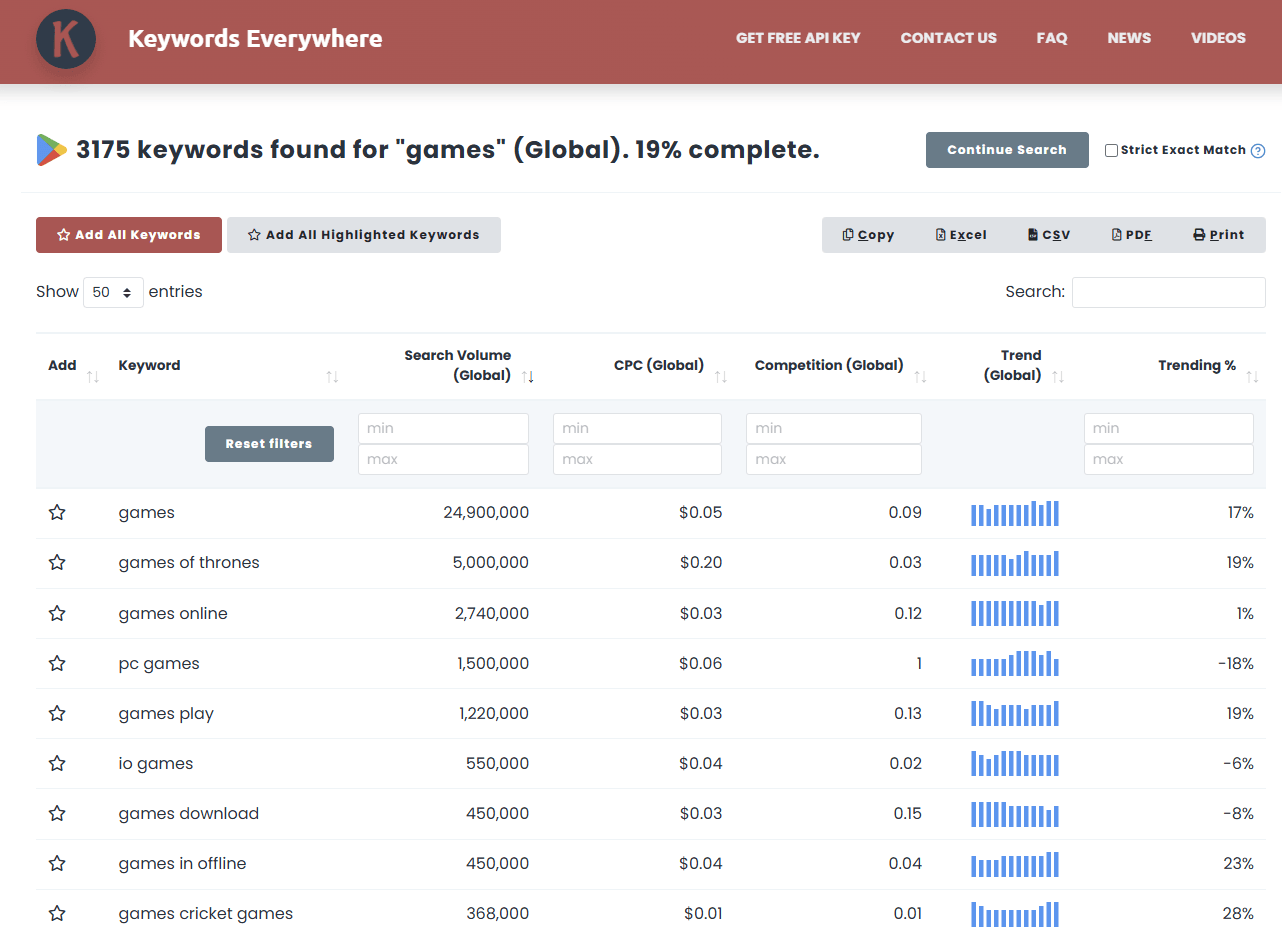
The "Find Google Play Keywords" feature uses the Play Store's autosuggest to pull hundreds of long-tail keywords from a single seed search.
The list is sorted by Google Keyword Planner search volume, so it is easy to see which keyword is worth targeting in your app listing.
Questions you may have
Does Google Play show keyword search volume?
No. Google Play shows you a list of apps and games and an autosuggest dropdown, but it never tells you how many people search for a term. There is no search volume, CPC or competition data anywhere in the Play Store interface. Keywords Everywhere adds the Google search volume for each term right under the Google Play search bar, so you have a concrete number to compare keywords with instead of guessing.Where does the Google Play search volume data come from?
The numbers come from Google Keyword Planner, the same data Google gives its advertisers, so they are Google web-search volumes, not the Play Store's. Google Play never releases its own search counts (nor do Amazon, YouTube or Etsy), so no tool can show you the Play Store's true volume. We show the Google figure because a consistent number for every keyword lets you compare demand between keywords, which is far more useful than no data at all.Can I use this for App Store Optimization (ASO)?
Yes. The keywords you choose for your app title, short description and long description drive how you rank in Play Store search, which is the heart of ASO. Keywords Everywhere gives you the Google search volume for each term, so you can prioritise the words people actually search for instead of guessing. Pair it with the search terms in your own Google Play Console acquisition reports, which show how people already find your app, for a fuller picture.How do I check the search volume for a Google Play search?
Install the Keywords Everywhere extension for Chrome, Firefox or Edge, then search on Google Play as usual. The Google Keyword Planner search volume, CPC and competition appear right under the search bar, and the volume also shows beside each term in the autosuggest dropdown as you type.How do I find long-tail Google Play keywords?
Use the Find Google Play Keywords feature. It takes a single seed search, pulls hundreds of long-tail suggestions from the Play Store's autosuggest, and sorts the whole list by Google Keyword Planner search volume. That makes it easy to see which long-tail keywords are worth targeting in your app title, short description and long description.Is the Google Play keyword data free?
The Keywords Everywhere extension is free to install. The search volume numbers are a paid feature: you buy credits, and one credit returns the data for one keyword. Credits start at a low annual price and there are no monthly plans. You can also check the monthly volume for a small batch of keywords for free with our Search Volume Checker tool.Already installed? Sign up for an API key here
I love this tool. How can I help?
It would be awesome if you could write a review & share us through your favorite social network. We would love any help to get the word out.
Guides from our blog
Step-by-step articles on getting the most out of this data.
How to see how many searches a keyword gets
Stop writing content nobody searches for. Learn how to see how many searches a keyword gets with our simple guide and boost your organic traffic.
Read the guideHow to find keyword search volume using Keywords Everywhere
Find keyword search volume in seconds! Use Keywords Everywhere to reveal search data, CPC, and trends right inside Google and other major platforms.
Read the guide