
Google's AI Overviews are changing the way users interact with search results. These AI generated summaries appear at the top of the search results page and pull information from multiple sources to give users a quick answer to their query. For SEOs and website owners, understanding which sources Google cites in its AI Overviews and how those sources are selected is becoming critical.
Keywords Everywhere now lets you analyze Google's AI Overview right from the search results page.
Every time you search on Google and an AI Overview is shown, you will see a new "Analyze AI Overview" button, as shown in the screenshot below.
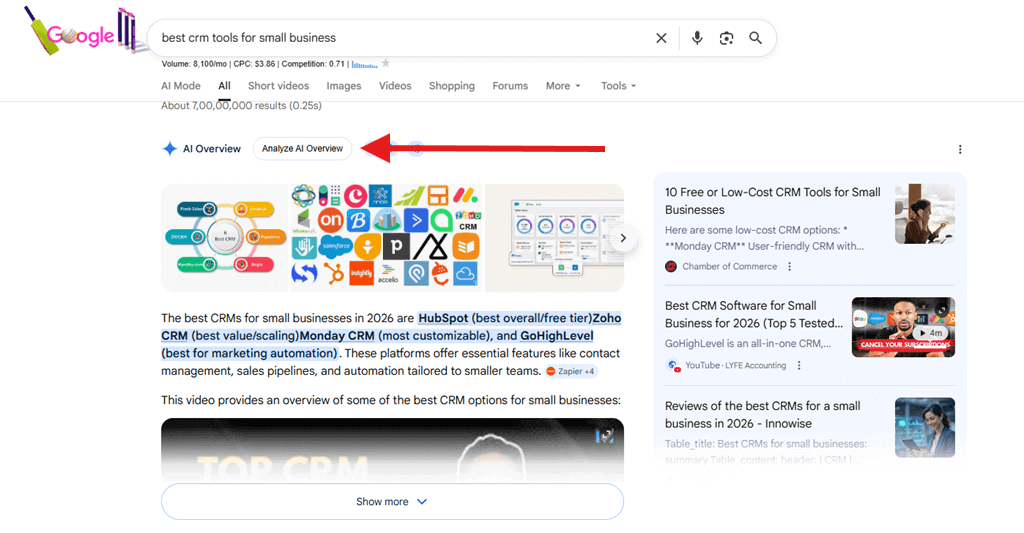
When you click this button, Keywords Everywhere parses the AI Overview, extracts all the links embedded in it, and opens a new page with a detailed breakdown of each source along with useful SEO metrics.
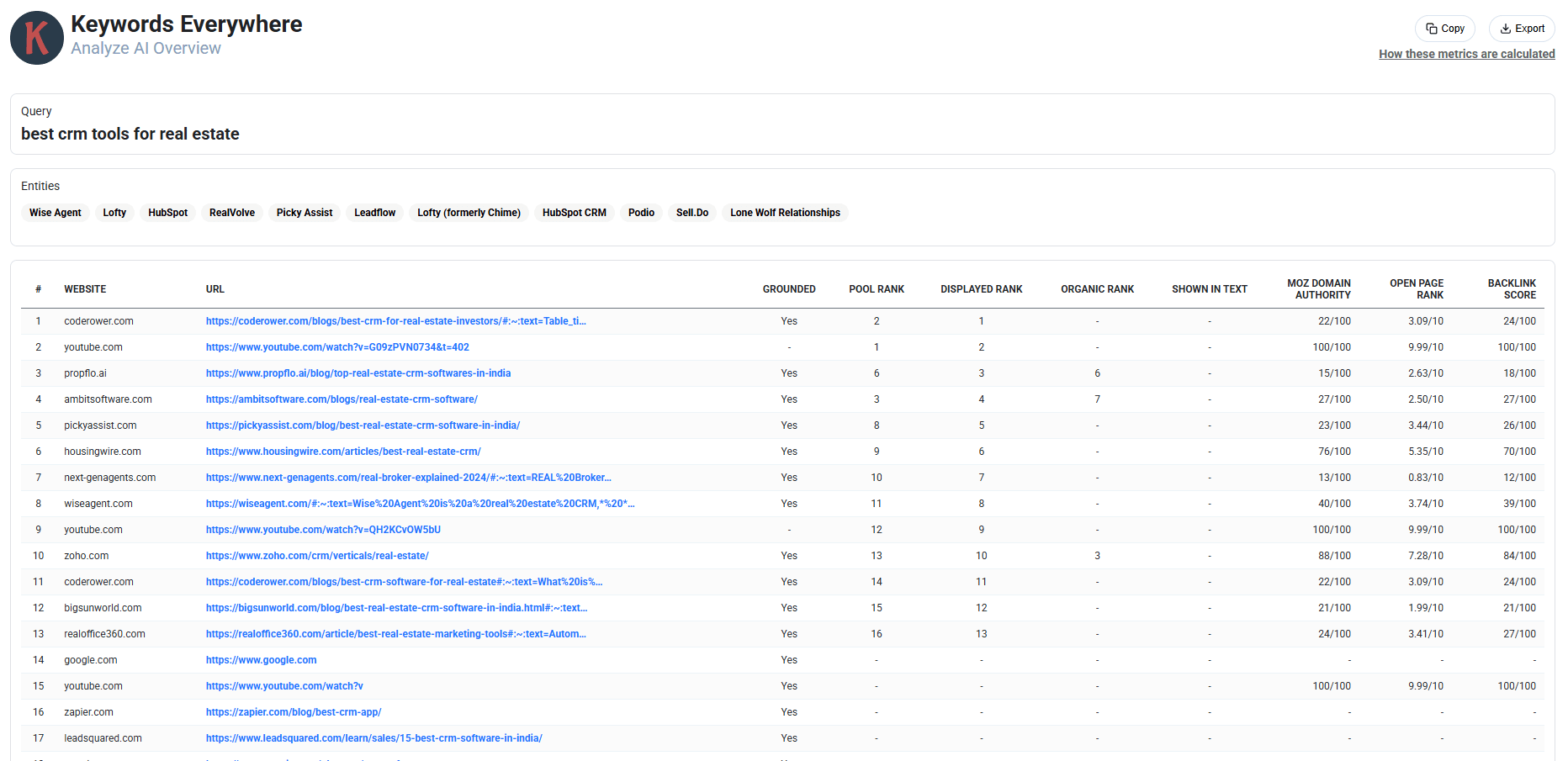
The detailed breakdown page shows the following data for each link found in the AI Overview:
| Column | Description |
|---|---|
| Website | The domain of the source cited in the AI Overview |
| URL | The full URL of the page cited in the AI Overview |
| Grounded | Whether the link is actually cited/referenced in the AI Overview text |
| Pool Rank | The rank of the URL in Google's pool of sources used for the AI Overview |
| Displayed Rank | The order in which the link appears visually in the AI Overview |
| Organic Rank | The position of the same URL in the regular organic search results |
| Shown in Text | Whether the URL or brand is mentioned in the AI Overview text itself |
| Moz Domain Authority | The Moz DA score out of 100 for the domain |
| Open Page Rank | The Open Page Rank score out of 10 for the domain |
| Backlink Score | The Backlink Score out of 100, calculated from the Moz DA and OPR |
This is where Keywords Everywhere is different from all the other SEO tools. We never hide behind "secret algorithms". All our data is laid out bare for you to understand exactly what Google's AI Overview is doing and which sources it favors.
The rest of this article explains each data point in detail.
Entities
At the top of the breakdown page, you'll see a list of Entities. These are the brands, products, or named entities that Google's AI Overview mentions in its generated text.
For example, if you search for "best crm tools for real estate", the AI Overview might mention entities like Wise Agent, Lofty, HubSpot, RealVolve, Picky Assist, and others. Our tool extracts these entities and displays them at the top of the page so you can quickly see which brands Google's AI considers relevant for that query.
This is especially useful for competitive analysis. You can instantly see whether your brand is being mentioned in the AI Overview, and which competitors are being featured.
Grounded
The Grounded column tells you whether a link in the AI Overview is actually cited or referenced in the AI Overview text. A "Yes" value means that Google has used this source as a reference and has grounded its AI-generated content on information from this page. A "-" value means the link is part of Google's source pool but is not directly cited in the visible text.
This distinction is important because being in the source pool is one thing, but being actively grounded, meaning Google's AI actually references your content is a much stronger signal that your page is considered authoritative for that query.
Pool Rank
The Pool Rank is the rank of the URL in Google's pool of sources that it uses to generate the AI Overview. Google maintains a pool of sources it considers relevant, and this rank tells you where each page sits in that pool.
A lower pool rank means Google considers that source more relevant to the query. For example, a page with a Pool Rank of 1 is considered the most relevant source in Google's pool for generating the AI Overview.
Displayed Rank
The Displayed Rank is the order in which the link appears visually in the AI Overview as shown to the user. This is the rank that the user sees when they look at the AI Overview.
Note that the Displayed Rank can differ from the Pool Rank. Google may reorder sources when displaying them in the AI Overview based on relevance to specific parts of the generated text. Understanding the difference between Pool Rank and Displayed Rank can give you insights into how Google prioritizes sources for different parts of its AI generated content.
Organic Rank
The Organic Rank shows the position of the same URL in the regular organic search results below the AI Overview. This lets you compare how a page ranks in Google's traditional organic results versus how it's featured in the AI Overview.
A dash (-) in this column means the URL is cited in the AI Overview but does not appear in the top organic search results. This is a particularly interesting data point because it shows that Google's AI Overview can pull from sources that don't necessarily rank well in traditional organic search.
Shown in Text
The Shown in Text column indicates whether the URL or brand name is explicitly mentioned in the AI Overview text itself. This goes beyond just being cited as a source. It means the brand or website is actually named in the generated content that users read.
Being shown in the text is valuable because users see your brand name directly in the AI Overview without having to click on any source links. This can increase brand visibility and recognition significantly.
SEO Metrics
For each URL cited in the AI Overview, we also show the following SEO metrics:
Moz Domain Authority
The Moz Domain Authority score out of 100 for the domain. This is a widely used metric that predicts how well a website will rank on search engines.
Open Page Rank
The Open Page Rank score out of 10 for the domain. This provides an additional data point for evaluating domain strength.
Backlink Score
The Backlink Score out of 100, calculated from the Moz DA and OPR using our standard formula:
Having these SEO metrics alongside the AI Overview data gives you a complete picture. You can see not just which sources Google's AI is citing, but also how strong those sources are from an SEO perspective. This helps you understand what it takes to get your content featured in AI Overviews.
You can use the Copy button at the top right to copy the data to your clipboard, or use the Export button to download it for further analysis.
At the top right of the page, there is also a "How these metrics are calculated" link that will bring you to this article so you can always reference the methodology behind the numbers.
Frequently Asked Questions
Q: I don't see the "Analyze AI Overview" button on my search results page.
A: The "Analyze AI Overview" button only appears when Google shows an AI Overview for the search query. Not all queries trigger an AI Overview. Try searching for a different query that is more likely to trigger one.
Q: Why do some URLs have a dash (-) in the Organic Rank column?
A: A dash means that the URL is cited in the AI Overview but does not appear in the top organic search results. Google's AI Overview can pull from sources that don't necessarily rank well in traditional organic search.
Q: Why do some URLs not have Moz DA or OPR values?
A: Some newer or less well-known domains may not yet have Moz DA or OPR data available. In such cases, these values will not be shown.
Q: Can I export the data?
A: Yes, you can use the Copy button to copy the data to your clipboard, or use the Export button at the top right of the breakdown page to download the data.
Q: I have some more questions on this feature. What do I do?
A: Please email us at help@keywordseverywhere.com