What is Keywords Everywhere?
Keywords Everywhere is a freemium online marketing research browser extension, available for Chrome, Firefox & Edge
Packed with Features to Power Your Marketing
The paid version has everything the free version, plus the 10 paid only features

Search Volume for 15+ websites
Accurate monthly search volume, CPC, competition & 12 month trend data.


Import Keywords
Import your keywords to see accurate monthly search volume, CPC, and competition for them

Bulk Trends Data
Historical volume data obtained in bulk using Bulk Trends feature

Competitor Gap Analysis
Find keywords that your competitors rank for, and which you do not

Multiple Google properties
Google Search, Google Search Console, Google Analytics, Google Keyword Planner & Google Trends

Multiple ecommerce websites
Amazon, eBay & Etsy

Multiple search engines
Google, YouTube, Bing & Duck Duck Go

Website Traffic Metrics
Traffic Metrics: View monthly estimates traffic & the top 10,000 keywords that any URL or Domain

Moz Link Metrics
Link Metrics: View Moz Domain Authority, DA Trend, Spam Score, Total Referring Domains, Backlinks & more

SEO Metrics
SEO Metrics: SEO Difficulty, On-Page Difficulty, Off-Page Difficulty, Brand Queries & more

SEO Reports
SEO Reports: AI-powered SEO reports with keyword clusters, intent, titles & rankability insights


Local SEO Metrics
Access to the exact business categories plus behind the scenes data like Knowledge Graph IDs, Place IDs, and Business Profile IDs

Keyword Widgets
See Related keywords, People Also Search For (PASF) keywords & Long-Tail Keywords

On-Page Analysis
Analyze any URL to get the list of keywords in the content of the page, and the density of those keywords

Google Search Console Visualization
Transform your performance report into clean, easy to read tables and charts with a single click

Instagram Hashtag Generator
Generate the most popular hashtags for Instagram (no volume data)

Pinterest Insights
Pinterest Metrics: Search Insights, Trend Chat & Related Trends (no volume data).


ChatGPT Prompt Templates
200+ optimized prompt templates to help you get the most out of ChatGPT

Gemini Prompt Templates
200+ optimized prompt templates to help you get the most out of Gemini

Claude Prompt Templates
200+ optimized prompt templates to help you get the most out of Claude
ChatGPT Fanout Queries
See exactly the hidden queries that ChatGPT uses to answer your prompts.



Summary Generator
Use LLMs like ChatGPT, Claude, Gemini, or DeepSeek to condense online content into clear, concise summaries. (YouTube, Reddit & more)
The free version has the following features
Website Traffic Metrics
Traffic Metrics: View monthly estimates traffic & the top 10,000 keywords that any URL or Domain
Moz Link Metrics
Link Metrics: View Moz Domain Authority, DA Trend, Spam Score, Total Referring Domains, Backlinks & more
SEO Metrics
SEO Metrics: SEO Difficulty, On-Page Difficulty, Off-Page Difficulty, Brand Queries & more
SEO Reports
SEO Reports: AI-powered SEO reports with keyword clusters, intent, titles & rankability insights
Local SEO Metrics
Access to the exact business categories plus behind the scenes data like Knowledge Graph IDs, Place IDs, and Business Profile IDs
Keyword Widgets
See Related keywords, People Also Search For (PASF) keywords & Long-Tail Keywords
On-Page Analysis
Analyze any URL to get the list of keywords in the content of the page, and the density of those keywords
Google Search Console Visualization
Transform your performance report into clean, easy to read tables and charts with a single click
Instagram Hashtag Generator
Generate the most popular hashtags for Instagram (no volume data)
Pinterest Insights
Pinterest Metrics: Search Insights, Trend Chat & Related Trends (no volume data).
ChatGPT Prompt Templates
200+ optimized prompt templates to help you get the most out of ChatGPT
Gemini Prompt Templates
200+ optimized prompt templates to help you get the most out of Gemini
Claude Prompt Templates
200+ optimized prompt templates to help you get the most out of Claude
ChatGPT Fanout Queries
See exactly the hidden queries that ChatGPT uses to answer your prompts.
Summary Generator
Use LLMs like ChatGPT, Claude, Gemini, or DeepSeek to condense online content into clear, concise summaries. (YouTube, Reddit & more)
How much does the paid version cost?
We have four annual plans to suit different needs, from solo users to large teams. All plans are billed annually, so click below to see the current prices.
Interested in setting up Keywords Everywhere and start using it?

Purchase a plan
If you want to purchase a plan, then you need to follow the instructions below
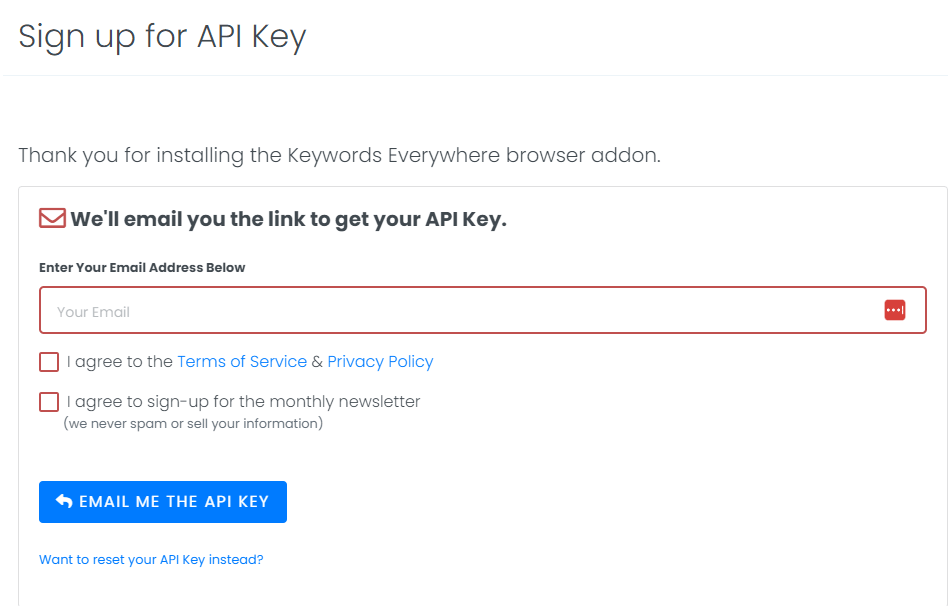
Sign Up
Click here to sign up for an API key.
You will
need
to enter your email address and then we will email you a link to get your
API
key
Setup API Key
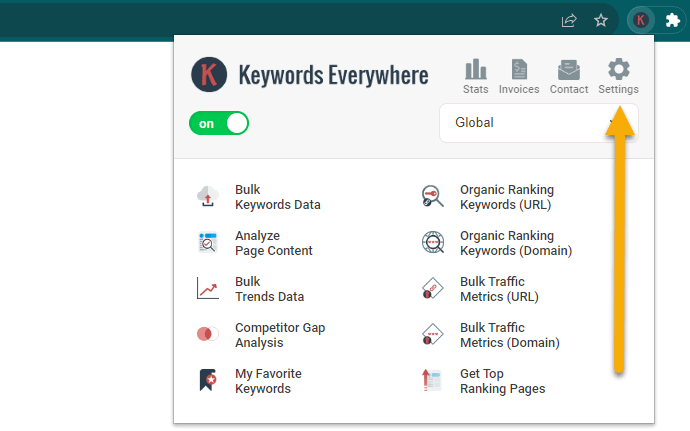
Click the  icon at the top right
of your browser. In the popup that opens, click the "Settings" link at the
top,
and then enter the API key and click Validate
icon at the top right
of your browser. In the popup that opens, click the "Settings" link at the
top,
and then enter the API key and click Validate
Subscribe
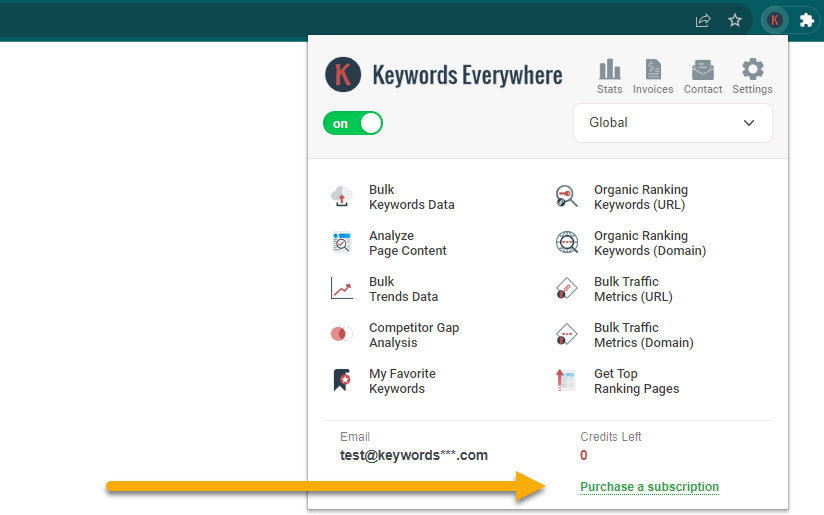
Click the icon at the top right
of your browser. In the popup that opens, at the bottom, you will find the
link
to purchase a plan. Clicking this link will take you to a page where you can
make payment.
Enjoy
Once the payment goes through, your account will automatically get the plan you purchased along with the credits associated with it.
* Sometimes it can take up to 30 minutes to verify the transaction.
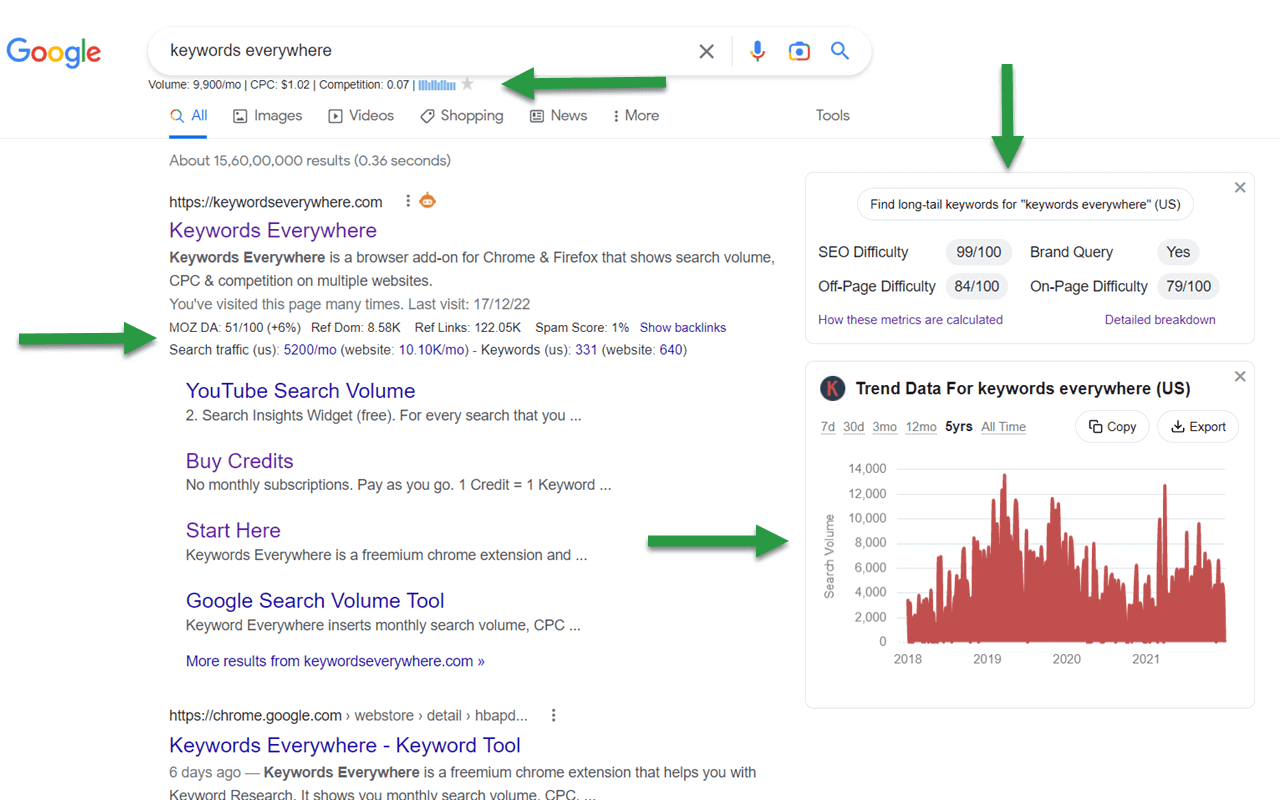
Once you are all setup, here a few things to do
New to the tool? Our full guide walks through every feature and all the sites Keywords Everywhere works on.
How to use it
If you've purchased a plan, please do read through this article to understand how credits work, and how to save them.
Article on Saving Credits
We have multiple YouTube playlists with detailed videos on all of Keywords Everywhere's features. These will help you use the tool effectively.
View all playlists
Questions you may have
Is Keywords Everywhere free?
Yes, there is a free version and a paid version. A lot is free, including keyword ideas, traffic and Moz link metrics, SEO and YouTube metrics, social engagement insights, and 200+ AI prompt templates, with no credits used. See the full list of free features. The paid version adds the data layer: accurate search volume, CPC, competition and trend charts, bulk uploads, and competitor gap analysis. The extension itself is free to install on Chrome, Firefox and Edge.
Which browsers does it work on, and is there a mobile app?
Keywords Everywhere is a desktop browser extension for Chrome, Firefox and Edge. It does not work on Safari, and there is no iOS or Android app, so it will not run on a phone or tablet. You will need to use it on a desktop or laptop computer.
How does Keywords Everywhere work?
Once you install the extension, the data appears right where you are already working. Run a search on Google, YouTube, Amazon or another supported site and the metrics show up on the page, under the search box and in the side widgets. The free features work straight away, while the search volume and other paid metrics need an API key and a plan.
Is Keywords Everywhere a rank tracker?
No. Keywords Everywhere is not a rank tracker, so it does not monitor your position for a keyword over time. It shows keyword data and the keywords a site currently ranks for. If you do want to track rankings over time, the same team makes a separate free tool, Website Ranking Checker.
Is my keyword data private?
Yes. The extension sends your keywords to our server only to fetch the metrics it shows you. Your keyword data is never saved or used for anything else.
I have some questions/issues. What do I do?
You can check our FAQs for any common questions, or simply email us at help@keywordseverywhere.com.
View the FAQs