See the Tags Behind Any YouTube Video
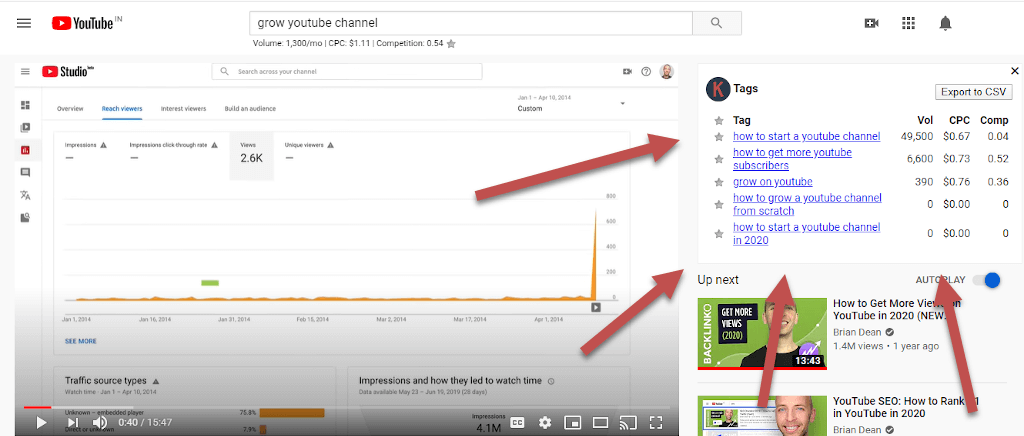
See the tags behind any video, and which ones are worth using
YouTube used to show a video's tags right on the watch page. It does not anymore, so the tags creators use to get found are now hidden from everyone else.
Keywords Everywhere brings them back. Install the extension, open any video, and a widget lists every tag the creator added to it.
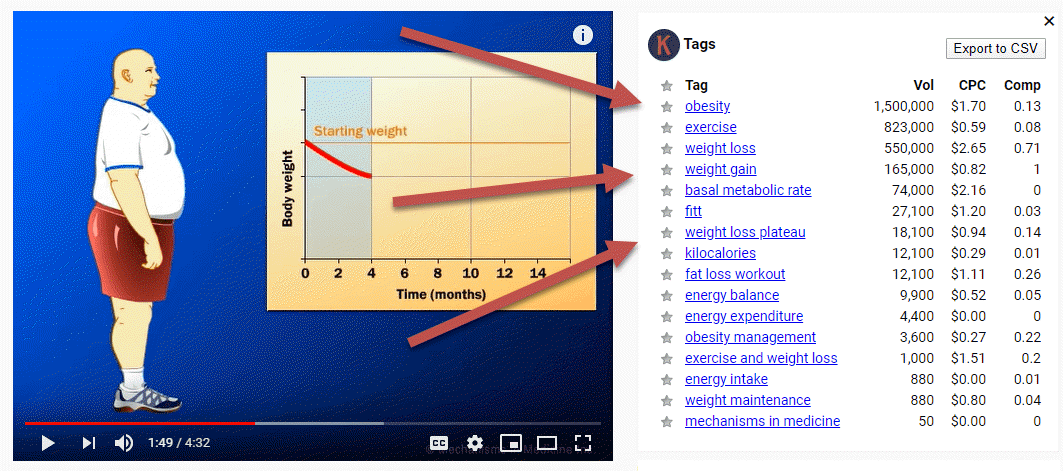
Next to each tag you also get its monthly search volume, CPC and competition. That turns a plain list of words into a ranked list of demand, so you can see at a glance which tags people actually search for and which are dead weight.
How to find the high-volume tags that already rank
This is the quickest way to choose your own tags. Open the videos that already rank for the topic you want, and let Keywords Everywhere show you the tags each one uses.
The volume beside each tag tells you which of those terms carry real search demand. Borrow the high-volume tags the ranking videos share, and skip the ones nobody searches for.
Is this the YouTube search volume?
No, and it is worth being clear about that. YouTube has never released its own search counts, so no tool can show YouTube's true tag volumes.
The number you see is the Google search volume from Google Keyword Planner, clearly labelled, not a guess dressed up as YouTube data. It is a consistent, real figure for every tag, which is exactly what you need to compare demand between one tag and another.
For the full explanation of why a Google number is the honest one to show on YouTube, see our YouTube Search Volume page.
Size up a keyword before you make the video
Tags help you describe a video you have already made. The YouTube Insights widget helps you decide whether a video is worth making in the first place.
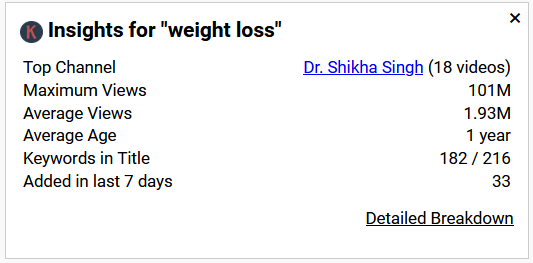
For every search you run on YouTube, the tool reads the data for all the videos on the results page and sums it up for you:
- Top Channel: the channel with the most videos ranking for this query.
- Maximum Views: the highest view count among the videos shown.
- Average Views: the average views across all the videos shown.
- Keywords in Title: how many of the videos use the exact query in their title.
- Added in last 7 days: how many fresh videos, less than a week old, are already ranking.
Read together, these tell you how strong and how fresh the competition is. The Detailed Breakdown link opens the same numbers video by video, so you can check the maths yourself.
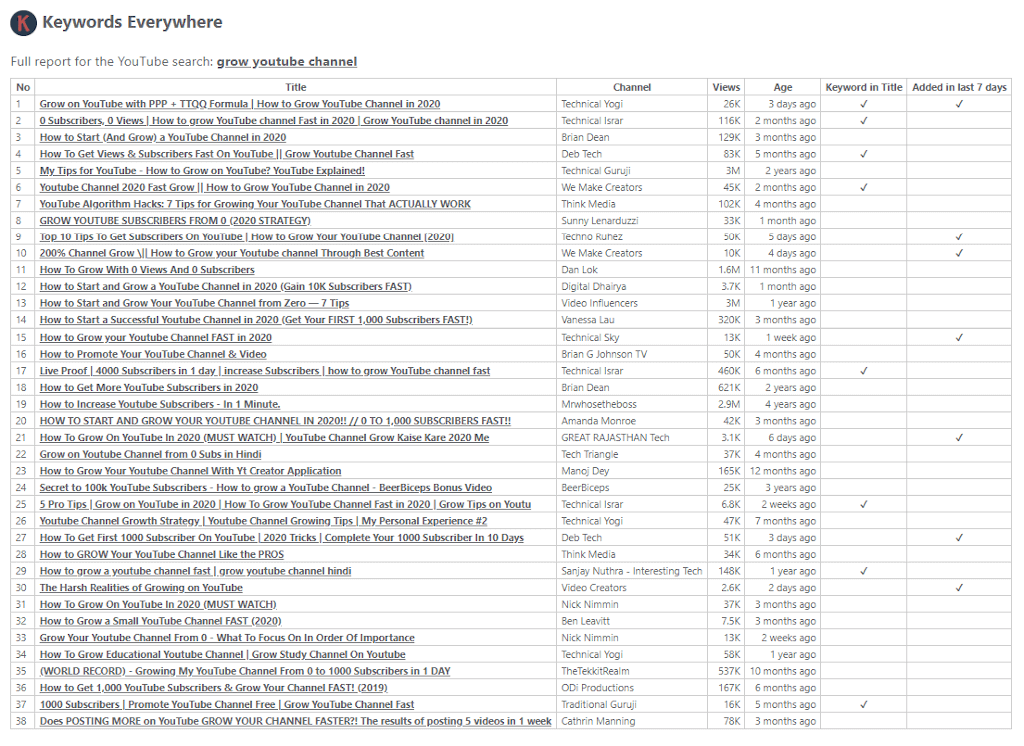
If you want to dig into these numbers, the YouTube metrics page explains each one and how to read it.
Questions you may have
Can I still see a YouTube video's tags?
Yes. YouTube removed tags from public view, but Keywords Everywhere brings them back. Install the extension, open any video, and the tag widget lists every tag the creator added to that video, with the search volume, CPC and competition for each one.How do I find high volume tags on YouTube?
Open the videos that already rank for your topic and look at the tags Keywords Everywhere shows for each one. The volume next to each tag tells you which terms people actually search for, so you can borrow the high volume tags the ranking videos already use and skip the ones with no demand.Is the tag search volume from YouTube or from Google?
It is the Google search volume. YouTube has never released its own search counts, so no tool can show YouTube's true numbers. Keywords Everywhere shows the Google Keyword Planner figure instead, clearly labelled, as a consistent way to compare demand between tags. See our YouTube Search Volume page for the full explanation.How many tags should I add to a YouTube video?
YouTube lets you use up to 500 characters of tags per video, but you do not need to fill that. Most well optimised videos use a handful of relevant tags, around five to eight, rather than stuffing the field. A few accurate tags help more than a long list of loosely related ones.Do YouTube tags still matter for ranking?
They play a smaller role than they used to. YouTube weighs your title, description and thumbnail far more heavily, and has said tags mainly help with context and common misspellings. Tags are still worth setting, but they are no longer the main lever for getting views.Can I see the most searched tags on YouTube?
There is no public list of the most searched tags on YouTube, because YouTube does not publish that data. The practical way to find high demand tags is to check the search volume on the tags that real ranking videos already use, which is exactly what Keywords Everywhere shows you.Is the YouTube tags feature free?
The search volume, CPC and competition shown next to each tag are part of the paid data, so you need a subscription with credits to see those numbers. The free tier does not include search volume. You will also need the browser extension installed on Chrome, Firefox or Edge.Already installed? Sign up for an API key here
I love this tool. How can I help?
It would be awesome if you could write a review & share us through your favorite social network. We would love any help to get the word out.