

When organic traffic starts to stall, the instinct is usually to publish more content. But the real goldmine is usually the content you already have, and improving it often delivers much better results at a fraction of the cost and effort.
Unfortunately, most companies rarely revisit the content they already have. Once a page is published, it’s usually treated as done and just left to collect dust.
If your site is seeing a gradual drop in organic traffic or leads, creating more content isn’t always the answer. In many cases, a content refresh is the smarter move. It’s low-hanging fruit, and more often than not, the simplest and most efficient way to turn performance around.
Why is it so important to refresh content?
In search, content doesn’t age like a fine wine. Even strong pages lose relevance as intent changes, competitors level up, and Google’s quality standards evolve.
It’s not necessarily because your content is bad, but because it’s no longer current or complete. Competing pages may simply be stronger, fresher, and better aligned with search intent. That’s why maintaining rankings isn’t a one-time activity, but an ongoing SEO task.
Here are the main reasons content refreshes should be part of your SEO routine:
1. Search engines tend to favor fresh content
Search engines are built to reward content that feels reliable and current. The good thing about refreshing content is you’re not starting from zero. Google already understands the page, has indexed it, and may even trust it. By updating the content, you activate freshness signals like Query Deserves Freshness, which can prompt quicker crawls and renewed ranking potential.
2. Large Language models (LLMs) also have content recency bias
LLMs like ChatGPT, Claude, and Gemini also naturally lean toward newer information. These AI systems are trained to prioritize more recent data when generating answers, summaries, and recommendations. Thus, content that’s updated, current, and aligned with recent developments is more likely to be surfaced or referenced.
3. Readers love fresh, up-to-date content
Searchers also naturally gravitate toward content that looks fresh and up to date. If an article looks dated, users are more likely to bounce and keep searching for something newer. We’ve all clicked a result, noticed it was written years ago, and immediately returned to the SERP to keep looking. Google picks up on those poor engagement signals and gradually deprioritizes the page in favor of fresher results.
4. Search intent, interests, and needs may change over time
What people search for evolves. Queries around remote work, for example, changed dramatically after 2019. Content that doesn’t adapt to these shifts slowly stops matching what users actually want.
5. Old content may contain broken links or point to outdated sources
Broken links are a normal part of the web over time. And external links that no longer work or lead to outdated information are a hit to your credibility. Users and search engines expect sources to back up claims, and when they don’t, it could weaken trust in the entire page.
6. Industry best practices evolve
Guides written years ago often miss key updates. A social media article from 2016 won’t cover TikTok or modern algorithms. Refreshing content keeps it aligned with how things actually work today.
7. Messaging and products may change over time
Brands evolve. Features get added or removed, pricing changes, tools get renamed, and entire product lines are sunset. Content that references specific products, services, or offers can become inaccurate if it isn’t revisited.
8. Content refresh is chance to improve readability and user experience
A refresh isn’t just about updating information. It’s a chance to clean things up—shorter paragraphs, clearer headings, more lists, visuals, screenshots, or examples. Simply making content easier to scan can make a big difference.
9. Better engagement and stronger conversions
Clearer, more relevant content keeps people on the page longer and nudges them toward action. That improved engagement feeds back into better performance overall.
10. Content Refreshes Combat Keyword Cannibalization
Multiple pages ranking for the same keyword isn’t always a good thing. Instead of reinforcing each other, those pages often divide clicks, links, and ranking signals. This internal competition (keyword cannibalization) can be resolved through a strategic content refresh that consolidates such overlapping topics and strengthens one clear, authoritative page.
11. Outdated content can be risky in sensitive niches
In YMYL areas like health, finance, or safety, stale information isn’t just unhelpful, it can be harmful. Google holds these pages to higher standards, and outdated advice can seriously hurt rankings.
12. It costs less and maximizes ROI
You’ve already paid for the research, writing, and publishing. Refreshing content extends the lifespan of that investment and pulls more traffic, engagement, and conversions from the same page. Instead of starting from scratch, you’re compounding the value of an existing asset—often with faster, lower-risk, and more predictable returns.
13. Content refreshes keep your content marketing ecosystem in sync.
Simply put, updating content isn’t optional maintenance. It’s how your content stays competitive. Instead of constantly starting from scratch, regular refreshes allow you to compound results, protect rankings, and keep your entire content ecosystem aligned with both users and search engines over time.
Ultimately, content refreshes are how you fight content decay and protect the rankings you’ve already earned. If you’re already ranking for high-volume keywords, refreshing content helps protect those hard-won positions. And if a page is close to breaking into the top results, an update can be the nudge it needs.
This doesn’t mean you have to abandon creating new content. You just have to prioritize smarter updates alongside fresh content built around real growth opportunities.
How to Update Old Blog Posts and Pages for SEO
Content refreshes work best when they’re selective. Instead of touching everything, you want to zero in on blog posts that are close to breaking out but need a push.
By auditing your existing content, you can identify which pages have the highest potential to drive traffic, leads, and conversions and avoid wasting effort on posts that won’t move the needle.
Identifying Content to Update
Identifying which content to update is the real starting point. Here’s how to find pages with real upside:
1. Compile your content inventory
First things first, gather all your content data to get a clear, bird’s-eye view of what you’re working with. Pull a list of all indexable URLs from your CMS, analytics platform, or SEO tool. Pay close attention to publication dates, last updated timestamps, and URL structures that may include the year of publication. You can also cross-reference this data with Google Analytics or Search Console to identify older pages that still receive impressions or traffic.
To stay organized, create a spreadsheet or CSV that includes every page older than 12 months, along with key metrics like traffic, rankings, conversions, and backlinks. Many CMS platforms, including WordPress, offer built-in export tools that make this process faster.
This inventory becomes the foundation for deciding which pages are worth refreshing and which can be deprioritized.
2. Perform content audit
Once you’ve mapped out your content inventory, the next step is understanding how those pages actually perform in search. Google Search Console is your go-to tool here. It shows you how often your content appears in search results, how frequently users click, and where your pages typically rank.
Focus on the following metrics:
• Impressions
This metric indicates how frequently a page appears in search results. High impressions with low clicks usually signal a visibility opportunity. Your page is being seen, but something—often the title, meta description, or intent mismatch—is holding it back.
• Clicks
Clicks show how much traffic your page is actually earning from search. Pages with declining clicks may be losing relevance, getting outranked by fresher content, or failing to stand out in the SERPs.
• Click-through rate (CTR)
CTR measures how compelling your result is once it appears. A low CTR despite good rankings often points to weak headlines, outdated dates, or snippets that no longer align with search intent.
• Average position
This shows where your page typically ranks for its queries. Pages sitting in positions 5–20 are often prime refresh candidates. They already have visibility, but a content update can be enough to push them into top results.
Google Analytics is another key data source for identifying content worth updating. It helps you understand how users interact with your content after clicking through from search.
From Google Analytics, focus on:
- Page views to gauge which pages still attract interest and demand
- Bounce rate to identify pages that fail to engage visitors
- Average time on page to measure how compelling the content is
- Conversion rate to check whether the page drives meaningful actions
Taken together, these metrics help you spot pages that are underperforming relative to their potential. Instead of guessing which content to update, SERP data lets you prioritize pages that already have traction and just need a strategic refresh to perform better.
3. Identify pages with technical issues
Before finalizing which pages deserve a refresh, you also need to rule out technical issues that may be holding them back. Even strong content can underperform if search engines can’t properly crawl, index, or render it—or if users have a poor on-page experience.
Tools like SEO Checker surface lots of these issues automatically, so you don’t have to spend hours digging through manual audits. These hints help you quickly spot problems such as:
- Broken internal and external links
- Missing, duplicate, or poorly optimized title tags
- Weak or missing meta descriptions
- Pages blocked from indexing
- Slow page load speed and performance issues
- Thin content or low word count
- Missing header structure (H1s, H2s)
- Image issues like missing alt text
- Poor mobile usability signals
What makes SEO Checker especially useful is context. Each issue comes with clear explanations and actionable recommendations. As you uncover these issues, log them in the same spreadsheet, so nothing slips through the cracks.
Pages with technical problems but decent demand often represent quick wins. Sometimes, fixing a single issue is enough to recover lost rankings or pull in additional traffic.
4. Prioritize accordingly
If time, budget, or resources are limited, you can’t refresh everything at once, and you shouldn’t try to. The goal is to focus on pages where a refresh will have the biggest impact on rankings, traffic, or revenue.
Below is a practical order of priority to help you decide what to tackle first.
Priority #1: High-Value Pages That Are Already Working (Protect First)
Start with content that already drives meaningful results. These pages are your biggest assets, and letting them decay puts your entire SEO performance at risk.
This includes:
- Pages with high organic traffic that are starting to plateau or decline
- Pages with strong conversion history (sign-ups, leads, sales) that are no longer growing
- Content ranking for high-volume or high-intent keywords
Refreshing these pages helps protect hard-won rankings, preserve revenue-driving traffic, and prevent competitors from overtaking you.
Priority #2: Pages With Clear Ranking Upside (Quick Wins)
Next, focus on pages that are close to breaking through but haven’t quite reached their potential.
Look for pages with:
- Current rankings between positions 6–15
These pages often move to page one with better content depth, intent alignment, or internal linking. - Strong backlink profiles but low traffic
In many cases, the authority is already there. The page just lacks clear keyword focus or structure. - Pages with impressions but poor CTR or engagement
Look for pages that appear in search but aren’t getting clicks or are underperforming relative to impressions. These often need better titles, meta descriptions, formatting, or clearer value upfront, not necessarily more links or keywords.
These pages typically respond quickly to updates and offer some of the fastest ROI.
Priority #3: Pages Affected by Keyword Cannibalization
If multiple pages are competing for the same keyword, none of them can perform at full strength. Instead of reinforcing each other, they split ranking signals, dilute relevance, and confuse search engines about which page should win.
Prioritize pages where:
- Two or more URLs rank for the same or very similar queries
- Rankings fluctuate or stall despite decent content
A strategic refresh that consolidates overlapping content into one stronger page often leads to more cumulative traffic.
This also gives you the opportunity to streamline your internal linking. Instead of splitting links across similar pages, you can point related anchor text to the same consolidated page, reinforce one clear destination, and strengthen equity flow instead of spreading it thin across multiple URLs. The result is usually a cleaner site structure, clearer topical authority, and more stable rankings over time.
Priority #4: Near-Miss Content (Page 2–3 Rankings)
Content sitting on page 2 or 3 for relevant keywords often represents wasted opportunity. Why you shouldn’t ignore these pages even if they seem to be performing well:
- The vast majority of clicks go to page-one results
- Even small ranking improvements can unlock disproportionate traffic gains
When a page is already hovering on page two or three, a focused refresh can be enough to push it over the line and start pulling in real traffic.
Priority #5: Revenue-Driven and Bottom-of-Funnel Content
Next, focus on content tied directly to business outcomes. This includes:
- Bottom-of-funnel blogs targeting commercial or comparison keywords
- Pages supporting product features, solutions, or use cases
- Content aligned with current sales or marketing initiatives
Even modest traffic increases here can lead to measurable gains in leads or revenue.
Priority #6: Evergreen Pain Points and Buyer-support Content
Some topics may not spike in search volume, but they come up repeatedly in sales calls, demos, or support conversations.
Refreshing this content:
- Reinforces authority around core pain points
- Gives sales teams updated, relevant assets to share
- Builds trust with prospects evaluating your solution
These pages can potentially compound value over time and deserve regular attention.
Priority #7: Pillar Pages and Topic Cluster Anchors
Pillar pages are structural supports for your SEO strategy. They do the heavy lifting by:
- Linking out to multiple related articles
- Ranking for several secondary keywords
- Influencing the performance of entire topic clusters
If a pillar page declines, multiple supporting pages can suffer as well. Keeping these pages current helps stabilize your broader content ecosystem.
Priority #8: Solid Performers That Are Stable (Maintain, Don’t Rush)
Some pages are doing fine.They’re stable and still doing what they’re supposed to do.
These pages show:
- Stable or upward traffic trends
- Consistent rankings and engagement
- No major signs of decay
These don’t need immediate action. Log them, monitor them, and revisit during future refresh cycles.
Priority #9: Poorly Performing Content (Last to Tackle)
Only after high-impact opportunities are addressed should you turn to content that has consistently underperformed.
This includes pages that:
- Never ranked meaningfully
- Generate little to no traffic or conversions
- Don’t align well with current business goals
At this stage, a refresh isn’t always the answer.
Possible actions include:
- Merging with a stronger, related page
- Redirecting to a more relevant resource
- Deindexing or removing the page entirely
Not every page is worth saving, and pruning weak content can actually strengthen your overall site quality.
When refreshing content, order matters. Trying to fix everything at once usually leads to wasted effort. The most effective approach is to double down on what’s already performing, push near-winners over the line, and clean up or retire content that no longer earns its place. Done right, this approach prevents busywork and drives real gains.
Planning and Organizing Your Content Refresh Strategy
Once you’ve identified which pages need attention, the next step is turning that insight into a clear, repeatable plan. A content refresh works best when it’s treated like a dedicated initiative, not a side task squeezed in between new posts.
Start by creating an editorial calendar specifically for content refreshes. This helps you space out updates, manage workload, and ensure refreshes don’t get endlessly pushed back in favor of new content.
1. Use a Spreadsheet to Centralize Everything
A spreadsheet becomes your command center. Create columns for all the data points you’ve already collected, such as:
- URL
- Page type (blog, landing page, pillar, etc.)
- Publication date and last updated date
- Traffic, rankings, and conversions
- Backlinks
- Notes or observations
Having everything in one place makes patterns easier to spot and decisions easier to justify.
2. Categorize Content by Action
After reviewing performance and relevance, assign each page a clear action. This avoids vague “we should update this someday” decisions and forces prioritization.
Common categories include:
- Keep as is: High-performing, still-relevant content that doesn’t need changes.
- Update: Content that needs minor tweaks, such as updated stats, examples, links, or formatting.
- Overhaul: Underperforming or partially outdated content that needs deeper revisions, restructuring, or intent realignment.
- Remove or merge: Content that’s outdated, irrelevant, or cannibalizing stronger pages.
Add short notes explaining why each page falls into its category. This context will be invaluable later.
3. Separate Relevant vs. Outdated Content
Before jumping into edits, make one more high-level distinction:
- Relevant content: Still aligns with current intent, products, and audience needs.
- Outdated content: No longer accurate, aligned, or useful in its current form.
Relevant content usually benefits from lighter refresh tactics. Outdated content often requires heavier changes or consolidation into stronger pages.
4. Prepare a Content Refresh Checklist
Consistency matters. Whether you already have a checklist or not, now is the time to formalize one. At minimum, include:
- Content accuracy checks
- Intent alignment review
- Internal and external link updates
- Title, headings, and metadata review
- Readability and structure improvements
- Opportunities for visuals, examples, or FAQs
For higher-priority pages, go further by creating individual content refresh briefs. These should clearly outline:
- The goal of the refresh (rank protection, growth, conversions, etc.)
- Specific issues to address
- Examples of what “good” looks like
- Any keywords, topics, or competitor gaps to consider
Since you’re already putting in the effort to refresh, might as well do it properly. Clear briefs reduce guesswork and speed up execution.
5. Set Goals and Assign Ownership
Every refreshed page should have a defined objective, such as protecting an existing top-three ranking, moving a page from page two to page one, improving conversion rates, or reducing bounce rates.
Tailor your briefs and annotations to those goals, then assign ownership by matching pages to team members based on subject expertise, allocating budget for freelancers or designers if needed, and adding refresh tasks to your roadmap with realistic deadlines. Clear ownership ensures refreshes actually get done.
Implementing Your Content Refresh Strategy
Refreshing content isn’t just about changing the publish date or tweaking a few headlines. A proper refresh strengthens relevance, depth, and usefulness so a page can compete in today’s SERPs and AI-driven search results.
Depending on the situation, you may refresh a single page or update a group of related pages within the same topic cluster.
1. Start by strengthening the content itself
Begin with substance. Add information that didn’t exist when the page was first published or that competitors now cover better. This could include deeper explanations, updated data, original insights, real-world examples, or short case studies that make the content more practical and trustworthy.
FAQs are especially effective here. They help cover long-tail queries, support voice search, and make content easier for AI systems to extract and reference. If applicable, incorporating user-generated feedback or common customer questions can further improve relevance.
At the same time, remove anything that no longer holds up. Replace outdated statistics, refresh examples, and remove references that no longer reflect how things work today. Accuracy is non-negotiable, especially in competitive or sensitive niches.
2. Improve readability and clarity
Even strong information can underperform if it’s hard to read. As part of every refresh, tighten the writing. Fix spelling and grammar issues, remove filler, and break up long blocks of text. Aim to answer key questions directly and early, using natural language that mirrors how people actually search and speak.
This is especially important for voice search and AI results, which favor concise, clearly structured answers.
3. Re-evaluate search intent
Before moving on, sanity-check whether the page still matches the intent behind the query. Search intent shifts over time. If users now expect a different format, depth, or angle, the page structure may need to change, not just the wording.
Updating visuals also helps here. Refresh screenshots, charts, and examples so they reflect current tools, interfaces, or processes.
4. Optimize keywords without forcing them
Keyword optimization still matters, but it should be subtle and strategic. Focus on long-tail terms and variations that reflect real questions and problems. Google Search Console is especially useful for identifying queries the page already shows up for but hasn’t fully capitalized on.
Confirm your primary and secondary keywords, ensure the main keyword appears in critical locations like the title, headers, and meta description, and review the page for balance rather than repetition.
5. Optimize for AI inclusion, not just rankings
Breaking into page one doesn’t guarantee visibility anymore. SERP features like AI Overviews and Google’s AI Mode often surface answers without users ever clicking a result.
To compete here, structure your content so it’s easy to parse at the passage level. Clear headings, concise sections, direct answers, and logical flow increase the likelihood that AI systems extract and cite your content, even if the page isn’t ranking #1 traditionally.
6. Clean up technical and on-page SEO issues
Fix broken links, outdated metadata, and weak headers. Ensure title tags, meta descriptions, and alt text are accurate and compelling, since these directly affect click-through rates.
Internal linking should also be strengthened during a refresh. Add links to relevant pages using natural anchor text, verify that links still work, and connect new content where appropriate. This prevents orphan pages and reinforces topical authority.
External links matter too. Linking to authoritative, up-to-date sources adds credibility and context for both users and search engines.
7. Improve user experience signals
Content refreshes are also a chance to improve UX. Faster load times, mobile-friendly layouts, and helpful visuals like infographics or annotated screenshots can significantly reduce bounce rates and increase engagement, which can strengthen rankings over time.
Updating titles and meta descriptions with recent dates, stats, or angles can further improve CTR by making the result feel timely and relevant.
8. Reinforce E-E-A-T signals
Trust is critical. Strengthen Experience, Expertise, Authoritativeness, and Trustworthiness by adding author bios, real examples, testimonials, expert quotes, and schema markup where appropriate.
These signals help users trust the content and help search engines understand why your page deserves visibility.
9. Identify gaps, merge overlaps, and prune strategically
Competitive analysis helps reveal what your content is missing. Look at top-ranking pages to identify topic gaps, keyword opportunities, or format improvements.
If you have multiple overlapping pages, consider merging them into a single authoritative “mothership” page and redirecting weaker URLs. A temporary dip in traffic is normal after merging, but the consolidated page often rebounds stronger with clearer signals and deeper coverage.
Some content should be removed altogether. Use Google Search Console to find pages with little traffic, declining performance, or outdated focus. Before deleting anything, decide whether it can be updated or merged. If it’s truly unsalvageable, remove it and redirect the URL to preserve link equity.
10. Protect backlinks during refreshes
Avoid changing URLs unless absolutely necessary. Keep slugs stable, preserve sections that earned backlinks, and use server-side 301 redirects if a URL must change. Make sure to audit existing backlinks before updating or merging pages, so you don’t erase hard-earned authority.
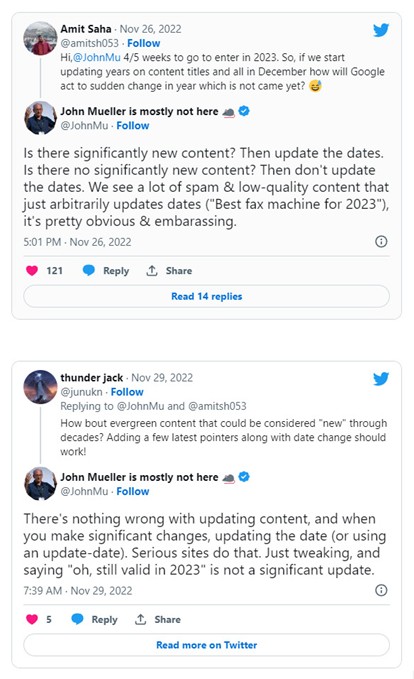
11. Update the publish date—properly
Only update the publish date after meaningful improvements. Simply changing dates without real updates may cause short-term bumps, but it can backfire long-term.
Before publishing, do a final reality check: is the page complete, current, and genuinely better than what’s ranking now?
12. Repromote and monitor performance
Treat a refresh like a relaunch. Share it on social media, consider outreach for fresh backlinks, and look beyond refreshing blog posts—product pages, FAQs, and support content can benefit just as much.
After publishing, monitor performance against the goals you set. Track organic traffic, rankings, engagement metrics, and CTR. Annotate changes so you know what worked and what didn’t, and refine as needed.
13. Schedule regular reviews.
Content refreshes work best as a system, not a one-off task. Ongoing monitoring helps you protect rankings, catch decay early, and capitalize on new opportunities as search continues to evolve.
Bonus Tip: Refresh content in stages instead of doing a full overhaul all at once. When too many changes happen together, it’s almost impossible to tell what worked.
The thing is, most pages don’t need a total work-up. A few smart updates can go a long way. That’s why it’s best to start with an audit, get clear on the objective, and map out the planned changes before rolling them out. From there, you can stack improvements over time and let the results add up.
Common Mistakes When Refreshing Content
Most refreshes fail for simple reasons. These mistakes usually come down to rushing, guessing, or treating refreshes as surface-level tasks instead of strategic updates.
• Overoptimizing
One of the most common missteps is pushing SEO too hard. Stuffing in keywords, swapping clear headers for misleading clickbait, or forcing awkward phrasing can make content worse, not better. Search engines are good at spotting pages that were “optimized” without becoming more useful. If the change doesn’t improve how helpful or readable the page is, it’s unlikely to pay off.
• Making changes without a clear hypothesis
Refreshing content without knowing what you’re trying to fix often leads to random changes instead of progress. Swapping titles, rearranging sections, or adding paragraphs just to “do something” makes it hard to tell what actually worked. Every meaningful refresh should be tied to a reason—intent mismatch, weak CTR, thin coverage, or declining engagement, so results can be evaluated properly.
• Changing too many things at once
Big overhauls can be necessary, but they also blur cause and effect. If you rewrite the intro, restructure the page, change keywords, update internal links, and alter CTAs all at once, it’s nearly impossible to know what drove the outcome. Incremental, intentional changes make optimization more predictable and easier to refine.
• Updating for age, not impact
Refreshing content just because it’s old—without evidence of decline or opportunity—can waste time and introduce unnecessary risk. Some pages are stable for a reason. Data should always drive the decision to update.
• Expanding content without improving structure
Adding more words doesn’t equal better content. Many refreshes fail because they stack new sections onto an already messy page. Long paragraphs, unclear headers, and poor flow make it harder for both users and AI systems to extract value.
• Changing URLs unnecessarily
Refreshing content does not require changing the URL in most cases. Doing so without a strong reason risks losing accumulated authority, backlinks, and historical trust, even with redirects in place.
• Ignoring internal links during the refresh
When internal links aren’t added or updated during a refresh, the page can become (or remain) an orphan, limiting how much ranking benefit it can actually gain. Even strong content struggles to perform if it isn’t supported by relevant internal links that pass authority and context.
• Publishing without monitoring results
Many refreshes tend to fail because no one tracks what changed. Without annotations, benchmarks, or follow-up checks, teams can’t tell whether a refresh helped, hurt, or did nothing at all.
The goal isn’t just to refresh a page once. It’s to build a repeatable content refresh process. Every update should teach you something, so future refreshes become faster, smarter, and more effective instead of starting from scratch each time.
• Treating refreshes as cosmetic updates
Swapping dates, tweaking intros, or changing a few headings without improving depth, intent alignment, or usefulness is one of the fastest ways to waste time. Google quickly recognizes superficial updates.


Refreshing content isn’t about doing more, it’s about doing the right things for the right reason. When updates are focused and measured, content compounds instead of losing ground over time.
FAQs
Does refreshing a page guarantee good results?
No. A content refresh improves your odds, but it doesn’t guarantee rankings or traffic increases. SEO performance depends on competition, intent shifts, and algorithm behavior. That said, refreshing content is one of the safest optimization moves because you’re improving pages Google already knows, rather than starting from zero.
What if I update a post and my traffic drops instead of climbing?
Don’t panic. Short-term dips are common while Google re-crawls and reassesses the page. Give it at least three to four weeks before reacting. If performance doesn’t recover, you can roll back to a previous version or refine the update based on what’s ranking. In practice, a well-executed refresh rarely causes lasting harm.
What types of content benefit most from a refresh?
Evergreen blog posts, pillar pages, landing pages, and guides tend to benefit most from refreshes. They already attract ongoing interest and often sit just outside top rankings, where even modest updates can translate into noticeable traffic growth.
Are there types of content you should not update?
Yes. Not all content should be refreshed. Case studies tied to specific moments in time, press releases, historical announcements, and accurate support documentation usually gain little from updates. The same applies to evergreen tutorials that are still performing well.
How often should content be refreshed?
There’s no fixed schedule. Content should be refreshed when rankings decline, search intent shifts, competitors improve, or information becomes outdated. High-value pages typically benefit from a review every six to twelve months.
Is refreshing content more cost-effective than creating new content?
Often, yes. Refreshing content is faster, cheaper, and lower risk because the page already has authority, links, and indexing history. For many sites, updates deliver a better ROI than publishing brand-new content.
Should you prioritize refreshing content over creating new content?
You shouldn’t choose one over the other. The best strategy protects existing winners first, pushes near-winners higher, and then creates new content to target fresh opportunities. If you’re already ranking for valuable queries, protecting those positions comes first.
How do you determine if a content refresh is successful?
Success depends on the goal of the refresh. Improvements in rankings, organic traffic, CTR, engagement, and conversions are all valid indicators. Tracking the same metrics used during the audit phase and annotating changes make it easier to connect updates to outcomes.
Conclusion
Content refresh shouldn’t be an afterthought. It should be a built-in part of any modern content marketing strategy. Search evolves, user expectations change, and even great content can slowly lose visibility, traffic, and trust over time. That’s normal, and more importantly, it’s fixable.
Refreshing old content lets you work smarter, not harder. In many cases, updating what already exists is often enough to regain rankings, unlock new traffic, and stay competitive as algorithms and industries shift.
The real advantage is compounding value. Instead of letting proven assets decay, you strengthen them, protect hard-won positions, and extend their lifespan. Whether you’re defending page-one rankings or nudging near-winners over the line, content refreshes deliver some of the highest ROI in SEO.
And the best part? It’s never too late to start. The content you’ve already published is often your biggest untapped growth lever. That is, if you’re willing to revisit it.