

For beginners, keyword research often feels confusing at first glance. There are too many tools, too many metrics, and everyone seems to have a different “rule.”
This beginner-friendly guide walks you through keyword research step by step, showing you how to find realistic keyword opportunities, avoid common mistakes, and build content around what people are actually searching for.
How to Do Keyword Research for Beginners
You don’t need expensive tools or years of SEO experience to do keyword research properly. What you need is a clear process.
To get started, just follow these keyword research best practices in order:
Step #1. Set the goal of the page
Before you even open a keyword tool, pause and decide what the target page is actually meant to do. Keyword research works best when you’re clear on the end goal first. Every search comes from a specific intent, and your page needs to match that intent if you want it to rank and get clicks.
Start by choosing one main outcome for the page:
- Informational – You’re trying to explain, teach, or answer a question
(think guides, definitions, tutorials, or “how does X work?” content) - Commercial – You’re helping users evaluate options before they decide
(comparisons, reviews, “best tools,” pros and cons) - Transactional – You want the user to take action
(buying, signing up, booking, downloading, or subscribing) - Navigational – The user already knows what they’re looking for and just wants to get there
(brand names, product pages, or specific websites)
This step is important because not all keywords are created equal. A keyword like “what is keyword research” behaves very differently from “best keyword research tools” or “buy SEO software.” If your page intent doesn’t match what people expect when they search, Google is unlikely to rank it, even if the content itself is good.
A common beginner mistake is trying to cover multiple intents on one page. That usually leads to mixed signals, weaker rankings, and a page that doesn’t fully satisfy anyone. Picking a clear goal upfront keeps your keyword research focused and helps you build a page that actually meets user expectations.
Once you lock in the goal, you’ll know what type of keywords to look for, what kind of content to create, and how deep the page needs to go. Everything else in keyword research gets easier from here.
Step #2. Choose a core topic (your “seed” keyword)
Once you know the goal of the page, the next step is to choose one core topic, often called a seed keyword. Every website, business, or entity has these. They’re simply the most obvious terms someone would use to describe what you do.
A seed keyword is broad, short, and descriptive. It’s not meant to rank on its own. It’s meant to give your keyword research a clear starting point.
Here are a few examples across different types of sites:
- Clothing or fashion store → “t-shirts”, “shoes”, “dresses”
- Electronics store → “laptops”, “headphones”, “smartphones”
- Home and furniture store → “sofa”, “bed frame”, “dining table”
- Beauty and personal care → “skincare”, “hair products”, “makeup”
- Food and recipe site → “recipes”, “dinner”, “desserts”
- Local services → “plumber”, “electrician”, “dentist”
- Education or learning site → “online courses”, “exam prep”, “language learning”
- Finance or money site → “credit cards”, “budgeting”, “investing”
Seed keywords are not meant to be your final target. They are broad by design and usually come with high competition, mixed intent, and vague expectations.
Trying to rank a page for a seed keyword like “shoes” or “credit cards” is extremely difficult, especially for new or smaller sites, because these terms often have huge search volume and attract heavy competition. The top results are usually dominated by big, established sites with strong backlinks and authority, so you’re competing with brands that have entire teams and years of SEO behind them.
That’s exactly what keyword research is for. It helps you break a broad topic into more specific search queries with clearer intent that are much easier to compete for, often called long-tail keywords. Long-tail terms usually have lower competition, stronger intent, and are easier to turn into focused pages that actually satisfy what users are looking for.
Below is a simple comparison using the same seed keywords from earlier.
| Site Type | Seed Keyword | Long-Tail Keyword Examples |
| Clothing or fashion store | t-shirts | cotton t-shirts for men oversized graphic t-shirts black t-shirts for summer |
| Electronics store | laptops | best laptops for students lightweight laptops for travel gaming laptops under $1000 |
| Home and furniture store | sofa | small sofa for apartment fabric sofa with storage modern sofa for living room |
| Beauty and personal care | skincare | skincare routine for oily skin gentle skincare for sensitive skin skincare products for beginners |
| Food and recipe site | recipes | easy chicken dinner recipes quick dinner recipes for weekdays no-bake dessert recipes |
| Local services | plumber | emergency plumber near me plumber for clogged drains 24 hour plumber in [city] |
| Education or learning site | online courses | online courses for beginners free online courses with certificates self-paced online courses |
| Finance or money site | credit cards | best credit cards for beginners credit cards with no annual fee credit cards for bad credit |
Simply put, when your seed keyword is clear, organizing variations, questions, and intent-based keywords becomes much easier. From there, you can expand it into real keyword opportunities using tools, SERPs, and user behavior, which is the next step in the process.
Step #3. Pull a big list of keyword ideas
After finalizing your list of seed keywords, it’s time to expand it into as many keyword ideas as possible. At this stage, your only job is to collect raw keyword ideas without judging or filtering them yet.
Just go into gather mode and pull what you can find in autocomplete, SERPs, and tools. Don’t filter too early. The bigger your pool now, the better choices will be later.
Here are the most reliable ways to build a large keyword list:
● Use Google autocomplete and “People Also Ask”
Start typing your seed keyword into Google and pay attention to the suggestions that appear before you hit enter. These are based on real search behavior.
For example, typing the seed keyword “rubber shoes” would automatically generate various suggestions:
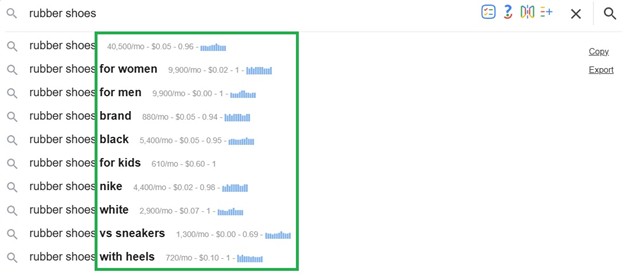


Autocomplete pulls from what people are actively typing into Google, which makes it a super practical starting point.
To go a step further, install the Keywords Everywhere extension to instantly see monthly search volume, competition data, and other key metrics directly within this section and throughout the SERP.
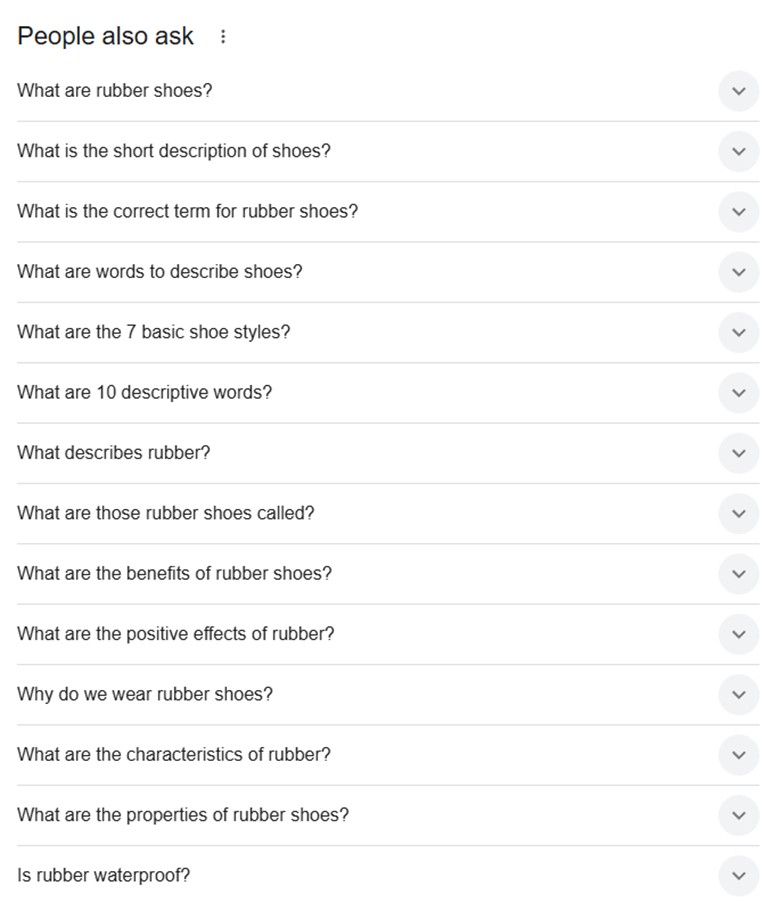
Don’t forget to scroll to the People Also Ask box as well. These questions are gold for beginners because they reveal possible follow-up questions and content gaps. Each question can become a potential subtopic or long-tail keyword.
● Check related searches at the bottom of Google
Scroll to the bottom of the results page and look at the related searches section. These are variations Google already considers closely connected to your topic.
Using “rubber shoes” as an example, you might see:
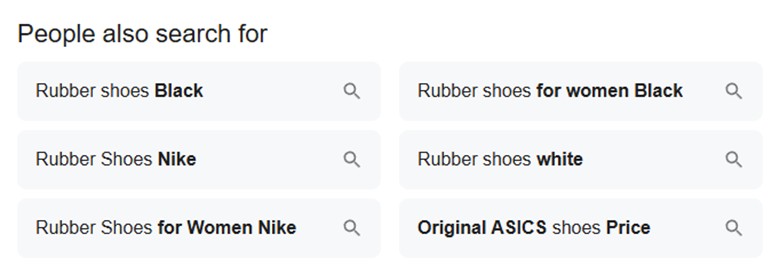
This section shows keyword variations and complementary phrases Google already considers contextually connected. Instead of treating them as random suggestions, look at the structure behind them. Are people adding brand names? Comparing versions? Searching by price or category? These signals help you identify commercial intent, segmentation opportunities, and content angles you might otherwise miss.
● Use a keyword research tool
While autocomplete and related searches are great for quick insights, a dedicated keyword research tool helps you scale the process. Instead of manually collecting suggestions one by one, these tools generate hundreds or even thousands of keyword ideas in seconds.
Plus, a keyword research tool doesn’t just show variations. It reveals search volume, competition level, cost-per-click (CPC), trend data, and even search intent classification. That extra context helps beginners understand not just what people search for, but how competitive and valuable those searches might be.
Also Read: The 3 Best Keyword Tools in 2026 (Trusted by Top Marketers)
Most tools pull from large databases of real search queries and organize them into categories such as:
- Related keywords
- Questions
- Prepositions (e.g., “for,” “with,” “near”)
- Comparisons (e.g., “vs,” “alternative,” “best”)
- Long-tail variations
This structure makes it easier to uncover angles you may not have considered. At this stage, don’t filter too aggressively yet. The goal is coverage and getting a clear picture of how people search around your topic. Export the full list if possible, then sort and prioritize in the next step.
Step #4. Clean the list and remove junk
Once you’ve pulled a large list of keyword ideas, the next step is cleanup. This is where you turn a raw brainstorm into a usable working list.
You’re not deciding what to target yet. At this stage, you’re simply removing keywords that clearly don’t belong, so everything left is easier to organize and group later.
Here’s what to remove right away:
● Remove duplicates
Most keyword tools surface the same keyword multiple times with slight variations. If two entries are literally the same phrase, keep one and delete the rest.
This also includes:
- capitalization differences
- spacing or punctuation variations
- plural vs singular versions that don’t change intent
You want one clean entry per idea.
● Remove totally irrelevant terms
Some keywords may technically contain your seed phrase but have nothing to do with your actual topic.
For example, if your page is about real estate investing, you might see:
- unrelated software names
- job titles or salaries
- academic or industry terms outside your scope
If a keyword doesn’t align with the purpose of your page, remove it now. Keeping irrelevant terms only creates confusion later and throws off your next steps.
● Remove same-intent keywords with awkward wording
You’ll often see multiple keywords that mean the same thing but are phrased awkwardly or unnaturally.
If two keywords express the same idea, keep the version that:
- sounds natural
- reads like something you’d use in a title or heading
- feels like a real search query
You don’t need to target every variation. Google understands synonyms and reworded phrases.
Some keyword tools can automatically group keywords by topic or intent for you. However, even when using automatic grouping, the initial cleanup step still matters a lot. Garbage keywords going in means messy groups coming out. A quick manual clean ensures the tool groups the right ideas together instead of forcing unrelated terms into the same cluster.
What you should have at the end:
After cleaning, your list should feel:
- shorter
- more focused
- easier to scan
You’re left with keywords that are relevant, readable, realistic, and all tied to the same topic. That makes grouping, prioritization, and page planning much simpler.
Next, you’ll decide which keywords belong on the same page and which deserve their own, whether you do that manually or with a keyword clustering tool.
Step #5. Tag each keyword by intent
Once you have a clean list of keywords, the next step is figuring out why someone is searching for each term. This is called search intent, and it’s one of the biggest reasons pages either rank and convert or fall flat.
Every keyword represents a specific mindset. Some people are trying to learn, some are comparing options, some are ready to buy, and others are simply trying to find a specific site or brand. If your content doesn’t match that intent, even strong SEO won’t save it.
Here are the four intent buckets to tag keywords with:
- Informational keywords are used when someone wants an explanation or guidance. These searches usually start with words like “what,” “how,” “why,” or “guide.” When a keyword falls into this category, the right response is educational content. That could be a blog post, tutorial, walkthrough, or explainer page. Trying to sell too early on these queries often leads to high bounce rates.
- Commercial keywords sit in the middle of the funnel. The searcher isn’t ready to buy yet, but they’re actively evaluating options. These searches often include words like “best,” “vs,” “review,” or “comparison.” For these keywords, people expect lists, comparisons, pros and cons, or recommendations. This is where reviews and buyer’s guides perform best.
- Transactional keywords signal action. When someone searches using terms like “buy,” “sign up,” “pricing,” or “download,” they’re already close to converting. These keywords usually belong on product pages, landing pages, or sign-up flows. Writing a long educational article for a transactional keyword often wastes that intent.
- Navigational keywords are about finding a specific destination. These searches include brand names, tools, or exact page names. “Facebook login”, “HubSpot pricing”, or “Canva dashboard”. They usually don’t need new content at all. Instead, they should point clearly to the correct page, such as a homepage, login page, or official resource.
When a keyword’s intent isn’t obvious, the easiest way to clarify it is to search the term in Google and look at what already ranks. If the top results are long guides, the intent is informational. If they’re comparisons or reviews, the intent is commercial. If product or pricing pages dominate, the intent is transactional. Google’s first page is essentially showing you what it believes users want.
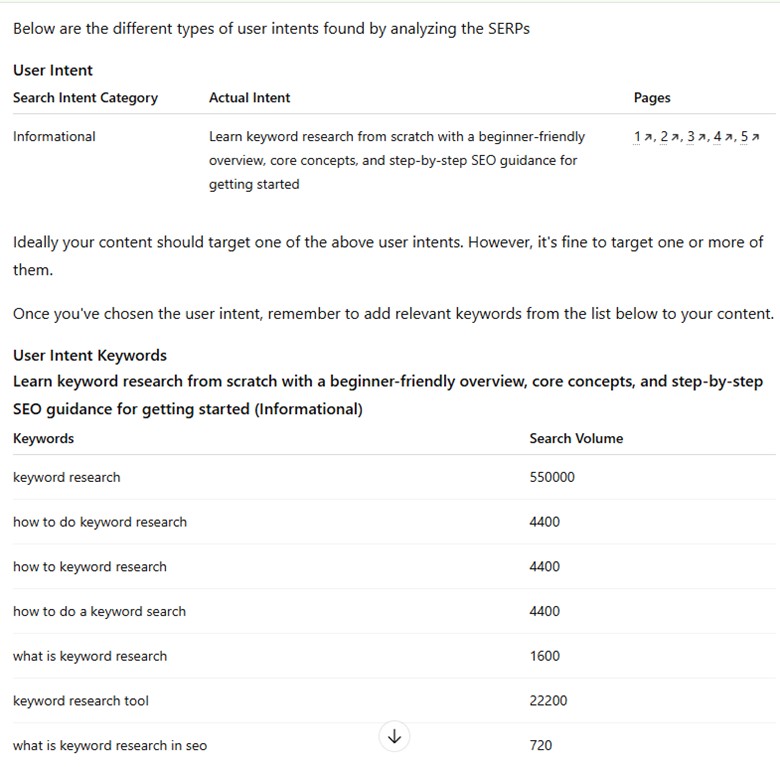
You can automate intent tagging with Keywords Everywhere. On a Google results page, open the Run SEO Report widget and click Get User Search Intent from the dropdown. Then, click any of the given AI models.
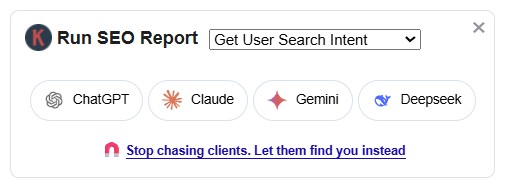
It will automatically review the ranking pages and give you a quick read on the dominant intent behind the SERP. It also suggests relevant supporting keywords/topics to include so your content better matches that intent.
Here’s an example for the query “keyword research for beginners”:
Whether you do it manually or with a tool, tagging intent prevents common beginner mistakes, like trying to rank a sales page for a learning-based query or writing a blog post for a keyword where users expect a product. Even well-written content struggles when it doesn’t match intent.
By the end of this step, every keyword should have a clear intent label. Get that right upfront, and the rest of the process is likely to fall into place.
Step #6. Check demand and difficulty
Now that you know what people are searching for and why they’re searching, the next question is simple: is this keyword actually worth going after, and can you realistically rank for it? This is where demand and difficulty come in.
- Demand is about whether enough people are searching for the keyword in the first place. You can usually see this as “search volume” inside keyword tools. Higher volume means more potential traffic, but it also usually comes with more competition. Very low volume keywords aren’t useless, but they may not be worth building an entire page around unless they’re highly specific or conversion-focused.
- Difficulty tells you how competitive a keyword is. Most tools express this as a score based on the strength of the pages currently ranking. High difficulty often means you’re competing against established sites with strong backlink profiles, deep content, and brand authority. Low difficulty usually means fewer strong competitors and a more realistic chance to break in.
Also Read: How the Top Tools Calculate KD (Which One to Trust?)
However, take note that numbers alone don’t tell the full story, and you shouldn’t treat volume or difficulty like just one fixed number. This is why you should also sanity-check the SERP before committing. Search the keyword in Google and study the first page. Ask yourself what kind of pages are ranking and how strong they really are.
You can use the same Keywords Everywhere widget mentioned above to automate this process. Go to Run SEO Reports and click Check Rankability for SERP.
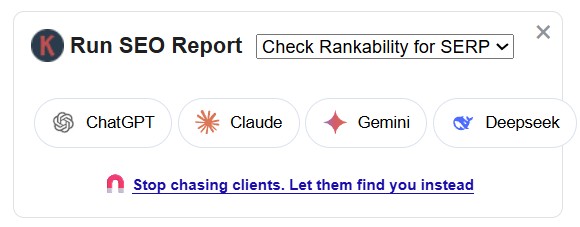
It instantly analyzes the current results and shows benchmarks like the minimum Domain Authority, Referring Domains, and Referring Backlinks you may need to compete on page one. That makes it easier to tell whether a keyword is a realistic target now or something better saved for later.
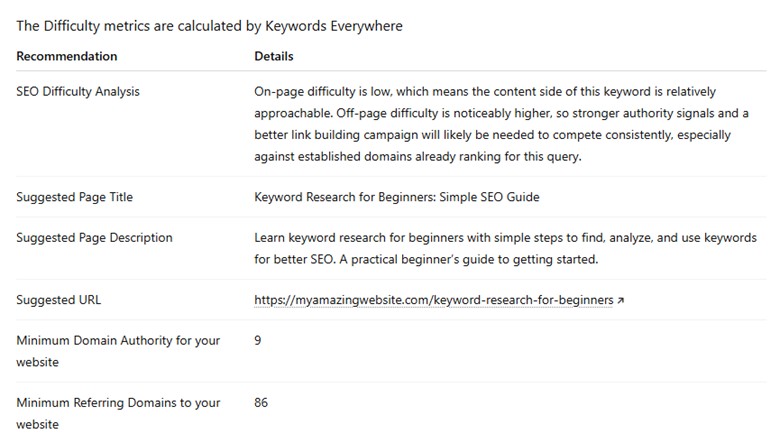
Just compare those benchmarks against your own site’s DA, referring domains, and backlink profile. That helps you put difficulty in a better context and avoid chasing terms that are out of reach for now. It also goes a step further by showing SEO title suggestions and meta description ideas, which are useful once you start planning the actual content.
At the end of this step, keep the keywords where the numbers and the SERP agree: there’s real demand and the competition looks beatable. If the top results are huge sites—or Google is showing AI Overviews, videos, or discussion threads—expect a harder climb and potentially fewer clicks. That’s why long-tail, lower-competition terms with more specific intent tend to be better early targets.
Step #7. Pick a primary keyword and a few secondary keywords
By this point, you should stop thinking in terms of long lists and start thinking in terms of one clear focus per page. Every page should be built around a single primary keyword, the main query you want it to rank for. It defines the structure, depth, and overall angle of the content. This keyword usually appears in the title tag, H1, and naturally throughout the content.
Secondary keywords support the primary one. These are close variations, related phrases, subtopics, and common questions that naturally belong on the same page. They help you cover the topic more completely without forcing repetition. Think of them as different ways people ask for the same thing or related things they expect to learn once they’re on the page.
For example, if your primary keyword is “rubber shoes for men,” your entire page should revolve around that core intent: helping someone choose, compare, or buy rubber shoes specifically for men.
Your secondary keywords might include phrases like:
- “best rubber shoes for men”
- “affordable men’s rubber shoes”
- “men’s rubber shoes for running”
- “how to choose rubber shoes for men”
- “rubber shoes size guide for men”
All of these variations share the same underlying intent. They reflect the different ways people search when they’re looking for the same type of product, or closely related information about it.
Instead of creating separate pages for each slight variation, you would structure one strong page that:
- Targets “rubber shoes for men” in the title and H1
- Naturally includes the supporting variations in subheadings and body content
- Covers related questions like sizing, use cases, materials, and price range
All of these reflect the same underlying buying intent. They belong together on one well-structured page, not split across multiple thin pages.
This is where clustering comes in.
Keyword clustering means grouping queries that can be fully answered by a single comprehensive piece of content. Instead of creating separate pages for slight variations, you combine related terms into one authoritative resource.
Clustering helps in two major ways:
- It prevents keyword cannibalization, where multiple pages compete for the same or similar queries.
- It strengthens topical authority by allowing one page to cover a subject from multiple relevant angles.
When grouping keywords, focus on intent. If two keywords would be satisfied by the same format, depth, and outcome, they likely belong on the same page. If they require clearly different angles or formats, separate them.
If clusters feel too similar, you either:
- Merge them into one stronger “mothership” page, or
- Differentiate the angle clearly so each page serves a distinct purpose.
You can automate keyword grouping with tools like KeywordClustering.net, powered by Keywords Everywhere. Instead of sorting every keyword one by one, you can begin with cleaner clusters and spend more time refining intent, choosing the right primary keyword, and shaping the page around what searchers actually want.
Learn More: Best Keyword Clustering Tool in 2026 (Low-Cost Option)
You don’t need to optimize for every variation separately. When a page is comprehensive and tightly aligned with intent, Google can even rank it for related queries you never explicitly targeted.
That’s why fewer pages with a stronger focus usually outperform a larger set of overlapping ones. One clear primary keyword, supported by closely related variations, creates a cleaner site structure and gives each page a better chance to rank well.
Step #8. Validate with a quick SERP scan
Before you lock in your page, do a quick reality check by looking at what already ranks for your primary keyword. This step keeps you from creating content that’s technically “good” but does not match the kind of page Google is choosing to rank.
Start by searching your primary keyword in Google and look closely at the format of the top results. Are the winning pages long guides, step-by-step tutorials, checklists, listicles, templates, or tool pages? If every result is a detailed guide and you plan to publish a short opinion post, you’re likely misaligned from the start.
Next, pay attention to depth. Skim the top pages and note how long they are and how much they cover. You don’t need to match word count exactly, but you do need to match coverage. If the top results all explain definitions, steps, examples, and common mistakes, your page should too. Thin content rarely beats thorough content.
Then look for common sections. When multiple top-ranking pages include similar headings or FAQs, that’s a strong signal those sections are expected. You don’t need to copy them word for word, but if everyone is answering the same questions, skipping them puts you at a disadvantage.
Finally, look for what’s missing. This is where your opportunity lies. Are competitors vague where you can be specific? Do they explain concepts but lack examples, visuals, checklists, or clear next steps? Small gaps like these are often what help a new page outperform established ones.
A quick SERP scan helps you align with reality while still finding room to stand out. Instead of guessing what Google wants, you look at what’s already working and then aim to do it better.
Step #9. Map keywords to sections (lightly)
At this stage, keyword placement should feel almost effortless. You’re not trying to repeat exact phrases or hit a quota. You’re simply making sure each keyword has a logical home within the page.
Keyword mapping is really just the process of matching a keyword to the part of the page where it fits best. For example, the primary keyword might belong in the title and H1, a comparison-style secondary keyword might fit under an H2 like “Best Options”, a pricing-related keyword might belong in a price or budget section, and a question-based keyword might fit naturally in an FAQ.
The primary keyword should clearly appear in the title, the H1, and early context if it fits naturally, so both users and search engines immediately understand what the page is about. Secondary keywords and variations should support specific sections, helping explain subtopics without forcing repetition.
As you write in depth, semantic and related terms will usually appear on their own. FAQs are a natural place to capture long-tail and question-based searches. When keywords are mapped to the right sections naturally, the content stays readable, focused, and easy for search engines to interpret, without feeling optimized for the sake of it.
Step #10. Publish, then use Search Console to expand
Keyword research doesn’t stop once you hit publish. After your page is indexed, Google Search Console becomes one of your most valuable tools. It shows you the real queries your page is already appearing for, even if you didn’t intentionally target them.
Impressions appearing in Google Search Console are early indicators of opportunity. Google already associates your page with those queries which makes them some of the most practical topics to expand on next.
Keywords Everywhere adds another useful layer here by showing search volume data directly inside Google Search Console, along with other GSC features that make it easier to decide which queries deserve more attention.
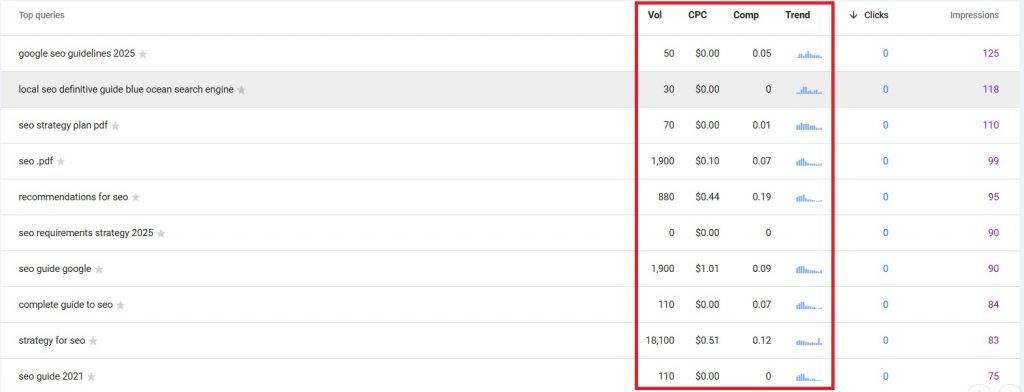
If you see queries generating impressions but few clicks, look for gaps in coverage and add short sections that directly address those topics. If impressions are high but CTR is low, revisit your title tag and meta description to better match intent and stand out in the SERPs.
Over time, this feedback loop—publish, observe, refine—is how pages gain depth, improve relevance, and steadily earn stronger rankings.
FAQs
Can I use AI for keyword research?
You can, and it’s a great starting point. AI works well for brainstorming and clustering keywords, but it doesn’t replace real SERP checks. Always validate ideas with search volume and ranking difficulty.
How to use keywords in your content and rank?
Use keywords to frame the topic, not stuff the page. Put the main keyword where it helps with clarity—title, H1, early context—then focus on answering the question fully. Rankings come from usefulness, not how many times you repeat a phrase.
Do I need paid tools to do keyword research?
No, beginners can start without paid tools. Google autocomplete, “People also ask,” related searches, and Search Console provide plenty of insight. Paid tools just make the process faster and more scalable once you want deeper data or competitive analysis. For most beginners, the best keyword research tool is usually the one that makes search volume, competition, and keyword ideas easy to understand at a glance.
How many keywords should I target on one page?
Instead of counting keywords, think in terms of intent. One page should answer one main question well. Related keywords that support that same goal can live together. Anything with different intent should be split out.
Should beginners avoid high-volume keywords?
Most beginners should avoid high-volume keywords at first. They’re usually very competitive and dominated by strong sites. Long-tail keywords with lower volume are easier to rank for and bring more targeted traffic. You can always target bigger terms later once authority builds.
What’s the biggest keyword research mistake beginners make?
Most beginners go wrong by thinking “more volume equals more success”. They ignore competition, intent, and SERP reality. A keyword isn’t “good” just because it gets traffic; it has to be achievable for your site, especially when you’re just starting out.
Conclusion
Keyword research isn’t about hacking SEO or obsessing over metrics. It’s about making sure you’re writing something people actually want, in a way that matches how they search.
For beginners, having a simple, repeatable process is everything. When you follow a clear structure—set the goal, start with a seed keyword, check intent, and sanity-check the SERPs—you dramatically reduce the chances of wasting time on content that never gets traction. Get the keyword research basics right, and you set yourself up for stronger, steadier results.
Also Read: