

If you’re a Keywords Everywhere user, here’s the good news: you’ve now got another tool in your stack, and it doesn’t come with a monthly bill.
KeywordClustering.net takes your messy, exported keyword list and turns it into clean, intent-based clusters— complete with live search volume, CPC, cluster naming, and even AI-suggested page types with ready-to-use titles and meta descriptions.
And yes, it’s free. You just log in with a Keywords Everywhere API key.
How Does KeywordClustering.net Work?
If you’ve ever tried clustering keywords manually, you already know it’s not the “fun” part of SEO. It’s necessary and strategic, but it’s painfully time-consuming.
Here’s where the real friction begins.
You export 2,000 keywords into a spreadsheet. You drag rows around. You color-code tabs. You switch between tools to check metrics. Hours pass, and the clusters still feel messy, inconsistent, and far from publish-ready.
That’s a bottleneck, and KeywordClustering.net fixes that.
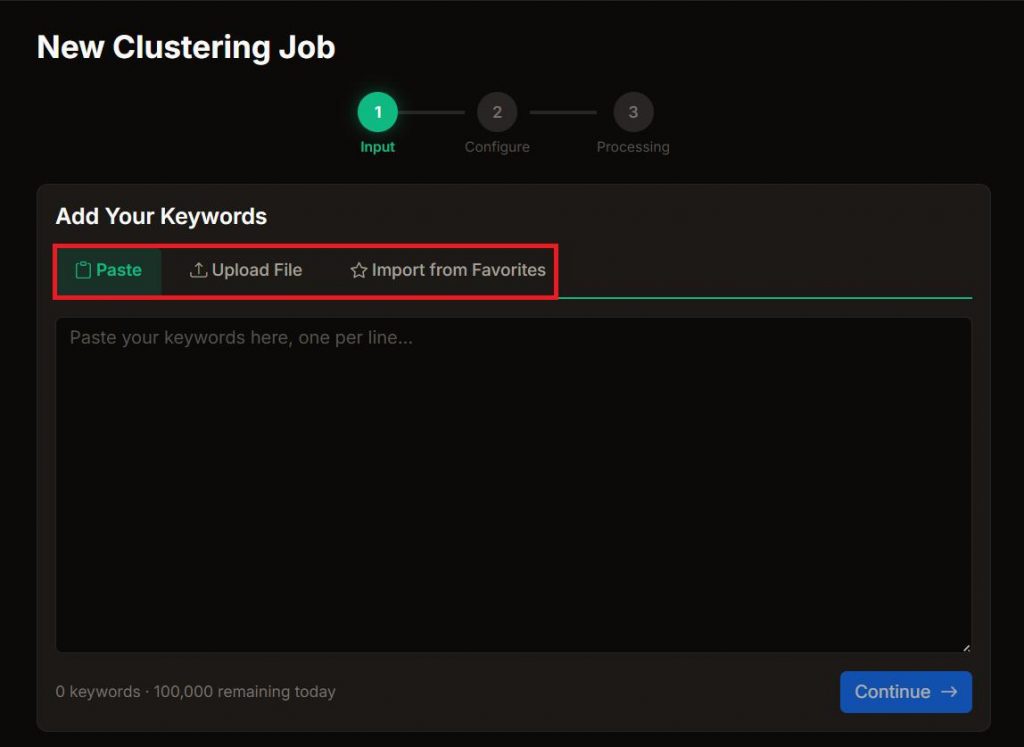
All you have to do is paste your keywords, upload a file, or pull directly from your Keywords Everywhere Favorites.
In under two minutes, AI groups your keywords by search intent, automatically attaches live Keywords Everywhere metrics, and suggests the right page type for each cluster, complete with a ready-to-use title and meta description.
Yes. There are no subscription fees or premium tiers. Every Keywords Everywhere user gets full access to clustering, metrics, export, and sharing. Your daily keyword limit depends on your Keywords Everywhere plan – from 5,000 to 200,000 keywords per day.



How to Use KeywordClustering.net
The workflow is intentionally lightweight. A few clicks are all it takes to turn raw keywords into clean clusters.
Step 1: Go to https://keywordclustering.net/ and click “Cluster My Keywords”.
Step 2: Since this is powered by the Keywords Everywhere API, you’ll be prompted to input your Keywords Everywhere API Key.

Learn how to get your API Key in this Keywords Everywhere guide.
Step 3: Click “Create New Clustering Job”.

Step 4: Load the keywords you want to cluster by pasting the list, uploading a CSV, TXT, or Excel file, or even pulling directly from your Keywords Everywhere Favorites.
Step 5: Start Clustering and get instant results!
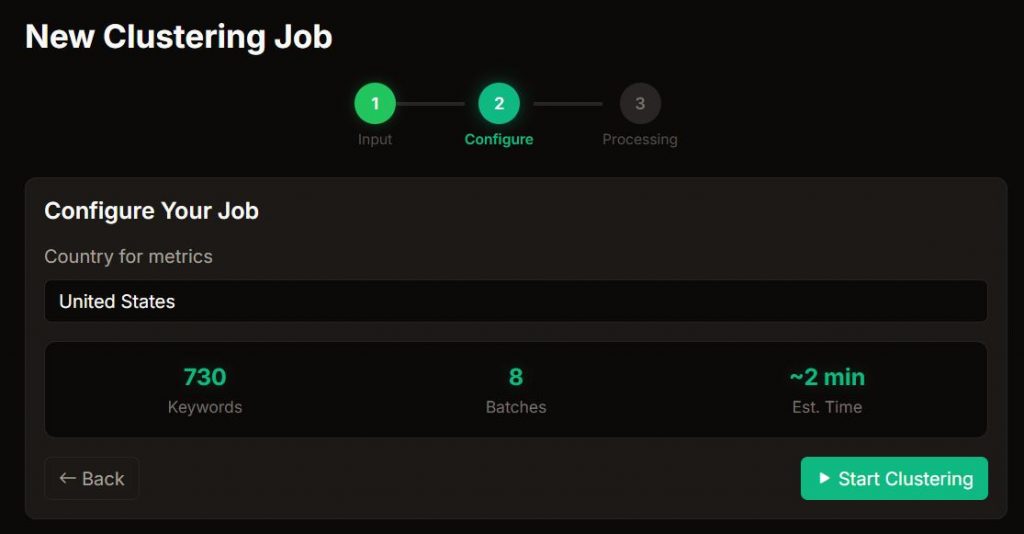
The entire process takes about two minutes. Duplicates are removed automatically. AI groups keywords by semantic search intent, not just matching words. Keywords that should target the same page end up in the same cluster.
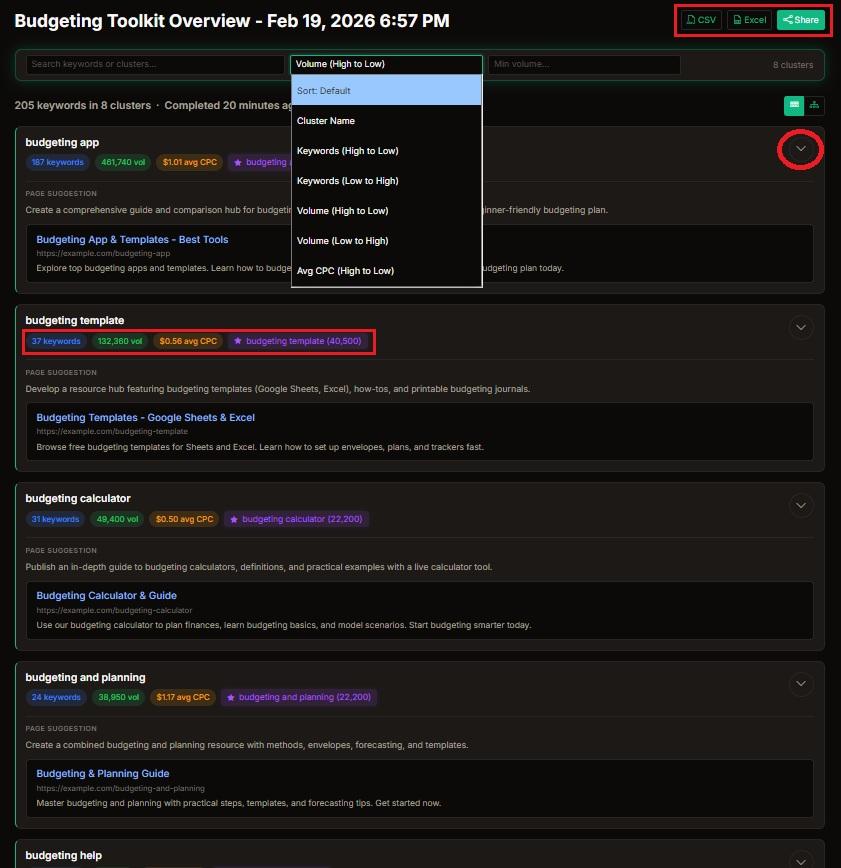
Each cluster is:
- Named automatically
- Enriched with live search volume and CPC metrics
- Assigned total cluster volume
- Paired with an AI-generated page suggestion
- Given a ready-to-use SEO title and meta description
- Displayed in a Google-style SERP preview
Instead of manually deciding whether two similar phrases deserve one page or two, this keyword grouping tool maps intent at scale. That means fewer cannibalization risks and clearer page targeting.
Why Use KeywordClustering.net?
Finding keywords is just the first step. The real work is turning them into clear, non-overlapping content plans.
Without a streamlined process and a reliable keyword clustering tool, the workflow slows down more than you’d expect. KeywordClustering.net keeps things organized and moving. Here are the key bottlenecks it removes:
1. Spreadsheet Overload
Keyword spreadsheets can get unwieldy at scale. When the list is large, you are forced into repetitive sorting and constant double-checking just to turn the data into something actionable.
With KeywordClustering.net, instead of wrestling with spreadsheets, you get organized clusters instantly.
2. Time Drain
Large keyword lists demand attention. A few thousand rows can absorb an afternoon. Ten thousand can require multiple sessions of manual review.
As the list grows, so does the friction, and the task gradually becomes something teams keep postponing. And understandably so because manual clustering requires constant filtering, regrouping, and validation. It’s repetitive work, and it often delays content production.
With our AI keyword clustering tool, what used to take hours now takes minutes. Through automated intent grouping, messy rows become clear, publish-ready clusters.
3. Manual Drag-and-Drop Fatigue
You start dragging rows into tabs. Then you second-guess yourself. Then you reorganize and reorganize again. It’s repetitive and difficult to scale. Even teams with a defined process still find themselves reworking clusters more than they’d like.
4. Inconsistent Grouping
Manual clustering often introduces inconsistency over time. Clusters created in the morning may not resemble those created later in the day. As fatigue sets in, judgment shifts. As the session stretches on, logic evolves, and small adjustments become frequent.
Without a standardized framework guiding every decision, the structure of the clusters can depend heavily on individual interpretation and energy levels. Over longer sessions, inconsistencies begin stacking up across the dataset. The result is uneven grouping that requires additional review and refinement before it can reliably support content planning.
5. Intent Confusion
Some keywords appear nearly identical at first glance. The wording is similar, the topic overlaps, and the metrics may even align. The distinction between informational, comparative, or transactional queries can be nuanced. Without a systematic way to evaluate those differences, clustering often turns into ongoing guesswork rather than a repeatable process.
6. Keyword Cannibalization Risk
If clusters aren’t mapped carefully, multiple pages can end up targeting the same underlying intent. On the surface, the keywords may look distinct enough to justify separate coverage. In actuality, however, they compete for the same rankings.
That overlap can weaken performance. Instead of strengthening topical authority, pages begin competing with one another, splitting impressions, diluting signals, and making it harder for any single page to dominate the SERPs.
7. No Clear Page Mapping
Grouping keywords is a structural step, but it doesn’t automatically translate into a content plan. After clustering, important decisions still need to be made. Should the cluster become an informational blog post? A commercial landing page? A product or category page? What should the page title prioritize?
Without defined page direction, clusters sit in limbo. Structured, but not actionable. KeywordClustering.net focuses on semantic keyword grouping and extends the workflow by recommending the appropriate page format and drafting an optimized title and meta description.
8. Separate Metric Lookup
Sometimes keyword exports don’t include performance metrics at all. You begin organizing clusters based purely on phrasing, then realize you still need to check search volume and competition separately. The result is a second round of data gathering that eats up time and breaks your flow. With KeywordClustering.net, you can cluster and validate keyword metrics without going back and forth between tools.
9. Data Copy-Paste Errors
Manual metric entry almost always introduces small mistakes. A search volume gets pasted into the wrong row. CPC values shift after sorting. A formula breaks when a column moves.
Instead of refining your strategy, you end up troubleshooting spreadsheets. You double-check numbers. You re-align columns. And then you question whether the data is still accurate.
KeywordClustering.net takes the manual friction out of the process, so clustering stays productive instead of turning into admin work.
10. Hard to Share With Clients
Large spreadsheets may work internally, but they’re rarely client-friendly. Multiple tabs, layered calculations, and loosely labeled clusters create room for misinterpretation.
Stakeholders don’t need thousands of keyword rows. They need summarized insights, clear prioritization, and page-level direction. Without that structure, even solid clustering work can feel unclear or unfinished.
The result is unnecessary back-and-forth, clarifying clusters instead of launching content.
11. Version Chaos
Manual workflows almost always lead to file sprawl. “Final_v2.xlsx” becomes “Final_v3_REAL.xlsx.” Then someone duplicates it again to “Final_v3_UPDATED.xlsx.” Before long, no one is completely sure which file is actually the final version.
Version control becomes the bottleneck, and keyword clustering tools like KeywordClustering.net replace scattered spreadsheets with a more stable workflow.
12. Paid Tool Frustration
Automation sounds great until you see the price tag. Many advanced clustering tools come bundled inside enterprise platforms with steep monthly fees, often ranging from $50 to $200 per month.
If clustering is just one step in your workflow rather than your core activity, committing to that kind of recurring cost can feel disproportionate. You don’t need a full SEO suite every month just to group keywords a few times per quarter.
That’s where lighter options make more sense. KeywordClustering.net is available as a free add-on, and when paired with Keywords Everywhere plans that start at just $7 per month, the math becomes far more practical for freelancers, lean teams, and occasional users.
Plus, you’re getting access to the plethora of SEO tools Keywords Everywhere offers.
13. Output Still Needs Cleanup
Manual workflows rarely produce stable clusters on the first pass. Subtle intent differences get missed. Edge-case keywords get misassigned. Overlapping groups go unnoticed.
So you clean it up. Then you discover new overlap while building content. Then you clean it up again. Without automation enforcing structure, manual errors compound over time.
14. Scaling Becomes Painful
Manual clustering feels doable when you’re working with a short list. But at about 500 keywords, it starts to drag. At 5,000, it becomes repetitive and error-prone. At 20,000, it’s basically unworkable unless you’ve got a team and a really tight process.
The bigger the list gets, the harder it is to keep clusters consistent, avoid cannibalization, and actually turn the data into a publishable roadmap.
Conclusion
Keyword clustering is one of the most strategic parts of SEO, yet it often gets reduced to tedious spreadsheet work.
KeywordClustering.net simplifies the entire process. It aligns intent, attaches live metrics, and provides clear page direction, all without adding another subscription to your stack.
Clustering doesn’t have to be expensive and feel like a chore. With the right structure in place, it turns into a more practical, repeatable workflow.