

Before it became a PPC-focused planning utility, Google Keyword Planner (and its predecessor, the AdWords Keyword Tool) was widely used by SEOs as a primary keyword research source, especially in the late 2000s and early 2010s.
At the time, Google openly provided exact monthly search volumes, broad/phrase/exact match data, and extensive keyword suggestions drawn directly from real Google search behavior. SEOs used it to size keyword demand, uncover long-tail opportunities, prioritize content topics, and estimate traffic potential with far less guesswork.
Because access was frictionless and the data came straight from Google, it functioned as a kind of baseline “truth” layer for keyword research, often used alone or as the anchor for spreadsheets and content roadmaps.
Once Google began hiding exact volume numbers by default and steering the tool toward advertisers, SEOs had to start looking elsewhere for clearer, organic-focused data.
9 Google Keyword Planner Alternatives
SEOs don’t hate Google Keyword Planner. They just don’t rely on it alone anymore. Volume is often shown in broad ranges, competition is PPC-based, and there’s no real insight into who ranks, how strong those pages are, or whether organic clicks are even available.
Because of that, most SEOs now use Google Keyword Planner as a quick first check (or skip it altogether), then turn to SEO-focused tools that support more informed keyword research.
Below are practical Google Keyword Planner alternatives that better support modern SEO workflows.
1. Keywords Everywhere
Plans start at: $7 per month
Free Trial: Freemium model
In Google Keyword Planner, exact numbers are hidden unless ads are actively running, and the interface is built primarily for paid campaign forecasting rather than organic research.
Keywords Everywhere is known to overlay search volume and keyword metrics directly in Google search results:



But it also does so directly within Google Keyword Planner and 20+ other major platforms.
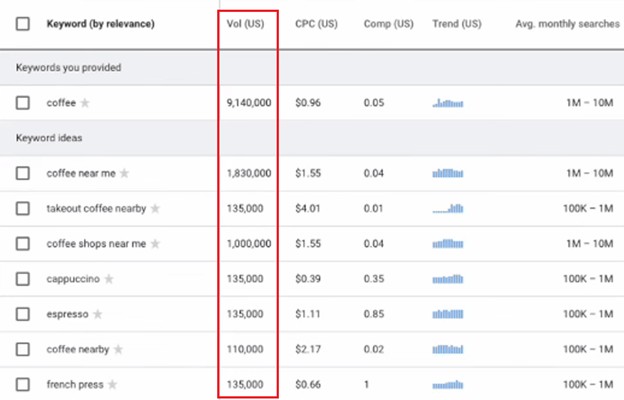
Keywords Everywhere augments Planner’s limited volume ranges by adding clearer volume estimates, CPC data, and even trend signals inline. This makes Google Keyword Planner far more usable for SEO research, since you’re no longer working with vague buckets alone.
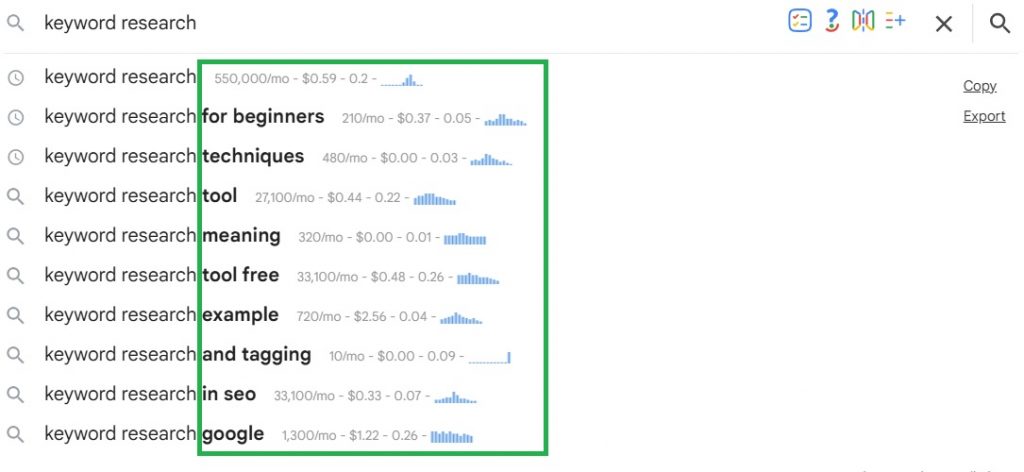
As a browser extension, Keywords Everywhere’s main focus is making keyword research faster and more accessible. It doesn’t require switching dashboards or setting aside time for a dedicated research session. Instead, keyword context appears naturally as you browse supported platforms. You can even see search volume and CPC data right inside autocomplete results.
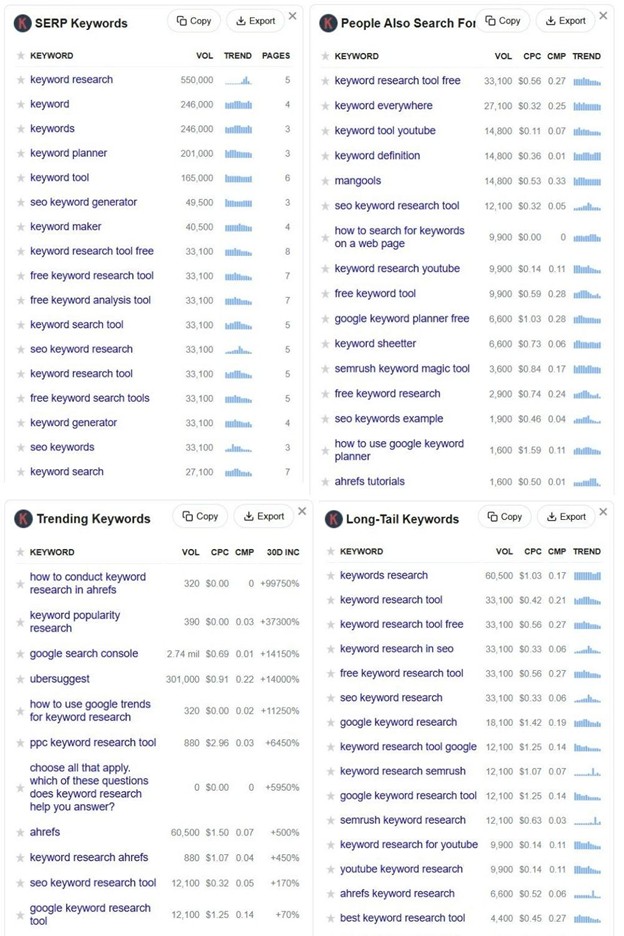
You’ll also see several neatly curated keyword widgets that make keyword expansion quick and painless.
If you need other features beyond keyword research, Keywords Everywhere also helps with on-page optimization via SEO Minion and technical audits via SEO Checker.
It’s important to view Keywords Everywhere differently from enterprise platforms such as Ahrefs or Semrush. Its value isn’t in exhaustive datasets or complex dashboards, but in speed, accessibility, and contextual keyword insights that support faster decisions during everyday research.
Google Keyword Planner vs Keywords Everywhere: Verdict
Keywords Everywhere removes workflow friction by turning everyday browsing into keyword discovery, letting SEOs validate ideas in real time without committing to a full research session.
For anyone who relies on Google Keyword Planner mainly as a starting point, Keywords Everywhere is a practical upgrade that adds speed, context, and usability without the cost or complexity of a full SEO suite.
Also Read: How to Use Keywords Everywhere (Step-by-Step Guide)
2. SEMrush
Plans start at: $199/month ($165.17/month billed annually)
Free Trial: 7-day free trial
Among all the possible Google Keyword Planner alternatives, SEMrush is often singled out because it directly addresses the exact keyword research tasks people still use Google Keyword Planner for and then goes several steps further.
Where SEMrush really pulls ahead is SERP context. Google Keyword Planner tells you a keyword gets searched, but it stops there. Since it’s built for advertisers, not SEOs, it doesn’t show who’s ranking, how tough those pages are, or whether you actually have a shot. Professional-grade tools like SEMrush connect the dots better by showing competitors, link strength, and SERP features.
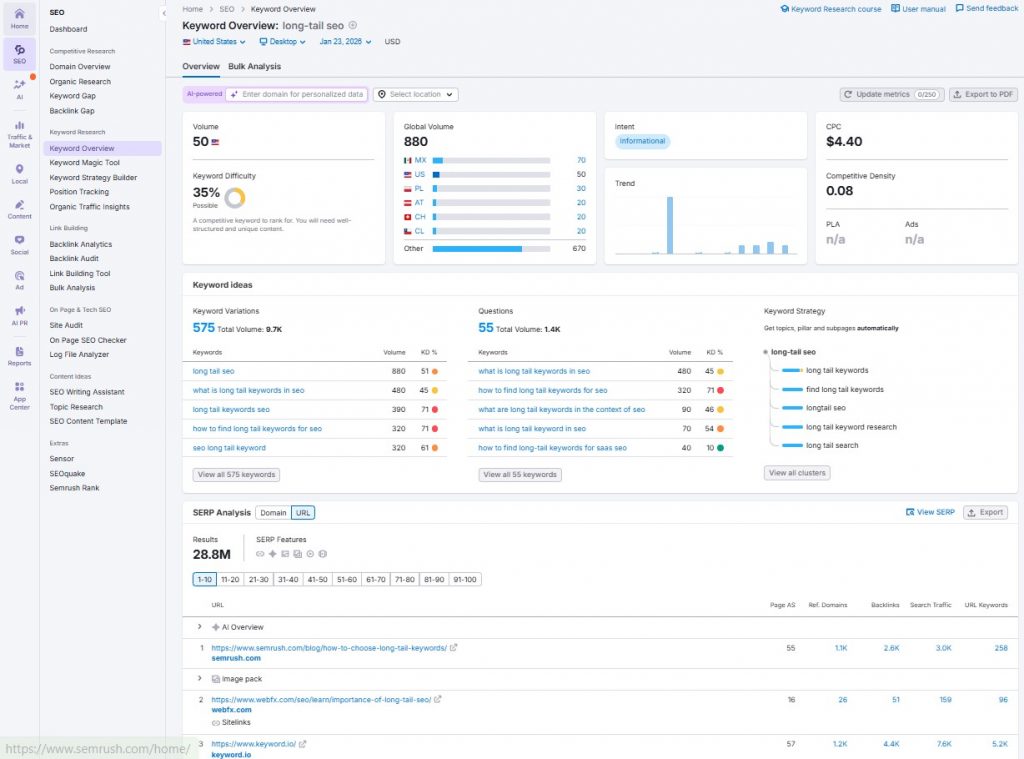
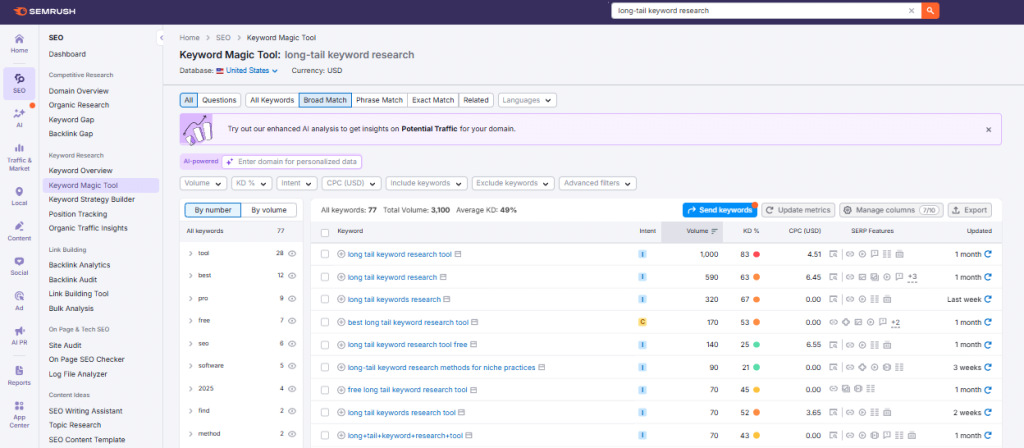
SEMrush also replaces Google Keyword Planner’s ad-centric grouping with content-first planning tools. Rather than organizing keywords for campaigns, features like Keyword Magic, keyword clustering, and topic-based filtering turn seed keywords into clear content plans, cutting out spreadsheets and manual sorting altogether.
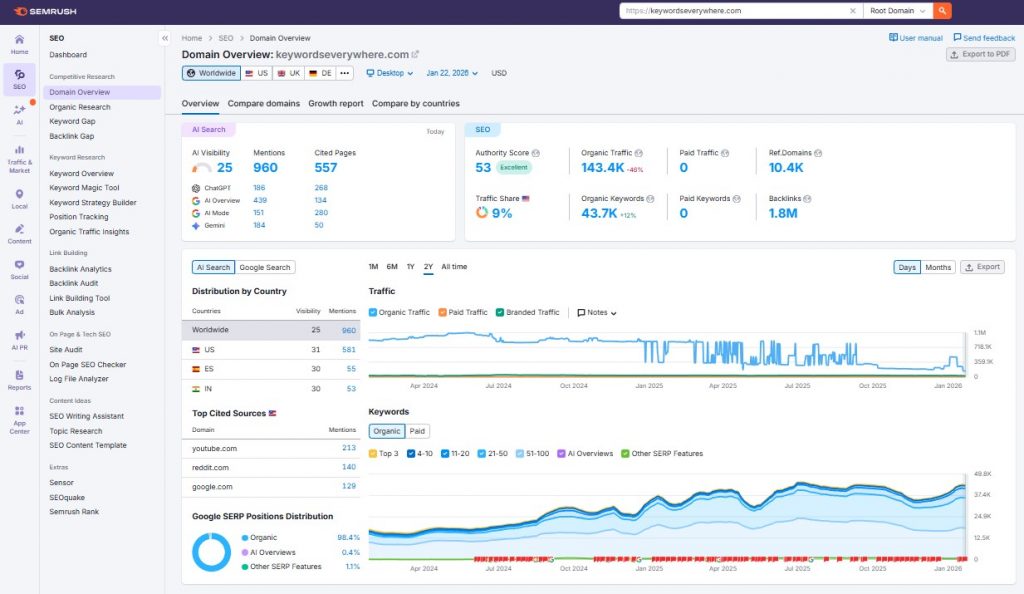
SEMrush’s toolkit also shines on the competitive side. Instead of just showing advertiser competition like Google Keyword Planner, it reveals keyword and content gaps, domain-level traffic share, and ranking trends across organic and paid search, so you’re not guessing where opportunities actually exist.
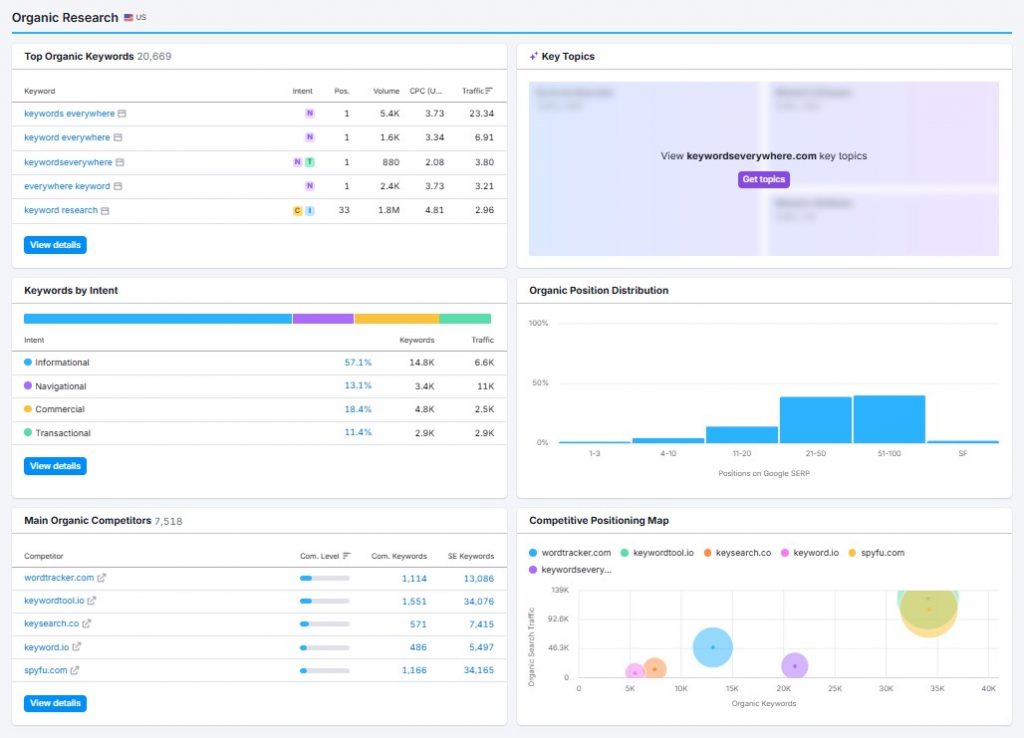
SEMrush comes much closer than most alternatives to matching Google Keyword Planner on PPC planning, offering CPC estimates, paid competition metrics, advertiser density, historical ads, and paid traffic insights. This makes it strong for evaluating opportunities and reverse-engineering competitor strategies.
However, final execution still lives in GKP, which remains the system of record for bids, budgets, impression share projections, and campaign creation.
Google Keyword Planner vs Semrush: Verdict
Google Keyword Planner still works well as a quick reference for baseline search demand, especially for users already operating within Google’s advertising ecosystem.
However, modern SEO usually requires more than volume estimates alone. Alternatives like SEMrush add the missing context needed to assess difficulty, opportunity, and real-world competition. If you’re ready to shift into strategic SEO planning, SEMrush gives you far more to work with than just baseline keyword numbers.
3. Ahrefs
Plans start at: $129/month ($108//month billed annually)
Free Trial: No Free Trial
If you’re early-stage, budget-constrained, or only doing lightweight validation, Ahrefs is often more than you need. However, if SEO is a core growth channel and you can’t afford to fly blind, Ahrefs definitely delivers.
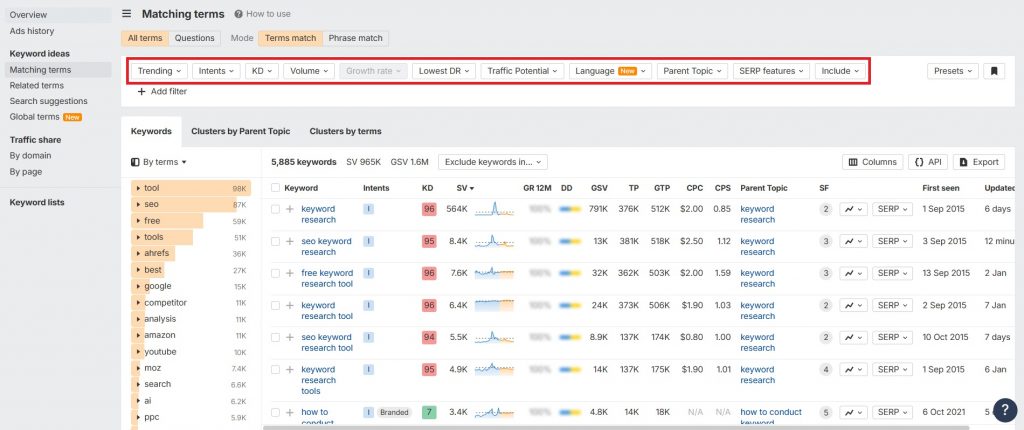
Ahrefs evaluates keywords through real competitive signals, like how many backlinks top pages have, how stable rankings are, and how much traffic a page could earn across an entire topic. You can layer multiple filters across keywords to separate viable targets from those that are out of reach.
In terms of PPC planning and forecasting, which is the main use case of GKP, Ahrefs provides ads data that’s contextual and competitive but not actionable for campaign setup. Ahrefs shows whether ads appear on a keyword, how crowded the SERP is, and how paid placements impact organic clicks, but it doesn’t support core PPC workflows like bid simulation, budget forecasting, match-type modeling, or campaign structure planning.
SEMrush is far more actionable for PPC work. You can review live and historical ads, identify paid keyword gaps, and understand how much traffic competitors are buying versus earning organically.
Though Ahrefs doesn’t really count as a full PPC planning tool, it excels in organic research, competitive analysis, and risk assessment. Its SERP overview and historical ranking data reveal whether rankings are stable, volatile, or dominated by entrenched pages, helping you choose more realistic targets.
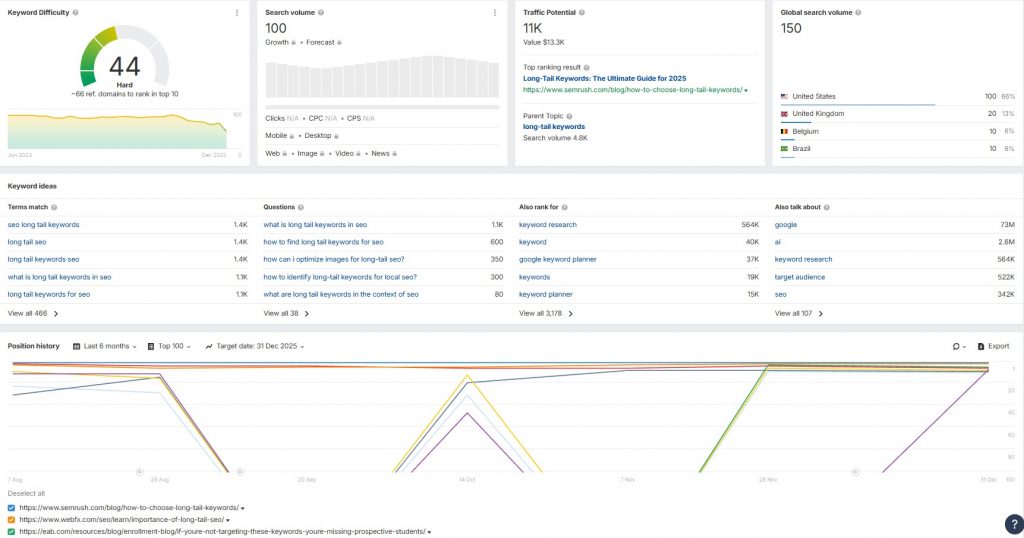
Ahref’s Keyword Difficulty metric is also more data-informed. While most tools use surface-level metrics for difficulty (like simple competition scores or estimates), Ahrefs’ KD is actually derived from real backlink data of ranking pages. Google Keyword Planner’s competition metric is largely ads-based, and doesn’t translate well to organic rankings.
Also, Ahref’s other features like Parent Topic help consolidate multiple keywords into a single page opportunity, preventing wasted effort and keyword cannibalization.
Google Keyword Planner vs Ahrefs: Verdict:
GKP is designed to answer advertising questions, not organic ranking feasibility. Ahrefs approaches keywords from an SEO-first perspective, helping users assess not just what people search for, but what can realistically rank, drive traffic, and justify the effort.
4. Moz
Plans start at: $49/month ($39/month billed annually)
Free Trial: 7-Day Free Trial
Another great Google Keyword Planner alternative is Moz, particularly for SEOs managing ongoing strategies. Unlike tools that focus purely on discovery, Moz connects keyword research to execution through on-page analysis, rank tracking, and competitive gap insights.
Moz even simplifies keyword evaluation by blending volume, difficulty, and CTR into one Priority score, which reduces guesswork when choosing what to target next. This feature used to be in their Explore by Keyword page but is now under the Keyword Lists function. All you have to do is create a Keyword List and paste all the keywords you want to sort.
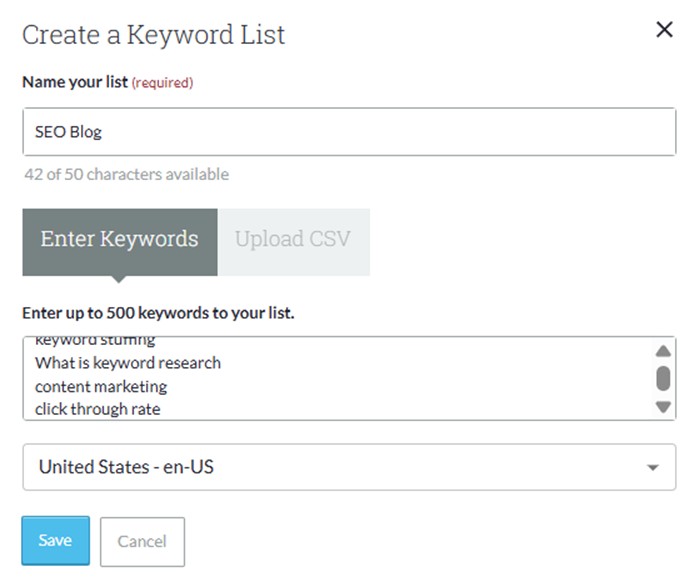
Moz will add a Priority Score to each keyword to better guide you on which terms to prioritize. If you’ve gathered a huge list of keywords, this metric can be handy in quickly narrowing down opportunities and deciding what to focus on first.
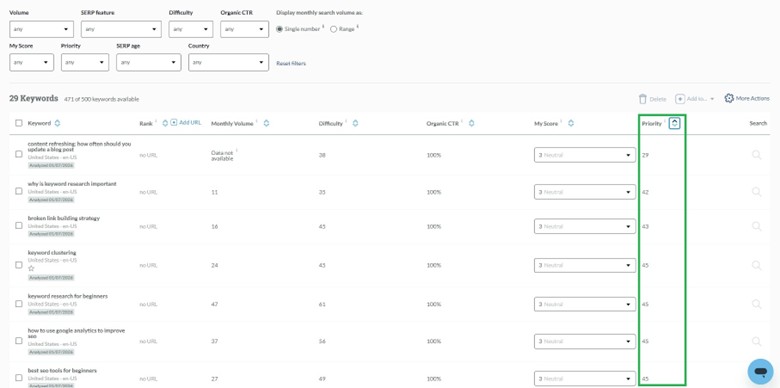
Rather than leaving you to interpret several metrics on your own, Moz uses its Priority Score to blend search volume, ranking difficulty, and CTR into a single opportunity score. It even factors in ads and SERP features that reduce organic clicks, giving you a clearer sense of which keywords are realistically worth pursuing.
With its Keyword Gap feature, Moz also highlights keywords competitors rank for that you don’t, along with terms where you’re close to winning.
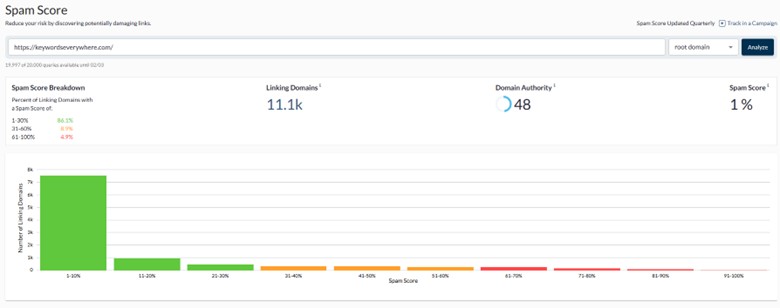
Another especially handy feature in Moz is its Spam Score, which is still fairly rare among keyword and SEO tools. Moz’s Spam Score is difficult for other tools to replicate because it relies on years of labeled spam vs non-spam domain data and a machine-learning model trained on domain-wide patterns, not just links. Most platforms lack this curated training data and avoid explicitly labeling domains as spam due to accuracy, legal, and trust risks, opting instead for safer backlink risk or toxicity signals.
Although Moz is strong in several areas, it isn’t without trade-offs. Longtime Moz users may disagree, but for users accustomed to newer UX patterns, its general interface feels clunkier and less modern, with key workflows spread across multiple tabs. It takes a few extra clicks to get to certain reports, with reporting, rank tracking, and competitive analysis split across sections instead of being grouped more coherently.
Google Keyword Planner vs Moz Pro: Verdict
For advertisers validating demand, Google Keyword Planner makes sense. For content teams and SEOs planning organic growth, end-to-end platforms like Moz provide clearer context around difficulty, competition, and opportunity—areas where GKP simply falls short.
While the interface could be more polished, Moz Pro offers solid value. It bundles site auditing, link data, ranking history, and keyword research at a more accessible price point than many competitors, without aggressive upselling or constant paywalls.
5. Ubersuggest
Plans start at: $12/month (Lifetime Price: US$120)
Free Trial: 7-day free trial
If you find higher tier tools like Semrush or Ahrefs a bit too expensive, Ubersuggest is a more practical Google Keyword Planner alternative. It covers end-to-end SEO workflows well enough, combining keyword research with SERP analysis, content ideas, and basic competitive data in a single interface that’s easier to act on.
Here’s what you get out of the box:
- Backlink Analysis: Ubersuggest includes a dedicated section to view a site’s backlink profile, including referring domains, domain-level authority metrics, and historical link trends.
- Content Ideas: displays top-performing articles related to a keyword, showing available social engagement signals (Facebook, Reddit, Pinterest) as well as estimated traffic to help with content planning.
- Site Audit Tool: Ubersuggest can scan a website to identify technical SEO errors, such as broken links, slow-loading pages, and mobile usability issues.
- Rank Tracking: It allows users to monitor their own keyword positions over time across specific locations and devices.
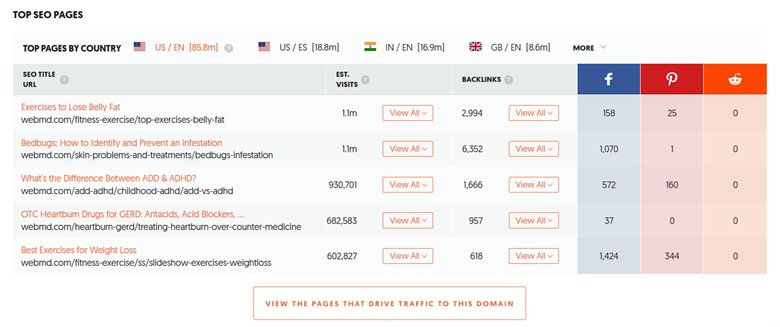
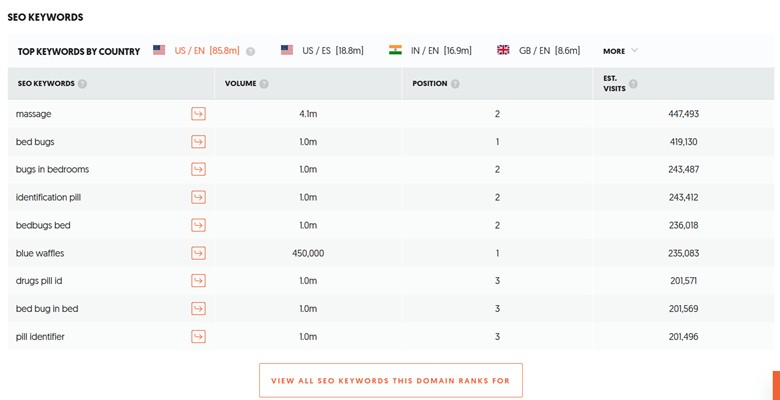
- Competitor Analysis: You can enter a competitor’s domain into Ubersuggest to see estimated keywords they rank for, modeled monthly traffic, and their top-performing pages. This is probably one of Ubersuggest’s standout features simply because it shows not just what competitors rank for, but which pages and keywords are driving real traffic.
Ubersuggest’s Traffic Overview interface is built around simple charts and summaries over dense tables which makes it really easy for non-experts (writers, founders, freelancers) to interpret.
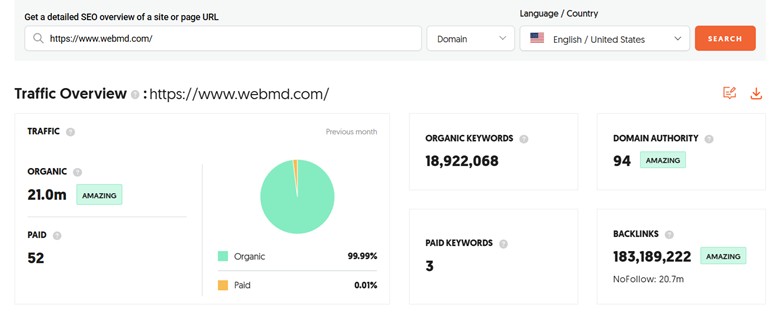
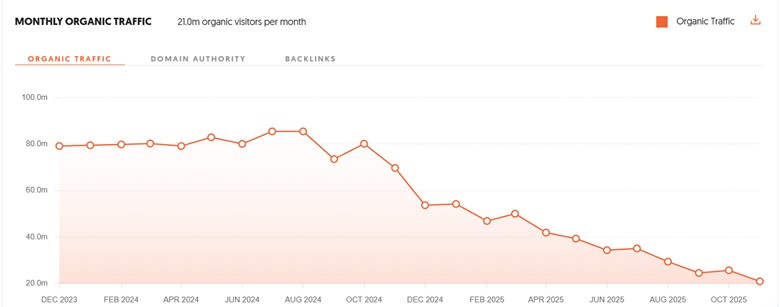
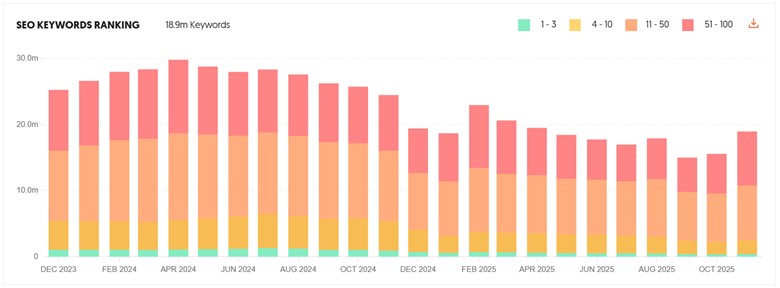
This page makes competitor performance easy to understand, with page-level estimates you’d normally expect from higher-end tools. That makes it much easier to spot content opportunities and reverse-engineer successful strategies.
Ubersuggest vs Google Keyword Planner: Verdict
Google Keyword Planner works best as a supporting tool for validating search demand and seasonality, particularly for PPC use cases. But platforms like Ubersuggest are the more practical choice for organic SEO, giving clearer ranking context, content direction, and competitive insight without juggling multiple tools.
If your goal is to move from keyword ideas to actionable SEO decisions efficiently and affordably, Ubersuggest provides far more value as a standalone solution. Plus, recent feature additions like the AI Writing Assistant and AI Keyword Overview further bridge the gap between keyword research and content creation. For beginners and small teams, that all-in-one flow can be a meaningful productivity boost.
6. Serptstat
Plans start at: $69/month ($50/month billed annually)
Free Trial: 7-day free trial
While Google Keyword Planner (GKP) is primarily a tool for advertisers to plan paid search campaigns, Serpstat is another all-in-one alternative designed primarily for organic search, with competitive insights that can support your broader search strategy.
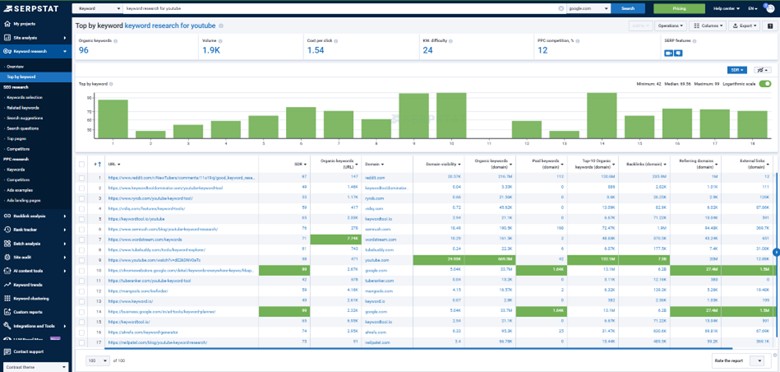
Google Keyword Planner tells you what people search for, but Serpstat helps you decide what’s worth targeting. With organic-focused metrics like keyword difficulty, competitor rankings, and modeled traffic, Serpstat gives much clearer ranking context.
Where Serpstat really starts to feel like a full SEO platform is in the extra tooling it layers on top. It includes keyword clustering to automatically group large keyword lists into topic clusters based on SERP similarity.
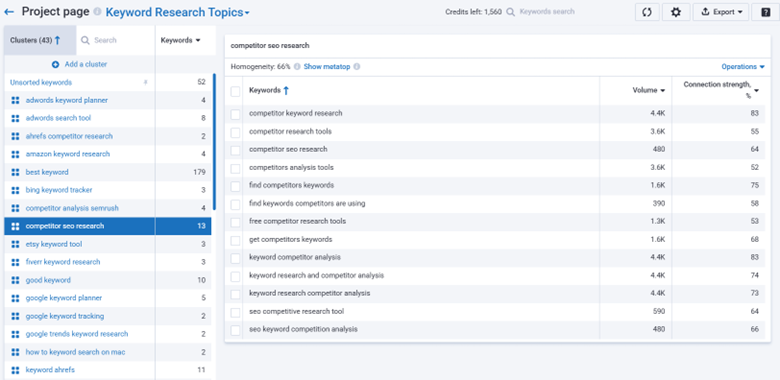
This is super convenient because lots of tools bulk generate tons of keyword ideas, but most of them are duplicates, and having an instant keyword grouper like this just makes working with large keyword sets far more manageable.
Serpstat also offers competitor gap analysis to surface keywords you’re missing, and search question data pulled from autocomplete sources for FAQ and blog planning. You also get rank tracking across regions, technical site audits, backlink analysis, and SERP feature tracking. Overall, Serpstant is definitely a solid google keyword planner alternative, ideal for anyone focused on organic growth.
Google Keyword Planner vs Serpstat: Verdict
If your goal is content and organic visibility, Serpstat is the more complete and strategic tool. With clustering, gap analysis, and rank tracking built in, Serpstat can well support your full SEO workflow. It even has native AI tools to help speed up content creation using SERP-driven insights. For $69 per month, it’s a practical upgrade for anyone outgrowing basic keyword tools.
7. Keywordtool.io
Plans start at: $89/month ($69/month billed annually)
Free Trial: None (But with Free limited version)
Some marketers still use Google Keyword Planner as the first stop for brainstorming ideas and sanity-checking demand. For pure keyword discovery, KeywordTool.io can handle that just as well.
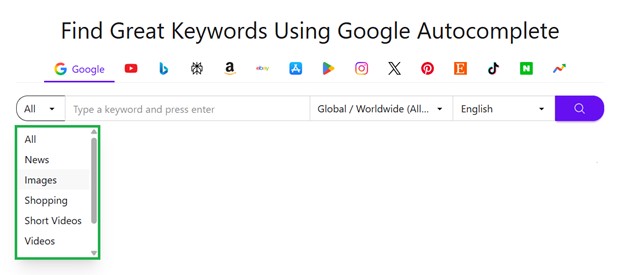
In fact, instead of returning only a few dozen broad ideas for a seed term, KeywordTool.io generates hundreds of long-tail keyword suggestions with each search. You’re also not limited to Google Search. KeywordTool.io pulls autocomplete suggestions from multiple platforms, including YouTube, Amazon, Bing, Instagram, and more.
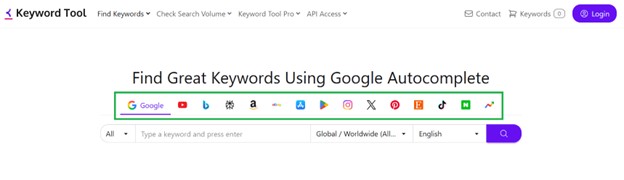
If you want to pull autocomplete terms from search engines, you can even set the filter to narrow down the search vertical:
You can instantly access hundreds of results organized into three categories: Keyword Suggestions, Questions, and Prepositions. The full list can be exported to Excel or CSV for further analysis. However, access to search volumes and other keyword metrics requires a Pro subscription. You can also save selected keywords to the Keyword Basket for later review.
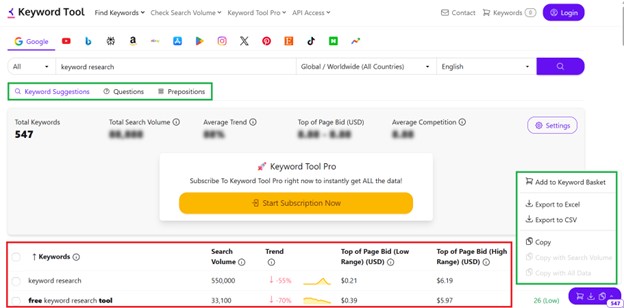
On top of showing keyword metrics, the paid version of KeywordTool.io also provides more granular filtering options like the ability to exclude large sets of negative keywords from your results to clean up your list instantly.
Google Keyword Planner vs KeywordTool.io: Verdict
The fact that Keyword Tool targets long-tail keywords, keeps keyword discovery simple, and works across multiple platforms, it definitely simplifies keyword discovery without overwhelming users. Although the free version is quite helpful, the paid version starts at $69 which some folks find a bit expensive as compared to fuller SEO suites. Even so, as a dedicated keyword discovery tool, it still holds its own.
8. Mangools KWFinder
Plans start at: $30.50/month ($18.85/month billed annually)
Free Trial: 10-day free trial (No credit card required)
Google Keyword Planner is clearly built for people running ads– setting bids, watching budgets, and planning spend. That’s why its interface leans heavily on CPCs and advertiser competition. Tools like KWFinder, on the other hand, are designed with SEO work in mind, assuming you’re planning blog posts, choosing topics, and looking for achievable ranking opportunities. This difference in purpose carries through to how each tool is laid out and which metrics are front and center.
Another major difference is how competition is defined and interpreted. Google Keyword Planner’s “competition” metric reflects how many advertisers are bidding on a keyword, not how difficult it is to rank organically. KWFinder, by contrast, provides an organic keyword difficulty score based on the actual strength of pages ranking in the SERP, making it far more useful for deciding whether a topic is realistically attainable.
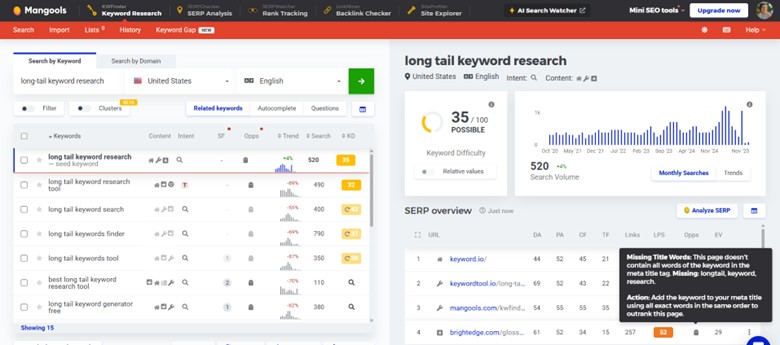
Another practical distinction is keyword granularity. Google Keyword Planner frequently groups close variants—such as plurals, reordered phrases, or slightly different intents—into a single volume range. This can hide important differences in competition and intent.
KWFinder typically shows these variants separately, giving each its own volume, difficulty score, and SERP overview. For content planning, this makes it easier to choose the exact phrasing with the best chance of ranking.
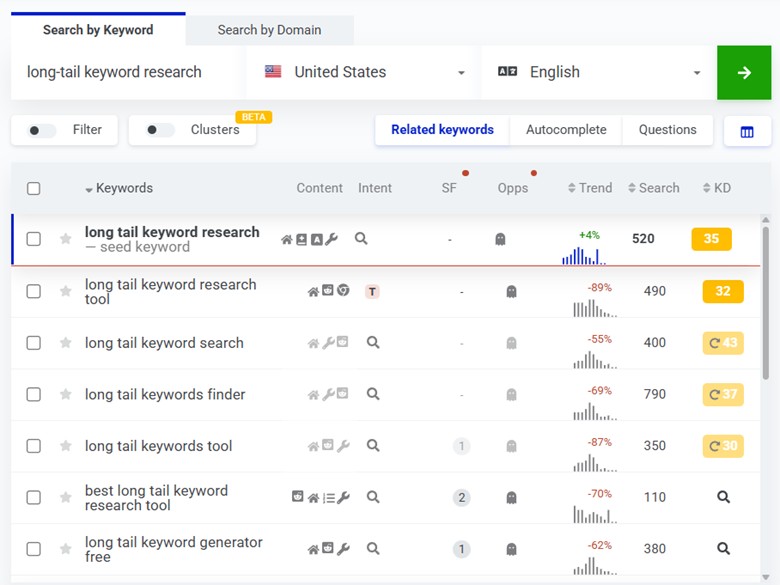
KWFinder also stands out when it comes to keyword expansion and organization. It offers Advanced Suggestions like Autocomplete and Questions, which surface long-tail, autocomplete-style phrases people actually search for—something Google Keyword Planner doesn’t really cover. You also get bulk analysis and filtering, making it easy to sort by difficulty or word count and save keywords into custom lists for content planning.
Tools like KWFinder just fit more naturally into ongoing SEO workflows. Plus, a KWFinder subscription already unlocks the full Mangools suite—SERPChecker for SERP analysis, SERPWatcher for daily rank tracking, LinkMiner for backlinks, and SiteProfiler for domain metrics. That all-in-one access makes Mangools especially practical for SEOs who value focus and efficiency over feature overload.
Google Keyword Planner vs KWFinder: Verdict
Google Keyword Planner tells advertisers where to spend money; KWFinder helps SEOs decide what’s worth targeting. If your goal is ranking content, Mangool’s KWFinder is the more well-rounded alternative, offering clearer SERP context, page-level competition insights, and a workflow designed for organic SEO and real content execution.
9. Answer the Public
Plans start at: $10/month ($8.25/month billed annually)
Free Trial: 7-day free trial
Neil Patel acquired Answer the Public in 2022. It was one of the first major tools to popularize the visual representation of keyword data. It transformed raw autocomplete data into “search clouds” and interactive visual maps.
Here’s an example of a visual “search cloud” or wheel that organizes queries into structured diagrams.
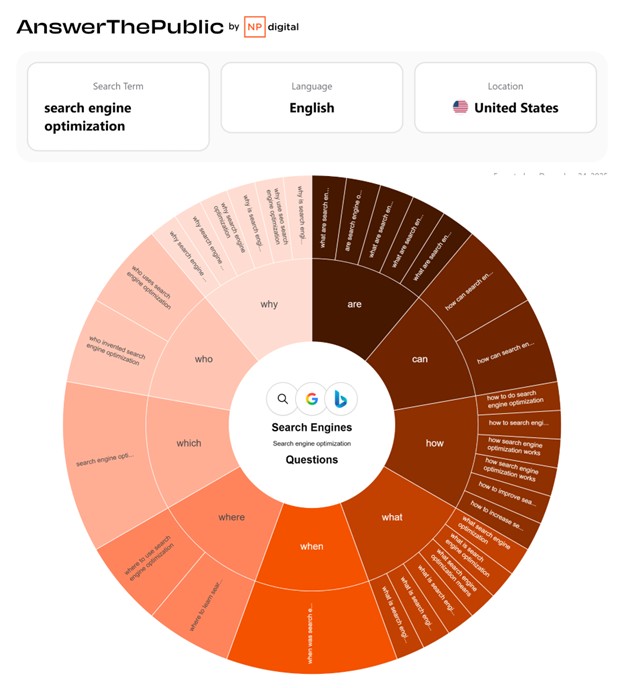
If you prefer the regular list of keywords, you can just scroll down to see the full overview. You can also set filters in terms of categories, Search Volume, and Cost per Click.
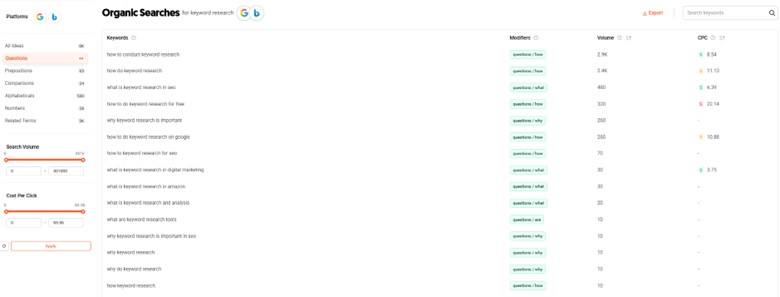
Answer the Public also added more search filters like AI Models to further generate more relevant results that match the users’ goals.

The platform continues to add practical refinements that help results better match user intent. Instead of just surfacing questions, it now helps prioritize which ones are worth exploring.
Google Keyword Planner vs Answer the Public: Verdict
Overall, Answer the Public is best used for brainstorming and topic exploration. It won’t replace feature-heavy SEO tools, but it’s great for seeing how people actually phrase questions and think about a topic.
The interface is intuitive enough for beginners, and it’s easy to spot ideas users might not think of on their own. Its neatly organized questions, comparisons, and conversational queries make content planning even more effortless.
Conclusion
In the end, Google Keyword Planner is useful for validating demand, but it was never designed to guide organic SEO decisions on its own. As soon as keyword research moves beyond confirming interest and into evaluating competition, feasibility, and upside, SEO-focused alternatives become necessary. The right Google Keyword Planner alternative doesn’t just tell you what gets searched. The best ones translate demand into clear, execution-ready priorities.