

It’s definitely handy how Keyword Surfer removes friction from basic keyword research, but wondering if there are keyword surfer alternatives that can do way more?
If you’re in the process of rebuilding your SEO stack, let’s talk about some Keyword Surfer alternatives worth exploring.
Why should you consider Keyword Surfer Alternatives?
Since it’s absolutely free of charge, Keyword Surfer is definitely a practical tool for validating keywords on the fly. Especially if you’re a new SEO or a hobbyist, it lowers the barrier to getting started. However, it only takes you so far once you move past basic checks.
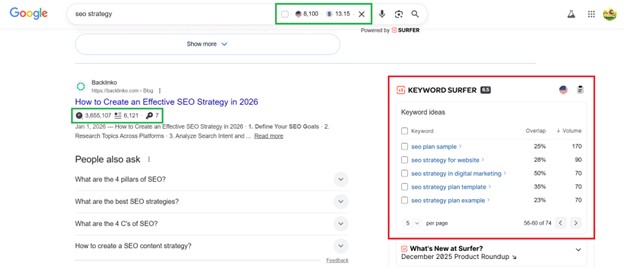


For example, related keywords are lumped into one group. There are no sub-groups, no intent splits, and no hierarchy– just one cluster tied to the same core query.
Keyword Surfer is helpful for fast validation, but it skips over a lot of context SEOs expect. There’s no real difficulty score, no competitor visibility, and no clear way to judge how realistic a keyword is. You don’t see intent, SERP features, backlink requirements, or ranking stability. It’s mostly just volume and related terms. That’s usually enough to spark ideas, but not enough to build a scalable SEO plan, which is fair given that it’s only a free tool designed for quick, lightweight checks.
It’s then important to consider Keyword Surfer as a starting tool, not a strategy tool. Eventually, you’d have to start looking for something more robust.
Best Keyword Surfer Alternatives
Below are Keyword Surfer alternatives that go beyond casual SEO use.
1. Keywords Everywhere
Plans start at: $7 per month
Free Trial: Freemium model
Keywords Everywhere is a natural Keyword Surfer alternative because both tools work right inside the browser and surface keyword data directly in the SERPs. Like Keyword Surfer, Keywords Everywhere is great for quick, on-the-fly keyword checks without opening a full SEO tool.
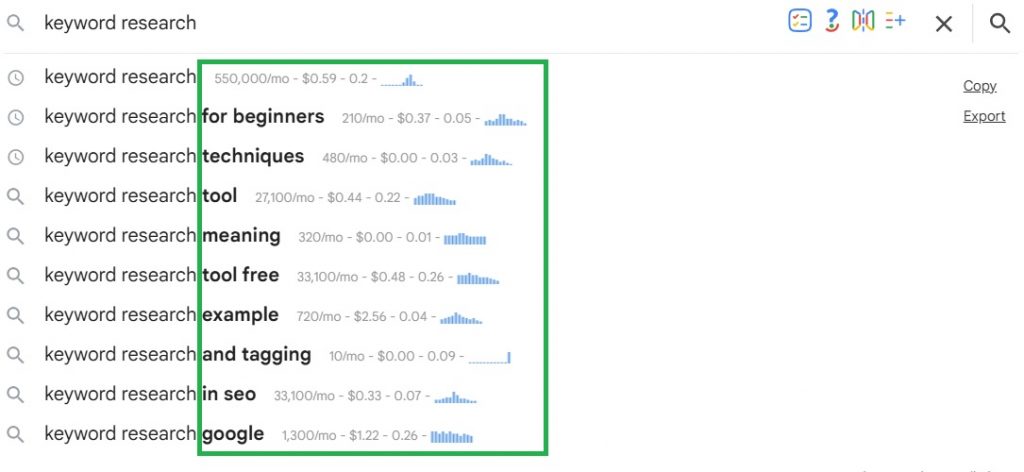
Besides showing keyword metrics within the search box, Keywords Everywhere also layers keyword data directly into the autocomplete section, making early keyword validation even faster and more intuitive.
It works across more than 20+ platforms, letting you uncover keyword opportunities not just on Google, but on YouTube, Amazon, Pinterest, and social platforms.
Where Keywords Everywhere stands out is in how much more context it provides, adding CPC, competition, trend data, and neatly organized keyword widgets that go beyond basic volume overlays.
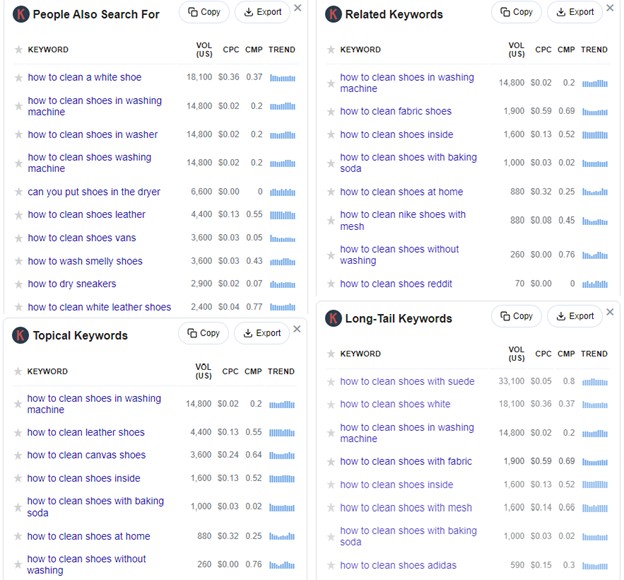
One underrated strength of our keyword tool is the quality of the keyword groupings. Instead of bloated lists with repeated variations, you get clear, intent-based groups packed with distinct, usable ideas. This eliminates the time sink of sorting through near-duplicate keywords that don’t translate into meaningful content angles and ideas.
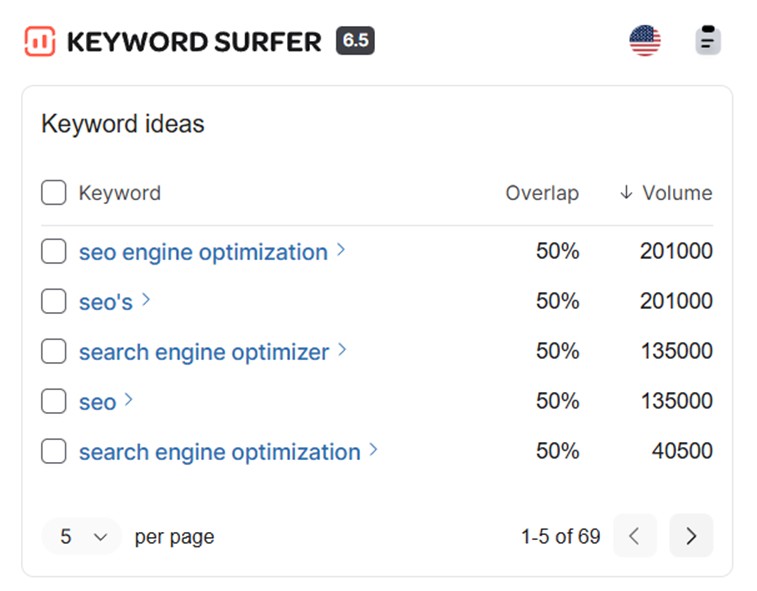
If you intend to keep using Keyword Surfer, its best use case is probably for adding more secondary keywords to your article since its keyword list mainly shows close variations of the main query:
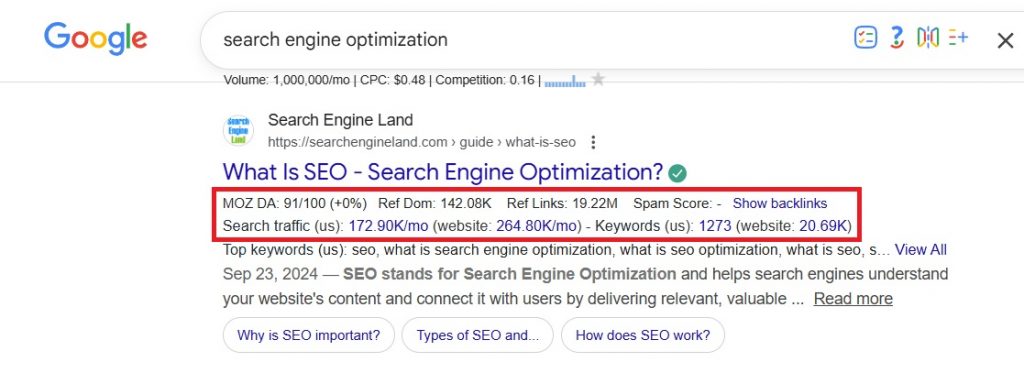
Keywords Everywhere also brings MozBar-style metrics straight into the SERPs with more data to work with. In just a few clicks, you can view the backlinks of the listing, how much traffic the page and the domain are getting, and how many keywords the article is ranking for. When you click on the blue links, you’ll immediately access the nitty-gritty like the list of keywords the page is ranking for, the actual backlinks, etc.
Beyond the browser extension, Keywords Everywhere now offers standalone tools across key SEO areas, including:
- Free Keyword Finder
- Search Volume Checker
- Keyword Difficulty Checker
- SERP Checker
- Organic Ranking Checker
- Keyword Gap Analysis
- Competitors Finder
- Backlinks Checker
- Backlink Gap Analyzer
- Website Traffic Checker
- Top Pages Finder
- Website Ranking Checker
For technical and on-page SEO, the broader toolkit also includes SEO Minion and SEO Checker
Keywords Everywhere vs. Keyword Surfer: Verdict
If you like Keyword Surfer’s no-dashboard, in-SERP approach, Keywords Everywhere will feel immediately familiar. What sets it apart is how much more of the SEO workflow it actually covers. For as low as $7 per month, it delivers real SEO utility without locking you into a heavy dashboard.
2. Ubersuggest
Plans start at: $20/month (Lifetime Price: US$200)
Free Trial: 7-day free trial
Ubersuggest also has a browser extension that overlays search volume, CPC, and keyword suggestions directly on Google.
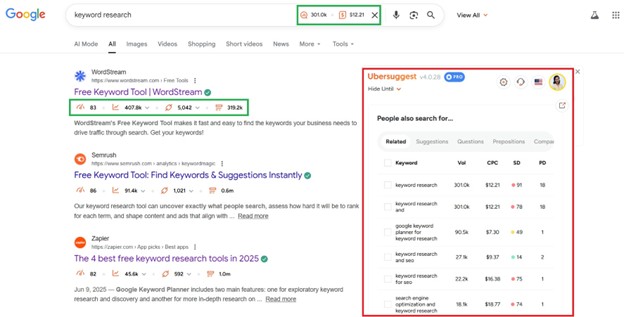
It even has the MozBar-style SERP overlay, showing the Moz Domain Authority, estimated monthly visits, number of referring domains, and number of organic keywords.
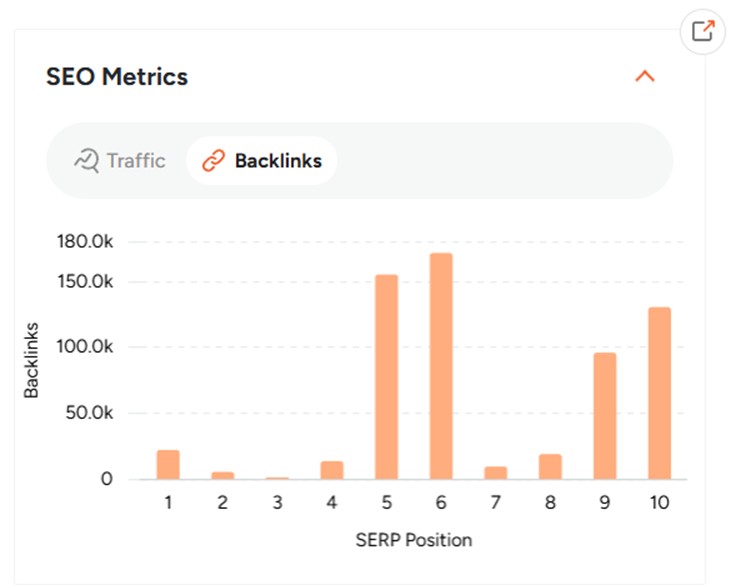
And as expected from Ubersuggest, key metrics are paired with simple graphs that show how competitive each SERP position really is.
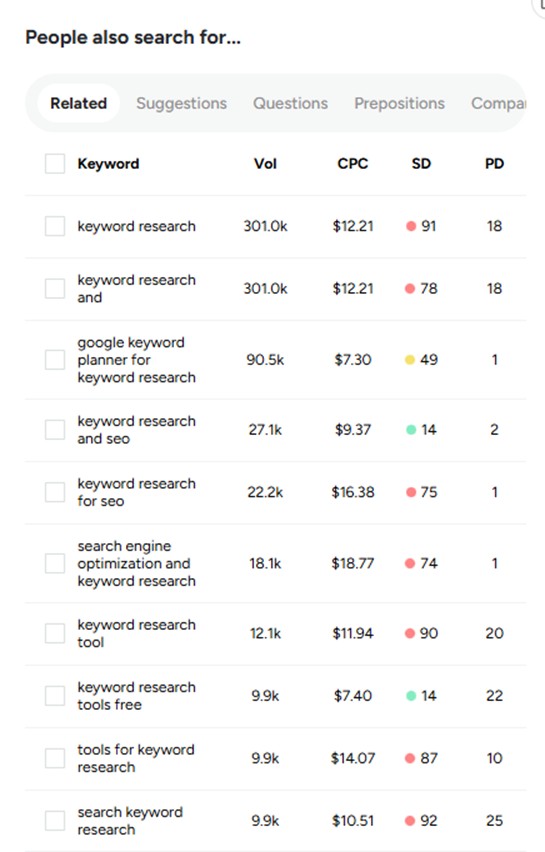
As for the keyword ideas, they appear in the same grouped format you see in the main Ubersuggest dashboard. However, you can’t directly interact with the tabs from within the SERP. Clicking items would redirect you to the Ubersuggest platform, where the analysis continues in the full dashboard.
Ubersuggest gives you a fuller picture of a keyword by pairing standard metrics with trends and visual insights. It even throws in a searcher age range, which is a bit unusual for SEO tools but useful in the right scenarios.
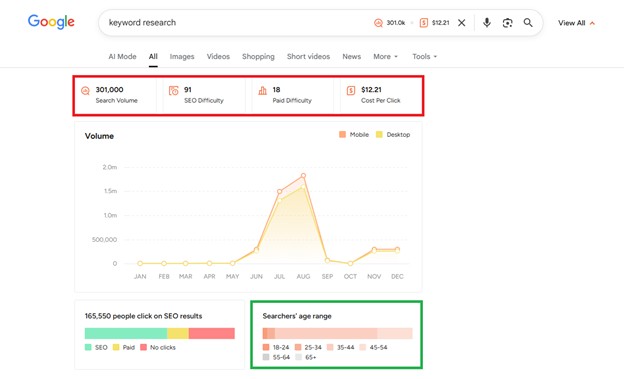
Overall, it’s a thoughtful addition that makes the Ubersuggest subscription more practical for everyday SEO work.
Ubersuggest vs Keyword Surfer: Verdict
Keyword Surfer is completely free and works well for quick, at-a-glance volume checks. Ubersuggest, on the other hand, is better suited for those who want an all-in-one SEO platform where SERP insights feed directly into broader research and decision-making.
3. Ahrefs
Plans start at: $129/month ($108//month billed annually)
Free Trial: No Free Trial (limited free Keyword Generator available)
Keyword Surfer’s data is deliberately lightweight. You see demand signals, but very little competitive context. There’s no clear view of how strong ranking pages are, how much traffic they actually get beyond one keyword, or what it would realistically take to compete.
Ahrefs’ SEO Toolbar goes several steps further by turning searches into real SEO analysis, without leaving your browser. Beyond basic volume and difficulty, it layers in page- and domain-level strength, backlink counts, referring domains, and estimated organic SEO traffic, so you can immediately understand why pages rank, not just that they rank.
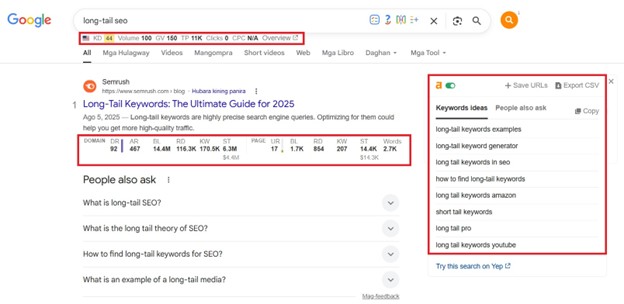
The toolbar also functions as a full SEO extension rather than a simple overlay. With one click, you can inspect on-page elements like titles, meta descriptions, headers, canonical tags, and indexation directives. You can highlight links on a page, trace redirects, spot broken links, export link data to CSV, and even view pages as Googlebot using different user agents.
It also supports global research out of the box, letting you switch regions, Google domains, and languages directly in the SERPs, no VPN required. Just know the free version is intentionally capped. Core metrics like search volume, keyword difficulty, traffic estimates, and backlink counts sit behind the paywall, so the free version is more of a smart preview than a complete setup.
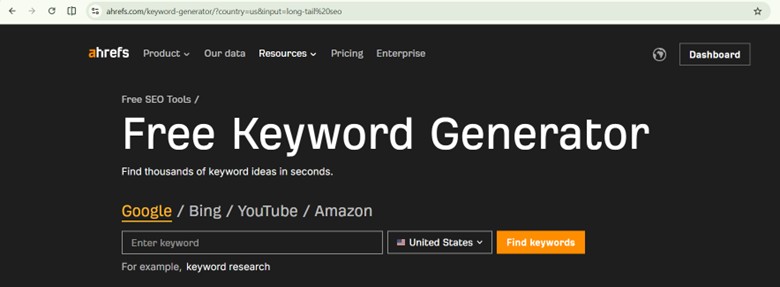
If you just want quick keyword ideas or basic expansion, Ahrefs also has a Free Keyword Generator, surfacing keyword suggestions across Google, Bing, YouTube, and Amazon. , However, the full search volume and Keyword Difficulty data are limited unless you’re on a paid Ahrefs plan.
Keyword Surfer vs. Ahrefs: Verdict
Keyword Surfer covers the basics fast. Ahrefs adds the missing context, layering SERP strength, backlinks, and traffic estimates into search results. If you’re making real targeting decisions and don’t want to guess, Ahrefs gives you the fuller picture of the search landscape.
4. Google Keyword Planner
Plans start at: Free
Free Trial: Not required (free to use)
People mainly use Keyword Surfer for quick keyword validation and exploration. Even if Google Keyword Planner doesn’t have that SERP overlay function, it’s a perfectly acceptable Keyword Surfer alternative because it pulls search demand data directly from Google itself, making it one of the most reliable reference points for baseline keyword volume.
Because the data comes directly from Google’s own systems, GKP’s keyword lists are also generally cleaner and more intent-aligned, even if they’re not as expansive as third-party SEO tools.
The downside is that exact search volumes are locked behind an active Google Ads campaign. Without ads running, Keyword Planner only shows broad ranges, which can feel limiting for SEO work.
If you have a Keywords Everywhere subscription, you can instantly layer real volume estimates, CPCs, and trend data over those broad ranges, turning Keyword Planner into a much more practical SEO tool without having to run ads.
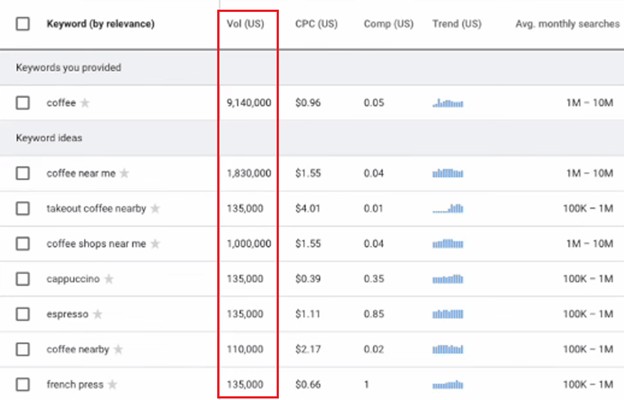
Google Keyword Planner is solid for baseline demand checks, but it’s not built to handle detailed SEO decisions. Most SEOs treat it as a starting point rather than a standalone tool.
Keyword Surfer vs Google Keyword Planner: Verdict
If you want quick numbers without leaving Google, Keyword Surfer gets the job done. If you want volume data straight from the source, Google Keyword Planner most definitely still holds weight. Both can support keyword research effectively, just in different contexts.
5. Semrush
Plans start at: $199/month ($165.17/month billed annually)
Free Trial: 7-day free trial
Outside of Google Keyword Planner, SEMrush is widely regarded as one of the most accurate tools for search volume data. SEMrush models volume using clickstream data, historical trends, and live SERP validation, which reduces over- or under-estimating demand.
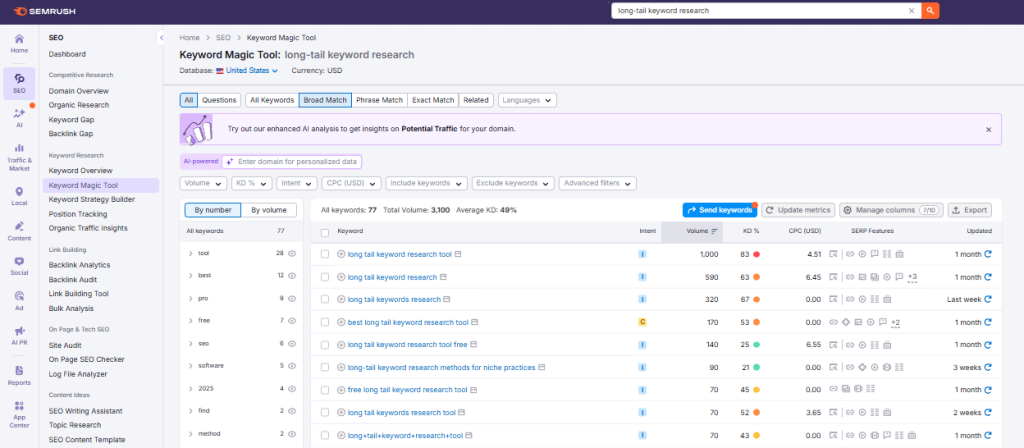
In terms of keyword expansion, rather than just surfacing related terms, it offers structured expansion via its Keyword Magic Tool, which breaks keywords into tightly organized groups by modifier, intent, questions, and semantic similarity.
You can filter by difficulty, volume, SERP features, intent, CPC, and even exclude unwanted modifiers, which makes it much easier to build content clusters or full topic maps at scale.

SEMrush also makes a lot of sense if your digital marketing needs go beyond basic keyword checks. Instead of stitching together multiple tools for SEO, PPC, content planning, and competitor research, SEMrush consolidates everything into a single platform.
Semrush vs Keyword Surfer: Verdict
For lightweight keyword validation, Keyword Surfer does the job. But if you’re planning content at scale or managing SEO beyond one-off checks, SEMrush gives you the depth and structure that Keyword Surfer simply isn’t built for.
6. Answer the Public
Plans start at: $10/month ($8.25/month billed annually)
Free Trial:7-day free trial
If SEMrush feels like overkill, AnswerThePublic is an easy, budget-friendly option that covers the same early-stage keyword discovery use cases as Keyword Surfer. But instead of a flat list, it groups results into questions, comparisons, and related phrases, which helps you understand search intent at a glance.
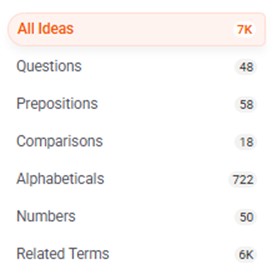
From a keyword research standpoint, AnswerThePublic does it better in terms of idea expansion and intent mapping. A single seed keyword can surface hundreds of long-tail variations pulled from real autocomplete data, which is especially useful for blog outlines, FAQs, and content hubs.
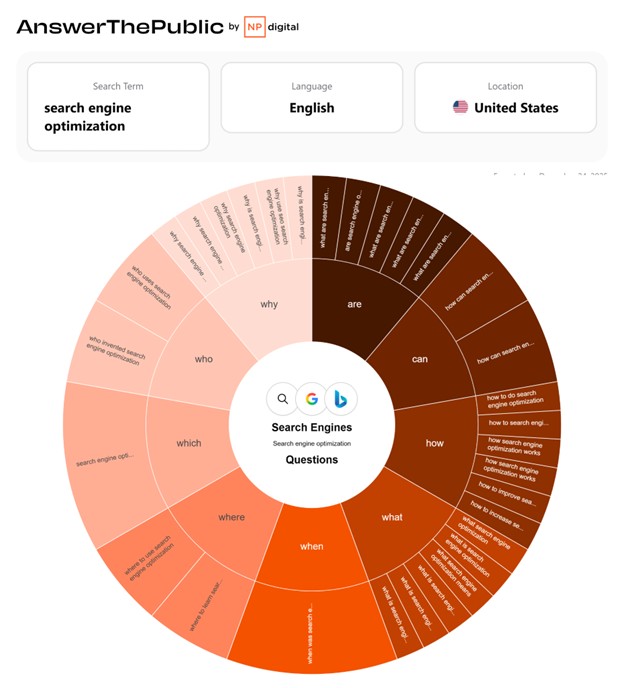
The visual wheel and list views make it easy to scan for angles people actually care about, rather than wading through generic keyword lists.
Keyword Surfer vs Answer the Public: Verdict
Overall, AnswerThePublic isn’t built for competitive SERP analysis or ranking difficulty. But for discovering what people are asking, how they phrase problems, and which content angles are worth exploring early, it’s definitely one of the most useful and affordable tools available. Starting at $11, it’s an accessible way to plan content without enterprise overhead.
Also Read: Best AnswerThePublic Alternatives in 2026 (Compared)
Final Thoughts
Keyword Surfer is perfect when you’re just kicking the tires. But if you’re mapping topics, comparing competitors, or planning content months ahead, a more robust tool gives you far better control. The keyword surfer alternatives above are all useful when quick checks are no longer enough.