

When you’re in discovery mode, Keyword Tool can really be a great solution to generate keyword ideas at scale. It pulls data from the autocomplete results of Google, Amazon, YouTube, Bing, and even the App Store. You can also spark content ideas easily without having to think about settings and filters.
However, SEOs usually complement it with additional tools for competitive analysis. If you’re looking for keyword tool alternatives that can help you do more, here’s a quick roundup to consider:
Best KeywordTool.io Alternatives
While KeywordTool.io is a solid option for keyword discovery, it isn’t the only tool built for expanding ideas and uncovering search intent. Some users want more context, others want trend data, and some simply want a more affordable solution. Choosing the right alternative is about finding what works best for your workflow.
1. Keywords Everywhere
Plans start at: $7 per month
Free Trial: Freemium model
Instead of generating lists in a separate dashboard, Keywords Everywhere overlays data directly onto Google Search, Google Trends, YouTube, Amazon, and 20+ other major platforms. You can immediately see search volume and other keyword metrics below the platform’s search box and even in the autocomplete section.



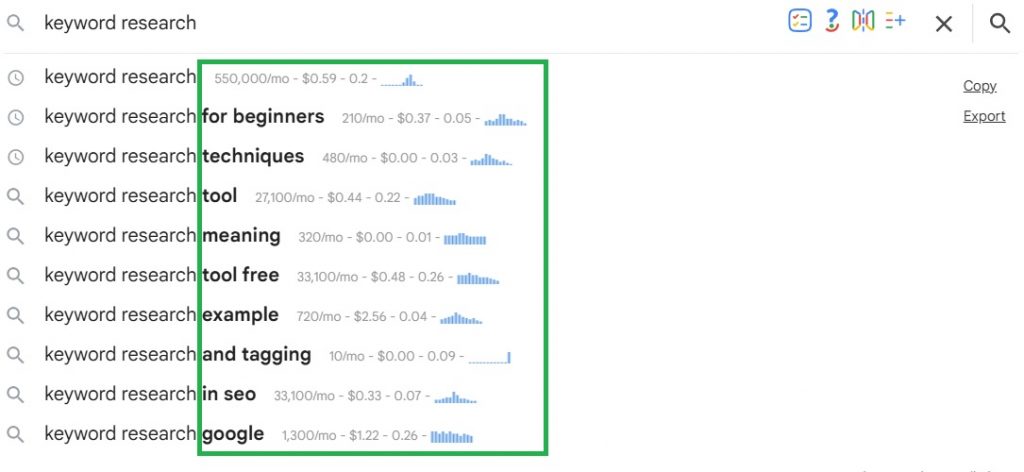
There are also multiple widgets and features for more keyword ideas and functionalities. As you browse, keyword research becomes continuous rather than something you do in batches.
KeywordTool.io, on the other hand, is built for large-scale keyword discovery. It pulls extensive autocomplete-based keyword lists across multiple platforms, helping users surface long-tail variations and modifiers very quickly.
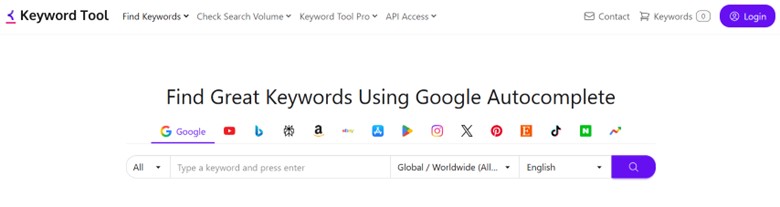
However, the trade-off is that results are broader and require more manual filtering to identify the most relevant opportunities. One area where Keywords Everywhere really stands out is the quality of its grouped keyword widgets.
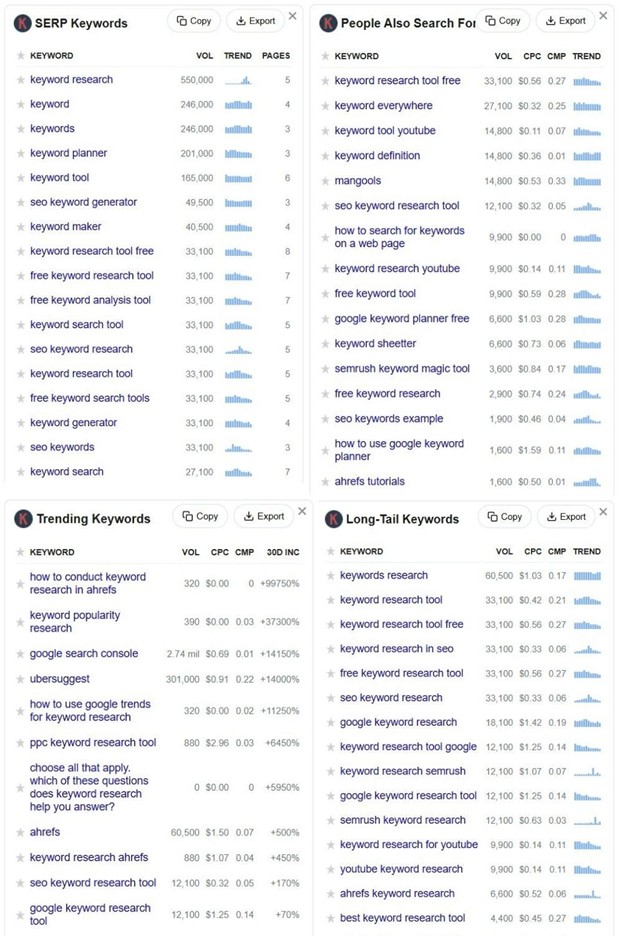
Instead of dumping loosely related suggestions, the tool surfaces tightly grouped, highly relevant keyword clusters that closely match the original query and user intent. You’ll see logical variations and supporting long-tails that translate cleanly into publishable content ideas.
For content creators and marketers, this saves time and reduces second-guessing– what you see is usually what people are actually searching for. And because the data is embedded into your browsing flow, validation happens as you think, not after exporting charts or running separate reports. This is why many users feel Keywords Everywhere is “more intuitive” than traditional tools as it mirrors how people naturally research.
Keywords Everywhere vs Keywordtool.io| Verdict
KeywordTool.io works best when you’re prepared to sort, cluster, and refine large keyword lists. Keywords Everywhere reduces cognitive load by surfacing only the most relevant terms inline, keeping research focused and friction-free. Ultimately, it’s less about better or worse and more about how you prefer to approach keyword discovery.
2. Answer the Public
Plans start at: $10/month ($8.25/month billed annually)
Free Trial: 7-day free trial
Just like KeywordTool.io, Answer the Public also builds from autocomplete-style query data although it’s not multi-platform. However, its edge over Keywordtool.io is how it visualizes search intent rather than presenting flat keyword lists.
- Applies question modifiers (how, why, can, vs, etc.)
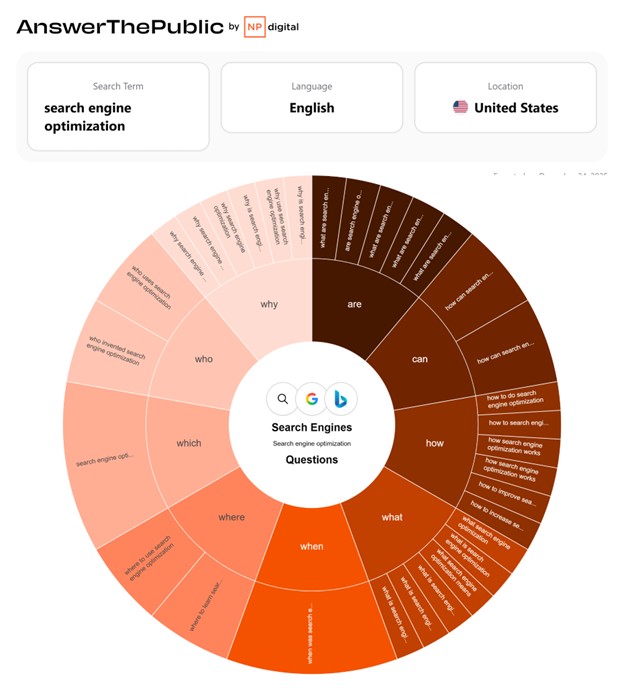
- Groups queries by intent buckets (questions, comparisons, prepositions)
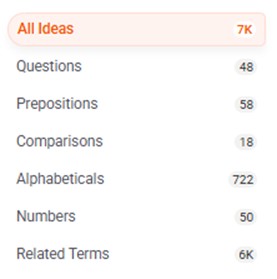
- Structures results into topic clusters
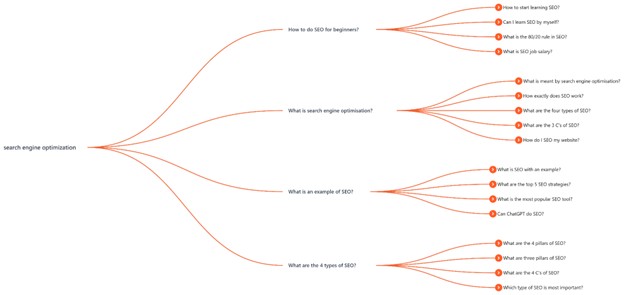
Beyond just finding keywords, it acts as a search listening tool with email alerts for emerging trends, data change monitoring to track keyword evolution, and audience demographics to help you profile your searchers. Plus, for those working with teams or clients, its ability to produce high-resolution presentation exports makes it a far more professional choice for communicating a content strategy than a standard raw data dump.
Answer the Public vs Keywordtool.io| Verdict
Both focus on keyword discovery and idea expansion, not full SEO analysis. If you just need to expand a seed keyword, discover long-tail variations, and generate content ideas quickly, either Answer the Public and Keyword Tool works although the former is much cheaper and has more intent-focused visualizations perfect for higher-level content planning. In the end, it comes down to personal preference.
3. Keyword Sheeter
Plans start at: $10/month ($8.25/month annually, with PAYG option available)
Free Trial: 7-day free trial
KeywordShitter officially rebranded to Keyword Sheeter in September 2019. The original name gained notoriety for its rather crude humor, but the new name is more “safe for work” (SFW) and also acceptable for a broader business and marketing audience.
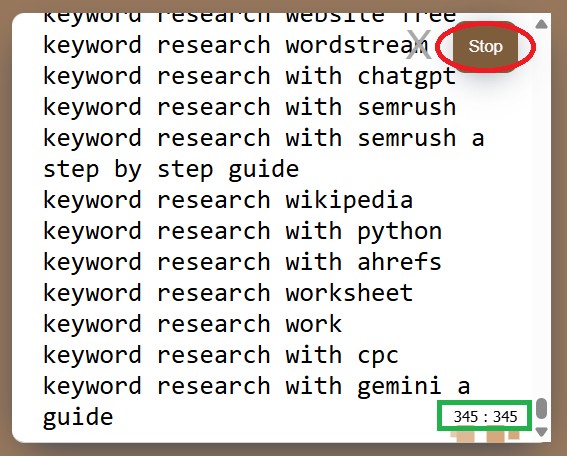
What Keyword Sheeter mainly does is scrape thousands of Google Autocomplete suggestions in seconds. It definitely filled a niche for SEOs who just need a massive list of long-tail keywords without the complexity and expense of larger platforms.
And the best part? It’s free of charge and you don’t even have to register. Generating keyword ideas is free, but if you want to access advanced data and metrics like search volume and keyword difficulty, just buy “Sheet Coins” and spend them on demand.
All you have to do is visit Keyword Sheeter, type in your search term, set filters, and then click “Start Sheeting”.
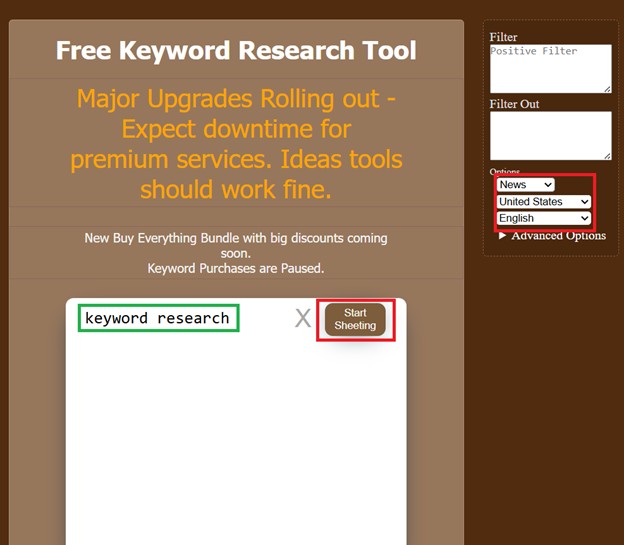
Once you click Start, it will just keep on going till you click the Stop button. There’s also an indication how many keywords have already been generated. This is a really fast and efficient way to generate high volumes of long-tail keywords and scale your brainstorming process.
Keyword Tool Vs. Keyword Sheeter: Verdict
If you’re a budget-conscious user just looking for keyword inspiration, both KeywordTool.io and Keyword Sheeter are great starting points. But Keyword Sheeter has a very straightforward way of spitting out long-tail keyword ideas in a rapid-fire way.
The difference is really about scope. KeywordTool.io has a cleaner, more polished interface and pulls data from several platforms, including Google, eBay, Amazon, Instagram, and Play Store. Keyword Sheeter sticks to Google-based expansion, but makes high-volume brainstorming really straightforward and frictionless.
Both are strong keyword discovery tools, but neither can be considered a complete SEO platform on their own. They’re best used as the first step in a broader SEO workflow.
4. Ahrefs
Plans start at: $129/month ($108//month billed annually)
Free Trial: No Free Trial
Even if Ahrefs is far more comprehensive, it can still double as a solid Keyword Tool alternative. Both aim to stop SEOs from guessing what to write about. Keyword Tool.io focuses on surfacing lots of keyword ideas quickly, which is great for brainstorming and content planning.
Ahrefs tackles that same need but adds SERP-aware context, helping teams evaluate whether those ideas are realistic by showing who ranks, how strong the competition is, and whether the keyword actually drives clicks. In modern SERPs packed with AI Overviews and snippets, that’s critical, because interest alone doesn’t guarantee traffic anymore.
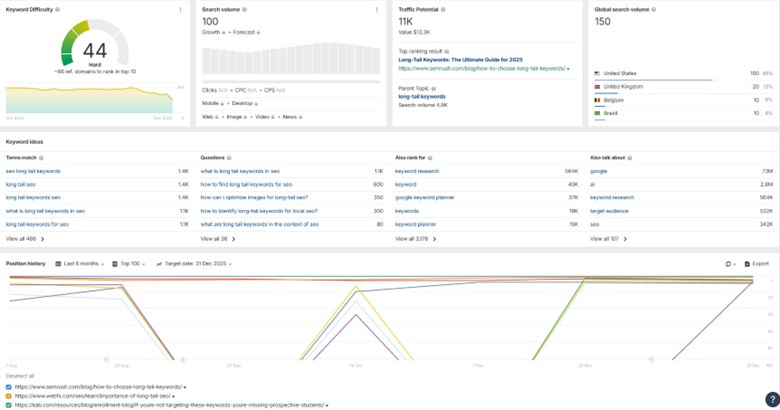
Ahrefs estimates the “Traffic Potential” of a keyword by modeling the total organic traffic a top-ranking page receives across all the keywords it ranks for, rather than just the one you searched.
The Content Gap Tool is also especially useful for competitive analysis, allowing you to input competitors’ domains to see estimated keywords they rank for that your site does not.
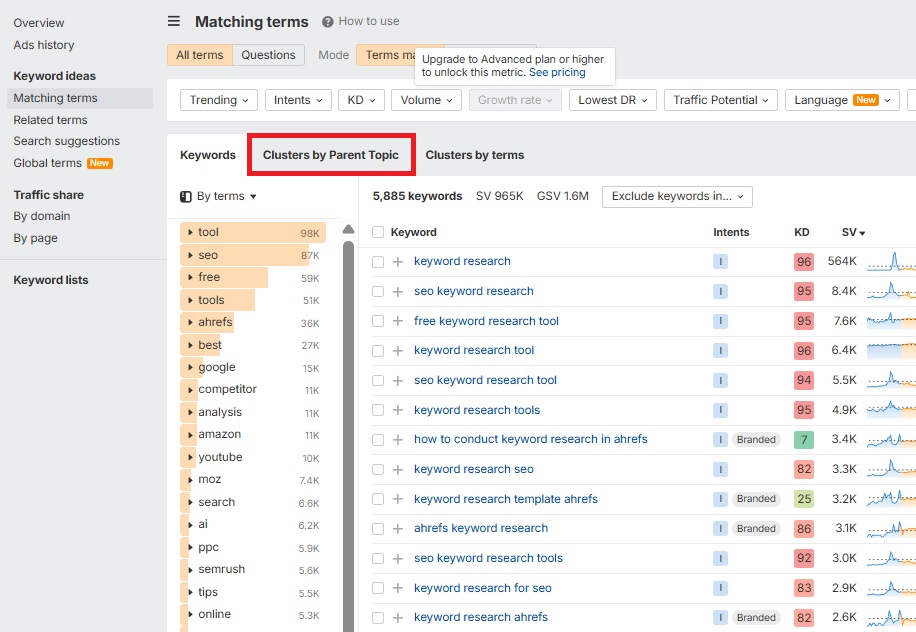
For content planning, Ahrefs also automatically groups related keywords under a broader “Parent Topic,” helping content teams determine whether to consolidate keywords into one page or split them across multiple pages.
Beyond keywords, Ahrefs adds more value through its backlink and page-level analysis. Tools like Site Explorer, backlink reports, and Linking Authors help teams understand why competitors rank, where their links come from, and which authors or sites are worth targeting for outreach.
Ahrefs vs Keywordtool.io| Verdict
For pure ideation, Keyword Tool.io is often more than enough. It’s quick, simple, and does a good job of surfacing lots of keyword ideas. Ahrefs, on the other hand, is built for teams that need to go beyond ideas and make confident, competition-aware decisions. It’s a perfect keywordtool.io alternative for agencies, in-house teams, and established sites where SEO is mission-critical.
5. SEMrush
Plans start at: $199/month ($165.17/month billed annually)
Free Trial: 7-day free trial
SEMrush has earned its place as an industry-standard SEO platform by connecting keyword research directly to competitive analysis and content planning. Compared to KeywordTool.io, which focuses primarily on autocomplete-based keyword generation, SEMrush provides deeper insight into ranking feasibility, SERP composition, and search intent.
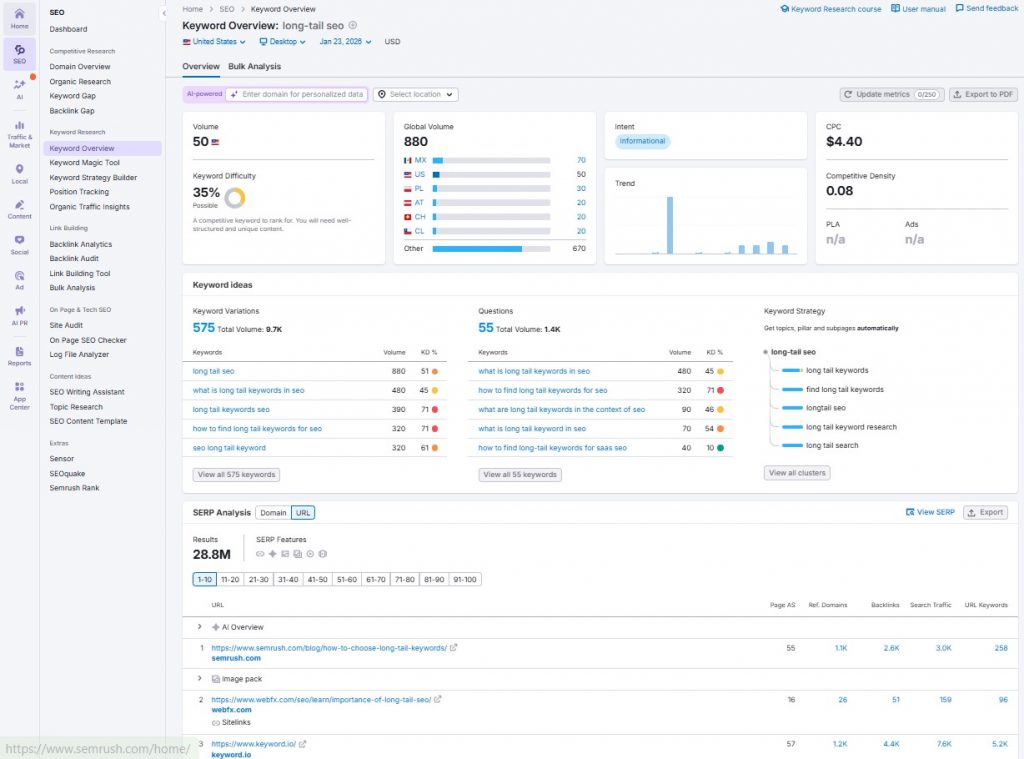
Here are some of the biggest reasons why you should consider SEMrush over KeywordTool.io:
- Deeper Analytics– SEMrush adds depth to keyword research by combining search intent, difficulty metrics, and SERP feature analysis, such as featured snippets and even local results.
- Data Depth & Modeling– Powered by a proprietary keyword database and clickstream-based modeling, SEMrush estimates search volume and trends with far greater depth than autocomplete-based data alone.
- Integrated Workflow– With built-in integrations for Google Analytics and Google Search Console, SEMrush turns raw performance data into actionable keyword and visibility insights– all in one place.
- Competitor Intelligence– Tools like Keyword Gap and Domain Overview reveal which keywords competitors rank for, how much organic visibility they hold, which pages drive traffic, and where paid search activity is happening.
- Content & Campaign Planning – Rather than stopping at keyword discovery, SEMrush supports execution through topic clustering, rank tracking, and PPC insights that drive execution and results.

It’s clear that SEMrush is designed for strategic SEO decision-making. By combining keyword data with SERP composition, intent signals, and competitive intelligence, it offers a level of depth that KeywordTool.io doesn’t aim to provide.
Semrush vs Keywordtool.io| Verdict
While KeywordTool.io helps surface keyword ideas, SEMrush is built to carry those ideas through execution and strategy. By exposing competitor rankings, traffic share, and content gaps, SEMrush provides the competitive clarity needed to win difficult SERPs.
6. Low Fruits
Plans start at: $29.9/month ($20.75/month billed annually)
Free Trial: Limited Free Credits + 14-day money-back guarantee
Like Keyword Tool, Low Fruits also focuses on long-tail keyword discovery. However, it takes everything up a notch by focusing on SERP analysis and difficulty instead of just standalone keyword metrics.
One of the biggest time-wasters in SEO is targeting keywords that look easy but are actually dominated by strong domains. This is exactly where LowFruits stands out.
Instead of making you manually inspect every SERP, LowFruits checks domain authority for you and highlights keywords where ranking is realistically achievable.
LowFruits basically scans the first page of Google and identifies signals of lower competition, such as the presence of forums, user-generated content, or comparatively lower-authority pages. If Google is ranking multiple low-authority domains, that keyword is then considered a low-hanging fruit.
Just go to Keyword Finder, input a seed keyword (make sure it’s not too broad) and set the other filters like Country and Language, Click “Generate” and the tool will instantly show a relevant list of long-tail queries.

Thousands of keywords will be generated in seconds. Click “Access” to view all the generated search terms. If you already have a list of keywords you want to analyze, you can also just import keywords and analyze them in bulk.
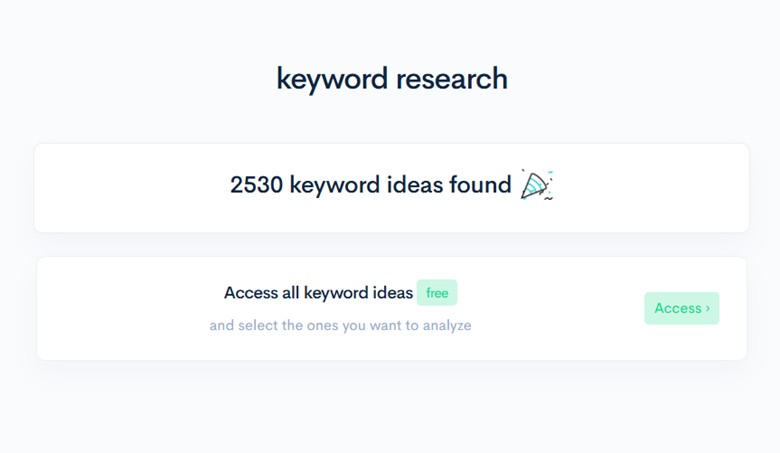
You can use the tickboxes to choose keywords you want to use for your campaign. Select those with business potential and clear search intent.
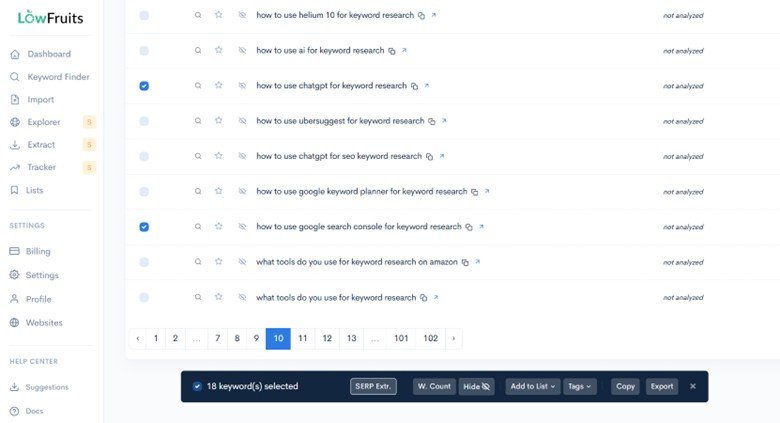
Going over the complete list and choosing keywords you want to analyze might be time-consuming, but the fact that you now have a huge list of keywords on a silver platter is a clear advantage. Instead of exporting keyword ideas and analyzing them in a separate tool or spreadsheet, you’re organizing everything in one intuitive platform.
Once you’re done choosing the keywords you want to examine, click “SERP Extr.” to analyze the SERP and keywords.
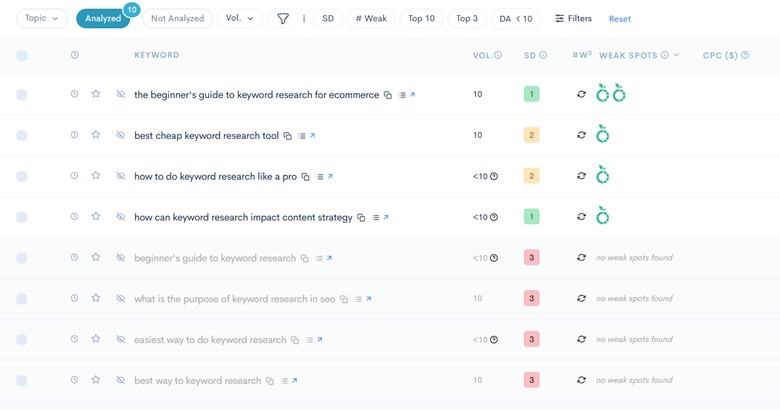
Under the Weak Spots column, you’ll see the Low Fruits icon if the keyword is highly rankable. The more fruit icons, the better. Every icon represents a listing in the top 10 results that have a low Domain Authority. That means that if a low-DA website is ranking for such keywords, you could be as well.
That said, if the analyzed keyword indicates “no weak spots found”, that means it could be harder to rank for as stronger websites are already dominating the first page of Google. Especially if you’re a newer website who wants to be extra selective in choosing keywords that would rake in results, this tool is an easy-to-use software for both effective keyword research and SERP analysis.
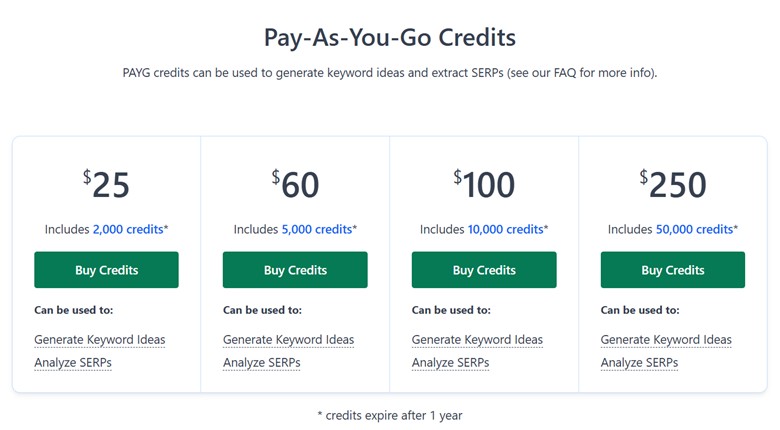
Another neat thing is their Pay As You Go (PAYG) model. While you can also subscribe and pay per month, you can also just buy credits which expire after a year.
Low Fruits vs KeywordTool.io Verdict:
Both tools help you validate keyword opportunities and explore ideas worth turning into content. The main difference lies in how LowFruits directly evaluates what is already ranking on Google, which saves you a lot of time. But in practice, both aim to reduce wasted effort and improve content ROI.
7. Mangools KWFinder
Plans start at: $30.50/month ($18.85/month billed annually)
Free Trial: 10-day free trial (No credit card required)
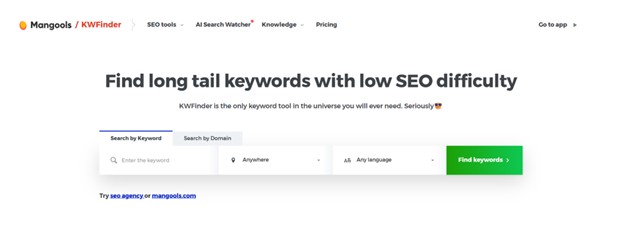
While KeywordTool.io is built almost entirely on autocomplete data, KWFinder by Mangools sources keyword ideas from a broader mix of databases. You can also quickly perform SERP analysis within the same screen, giving you SERP metrics right next to keyword volume and difficulty. The SERP metrics include authority metrics (such as DA/PA) and backlink-related signals.
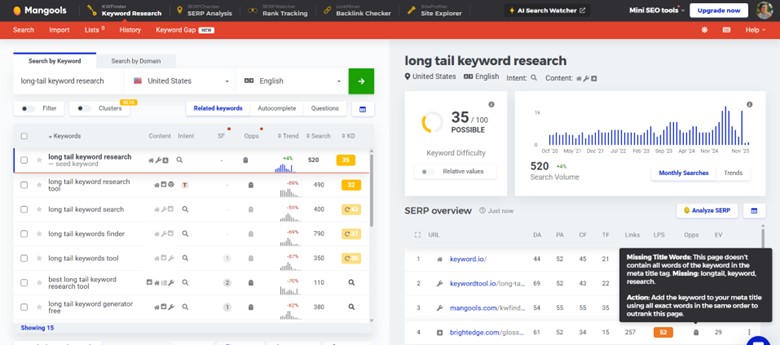
But unlike Keyword Tool that supports multi-platform keyword discovery, KWFinder is largely focused on Google SEO.
There’s a fine distinction you need to take note of, though. If you’ve been using KeywordTool.io to bulk generate ideas, keep in mind that KWFinder is intentionally more selective and returns fewer keyword ideas per seed. That’s because it focuses on high-relevance, SEO-viable keywords, meant to reduce noise rather than maximize list size.
However, KWFinder does return results very quickly with minimal waiting, unlike other tools that tend to take noticeably longer to generate keywords.
With KWFinder, you’re also getting way more bang for your buck as it already includes several other SEO-oriented features bundled in one subscription:

KeywordTool.io vs KWFinder: Verdict
A KWFinder subscription includes access to the Mangools suite, which also provides rank tracking (SERPWatcher), backlink analysis (LinkMiner), and domain analysis (SiteProfiler). This integrated SEO Suite makes it a strong Keyword Tool alternative. You no longer need to export keywords into another tool just to assess competitiveness, check keyword difficulty, and so on.
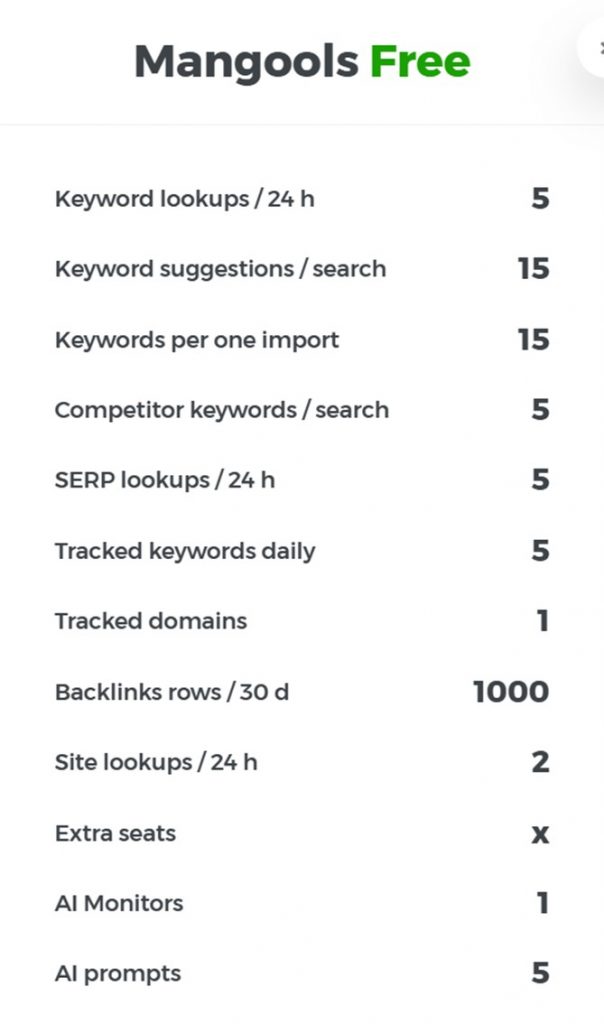
Overall, Mangool’s KWFinder is a good budget-friendly option when KeywordTool.io is no longer sufficient and more expensive tools feel overkill. If you’re on the fence, KWFinder’s free trial makes it easy to test the tool (no credit card required).
Conclusion
Especially if your team already has an analysis workflow and you just need a quick and efficient way to expand topic ideas, Keyword Tool is definitely a great discovery engine. However, if you need to evaluate opportunity, competition, and intent, you may want to explore keyword tool alternatives. Your final choice depends on what best aligns with your current goals and workflow.