
Most users start with Keywords Everywhere for search volume data, but the tool goes well beyond that. With multiple widgets, add-ons, and built-in tools, it can cover a big chunk of your SEO workflow.
From keyword discovery and competitor analysis to on-page checks, technical diagnostics, and content planning features, there’s a lot built in. In fact, some of its deeper features don’t always get the spotlight.
Below is a practical overview designed to help you explore the full feature set and make the most of everything it offers.
Keyword Research Features
The main appeal of Keywords Everywhere is convenience. Instead of bouncing between dashboards, it brings keyword discovery and validation into the same places you already research, which makes the whole workflow faster and easier to repeat.
● In-line keyword metrics in the SERPS
You search like you normally do, and Keywords Everywhere efficiently layers in the metrics and keyword ideas as you go. That means you can spot new targets, sanity-check volume, and collect long-tail terms in real time, without bouncing between tools or breaking your flow.
1. Main Query’s Keyword Level Data
Straight away, you can check the main query’s metrics under the search box, pulled from Google Keyword Planner.

And it’s not just for Google searches either. Keywords Everywhere can surface similar keyword-level data across other platforms too, like YouTube, Amazon, eBay, Etsy, and more, so you can validate demand wherever you search.
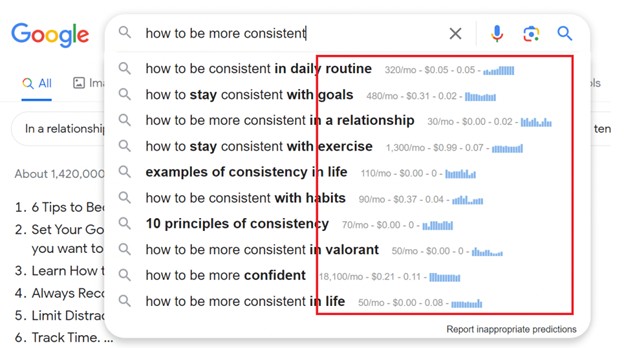
2. Query Suggestions’ Keyword Data
Keywords Everywhere also shows keyword-level data directly within the autosuggest section of Google and other major platforms.


3. Search Results SEO Data
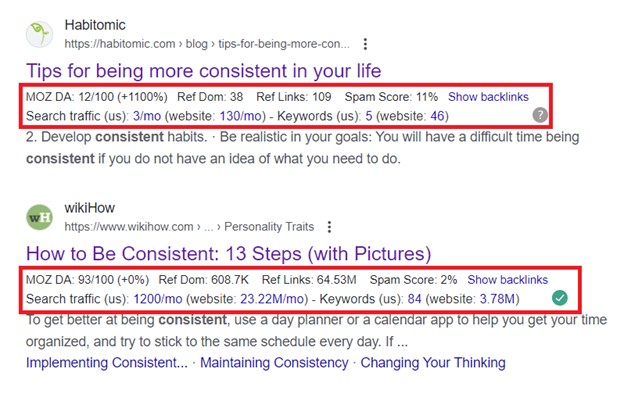
As you browse Google SERPs, Keywords Everywhere also shows Mozbar-style metrics as well as quick access to ranking pages’ backlinks, search traffic, organic keywords, and more. Just hover over the blue links to pull up the data instantly.
● Other Widgets in the SERPS
Beyond the in-line metrics, Keywords Everywhere adds a full set of SERP widgets that help you generate more keyword ideas, check difficulty, view trend charts, and even run quick SEO reports on ranking pages, all without leaving the results page.
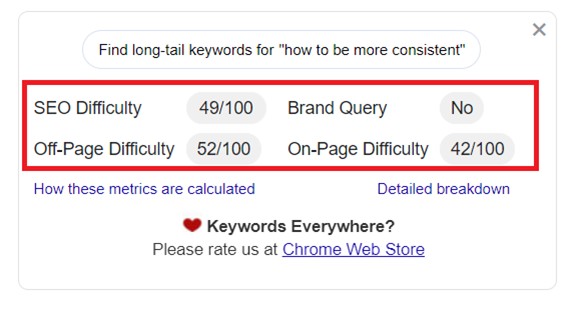
1. Main Keyword’s SEO Difficulty
In the top widgets, you’ll see the keyword’s SEO difficulty upfront, broken down into on-page and off-page factors.
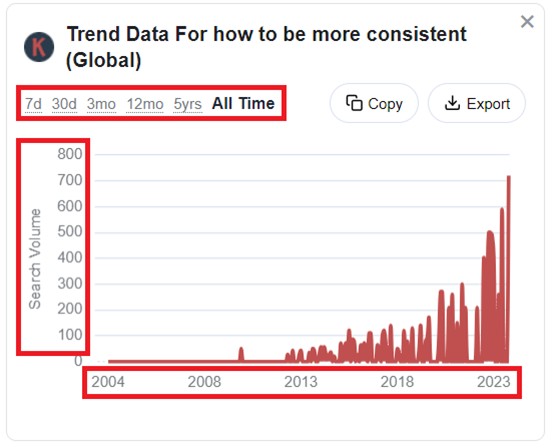
2. Search Volume Trend
It also shows a search volume trend chart, so you can compare recent spikes with longer-term performance, including all-time history back to 2004.
3. Related Keywords
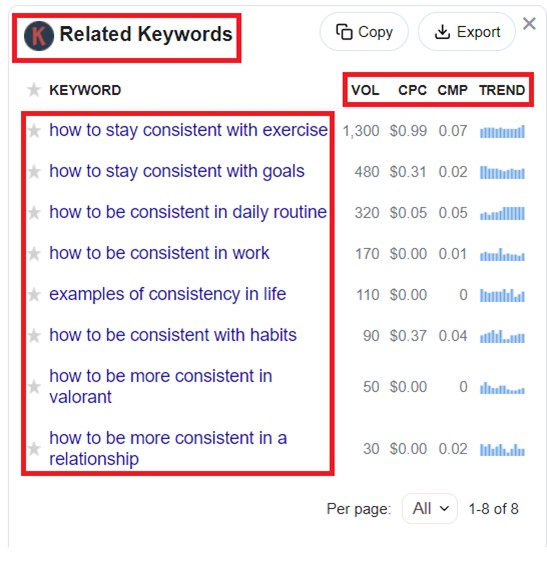
This widget surfaces closely related keyword ideas and lets you compare key metrics like search volume and CPC at a glance.
You’ll also notice the star icon beside each term, which lets you save keywords to your Favorites so you can keep your research organized as you go.
4. People Also Search For Widget
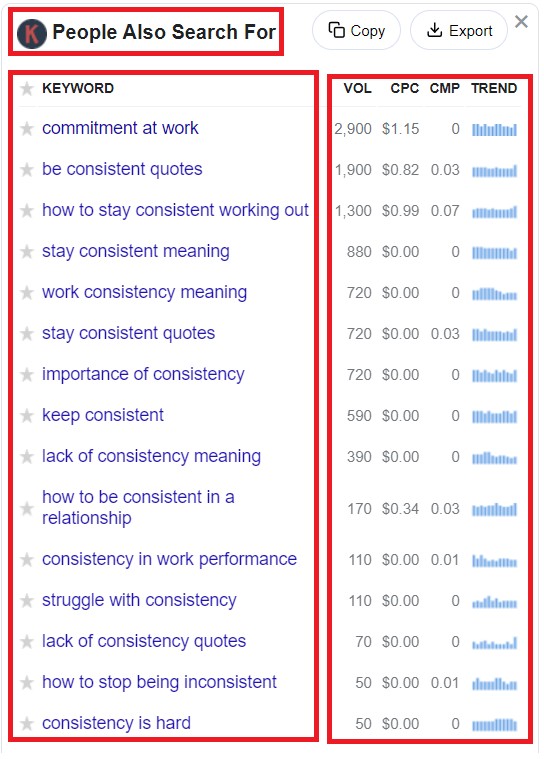
This widget is another useful place to find related keyword opportunities and pick up extra context you can incorporate into your content.
5. Long-tail Keywords
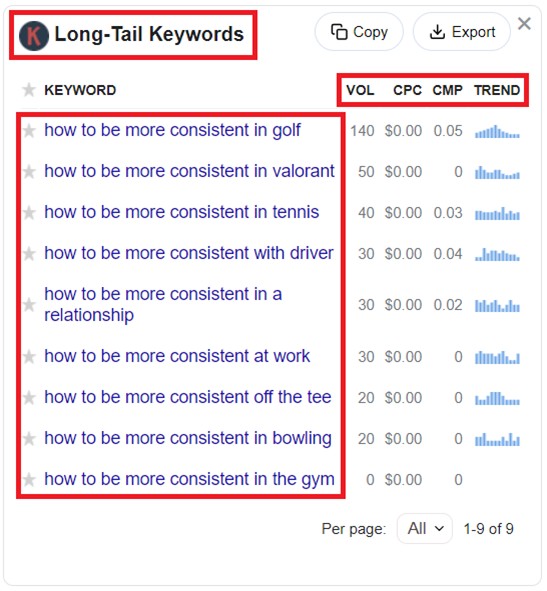
Here you’ll find longer, more specific keyword variations. They usually have lower search volume, but they can also be easier to compete for. Targeting long-tail terms is a common strategy for quicker wins and steady authority growth.
6. Run SEO Report
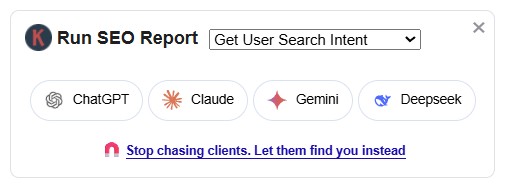
If you do a lot of content planning, this widget saves you time. Run SEO Report lets you generate AI SEO Reports straight from the SERP to analyze intent, content type trends, and competitiveness without doing everything manually. You can also use it for clustering keywords, reviewing SERP title patterns, estimating rankability requirements, and generating anchor text ideas for topic clusters.
7. Multi-platform keyword intelligence
Worth emphasizing, Keywords Everywhere gives you multi-platform keyword intel across YouTube, Amazon, eBay, Etsy, and 20+ other platforms, which is a real time-saver if you research across multiple channels. Instead of doing the same keyword checks in separate tools, you can validate demand and find related ideas in-context, right where you’re searching. This also helps you catch intent differences early, since the same topic can behave very differently depending on the platform.
It also fills in a big gap by showing search volume in places that usually leave you hanging, including Google Search Console, Google Keyword Planner, and Google Trends. So instead of piecing things together manually, you get a quicker, clearer sense of demand right where you’re already working.
8. SEO Minion’s One Click PAA Question Export from Google SERPs
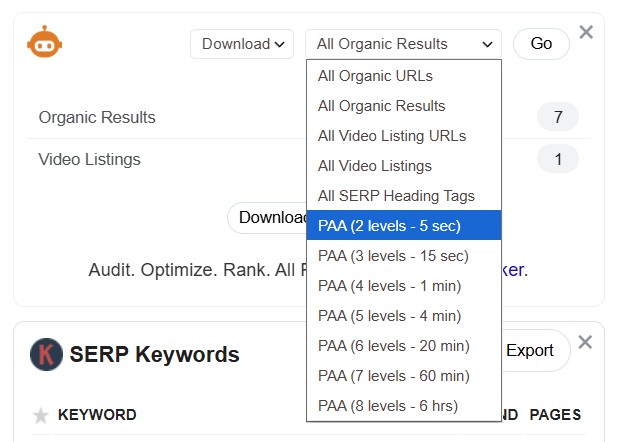
SEO Minion comes bundled with the Keywords Everywhere toolkit, and one of its useful features is the PAA Question Export from Google SERPs. It’s great for quickly turning “People Also Ask” questions into usable content ideas. With one click, you can download PAA questions from Google, and you can even expand up to 8 levels deep to pull more related questions as long-tail targets or supporting sections on a main page.
Beyond keyword research, it also helps with lightweight SEO checks, including quick on-page reviews, basic technical spot-checks like broken links and redirects, SERP feature extraction, and structured data validation, which makes it a handy “utility” tool to keep in your workflow.
Also Read: How to Use SEO Minion
9. Long-tail keyword generation via autosuggest via Keyword Planner
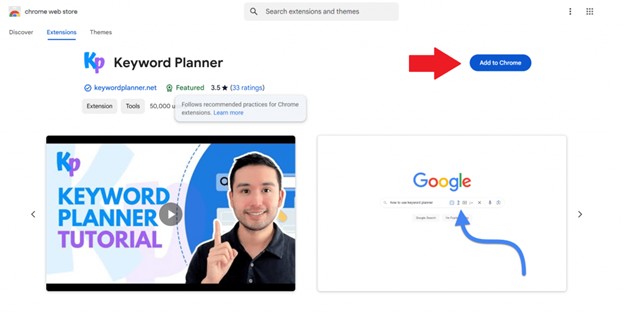
If you like using autocomplete for keyword research, Keyword Planner makes the process a lot smoother. It plugs into Google, YouTube, Amazon, eBay, and Etsy and surfaces autosuggest-based keyword lists next to the search bar. It also sorts them into long-tail, question, comparison, and preposition keywords, so you can grab ideas quickly and stay in one workflow instead of bouncing between tools.
Learn More: How to Use Keyword Planner
● Keyword Keg
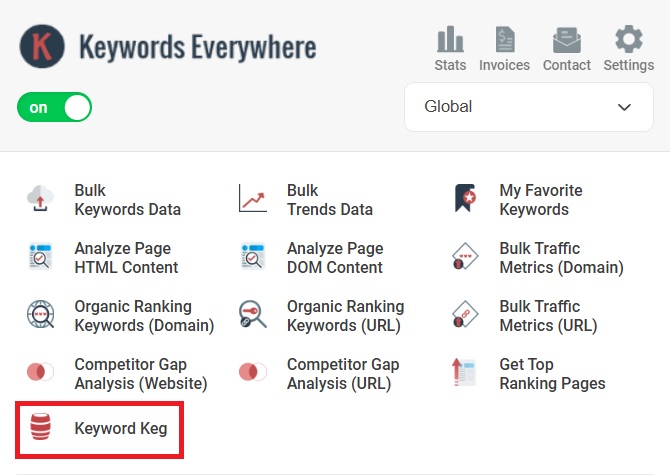
Keyword Keg expands Keywords Everywhere with a more dedicated keyword discovery tool. It can pull in thousands of keyword ideas from multiple autosuggest sources, then help you filter, categorize, and export them for SEO or PPC work. It’s a useful upgrade when you need more than the usual on-page keyword overlays and want a faster way to build larger keyword lists. Access is currently included on Gold and higher plans.
Competitive Research Features
Keywords Everywhere is not just for keyword ideas. It also includes a set of competitive research features that help you quickly size up what is already ranking, spot gaps, and pull useful competitor data without needing a full SEO suite.
● Search Results SEO Data (Moz metrics in Google SERPs)
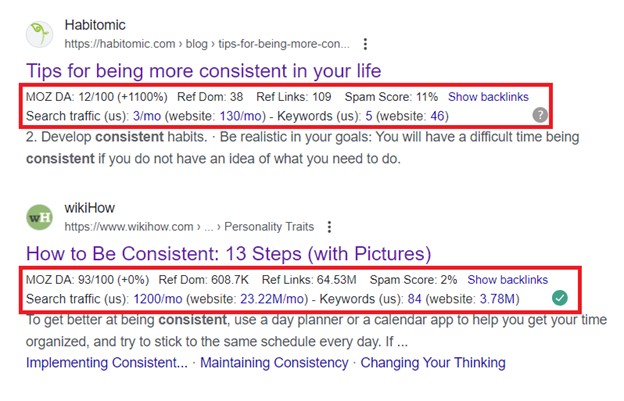
As you browse Google SERPs, Keywords Everywhere adds Moz-style metrics right next to each result, so you can quickly gauge how “strong” the ranking pages are even without opening them.
● Backlinks for ranking pages (quick access)
You can click into backlink data for any ranking URL straight from the SERP, which makes it easier to gauge how “link-heavy” the competition is. When most top results are backed by strong link profiles, it’s usually a sign you’ll need more authority or link equity to break into the top spots.

Search traffic for ranking pages (quick access)
You can view search traffic estimates for ranking URLs right from the SERP, which helps you gauge how much upside a keyword actually has. Low traffic across the top results can be a red flag that the keyword is too niche, low-click, or mostly answered on the SERP.
Organic keywords for ranking pages (quick access)
You can also see the organic keywords a ranking page shows up for, which is great for finding secondary terms you might want to include in your content. Just click the blue links, and you’ll get redirected to the full breakdown of results.
● Competitor Gap Analysis
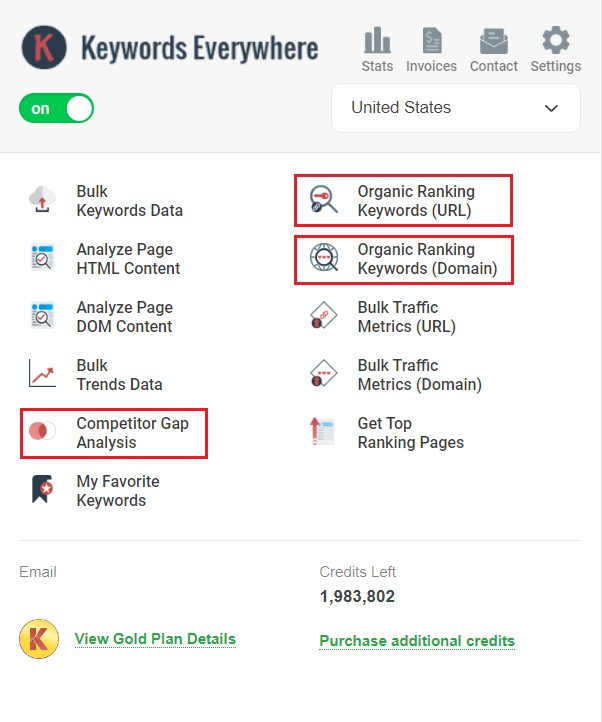
This feature allows you to compare your site against up to five competitors to find keywords they rank for that you don’t. If you already know who you compete with, this feature helps you build a clean list of keywords and topics you’re missing.
● Bulk Traffic Metrics (URL and Domain)
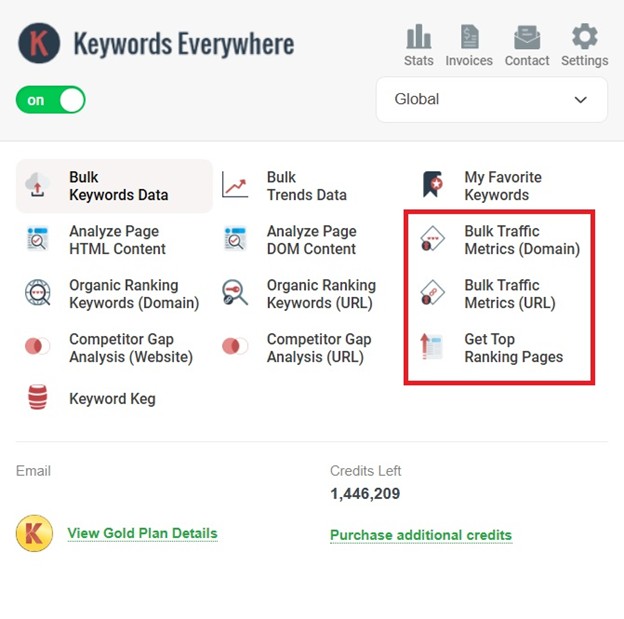
The Bulk Traffic Metrics tool removes the manual work of checking pages one by one. Instead of bouncing between spreadsheets and SEO tools, you can paste up to 1,000 URLs or domains and get a quick snapshot of their performance in one view.
You can use it to:
- Audit competitors at scale: Identify a competitor’s top-performing pages at a glance, along with pages that may be underperforming.
- Qualify Lead Lists: If you are doing outreach or guest posting, this helps you instantly filter out low-traffic sites so you can prioritize higher-value prospects.
- Validate keyword lists: Check whether the domains ranking for your target terms actually attract meaningful traffic, so you do not waste time on low-value opportunities.
- Streamline content audits: Bulk-review your own URLs to spot which pages or sections are worth updating, consolidating, or reworking first.
By putting all of this into a single view, Keywords Everywhere turns what could be hours of repetitive research into a much faster, more decision-friendly process.
● Get Top Ranking Pages
Unlike Bulk Traffic Metrics, where you need to paste in a list of URLs or domains, Get Top Ranking Pages works directly from the page you’re already visiting. Just open any page on a site, click Get Top Ranking Pages, and the tool will pull up that domain’s top organic pages for you.
This makes it a fast way to see which pages on a competitor’s site are doing the most SEO heavy lifting. Instead of guessing what content is working, you get a ranked list of top-performing URLs along with estimated monthly traffic and the number of ranking keywords.
By using this report, you can:
- Identify Proven Content Pillars: Quickly see which topics and page types are driving the most value for competitors, so you can model your own strategy after what is already performing well.
- Analyze Traffic Distribution: View estimated monthly organic traffic and the total number of ranking keywords for each top URL to understand the “reach” of individual pages.
- Uncover Market Opportunities: By comparing a competitor’s top pages against your own content, you can spot high-traffic subjects you haven’t targeted yet.
- Streamline Site Audits: Efficiently assess the organic strength of any website while browsing, making it easy to evaluate rivals or potential partners without leaving your workflow.
Use this feature to identify high-performing pages and prioritize your content strategy based on what is already winning for your competitors.
● Organic Ranking Keywords (URL)
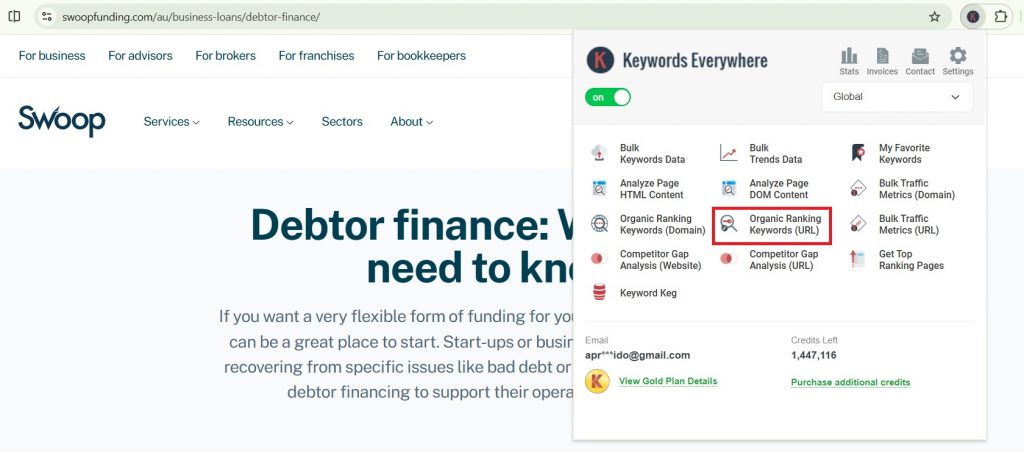
Open any page, click Organic Ranking Keywords (URL), and you’ll instantly see the keywords that exact URL ranks for. It’s a quick way to uncover the secondary terms and topic angles driving its traffic.
● Backlink competitor checks (page-level + domain-level)
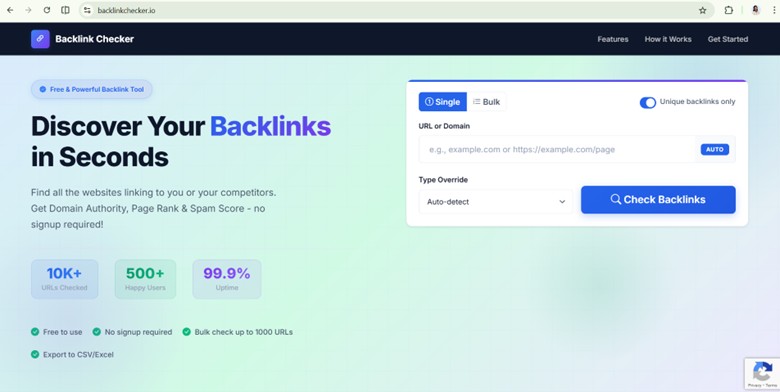
Powered by Keywords Everywhere, BacklinkChecker.io is one of the newer tools in the broader KE ecosystem, and it’s completely free to use even if you’re not a Keywords Everywhere customer. It supports page-level and domain-level competitor backlink checks, which helps with quick benchmarking, competitor audits, and identifying link opportunities without subscribing to a high-cost full backlink platform.
Learn More: Best Free Backlink Checker (Page-Level + Bulk Reports)
● Bulk competitive research (up to 1,000 URLs/domains)
BacklinkChecker.io also supports bulk competitive research, letting you analyze up to 1,000 URLs or domains in one run. This is especially useful when you want to compare multiple competitor pages at once, audit an entire content cluster, or quickly identify which URLs have the strongest backlink support, without running reports one by one.
On-page SEO Features
Beyond keyword research and competitive insights, Keywords Everywhere also includes on-page SEO features that help you quickly review what’s happening on a page and make practical optimization improvements without relying on a heavy audit tool.
Here are all the on-page SEO tools you get:
● SEO Minion’s On-Page SEO Analyzer
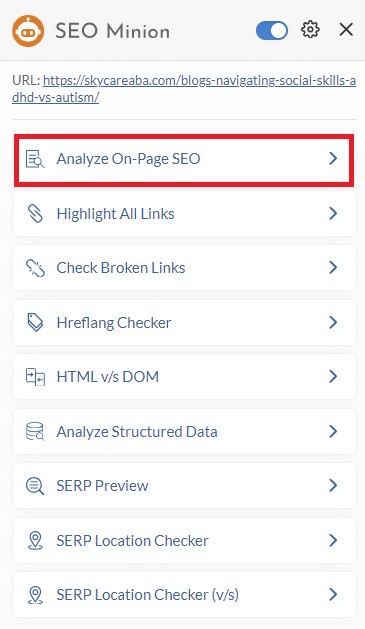
SEO Minion includes an Analyze On-Page SEO feature that helps you quickly review the key on-page elements of any page without doing a manual check. It’s useful for spotting common issues like missing or poorly optimized titles and headings, weak metadata, and other page-level signals that can affect relevance and click-through rate.
If you’re reviewing a competitor page or auditing your own content before updating it, this is a quick way to confirm whether the on-page fundamentals are in place.
● SEO Checker’s On-page SEO Audit
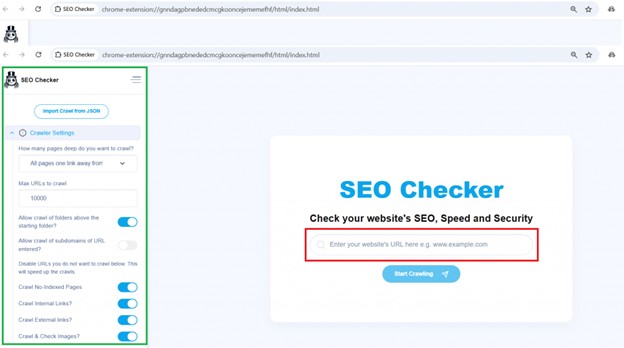
SEO Checker is another extension in the Keywords Everywhere toolkit that’s useful for quick on-page audits. It checks titles, meta descriptions, and H1s, and also reviews URL structure, thin or duplicate content signals, image meta elements, and even mobile content readiness and other technical SEO elements.
Also Read: How to Use SEO Checker
● SERP Preview Tool
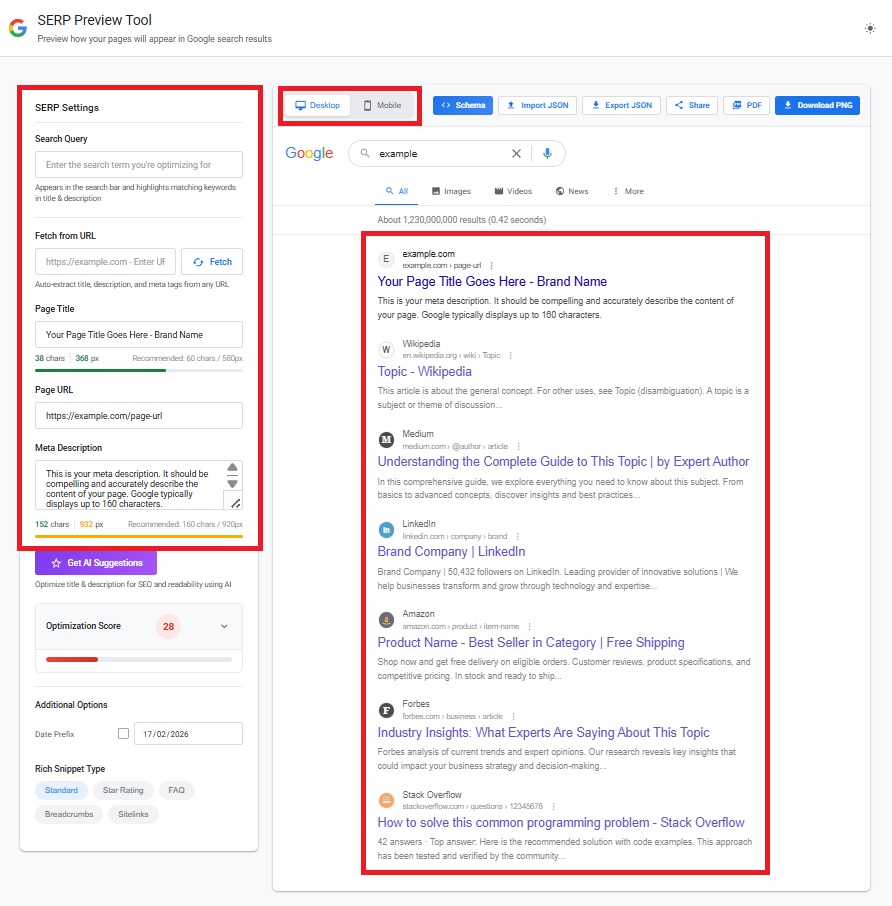
SERPPreviewTool.com fits nicely under Keywords Everywhere on-page tools. It’s free and doesn’t require an account, and it lets you simulate your SERP snippet on desktop and mobile so you can avoid truncation and improve CTR. Beyond the basics, it can pull metadata from a live URL, highlight keywords, offer AI improvements, and generate schema previews with export and sharing features.
Read More: Best Free Google SERP Preview Tool: Optimize Titles & Descriptions

● Keyword Clustering Tool
If you’re building clusters at scale, keywordclustering.net is built for that. Powered by Keywords Everywhere, it groups keywords by intent while attaching KE metrics. It also nudges the work into on-page territory by recommending page types and generating title and meta description drafts, which helps keep targeting clean and reduces cannibalization.
Also Read: Best Keyword Clustering Tool in 2026 (Low-Cost Option)
Technical SEO Features
In addition to on-page and competitive features, Keywords Everywhere includes technical SEO checks designed for fast site diagnostics. These help you surface common issues that can impact crawling, performance, and overall site quality.
The following are the core technical SEO checks available:
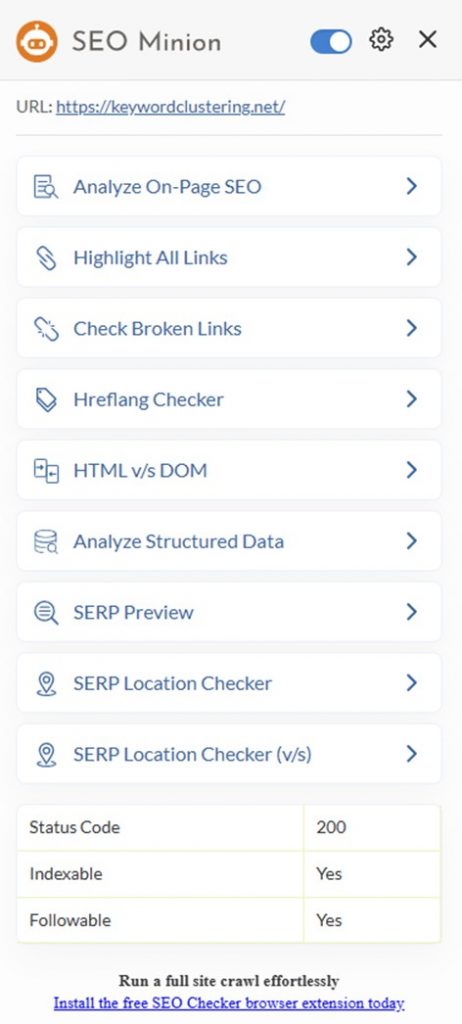
Technical SEO Checks in SEO Minion
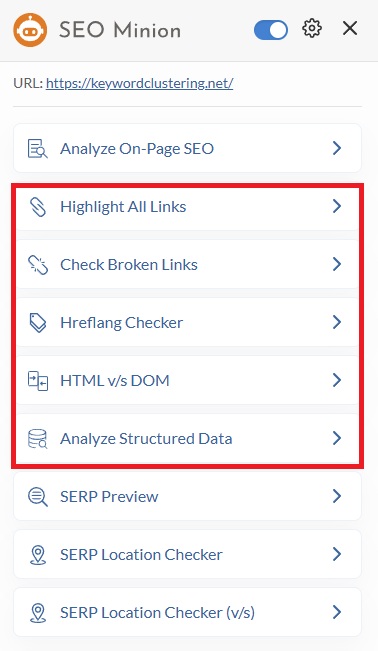
SEO Minion gets a lot of love as an all-in-one browser helper for technical SEO. It’s very straightforward and time-saving for routine checks like broken links, hreflang validation, HTML vs DOM, and structured data, without the overhead of a big audit platform.
● Highlight All Links (internal & external)
This feature visually highlights all links on a page and separates internal vs external links, making it easier to spot linking patterns, nofollow usage, and potential link issues at a glance.
● Check Broken Links
SEO Minion can scan a page for broken links so you can catch 404s and dead outbound/internal links that hurt UX and waste crawl budget.
● Check Hreflang Tag Validity
If you run multilingual or multi-region sites, this helps validate hreflang tags and flag common implementation issues that can cause wrong-language or wrong-country indexing.
● Check HTML vs DOM
This compares what’s in the raw HTML versus what’s rendered in the DOM, which is useful for diagnosing JavaScript rendering issues where important content or links only appear after scripts run.
● Analyze Structured Data
This checks structured data on a page and helps you verify whether schema markup is present and valid, which supports eligibility for rich results and reduces markup errors.
Technical SEO Audit via SEO Checker
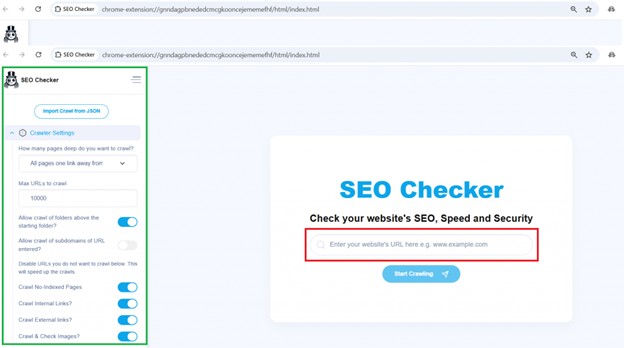
SEO Checker is another tool in the Keywords Everywhere toolkit that helps with technical SEO maintenance. It highlights common crawl, index, and site performance issues, making it easier to troubleshoot issues before they start affecting rankings.
● Speed Audit
SEO Checker also helps you pinpoint what’s driving slow load times by calling out resource-level issues, including heavy scripts, large images, and inefficient CSS. It also reviews whether your assets are minified properly and flags areas where trimming file size could improve speed.
● Security Audit
The tool verifies whether a site is running on a secure connection and flags issues that can weaken trust signals and basic security hygiene.
It also scans for common security-related misconfigurations, including missing protections for content sniffing, iframe restrictions, and clickjacking prevention. These checks help you spot gaps that can expose a site to risk and potentially affect overall site quality.
● Crawl Controls
For more control, SEO Checker lets you fine-tune its crawler settings. You can choose how many levels deep to crawl, cap the total URLs scanned, and filter out pages you do not want included, which helps keep audits faster and more targeted.
Also Read: Technical SEO Explained: A Beginner’s Guide to Crawl and Index
Other SEO Features
Keywords Everywhere also includes additional SEO utilities outside of keyword research and primary SEO tasks. These smaller tools can still be useful for day-to-day tasks and help reduce the need for extra add-ons in your workflow.
● SEO Minion’s SERP Preview
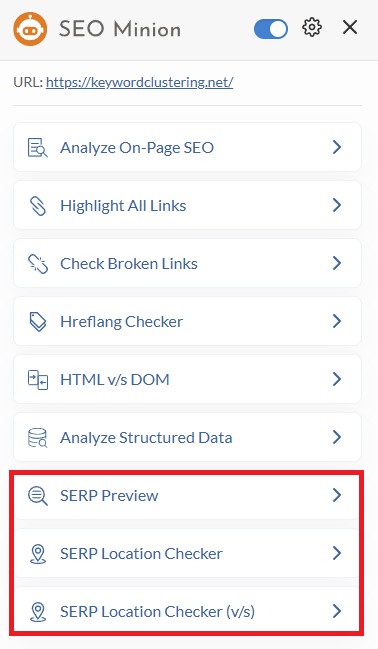
SEO Minion’s SERP preview tool is a quick way to sanity-check how your title and meta description will look in Google before you publish. It helps you catch common issues like truncation, awkward phrasing, or titles that bury the main keyword too late. It’s also useful when you’re testing small variations for CTR, since you can see how different wording, punctuation, or length changes the overall “feel” of the snippet at a glance.
● SEO Minion’s Google Search Location Simulator
Its Google Search Location Simulator gives you a practical way to test location-based SERP variation. By simulating searches from different countries or areas, you can check whether Google is reshuffling results based on geography, verify which pages are surfacing in each market, and see how consistent your search presence really is across the locations you care about.
● Keyword Everywhere’s Fan-out Query Tool
In GEO workflows, fan-out queries help you expand beyond a single keyword by identifying the natural “next questions” users ask. Covering them can make pages more useful, more comprehensive, and more citation-friendly.
Also Read: How to Find and Optimize for Fan-Out Queries (AI SEO)
● AI Prompt Templates
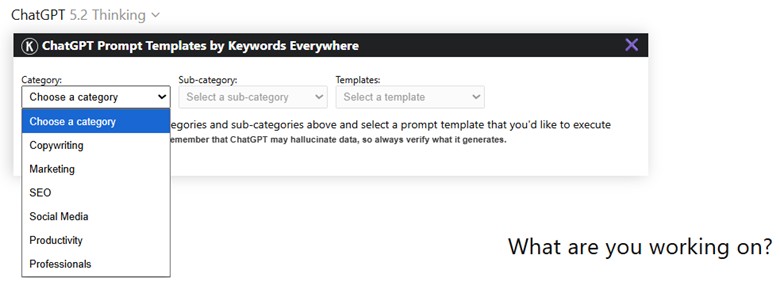
Keywords Everywhere also includes a lightweight AI Prompt Templates panel that lets you run pre-built ChatGPT prompts without writing them from scratch. You pick a Category, narrow it down with a Sub-category, then choose a Template, and it populates a structured prompt you can execute right away (the dropdown-style workflow makes it fast to repeat the same tasks across many pages).
● Country or Region Selector
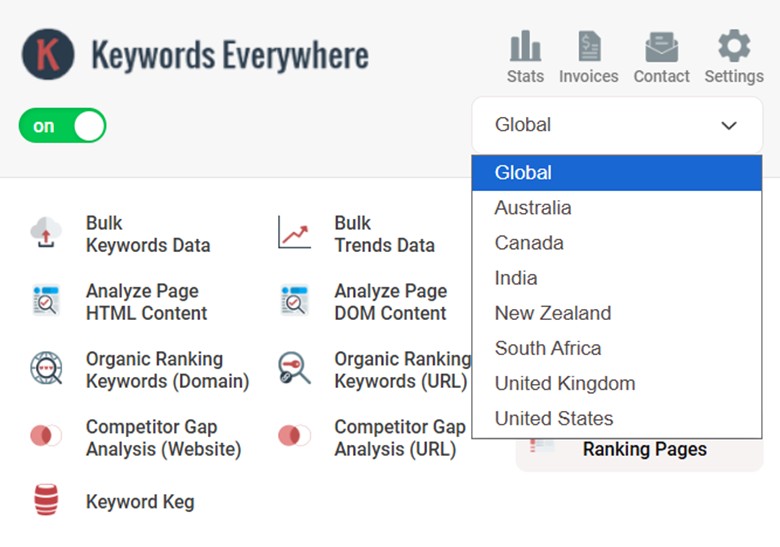
Keywords Everywhere also includes a country or region selector. This lets you view keyword data at a worldwide level or narrow it down to a specific country. It’s a helpful feature when you want cleaner, more relevant keyword metrics for the market you’re targeting.
For example, a keyword may show healthy search volume globally, but once you switch to a specific region, the demand may be much lower or much stronger. That makes this dropdown useful for localized content planning, geo-targeted SEO, and evaluating whether a keyword deserves its own page in a given market.
Takeaway
Keywords Everywhere goes way beyond being a keyword overlay. Once you factor in the competitive features, on-page tools, and technical checks, it becomes a well-rounded SEO toolkit.
The ecosystem is what makes it click, since tools like SEO Minion, SEO Checker, Keyword Planner, BacklinkChecker.io, SERPPreviewTool.com, and KeywordClustering.net cover a lot of the gaps you’d normally need separate subscriptions for. If you want a lean setup that still supports real SEO work from research to execution, this is a solid stack to build on.