
Internal linking is regrettably one of the most overlooked SEO strategies. Marketers and SEOs sometimes get too caught up in “glitzy” new SEO tricks, algorithm updates, and external backlink campaigns that they forget to shore up the basics on their own site.
Also, backlinks generally have more “perceived value”, so people end up chasing them nonstop while overlooking the easy wins sitting right inside their own pages.
If done right, your internal linking strategy can be the unsung hero of your SEO campaign. Here, let’s talk about how simple, strategic internal links can make a surprisingly big impact on your overall SEO.
What are internal links?
An internal link is any hyperlink that takes users from one page of your website to another page on your website. On a practical level, webmasters add internal links to enhance user experience and navigation. Users can easily move around the website with proper, thoughtfully placed internal links, helping both users and crawlers jump from one helpful page to another. From an SEO standpoint, internal links can be strategically used to guide search engines through your website. Internal links provide context and hierarchy between relevant pages, making everything easier to interpret for both search engines and even AI models.
Internal links vs. external links
While internal links keep users within your website, external links point them outward, usually to strengthen arguments, cite reputable sources, or just give users more context overall. Each serves its own purpose, but both help reinforce relevance and trustworthiness across the board.
Just how important is internal linking for SEO?
Whenever new pages are published on the internet, Google is not automatically alerted or flagged. It’s actively using its own software, a.k.a bots or crawlers, to perpetually find new pages to add to its gigantic Search Index.
Links serve as pathways for these search engine crawlers, making them foundational for speeding up discovery, indexing, and eventually ranking.
Thus, you need to make sure that you’re internally linking to every single page on your website that you want to index and rank. Otherwise, these pages will be “orphaned”, and orphan pages are very unlikely to get found by search engines. Even if they’re included in your site’s XML sitemap, it doesn’t guarantee high ranking without contextual links that help search engines understand what the pages are about.
Search engines heavily rely on link following, and the better they can navigate your website through proper internal links, the more chances of impressions, clicks, and organic traffic.
If you want a page to seem more important or trustworthy in the eyes of Google, reinforce it with more internal links to pass more link equity. Internal linking is one of those neat SEO strategies that you have full control over as a site owner. Unlike link building, which is more time-consuming and outreach-heavy, internal linking allows you to strengthen your website on your own terms. You still need to support off-page efforts, but if you want quick wins and a stronger competitive edge, the best time to tighten up your internal linking strategy is now.
Just make sure to avoid adding internal links for the sake of it. Everything has to be done intentionally yet naturally. Just adding random anchors and link drops will only ruin the user experience and confuse search engines. In the next few sections, we’ll walk through internal link best practices that help you stay strategic at every step.
Types of internal links
There are two main types of internal links: navigational and contextual. Let’s differentiate the two:



1. Navigational links
These are the links typically found in menus, headers, footers, and sidebars. They make it easy for visitors to find information, understand your site’s structure, and navigate from one section to another. Besides forming a clear path for users, they also help search engines efficiently interpret the hierarchy and organization of your website.
Pages linked from the main navigation, such as the Product/Service pages, Location pages, Resources, and Contact page, are generally considered by search engines to be more important than pages that are several clicks deep within the site structure or unlinked entirely.
Thus, you should make sure to structure your top-level navigation well and prioritize the pages you actually want users (and Google) to land on.
Besides the top menu, navigational links can also be found on the sidebars, category pages, and the footer section. The following types of links can also be considered navigational:
- Breadcrumb links
- Sitemap links (HTML)
- Pagination links
- Tag and category archive links
- Faceted navigation links
- Image navigation links
Whatever guides users and crawlers in the right direction, it’s helping you more than you think, so make sure to give it the attention it deserves.
2. Contextual links
A contextual link is also called an editorial or in-line link. It’s a hyperlink placed directly within a webpage’s main text to help connect two relevant pieces of content on your own site. Descriptive anchor texts are hyperlinked and should be naturally and strategically used to help Google understand what the destination page is about.
For example, here’s a section from an article we published titled Local SEO: The Ultimate Guide to Ranking in 2025 (also an internal link, btw) :
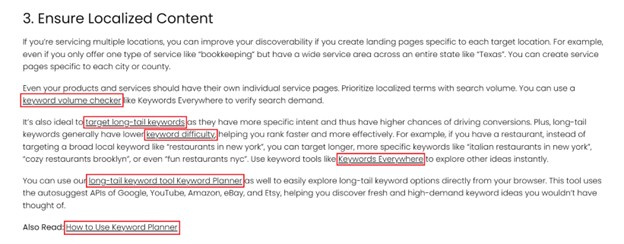
The section above has a few internal links pointing to other relevant pages related to the corresponding anchor texts. This allows users to do further reading if they want, giving supplemental information that can not only add value to users but also very much support SEO as well.
Again, links are how search engine crawlers discover new pages to index and rank. The more you use contextual links throughout your website, the better your chances of getting more pages discovered. Plus, dwell time is a good indicator of content quality, and having high-quality internal links can help users stay for longer, moving to more pages and information instead of bouncing.
In the end, you need to think about both structure and substance. When they work in sync, your SEO efforts will go much further.
What happens if you don’t use internal links?
It’s easy for webmasters, especially large enterprise websites with thousands of pages, to slack off on doing internal linking consistently and thoroughly. After all, doing it right does require manual effort and can be resource-intensive and time-consuming. Teams then end up deprioritizing it altogether, letting pages slip through the cracks. Surveys even suggest that only a small percentage of SEOs actively prioritize internal linking, making it a common “silent killer” of organic performance.
This recurring theme then leads to a lot of orphaned pages that search engines can’t find and index. Even with sitemaps, search engines would still be unable to map out everything without a robust internal linking structure.
Bottom line, SEOs are failing to take advantage of the fact that both external and internal links pass link value on. Internal links may not be as equity-dense as external links, but they hold link value nevertheless. Google regards pages with lots of valuable links as more important, increasing their chances of better ranking and more visibility.
If you want more ways for search engines to reach your content, you need to stop putting your internal linking strategy on the back burner. Start making your internal links work harder for you and start today.
Internal Linking Strategy for SEO
Internal linking isn’t necessarily the sexiest SEO strategy, but it’s definitely one of the easiest SEO wins you can pull off. You can set the groundwork with the following internal linking techniques:
1. Map site architecture
This is the foundational step in your internal linking strategy. A properly mapped site architecture ensures a logical hierarchy, preventing pages from getting lost or buried. The goal is to make the structure shallow– meaning, users can reach any specific page with just a few clicks instead of getting buried deep within numerous levels of subpages. This not only helps users quickly and easily find the information they need. It also helps search engines seamlessly work out the relationship between various pages.
2. Decide what your most important content is
You want users to easily find your best or most profitable content. This could be your service page, pillar page or cornerstone content, or high-converting product pages. The more internal or external links a page has, the better its link value, so you ought to identify which pages on your site you want to reinforce and make sure you’re funneling relevant and high-quality links into those core pages. Since link equity can be passed on, it’s best to create internal links from pages with more backlinks and page authority, such as your home page and popular blog pages. You can use a backlink checker to identify what those pages are.
3. Add contextual links
The term “topical authority” is thrown around a lot among SEOs, and one of the easiest ways to achieve that is having a solid internal linking structure.
Google doesn’t really use the term “topical authority” explicitly as a direct, technical ranking factor, but done right, it can definitely supercharge search engine rankings. After all, adding more contextual links carries more weight, making your entire topic coverage more cohesive and authoritative.
In some cases, topical authority even beats sheer domain size. Newer players specializing in a particular subject matter can end up outranking larger competitors with higher domain authority, but only covering the topic superficially.
The key is natural, bidirectional linking, which is a natural byproduct of creating topic clusters, which we’ll talk about in the next section.
4. Organize content by topic clusters
Clusters link to pillar, and pillar links to all clusters. For instance, if your pillar page (your broadest, most important topic) is about Keyword Research: The Ultimate Guide, you’d naturally mention lots of subtopics you can further write individual articles about, like keyword placement, keyword research tools, and types of search intent.
Your next move then as you write and publish all these topics is to make sure all sub-pages are linking to the pillar page, and the pillar page is also linking to the cluster or support pages. This tight, cross-linked structure is a definite growth engine of topical authority and search dominance. Users will take your website as a trusted and go-to resource, boosting brand awareness and credibility. Search engines will also understand the breadth of your content and quickly figure out how all ideas connect.
No doubt, developing topic clusters is one of the best SEO practices to really expand reach across competitive SERPs.
5. Link hierarchical pages
Hierarchical pages are a part of the traditional website architecture. A classic model goes like this: Homepage -> Category -> Subcategory -> Specific Page, usually reflected directly in the URL path (e.g., site.com/category/subcategory/page).
In the signature example above, the Homepage is the ultimate parent of all the other pages. The subsequent pages are the child pages. The Category page is also the parent page of the subcategory page and the pages after that. To make this hierarchy extra robust, you need to create two-way links between parent and child pages, providing a much clearer pathway for both users and search engines and further reinforcing the site’s navigation as a whole. This means linking both up and down through contextual links in Body Content, using Breadcrumb Navigation, or adding “See Also” or “Related” sections. This really makes your site’s logic extra clear-cut in the eyes of crawlers, not to mention making it easier for actual users to move around your site.
6. Use navigational links to reinforce core pages
Navigational links include buttons, menus, and other mechanisms that move users between pages. They don’t necessarily have a top-down structure, but they still influence how users and search engines experience your site. If your pillar page is super high-converting or just foundational in your branding and business strategy, consider giving it a prime spot in your site’s main menu. For example, this website straight-up includes a broad, super relevant cornerstone content in its top navigation:
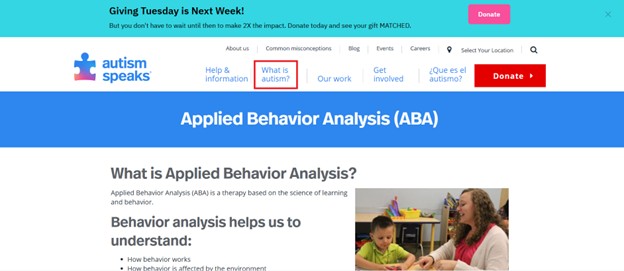
This makes your pillar page even more authoritative in terms of both link equity and user value. If you have lots of important pages you want to highlight, you can create a thoughtfully organized navigation menu for your key resources like what Backlinko did:
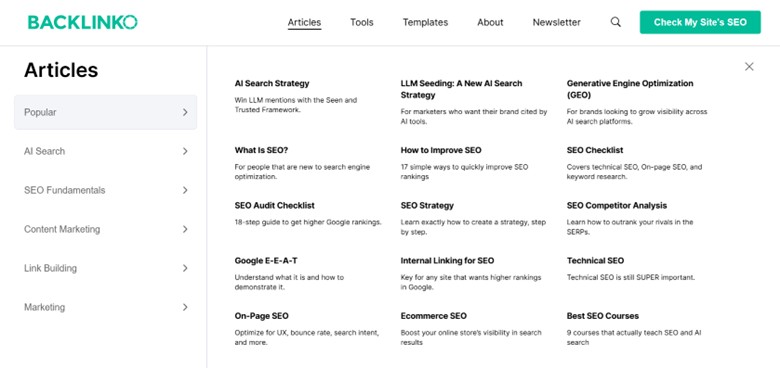
Doing this not only makes it super easy for users to move around your website and access your most important and relevant content. Linking straight from or close to the home page can also make your pages get discovered, indexed, and ranked faster since Google bots would visit your most authoritative pages more frequently, and that mainly includes your home page.
7. Use the right anchor texts
This might be a no-brainer but is always worth emphasizing. Refrain from using skin-deep anchors like “click here” or “read more”. Not using a more descriptive anchor text is a wasted opportunity for letting Google understand your pages better.
The key is to make sure that the anchor text you use accurately describes the search intent of the target page. That’s why it’s not recommended to use automation tools that tend to go blind in matching anchors to intent. Automation tools also look spammy, ignore user experience, and can’t apply the same strategic and intentional nuance as manual linking. It takes an extra minute, but manually choosing anchors pays off with clearer intent and better user experience.
Another common mistake that you should definitely avoid is anchor text inconsistencies. For instance, if you’re using anchor texts like keyword research tool and featured snippet to point to an article about SEO Strategy: The Definitive Guide, it won’t really add up. The search intents all have to match up. If not, it only ends up confusing both readers and search engines.
Also, you should avoid using the same anchor text to point to different pages. Remember, the goal is to reinforce signals and help crawlers really understand the context of certain pages. If you use an anchor text “search engine optimization” to point to different adjacent topics, you’re only diluting the SEO value for these pages. An effective internal linking strategy requires intentionality. That’s why you should strive to dedicate only one page to a particular search intent instead of writing about the same topic multiple times. This way, you can funnel internal links more effectively and build a single, authoritative page that captures all the search equity related to that intent.
8. Avoid overoptimizing
As a rule of thumb, you should avoid any attempt to manipulate rankings at the expense of quality and user experience. For example, you may be tempted to use the anchor text “search engine optimization” again and again to link to an article about “What Is SEO?”, but Google views this excessive, non-varied use of exact-match keywords as an attempt to “game the system”, especially in link building campaigns. The Penguin update was designed to detect and penalize any unnatural patterns. Besides, Google is so sophisticated that it can understand context, relevance, and page relationships just fine. You don’t have to bend sentences just to squeeze in exact-match anchors.
If you want to plot your internal linking strategy down to a T, you can use a handy Keywords Everywhere feature that automatically gives you different anchor texts to use for a specific search intent.
If you have a Keywords Everywhere account, just enter a query on Google, then head to the “Run SEO Report” widget. Next, select “Suggest Anchor Texts” from the dropdown and click an LLM of your choice to run the report.
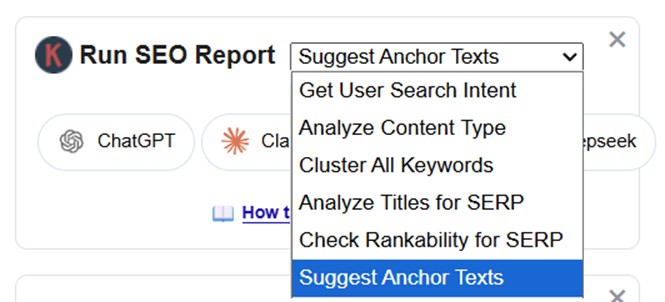
This feature automatically fires the exact prompt that gives you a list of good anchor texts that 100% match the target search intent.
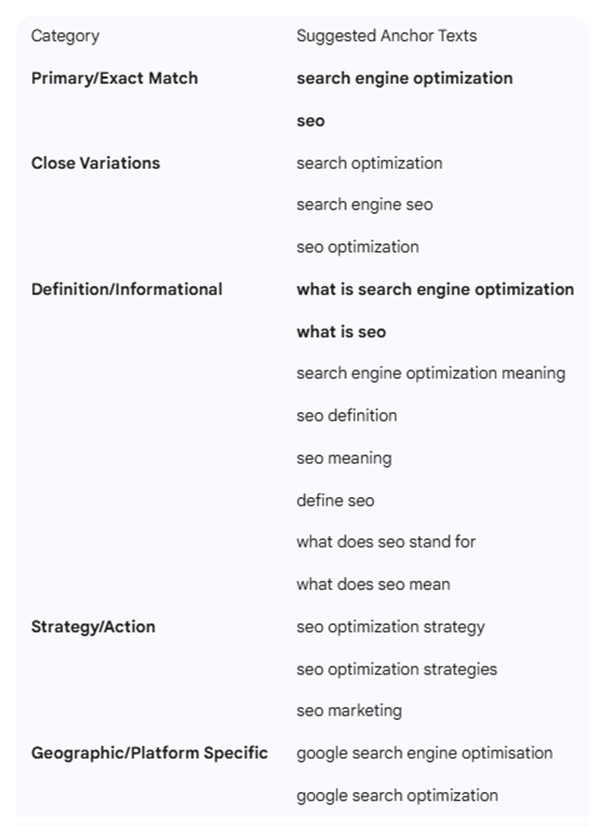
This bulk anchor text generator can also be especially helpful when you’re designing your off-page and outreach strategy. You can assign an anchor text variation to a specific outreach article, baking it into the writer’s brief. Going varied and more descriptive with your anchor text is what Google recommends, not only to avoid appearing spammy but to really make it more natural and context-specific, helping Google understand your pages even better. A well-thought-out anchor text improves your page’s topical relevance and thus its ability to rank for specific terms or related queries.
Google has mentioned before that using lots of exact-match internal anchors won’t typically hurt your website. But best to play it safe and just switch up internal link anchor texts now and then.
For your link-building campaign, though, it’s worth taking an extra step and mapping out your anchors so you can keep things natural, well-spread, and diverse.
9. Add links to your most recent posts
After publishing new articles, make it a habit to link them to and from previous relevant posts. Never interlink for the sake of it and only do so where natural. That’s why it’s best to strategically cover closely related topics in the form of topic clusters, as it naturally makes internal linking a breeze. It’s best to make internal linking a part of your post-publishing workflow to maximize link equity as soon as possible and avoid ending up with a bunch of orphaned pages that can only bog down your SEO performance.
10. Add links only to important pages
This is another no-brainer, but some people still resort to adding nofollow tags to linked pages, hoping to send a signal to Google that link value shouldn’t be passed. However, that no longer works. Nofollow links are now still counted as a link. Adding a nofollow tag is not preserving link equity– it’s diluting and losing it. The general rule for internal links is that they should be “dofollow” by default. If there are low-value, utility pages that shouldn’t be surfaced at all, like login, registration, or shopping cart pages, you can add a noindex tag instead to truly preserve both link equity and crawl budget.
11. Don’t go overboard
Google and other search engines assign a particular amount of “link equity” or “PageRank” to a given page. If that page links to other internal pages, the total link equity will be divided among all those outbound links. The more internal and external links you add to a page, the more diluted the link value will be.
So, if you add 100 links, every single one would just receive a tiny fraction of the total link equity allocated. It makes sense for Google to design it this way since it would be very easy to manipulate rankings if adding infinite links passes infinite value. Plus, a page crammed with too many links might also feel overwhelming and difficult to navigate. The most important thing is to prioritize user experience and utility.
Don’t get too hung up on link dilution as well if your internal links are truly helpful and relevant for users. After all, if your strategic and genuine internal linking process makes readers stay and engage more, that will eventually make Google give your page a little extra love in rankings.
12. Audit your internal links regularly
Neglecting this important step can negatively impact your site’s user experience and overall SEO performance. Issues like broken links almost always happen due to content and structure changes on websites, simple human errors, or just the dynamic nature of the internet.
During an internal link audit, consider this checklist:
- Check for broken links (404 errors)
- Fix improper redirects
- Update outdated/irrelevant content
- Identify and fix orphaned pages
- Determine irrelevant/spammy anchor text
- Remove excessive and irrelevant links
- Check for improper use of nofollow or redirects
- Correct poor site hierarchy
- Review pages buried too deep in the structure
- Add more internal links to old pages
Do this audit once or twice a year, especially if your site is built with Javascript. Certain technical frameworks are prone to internal linking issues like multiple redirects. Routine cleanups make it easy to catch issues before they pile up.
And as you add new content, it’s best to build internal linking into your publishing checklist. It’s easy to forget going back and adding new links to those posts, especially as your site expands and becomes more complex. The goal is for each new page to link to relevant old content and vice versa. This regular workflow and maintenance ensures that link equity keeps flowing and your site architecture stays healthy and scalable.
Google Search Console is another free and awesome feature to examine your internal links. The “Links” report shows your most internally linked pages to spot gaps and imbalances you might need to fix.
13. Put links high up on your page
Internal link placement also matters to some extent. Although it’s not the biggest needle-mover, it makes sense to place internal links higher up the page to make them more visually prominent, reduce bounce rate, and improve dwell time. Getting people to stay on your pages for longer tells Google that you’re actually keeping readers engaged. Placing links higher up gives people something relevant to click on right away, making them spend more time on your website. Whether Google directly uses that in its ranking systems is up for debate.
However, you don’t have to make it a requirement for writers to drop a link right out of the gate. In fact, you also need to tread lightly when adding internal links to the first paragraph or intro since sending them away too soon could also tank early-page retention. Since it’s a balancing act, you can simply link the most important pages after the first H2 or whenever the flow naturally allows it. Google and users care about the reading experience above all else, so only add links in the opening paragraphs when it’s natural and genuinely helpful. All you have to do is just cover the topic well. The best content will speak for itself without needing gimmicky maneuvers.
14. Consider using breadcrumbs
From the word itself, breadcrumbs refer to a trail of clickable links usually shown at the top of the page, helping users orient themselves within a website’s hierarchy.
For example:
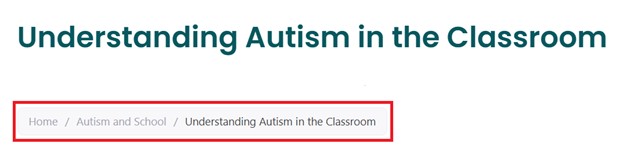
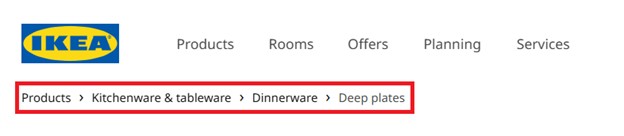
Whether you’re running an e-commerce site, an e-magazine, or any website with a deeper hierarchical structure (3+ levels deep), using breadcrumbs can definitely be a big help. It’s great for both user navigation and search engine crawlability. It also makes your internal linking structure more robust as every breadcrumb trail comes with an internal link, making your site’s structure even clearer and passing “link juice” and authority more effectively.
15. Encourage users to click links with buttons
Buttons are mainly used as a form of Call-to-Action (CTA), and strategically placing them in your core pages or even blog pages can push users toward key actions more effectively.
To maximize click-through rate (CTR), design your CTA buttons in a professional yet visually appealing way. And like any other anchor texts and internal links, try to make the CTA button text more specific as well. For example, instead of saying “Click Here” or “Read More”, be more concrete and descriptive and say “Download Marketing Guide” or “Read Testimonials”. Make it keyword-relevant and action-oriented, helping both users and search engines pick up on the relevance behind the link.
If you want search engines to treat your buttons as internal links and pass link authority, make sure to use proper HTML <a> (anchor) tags along with the descriptive anchor text. Style the link instead of using <button> for navigation. Use CSS to style an <a> tag to look like a button since Google’s web crawlers generally don’t interact with <button> elements as they’re usually only meant to trigger an action (like submitting a form, opening a modal, or playing a video) rather than actually navigating to a new page.
16. Link blog from the footer
There are pages on your website that are important but don’t necessarily have to be as prominent. Users typically lean on the footer section as backup navigation whenever they couldn’t find what they’re looking for in the main menu. Utility pages like Terms of Service, Help Center, Privacy Policy, and Contact page are typical examples of pages that get housed in the page footer. However, Google doesn’t generally assign much value to footer links, but since they appear on every single page, they can still do some good in terms of crawlability and indexing.
To make your footer section an effective point of reference for both users and search engines, keep it clean and organized by grouping elements logically and making sections easy to scan.
17. Use internal links to support long-tail keywords
Long-tail keywords are still getting a lot of hype, and for good reason. They’re not as saturated as other bigger and broader keywords, and because they’re so specific, the search intent is also much closer to conversion. Pair their general ease with internal links reinforcement and you get a recipe for quick but meaningful SEO gains.
If you manage to win lots of long-tail rankings, that would translate to a lot of high-quality organic traffic. Even better, if you intentionally create a campaign to rank for long-tail transactional keywords for your product or service pages, you’ll be getting more than visits but tangible success in the form of qualified engagement and increased revenue.
18. Publish high-quality content consistently
On top of your usual on-page optimization, you need to focus on creating genuinely helpful content because great content naturally draws dwell time, engagement, and real interest– and Google will always want to promote content with such engagement signals. The more you rank, the more chances of attracting backlinks naturally. The more popular your page gets, the higher its link equity will be. It’s then easier to support many more of your pages if you have a solid pool of content already sitting pretty high up the SERPs.
And once you’ve built that foundation, consistency becomes just as important as quality. Not only does it keep momentum going but it allows you to cover more keyword opportunities and get search bots to crawl your site more often. Regular content also indicates “freshness” which is generally favored by Google.
19. Define strategic internal linking goals
Maximizing link equity is a sound goal, and if you want to squeeze the most value out of your links, you ought to do it as strategically as possible. To do so, you can narrow down the focus of your campaign by deliberately setting your internal linking goals.
Your internal linking campaign should revolve around your website or business’s priorities. Is it to drive traffic to high-converting content? Support newer pages? Or reinforce high-competition keywords? It can also be all of the above, but tackling goals one at a time helps you allocate resources better to hone in on topic clusters that get you closer to your core priorities.
Guiding both link equity and user behavior in the right direction can tremendously help boost your organic performance overall.
FAQ
How many internal links are too many?
There’s no hard limit on how many internal links a page can have today. Google’s old guidance on limiting links dates back to a time when crawlers faced real bandwidth and processing constraints, which no longer apply. What matters now isn’t the number of links, but their quality and relevance.
Internal link equity is distributed across links, but that only becomes a problem when links are added carelessly. As long as links are contextually relevant, helpful to users, and not visually overwhelming, adding more internal links can actually strengthen topical authority rather than dilute it.
How do you make your internal linking process more efficient?
The best way to be more efficient in your internal linking process is to integrate it into your regular workflow. For instance, you can include it in your publishing checklist to always naturally link a newly published post to and from previous ones.
This way, you won’t end up with a bunch of orphaned content that never gets to see the light of day. Making the most of a topic cluster or a “hub-and-spoke” content structure can also go a long way in making your topic coverage extra robust and your internal linking structure more efficient.
Can you link to the same page from the same page more than once?
There’s no real harm in linking from the same page multiple times. In fact, it’s normal especially when there are navigational links on top of contextual ones that happen to lead to the same page. However, do take note that there’s no added benefit when you link to another page multiple times. The best route is to keep internal linking intentional yet natural, focusing on adding value and improving user experience.
Final Thoughts
Internal linking is often regarded as a basic and one-dimensional task. However, when done strategically, it can end up being a huge multiplier. So, don’t get lulled by its perceived simplicity because it’s actually doing a lot of heavy lifting behind the scenes. If you’ve been treating it like an afterthought, it’s time to start using it like a real strategy and building it into every piece of content you ship. You’d quickly realize it was the missing piece all along.