

On the surface, publishing more content seems like it should always help. But when new pages start overlapping too closely with existing ones, the result can be keyword cannibalization.
Rather than making your site stronger, that overlap can create friction within your own content strategy.
What is Keyword Cannibalization?
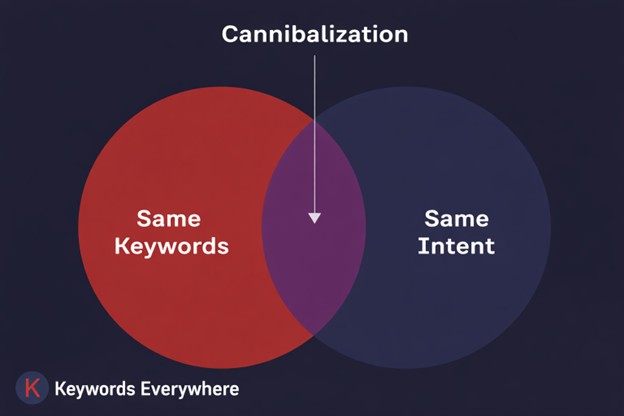
Keyword cannibalization happens when multiple pages on your site target the same or very similar keywords and intent. Instead of one strong page ranking well, you end up with several similar pages competing against each other.
A lot of articles you read online frame keyword cannibalization as pages “confusing” search engines, but that’s not really the issue. Google is smart enough to understand what similar pages are about, and it will rank whatever it sees as the best and most relevant result. The real problem is that when multiple pages overlap too closely, they can split relevance, links, clicks, and internal signals in ways that weaken your overall performance.
Google may also rotate rankings between similar pages, splitting visibility or just ranking all of them lower than they could be. This tends to show up more as your site grows. You publish more content, cover similar topics from slightly different angles, and before you know it, your pages start stepping on each other.


Keyword Cannibalization Examples
Take note that it’s only really considered keyword cannibalization when pages overlap on both keywords and intent. Sharing just similar keywords is not enough, and covering a similar topic with different intent is usually fine. The issue shows up when two pages are trying to rank for the same terms and answer the same type of query in the same way.
For example, “keyword research guide” and “how to do keyword research” would likely be a cannibalization problem if both pages are informational, beginner-focused, and trying to rank for the same kind of search. They may use slightly different wording, but they’re still doing the same job for the same user.
On the other hand, similar keywords are not automatically a problem when the intent is different. “How to do keyword research” and “best keyword research tools” can coexist just fine because one is informational and the other is more transactional or commercial. They are related, but they serve different needs, so they’re not necessarily competing with each other.
Besides, there’s a little bit of breathing room. Google’s site diversity system will often show two results from the same site near the top, which is why you’ll occasionally see two similar pages ranking together. If the query is branded, Google can be more willing to surface multiple pages from the same domain, since the user clearly wants that site. But don’t take that as a free pass. You’ll still eventually split authority, dilute internal links, and make rankings less stable if you keep stacking near-duplicates.
Other distinct keyword cannibalization examples include:
- Publishing a new “2024 version” of an article without updating or redirecting the old one
Now you have two pages competing for the same keyword, just with different years. - Creating separate posts for minor keyword variations
Like one page for “seo tips for beginners” and another for “beginner seo tips,” both covering the same content. - Writing multiple blog posts from slightly different angles on the same topic
For example: “content marketing ideas,” “content marketing examples,” and “content marketing tips” — but all end up repeating similar points. - Splitting one topic into multiple thin pages instead of one strong one
Like separate posts for “what is keyword research,” “why keyword research matters,” and “how to do keyword research,” each too shallow on its own. - Duplicate or near-duplicate location pages
Like “seo services in chicago” and “chicago seo services” with almost identical content. - Tag or category pages competing with blog posts
A tag page optimized for “seo tools” competing with a blog post targeting the same keyword. - Old vs updated versions of the same guide still live
Instead of refreshing the original, a new post is published, leaving both to compete. - Programmatic pages with minimal differences
For example, hundreds of pages targeting slight keyword variations but offering nearly identical content. - Ecommerce product vs category overlap
A category page targeting “running shoes” competing with a top product page also optimized for “running shoes.” - Product or category pages competing with blog content. This happens when a blog post starts targeting the same commercial keyword your product/category page is supposed to own. For example, both pages target “email marketing tool.” The result is usually overlap, split signals, and rankings that aren’t as stable as they could be. And if the blog post ranks instead of the landing page, you can end up compromising conversion potential.
Keyword cannibalization is a pretty common issue on growing websites. As you publish more articles, landing pages, category pages, and updates, some overlap is bound to happen. The key is making sure every page has a clear job, so your strongest page doesn’t end up competing with your own content. Think of it as basic content hygiene because if you don’t manage that overlap, it can easily start dragging performance down.
Why is Keyword Cannibalization So Bad?
When you have multiple pages doing the same job, you end up updating, optimizing, and building links to more than one URL just to maintain the same performance. Cannibalization turns content into extra upkeep– more pages to refresh, more internal links to manage, and more chances of sending mixed signals that hold rankings back.
Here are the main ways keyword cannibalization can drag down your SEO performance:
● Signal dilution across pages
If you’ve got multiple pages targeting the same keyword, you’re basically splitting your own SEO power across several URLs. Internal links, backlinks, anchor text, engagement signals, and topical relevance don’t consolidate around one priority page. Instead, they get distributed across competing versions instead. That weakens the overall signal strength of each page and makes it harder for search engines to identify a single strongest result from your site.
So instead of one strong page owning the keyword, you often end up with a few pages that are only moderately relevant, moderately linked, and moderately performant– but none strong enough to consistently dominate.
● Lower rankings
When pages compete for the same terms, rankings can start bouncing around. One page shows up for a while, then another takes over, then both underperform. Instead of one page gaining steady traction, rankings become less stable and just weaker overall.
● Reduced Click-Through Rate (CTR)
Cannibalization can push the wrong page into view. Maybe the page that ranks is thinner, older, or less aligned with what users need. That can hurt CTR and conversions, because the page showing up is not your strongest option. Even if Google understands the signals, it may take time to settle on the page that best matches intent, which can further reduce CTR as users keep seeing a weaker or less relevant result.
● Wasted crawl budget
Overlapping pages don’t just compete in rankings. They can also make crawling less efficient. Search engines may spend extra time processing multiple URLs that are broadly saying the same thing.
That may not matter much on a small website, where the total number of URLs is limited. But on larger sites, it can lead to a messier crawl pattern and reduce how efficiently search engines discover and prioritize your most valuable pages.
● Internal links divided
Cannibalization can also make internal links a lot less focused. Instead of consistently pointing to one main page, they get scattered across a few similar ones. That means anchor text, contextual relevance, and link equity are no longer reinforcing a single destination. Little by little, your site starts nudging search engines toward multiple overlapping pages instead of clearly signaling which page matters most.
● Hurting your backlink authority
Like internal links, backlinks work best when they back a single page. Plus, backlinks are a bigger deal than internal links, because backlinks are often one of the hardest and most expensive SEO assets to build. If that authority gets split across overlapping pages, those hard-earned links end up doing less for you than they should.
Backlinks do tend to come more naturally once a page is established, but you still want to be careful with cannibalization early on, because those first meaningful links are often the hardest to earn. You can use a Backlinks Checker to spot which page has the strongest backlink support before making cannibalization fixes. That way, you’re not guessing which URL should become the main page.
Overall, cannibalization is not just a performance issue. Inherently, it’s an opportunity cost. Rather than putting all your weight behind one standout page, you divide that effort across several overlapping ones that each end up doing less.
How to Avoid Keyword Cannibalization
Keyword cannibalization is rarely intentional. It usually happens as your site grows, content stacks up, and similar topics get covered from slightly different angles. The good news is it’s also very avoidable with a bit of structure and planning. Instead of letting pages compete, the goal is to give each page a clear role, clear targeting, and a reason to exist on its own.
Here’s how to make your content line up better:
1. Unify content creation
One of the simplest ways to prevent cannibalization is to standardize how content gets planned before anyone writes a word. Start every piece with a short brief that clearly states the target keyword, the primary search intent, the “job” of the page, the key points it must cover, and how it fits into your existing content. This keeps articles focused, reduces accidental overlap, and forces you to make the new piece meaningfully different instead of just another version of what you already have.
Most cannibalization happens when teams move fast without a shared map of what’s already been published. People pitch similar topics, writers cover the same angles, and suddenly you have multiple pages competing for the same intent without realizing it.
A practical habit is to do a quick gut-check before publishing anything new. Run a simple Google search like site:yourdomain.com “target keyword” (and try a few variations). If you see multiple pages already covering that query or intent, you’ll know to either update an existing page, consolidate content, or pick a different angle before creating a brand-new URL.
2. Assign a unique target keyword to each page
Assign a unique target keyword to each page, but more importantly, assign a unique intent. For example, “how to write a resume” isn’t the same as “resume examples,” “resume template,” or “best resume builder.” They’re related, but they serve different needs and can take a clear angle if developed properly. When each page targets a distinct query + intent, Google has a clearer reason to rank one page for one search.
Also, make sure to keep a simple keyword/topic map so the team can actually see what already exists. It doesn’t need fancy tooling. Just list topics, primary keywords, the “main” URL, and which pages support it. This alone prevents a ton of duplicate content.
Finally, organize it with a pillar/cluster approach. Choose 3–5 core topics you want to be known for, publish a pillar page for each, then create cluster pages that cover the long-tail angles. Think pricing, comparisons, use cases, templates, and how-to guides. Everything links back to the pillar, creating that clear and strong site hierarchy.
3. Use strategic internal linking
Internal linking is one of the simplest ways to prevent cannibalization because it helps you signal which page should win. When you have multiple pages in the same topic area, Google has to decide which URL is the best match for the query. Your internal links can make that choice easier by consistently pointing to the priority page as the primary authority.
A good rule is to pick one “main” page for each keyword intent (usually your pillar page, core guide, or money page), then link to it from related articles using descriptive anchor text. That means avoiding vague anchors like “click here” or “read more,” and instead using anchors that reflect the topic, like “email marketing strategy,” “project management template,” or “pricing comparison.” This makes it clearer to both users and search engines what the destination page is about.
If cannibalization is already happening, internal linking in SEO is also a clean way to correct it without drastic changes. Link supporting pages up to the priority page, add a small “related reading” section near the top if it makes sense, and make sure your navigation and site-wide links point to the page you actually want ranking.
Just keep it consistent. If half your internal links point to Page A and the other half point to Page B for the same intent, you’re still splitting signals. The goal is a clear internal hierarchy: one page owns the intent, and the rest support it.
4. Audit content regularly
If you want to avoid keyword cannibalization, regular content audits should be part of the routine.
Cannibalization usually does not announce itself with one big red flag. More often, it shows up through small performance changes that are easy to brush off, like declining traffic, lower click-through rates, or rankings that keep bouncing around. Individually, those issues may not seem alarming. Viewed together in a content audit, though, they can point to a broader content overlap issue.
Keyword cannibalization is not something you fix once and forget. It’s something you manage as your content grows. Tools like Website Ranking Checker, SEO Analyzer, SEO Optimizer, and and SEO Content Checker can help you review page-level issues, spot optimization gaps, and identify pages that may need clearer targeting or stronger differentiation. With a bit of planning, regular audits, and a clear structure, it’s not that hard to keep things aligned. Done well, it helps your site stay clearer, stronger, and easier to maintain over time.
How to Find Keyword Cannibalization Issues
Finding keyword cannibalization is less about catching one bad page and more about spotting overlap across your content. Once you know the signs and where to check, it becomes much easier to pinpoint.
Here’s how to identify cannibalization issues on your site”
Manual Methods
A few manual checks can already quickly show whether multiple pages on your site are competing for the same search term.
● Use the site: operator to surface related pages
Run a Google search for site:yourdomain.com “your keyword” to see which pages on your domain mention that keyword.
A big list of results is not proof of cannibalization by itself. It just tells you Google has indexed those pages and found the keyword on them. In many cases, only one or two of those pages are actually competitive for the query. The rest may be loosely related or not ranking meaningfully at all.
Still, this is a useful first pass because it helps you quickly spot pages with similar titles, angles, or topics that might be stepping on each other.
● Check Google Search Console
Google Search Console is one of the most reliable manual ways to confirm whether multiple pages are showing up for the same keyword.
Just go to Performance > Search Results, then add a Query filter and enter the keyword you want to check. From there, review the list of pages that have appeared in search for that term or close variations of it.
Click the Pages tab to see which URLs are getting impressions and clicks for that keyword. Then switch to Queries if you want to see related search variations. If two or more pages are sharing impressions for the same term, you may need to decide which page should stay primary and whether the others should be updated, merged, redirected, or retargeted.
Automated Method
There are plenty of tools that can help automate cannibalization checks, including paid options like Semrush, Screaming Frog, Ahrefs, and TrueRanker. But if you don’t want to pay for a full SEO suite just to spot overlap, there are free tools that can still get the job done.
Website Ranking Checker is 100% free and helps automate the process by flagging keywords tied to multiple pages on your site. The tool simplifies cannibalization detection by automatically showing keywords that trigger multiple pages from your site in search results.
Using Google Search Console data, it groups these keywords and shows how many URLs are associated with each one, along with total impressions and clicks. This gives you a quick overview of where overlap is happening and how much visibility is affected.
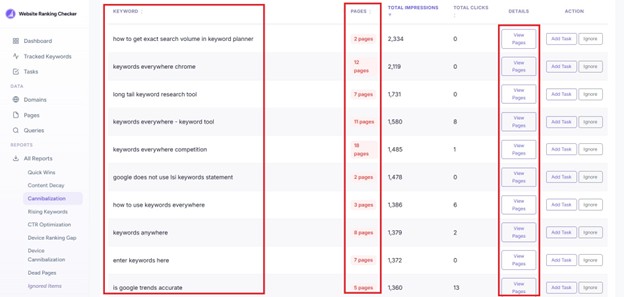
From there, View Pages lets you drill into the keyword and see the exact URLs competing for it. You can inspect which pages are involved and see if they’re truly competing. The page also highlights your top 10 most cannibalized keywords right away, so you can quickly spot the biggest overlap issues without digging through everything manually.
The extra actions also help you sort the report as you go. Add Task is handy for anything you want to come back to later, since it lets you send the issue to a separate workspace where you keep your optimization tasks and work through fixes in a more organized way. Ignore makes sense when the overlap is not really a problem, like when the pages target slightly different intents, the keyword is too broad to worry about, or the report flagged something that’s technically harmless.
So if you want the quickest and most efficient way to spot cannibalization, using a tool like this is usually the better route. Doing it manually in Google Search Console is possible, but it often means a lot of filtering, comparing, and piecing things together yourself.
How to Fix Keyword Cannibalization
Once you have found cannibalization issues, fixing them is usually pretty straightforward. Most of the time, it comes down to merging overlapping content or totally getting rid of pages that are competing for the same thing.
You can usually clean it up with a few simple fixes:
1. Consolidate competing pages
When two pages are going after the same keyword and intent, the best fix is often to combine them into one stronger page. Take the best sections from each, remove overlap, fill any gaps, and turn them into a single, more complete resource. Once you have chosen the main page to keep, the next step is making sure the weaker URLs are redirected correctly, which brings us to the next tip.
2. Use 301 redirects
301 redirects are a key part of fixing keyword cannibalization when overlapping content needs to be removed. After deciding which page should stay as the main version, you can merge the strongest parts of the weaker pages into it and redirect those old URLs to the updated page. That gives search engines a clearer signal about which page should rank and helps consolidate visibility into one place.
On the technical side, this usually means setting up a 301 (permanent) redirect in your CMS, SEO plugin, or server settings. Most platforms make this pretty straightforward. The main thing is to point the old URL directly to the new primary page. However, it’s worth verifying the redirect after setup. Our Free Redirect Checker can help you confirm that users and search engines are reaching the intended destination without unnecessary redirect hops or loops.
Without redirects, deleted pages can leave behind broken links, wasted backlinks, and lost traffic. A proper 301 redirect helps carry users and search engines to the right destination while preserving much of the original page’s value.
If merging is not the right move, then redirects may not be needed at all. In that case, the better approach is to re-optimize each page so it targets a clearly different keyword or intent. The main thing is to avoid leaving pages too similar to each other.
3. Use canonical tags
Canonical tags are essentially Google’s way of settling duplicates. When multiple pages are very similar, a canonical tag tells search engines which version should be considered the primary one.
This works well in situations where pages need to stay separate, like:
- Filtered product listings
- Regional or language versions
- Similar landing pages used for different campaigns
You can usually do this through your CMS or an SEO tool in just a few clicks. Just make sure the canonical points to the page you want search engines to treat as the primary version, so signals consolidate without you having to remove pages that still serve a purpose.
4. Reinforce the page you want search engines to favor
If search engines are bouncing between a few similar pages, you can help steer them toward the one that matters most. The idea is simple: make your preferred page stronger, clearer, and better supported than the rest.
A few practical ways to do that:
- Add internal links from cannibalizing pages to the preferred page, ideally with anchor text that reflects the target keyword
- Find internal links elsewhere on your site that use the same anchor text but point to a different page, and switch them to the preferred URL
- Earn backlinks for the page you want to rank, so authority builds in one place instead of getting split
- Fine-tune the page’s on-page SEO by improving elements like the title, headings, meta description, and URL
Over time, that can help improve SEO rankings and give your strongest page a better shot at performing well.
5. Deindex or noindex lower-quality content (last resort)
Noindexing a page means telling search engines not to include it in search results. The page can still stay live on your site, but it basically steps out of the SERPs.
This can be useful when a page still helps users but is not doing much for search. Say you have a niche article that supports a bigger pillar page. It may still be worth keeping around for readers, but if it brings in little organic SEO traffic and overlaps with keywords your stronger page is already targeting, letting both stay indexed can just create more competition than you need. In that situation, noindexing the weaker page can help keep the focus on the page that matters more.
It’s called a last resort for a reason, though. You could lose whatever traffic, rankings, or SEO value that page had built up. And if other pages on your site still link to it heavily, you can end up wasting internal link equity on a page you no longer want showing up in search. That is why it usually makes more sense to try merging, redirecting, or repositioning the page first. Use no-index when the content still needs to be there for users, but does not need to compete in Google anymore.
You don’t need to overcomplicate it. Most of the time, fixing cannibalization just means deciding which page should lead, then making sure everything else reinforces that choice. Keep your structure clean, your signals consistent, and your pages clearly differentiated.
Mistakes to Avoid When Fixing Cannibalization
While fixing cannibalization can improve performance, the wrong moves can set you back. Before making changes, it helps to know which mistakes to avoid so you don’t accidentally lose traffic or authority.
● Deleting pages without checking their value
Don’t delete content because you think it no longer serves a goal. Look at traffic data, backlinks, and search performance before taking drastic measures. For instance, a page may look outdated, while in reality, it still drives traffic or has solid external links. Simply deleting it could lead to unwanted ranking losses.
● Relying on canonical tags without checking content
Adding a canonical tag isn’t always the right fix. If two pages are too similar, merging or redirecting them may be better. Canonicals help when content overlap is minimal and both pages still serve a purpose, not as a quick workaround for overlap that should be cleaned up properly.
● Merging pages that target different search intent
Just because two pages cover a similar topic doesn’t mean they should be combined. For example, a “how to lose weight” guide and a “meal plan for weight loss” page. If each one is aimed at a very specific audience or answers a different question, merging them could hurt relevance and rankings. Always consider the intent behind each page before deciding to consolidate.
● Noindexing the page
Using a noindex tag can seem like an easy fix for keyword cannibalization, but it can backfire if you’re not careful. A noindex tag tells search engines to remove a page from their index, which means it will no longer appear in search results at all, regardless of its rankings or backlink profile.
That also means you’re potentially cutting off any traffic the page was bringing in from other keywords. Even if the page was not performing well for your main target term, it may still have been contributing value through long-tail searches or existing rankings. Once it’s noindexed, that visibility is gone.
● De-optimizing the page
De-optimizing a page usually means removing or reducing the use of a target keyword across key elements like the title tag, headings, body content, and internal anchor text. The idea is to make the page less relevant for that keyword so another page can rank instead.
While that might sound like a simple fix, it’s often unnecessary and can backfire. Cannibalization is rarely caused by just a few shared keywords. Most pages rank for dozens of different queries, not just one main term.
By pulling keywords out, you risk weakening the page across all the other queries it performs for. What might have been bringing in steady long-tail traffic can lose visibility just because you tried to separate it too aggressively. In most cases, it’s better to refine the page’s intent or reposition it rather than reducing its optimization.
The key is to be deliberate. Not every overlapping page needs to be removed or changed aggressively. When you check performance, respect intent, and choose the right fix for the situation, you can clean up cannibalization without hurting your overall SEO.
FAQs
Is keyword cannibalization always bad for SEO?
Not always. Multiple pages can rank for similar keywords if they target different intent. It becomes a problem when pages overlap too closely, split signals, or cause Google to rank a weaker page instead of your preferred one.
Can blog posts and landing pages cannibalize each other?
Yes, they can. If a blog post targets the same keyword and intent as a landing page, they may compete. This can lead to the wrong page ranking, which can hurt conversions if the blog outranks the page meant to drive action.
Can internal linking fix keyword cannibalization?
Internal linking can help, but it’s not always a full fix. Consistently linking to a preferred page signals importance to search engines, but if pages heavily overlap in content and intent, you may still need to merge, redirect, or reoptimize them.
How often to audit for keyword cannibalization?
For most sites, auditing every few months is enough. If you publish frequently or manage a large content library, monthly checks are better. Regular audits help catch overlap early before it affects rankings, traffic, or the performance of key pages.
How quickly can keyword cannibalization issues improve after a fix?
It usually takes a few weeks to a couple of months to see results. Search engines need time to re-crawl, reindex, and reassess signals. The timeline depends on site authority, crawl frequency, and how significant the changes were.
Conclusion
Keyword cannibalization is less about “mistakes” and more about how content evolves over time. As your site grows, some overlap is rather inevitable. The key is catching it early, cleaning it up when needed, and making sure your content stays aligned over time. When every page has a clear job to do, your whole site simply works better.