

As you’d expect, Google is the only platform with direct access to first-party Google Search data. Every other SEO tool works off modeled demand using clickstream panels, Google Ads ranges, and third-party datasets. That’s why Google Trends is widely trusted for directional accuracy. But on its own, it doesn’t go far enough for full SEO planning.
For that reason, Google Trends is often paired with other SEO tools that add keyword volumes, SERP difficulty, and competitive context. In this article, we’ll explore Google Trends alternatives that not only spot rising interest but also bring a lot more to the table.
9 Google Trends Alternatives
Google Trends is handy, but it’s not always enough on its own. Depending on your needs, these Google Trends alternatives can help you figure out whether a trend is actually worth chasing.
1. Keywords Everywhere
Plans start at: $7 per month
Free Trial: Freemium model
Google Trends reflects actual Google Search activity, making Google Trends useful for SEO. It shows right when interest is rising, falling, or breaking out, not months later after the data has been averaged, bucketed, or smoothed. It doesn’t just guess what people search for. It actually shows how interest is shifting.
That alone is already good enough, but people often hit a wall when they can’t see real volume numbers. It only uses a relative scale (0–100) to show popularity, which doesn’t really represent the actual number of searches.
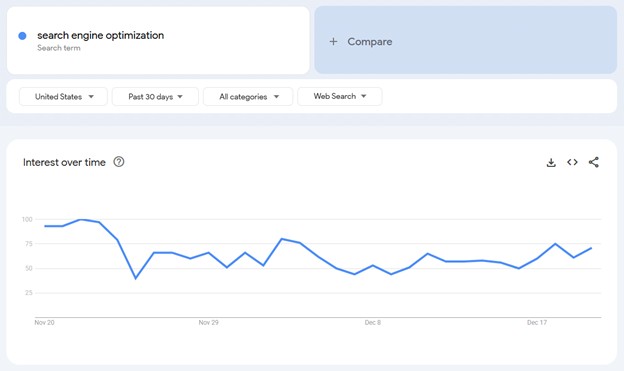


Keywords Everywhere solves this by conveniently overlaying search volume on top of the trend data.
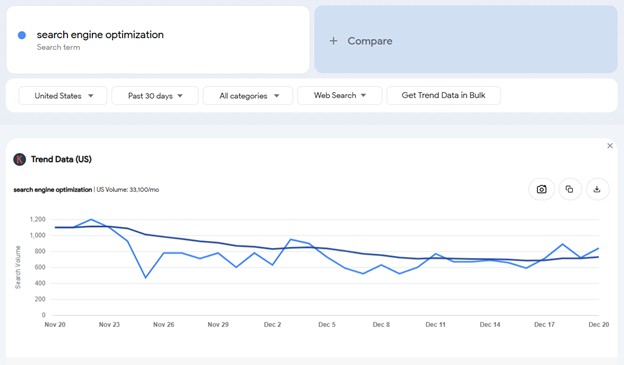
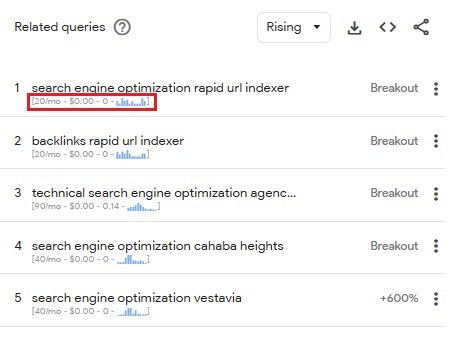
Keywords Everywhere overlays important keyword metrics not only on Google Trends but also in 20+ other major platforms including Google Search.
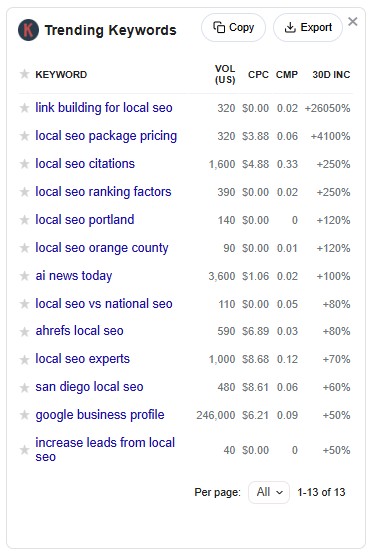
As you browse search results on Google, you can even see a Trending Keywords widget with important keyword metrics like Search Volume and 30-day trend increase to ride the wave of growing popularity. The example below is a widget showing up for the query “local SEO”.
There are more widgets available that neatly group keyword categories like SERP Keywords, Related Keywords, Long-tail Keywords, and People Also Ask for Keywords. You can even see keywords data directly within the autocomplete section with a little trend graph to easily visualize search trajectory.
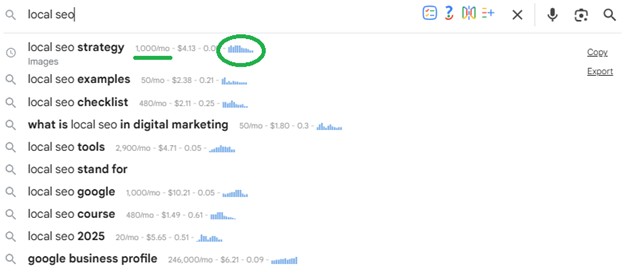
Google Trends is great for spotting momentum, but Keywords Everywhere makes it more actionable by showing real numbers and keyword insights right where you search.
Google Trends vs Keywords Everywhere: Verdict
Google Trends is awesome for spotting what’s hot, but it leaves you hanging when it comes to actual numbers. Keywords Everywhere is the missing piece of the puzzle. It takes those vague “0-100” charts and slaps real search volume right on top of them. For just $7, you stop squinting at trend lines and start making decisions based on real search volume. Plus, it helps you validate ideas beyond popularity, with other useful data and features that support execution.
And if you want to move from validating trends to actually finding new ones, Keywords Everywhere also has Free Trends Finder. It surfaces fast-growing topics before they fully blow up, with filters for category, timeframe, and growth rate, plus real search volume to help you prioritize the trends with the biggest SEO potential.
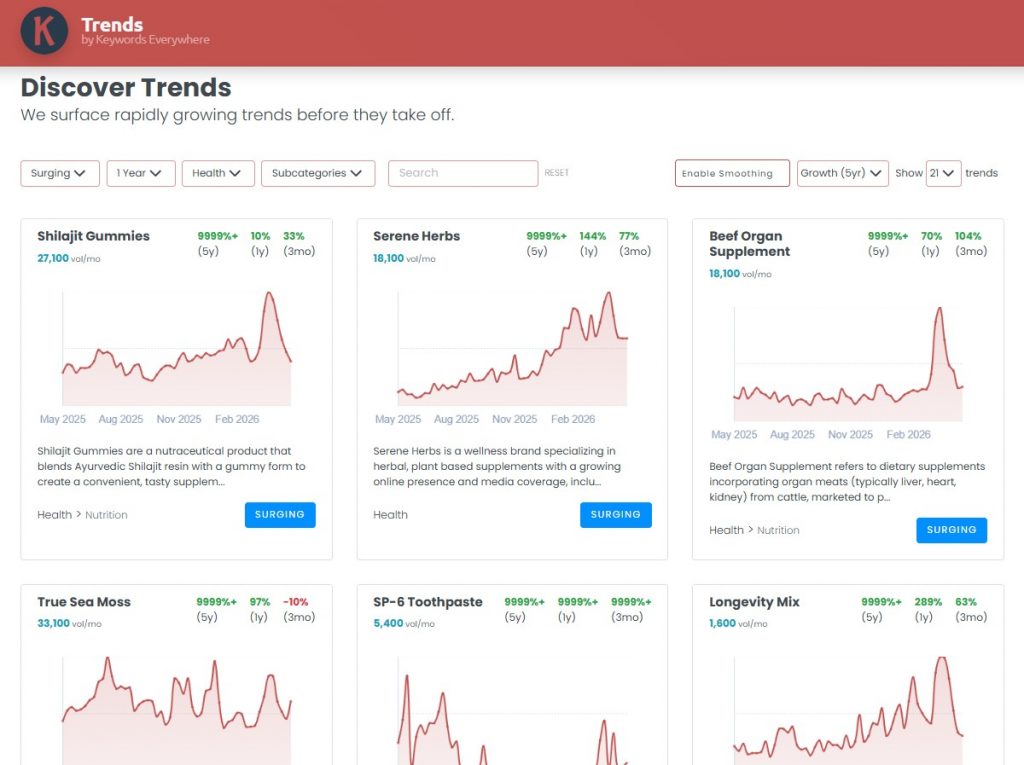
Overall, Keywords Everywhere is a useful add-on if you already rely on Google Trends but want more context. It gives you the extra numbers and keyword data needed to compare opportunities more effectively.
2. Pinterest Trends
Plans start at: Free
Free Trial: Not required (free to use)
Google Trends shows what’s hot right now, which is perfect for demand validation. Pinterest Trends, on the other hand, is a good complementary tool for early discovery. Plus, it’s also free of charge.
Pinterest powers billions of pins, saves, and searches from a highly engaged audience of over 480 million monthly active users. It’s especially helpful for visual, lifestyle, and planning-driven topics. If you belong to this niche, Pinterest Trends can be your best friend. Just sign up or log in to Pinterest Trends and set the key filters:
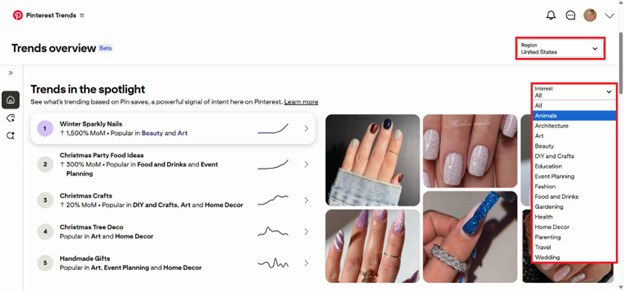
Every section of the Trends Overview can really spark lots of ideas. You can browse through the following sections:
- Trends in the Spotlight– A curated view of breakout trends that are accelerating quickly within Pinterest’s ecosystem, great for spotting emerging themes before they hit mainstream search demand.
- Shopping Trends– Offers insight into what people are preparing to purchase, not just browsing casually, which is especially valuable for ecommerce, retail, and seasonal campaign planning.
- Search Trends– Shows how search interest on Pinterest rises or falls over time, helping validate whether a topic is gaining momentum or fading. Useful for timing content and seasonal planning.
- Pinterest Predicts– Forecasts trends months ahead using historical Pinterest data, offering early insight into what’s likely to grow before it shows up in mainstream search.
Pinterest users are natural planners, so search behavior on the platform often signals future demand rather than current hype.
If you belong to any of the niches below, Pinterest Trends should be a staple in your content planning and strategy:
- Ecommerce brands in fashion, beauty, food, home, DIY, etc
- Service businesses like interior designers, event planners, and wellness coaches.
- Content creators trying to ride visual trends before they blow up
If you’re considering this Google Trends alternative, you don’t really have to choose one or the other. Pinterest Trends helps you spot ideas early, while Google Trends confirms when those ideas are breaking into broader search demand. So, you can use Pinterest to discover what’s coming next, and Google to validate when it’s time to scale content and campaigns.
Google Trends vs Pinterest Trends: Verdict
Since both tools are completely free, there’s no reason to choose one over the other. Pinterest Trends helps you spot ideas early, while Google Trends confirms when those ideas start showing up in broader search behavior. Used together, they give you better timing with zero cost.
3. BuzzSumo
Plans start at: $199/month ($159/month billed annually)
Free Trial: 7-day free trial (No credit card required)
Google Trends shows us what search terms are popular, helping us see how topics rise and fall in interest. On the other hand, BuzzSumo focuses on what content is being shared the most across social media, giving us a peek into what actually catches people’s attention.
Besides topic discovery, Buzzsumo has many other features digital marketers can find handy such as influencer search, backlink analysis, and brand mentions monitoring & alerts.
But if you’re particularly looking for a robust topic exploration tool that is as good or even better than Google Trends, Buzzsumo’s Discover section has lots of features that can get you instant access to all the hot topics in your niche.
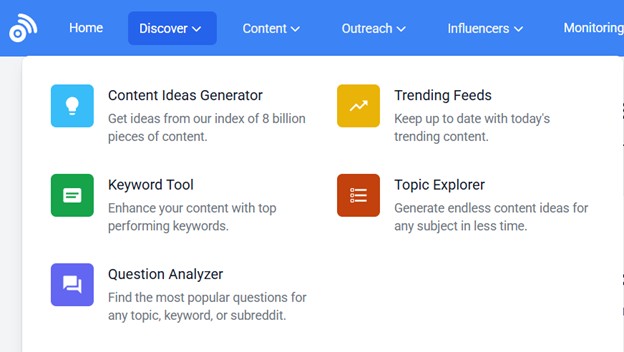
For example, the Trending Feeds section shows recent stories and topics that are quickly gaining traction based on social engagement.
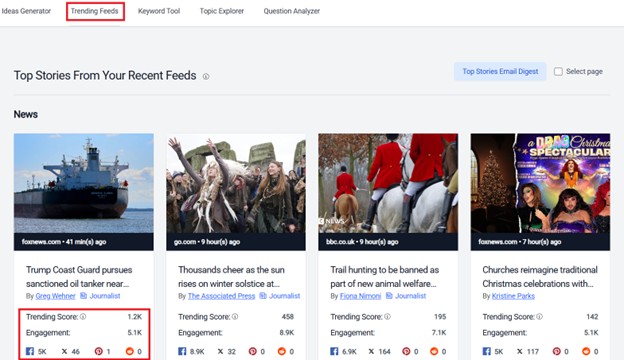
You can even see a Trending Score, which reflects the speed at which engagement is increasing, not just total shares. The higher the score, the faster that topic is taking off.
Most tools need you to input a query to get the search going, but with tools like BuzzSumo, you can readily get your hands on a whole lot of ideas to work with even without a seed keyword.
Besides News stories, as you scroll down the feed, you’ll see a nicely curated list of articles and topics under the following broad categories.
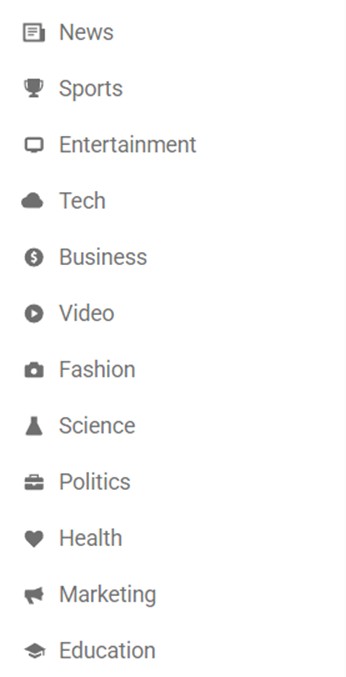
The topic areas above are major content verticals, so you’ll be able to quickly browse something relevant. If not, you can also create your own feed and customize all the settings to have it match your niche precisely.
Another standout feature people love is BuzzSumo’s Topic Explorer. For this feature, you need to input a keyword to generate a word bubble, visually presenting all the search terms and their corresponding size in terms of popularity and engagement. This makes it easy to spot subtopics, angles, and content opportunities at a glance.
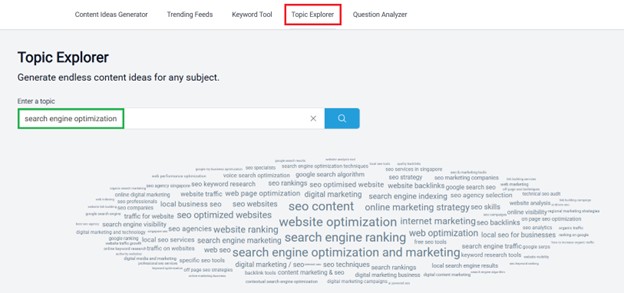
Overall, BuzzSumo is a strong complement to Google Trends, helping marketers move beyond search demand and into real engagement signals.
Google Trends vs BuzzSumo: Verdict
If your work depends on generating content ideas quickly, BuzzSumo’s discovery tools can feel more immediately useful than Google Trends alone.
Buzzsumo’s monthly subscription is a bit steep at $199, but if you’re a news and media site or content creator who needs constant and real-time content inspiration, Buzzsumo can make sure you don’t miss what’s gaining traction right now. Everything can be generated with a click of a mouse, and the fact that you get to view the source info (where each story is published) makes it even easier to verify and act on ideas fast. Social data can be very hard to track and gauge manually. Buzzsumo is a great way to spot trends without guesswork.
4. SimilarWeb
Plans start at: $199/month ($125/month billed annually)
Free Trial: 7-day free trial
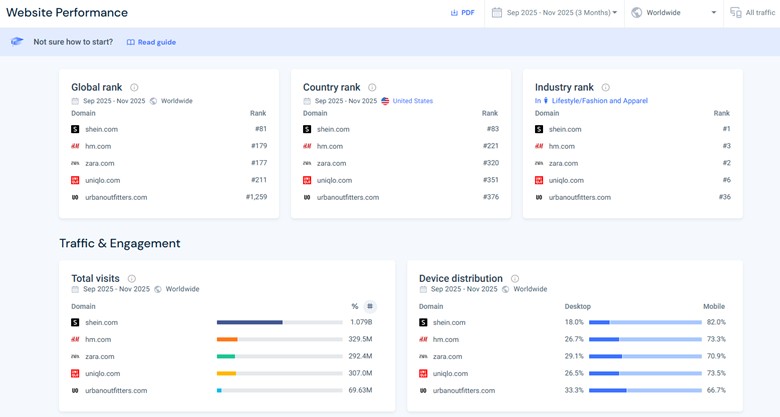
Many teams lean on Google Trends as a quick reality check on market demand, using the Compare feature to line up brands or topics and see how interest shifts over time. SimilarWeb also has a Compare tool that can examine up to 5 websites side by side.
Just go to Website Analysis and click +Compare under Website Performance.
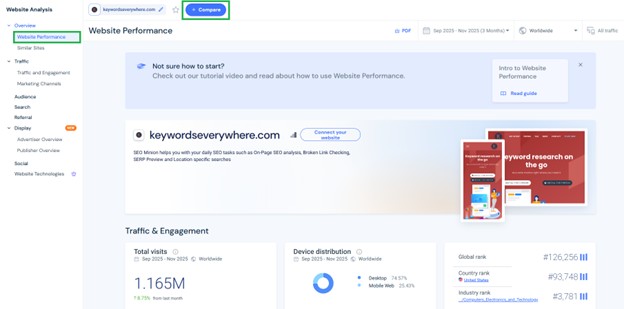
You can see the Global, Country, and Industry Rank of the compared websites as well as their total visits and even bounce rate and visit duration:
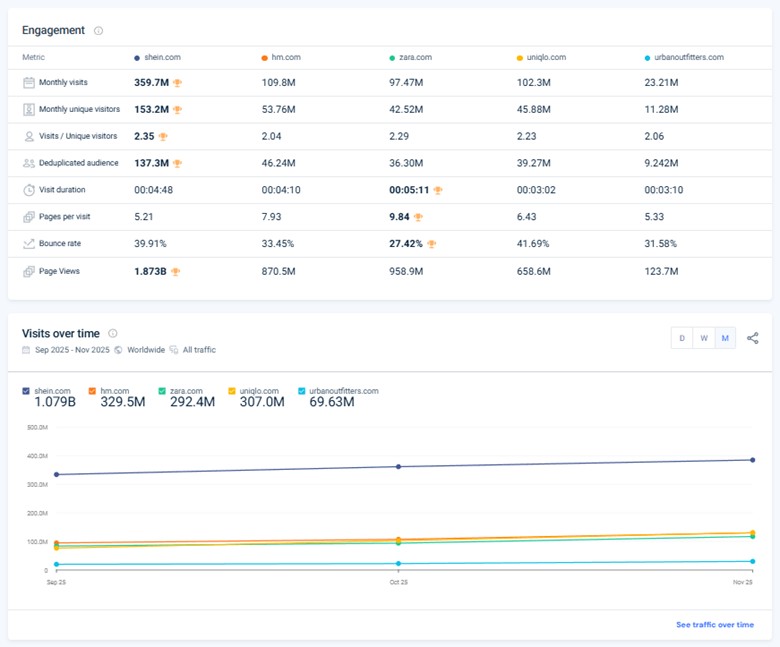
You can even view the breakdown of their traffic share per country as well as their main traffic sources. As you explore the page more, you’ll also know who’s winning in terms of organic search, paid search, and social traffic. You can also view the top referring websites to dissect the competitor’s strategy and uncover partnership, channel, or acquisition opportunities you haven’t tapped into yet.
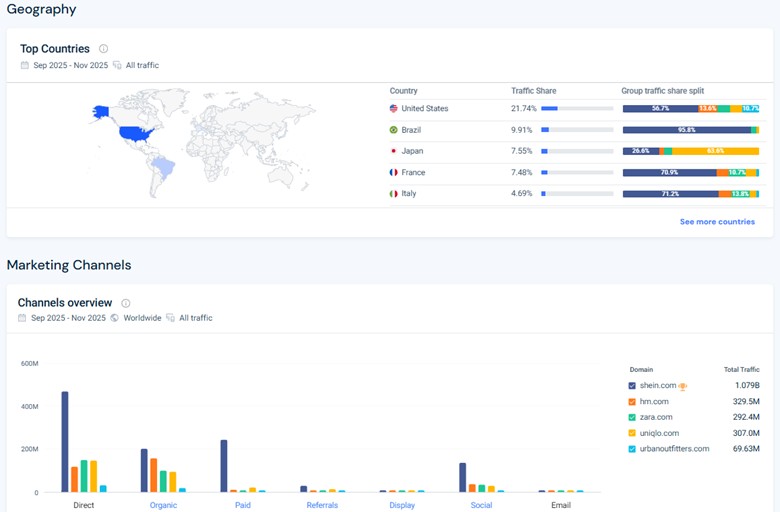
If you’ve been heavily using Google Trends for competitive benchmarking and market analysis, tools like Similarweb can take things way further by showing real traffic trends, market share shifts, and competitor growth over time.
You can even get a quick overview of the actual market leaders of over 200 curated industries, showing their market share, traffic trends, growth momentum, and key acquisition channels.
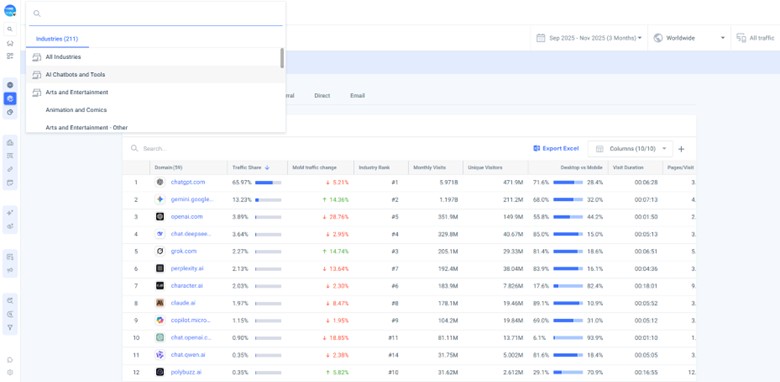
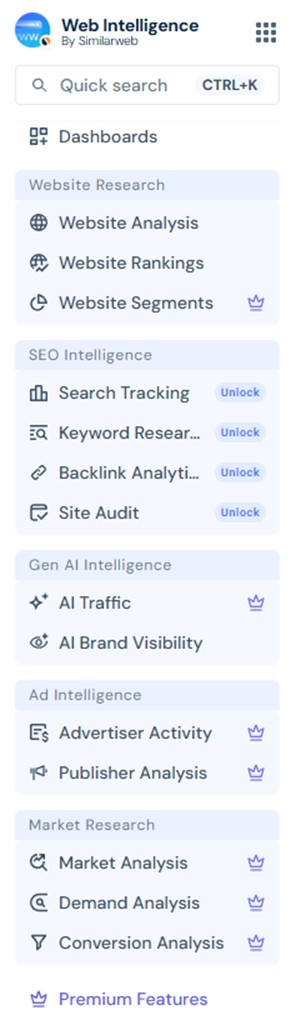
SimilarWeb basically helps you see who’s getting traffic, where it’s coming from, how markets are moving, and who’s winning. This way, you’ll know where demand is growing and what you should focus on next. You can discover growth opportunities at the market, category, and product level, with real market signals guiding your next move. The platform covers the full spectrum of digital intelligence which can help minimize tool hopping. From Website Research to SEO Intelligence to Market Research, it brings traffic data, competitive insights, and market-level analysis into a single, unified view for faster decision-making.
Google Trends vs Similarweb: Verdict
From validating demand and benchmarking competitors to planning go-to-market and channel strategy, SimilarWeb delivers insights that reduce guesswork across the funnel.
It’s built to easily spot trend direction, relative size, and momentum, often all you need to make confident decisions. Whether you’re launching a site, entering a niche, investing in content, or expanding to a new country, having access to proper insights can significantly reduce risks upfront.
At around $199/month, Similarweb isn’t meant for casual research or one-off checks, and that’s exactly the point. The pricing makes sense for founders, growth teams, strategists, agencies, and investors who regularly make high-impact decisions and need competitive and market context, not just raw trend lines. Unlike Google Trends, which lacks competitive depth, Similarweb functions as a true business intelligence tool, supporting go-to-market planning, investment decisions, and broader expansion strategies.
5. Ahrefs
Plans start at: $129/month ($108//month billed annually)
Free Trial: No Free Trial
While Google Trends visualizes popularity using normalized scores (0–100), Ahrefs goes a step further by anchoring trend lines to estimated monthly search volume. It even has a forecasting layer, showing projected demand in the months ahead.
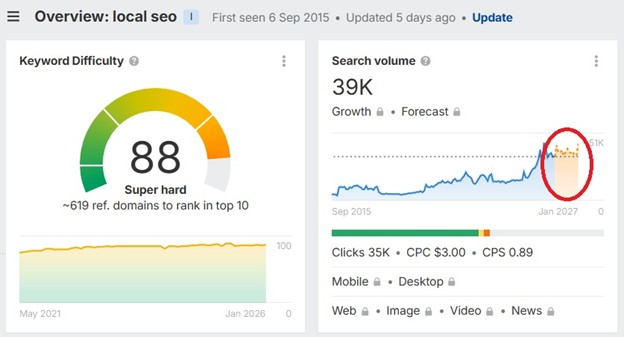
While Google Trends has “Breakout” keywords, Ahrefs has a “Growth Metric” inside Keyword Explorer. Instead of just showing how big a keyword is, it shows how fast demand is increasing over the last 3, 6, or 12 months.
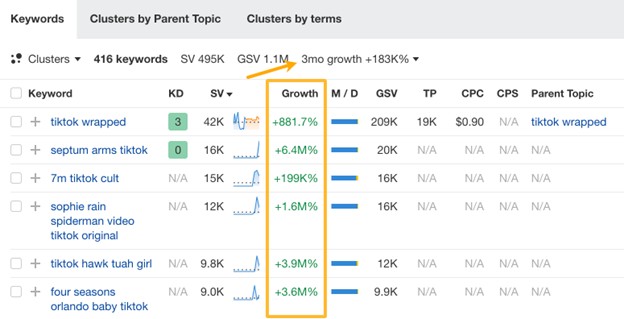
In practice, keywords showing +20–50% growth often signal early momentum worth testing, while +100%+ growth can indicate breakout topics that haven’t fully saturated yet.
However, take note that in terms of granularity, Google Trends shows real-time and daily shifts, while Ahrefs aggregates demand into monthly averages and longer-term trends.
Google Trends vs Ahrefs: Verdict
As long as you’re exploring ideas or checking seasonality, Google Trends does the job. But when SEO becomes about execution– choosing pages to build, estimating ROI, or sizing up competitors– Ahrefs’ full scope can come in handy. It adds the practical layers Trends lacks, including click potential, ranking difficulty, and SERP analysis. While it’s pricier than most niche tools, it can reduce tool sprawl and deliver stronger ROI for teams taking SEO seriously.
6. Semrush
Plans start at: $199/month ($165.17/month billed annually)
Free Trial: 7-day free trial
Another tool worth mentioning in trend analysis is Semrush. While it’s usually associated with full-scale SEO and marketing workflows, it also approaches trends with a more structured, planning-focused angle.
Where Google Trends answers “Is interest rising?” Semrush answers “Is this worth building around?” By pairing trend data with keyword demand and SERP competition, it makes trends usable for real planning.
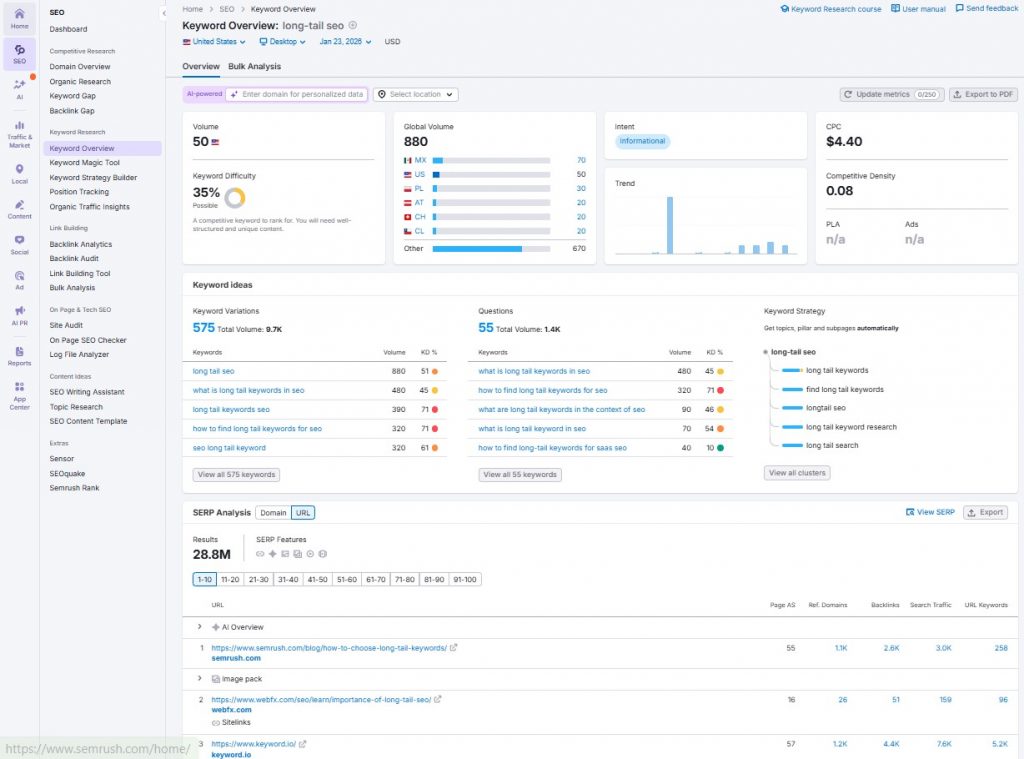
Semrush offers several modules specifically designed to discover and track emerging topics:
- Topic Research Tool– Generates a “mind map” of fresh, engaging content ideas based on real-time search data, related questions, and subtopics.
- Trends Suite– A premium add-on featuring Market Explorer and Traffic Analytics, which visualizes market structure, total available traffic, and the growth quadrant of competing sites.
- Keyword Magic Tool Filters– Allows users to filter its 25+ billion keyword database by specific metrics, such as keywords that trigger “AI Overviews,” to catch shifting search behaviors.
- Exploding Topics Integration– Through its App Center, Semrush provides access to Exploding Topics, which specializes in identifying trending products and ideas before they become mainstream.
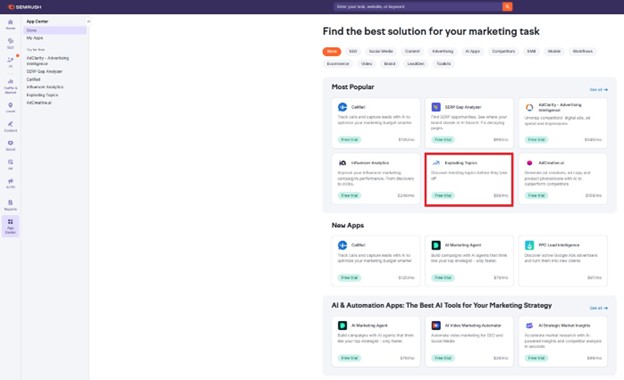
Together, these modules make Semrush more than just a snapshot tool: it becomes a platform for understanding how interest is evolving, where demand is accelerating, and which segments are gaining or losing momentum– insights that can inform not just SEO, but content strategy, product direction, and competitive positioning.
Google Trends vs Semrush: Verdict
Google Trends works well when your goal is simply to spot rising interest or seasonal patterns. But when trends need to translate into content plans, SEO roadmaps, or business cases, bigger tools like Semrush clearly pull ahead. It doesn’t just highlight momentum; it helps you plan around it.
7. Exploding Topics
Plans start at: $39/month
Free Trial: 7-day free trial
Originally co-founded by Brian Dean and now owned by Semrush, Exploding Topics is a strong alternative to Google Trends because it shifts from pulling data to pushing it. While Google Trends requires you to already know what you’re looking for, Exploding Topics proactively surfaces emerging trends before they reach the mainstream.
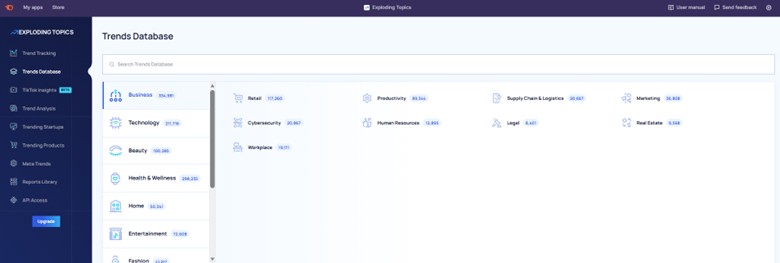
Its Trends Database is the company’s core feature. You can just choose a category and a subcategory to instantly access a list of emerging topics in that niche. For example, if you select Mental Health under Health & Wellness, you can see all the topics currently gaining traction in that space.
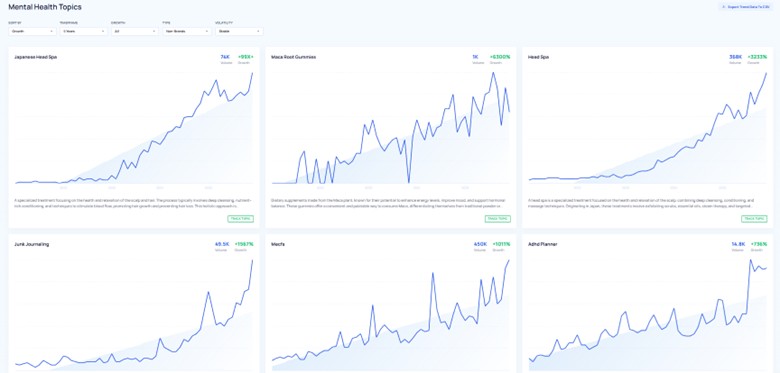
You can also use the filters and sort according to growth rate, timeframe, volatility, topic type (brand vs non-brand), and stability to narrow in on trends that match your strategy.
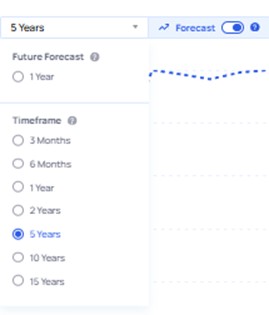
To dig deeper, just click on the results where you can see a quick overview of the topic, the Channel Breakdown, and even a visual forecast represented by the broken lines.
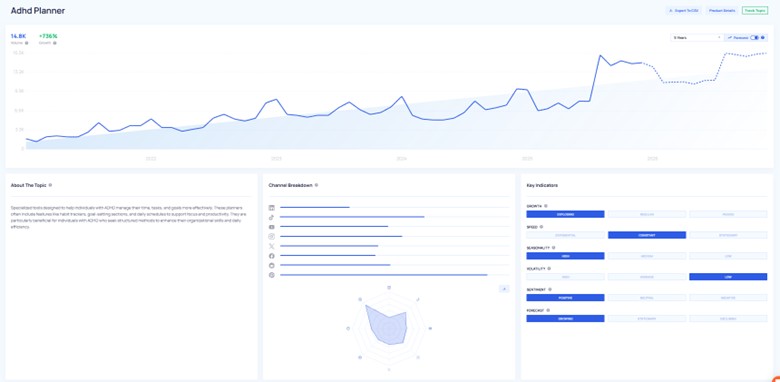
You can set the Forecast setting up to 15 years into the future:
Further down the page, you can review additional key indicators and discover related trends.
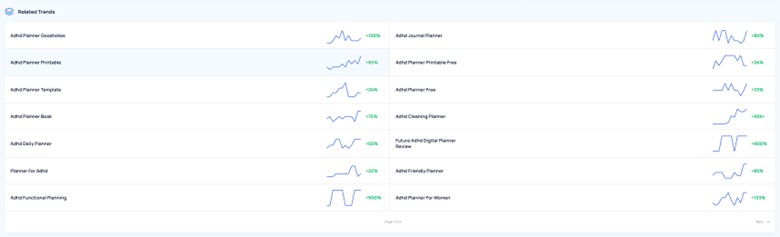
Exploding Topics shows trending products, companies, and concepts. It can be particularly great for ecommerce because it helps you spot product demand early, before everyone else jumps in. Instead of chasing saturated markets, sellers can catch trends while competition is still low and margins are higher.
If you’re an entrepreneur or investor, you can also explore the dedicated Trending Products and Trending Startups pages. Its growth filters and forecasting tools make it easier to separate ideas worth testing from short-lived fads.
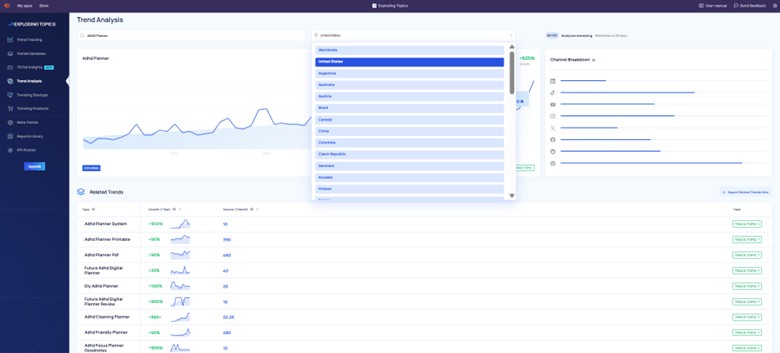
There’s also a standalone Trend Analysis tool that lets you filter by country, uncover related trends, and track topics over time with alerts as growth patterns shift.
Google Trends vs Exploding Topics: Verdict
Exploding Topics builds on Google Trends by adding context and curation. Google Trends shows interest patterns but doesn’t help much with organizing and structuring trends into actionable insights. Exploding Topics uses machine learning and analyst review to highlight trends that are actually gaining momentum.
The biggest upside is early discovery. Instead of reacting after a trend peaks, you can see it forming and position yourself early. That’s especially useful for anyone whose work depends on anticipating demand.
8. Glimpse
Plans start at: $99 per month
Free Trial: None (But with Free limited version)
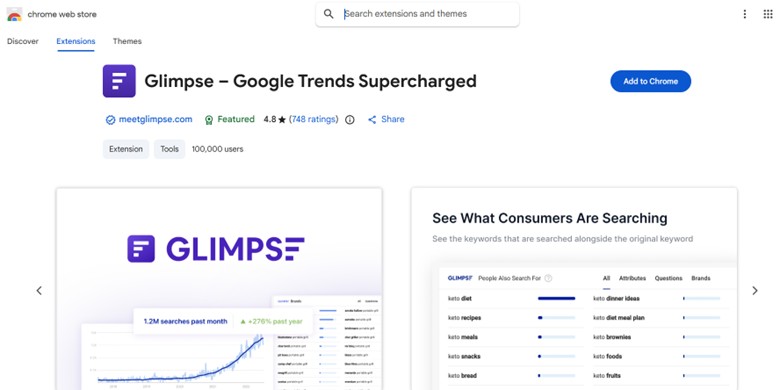
Glimpse is a browser extension, and it “supercharges” Google Trends by literally transforming the interface itself once the extension is active.
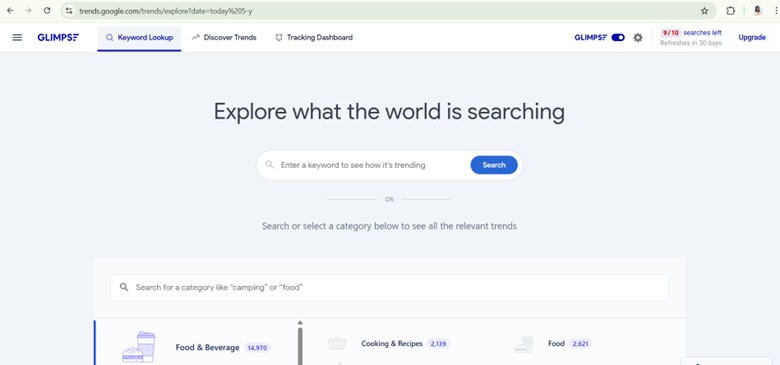
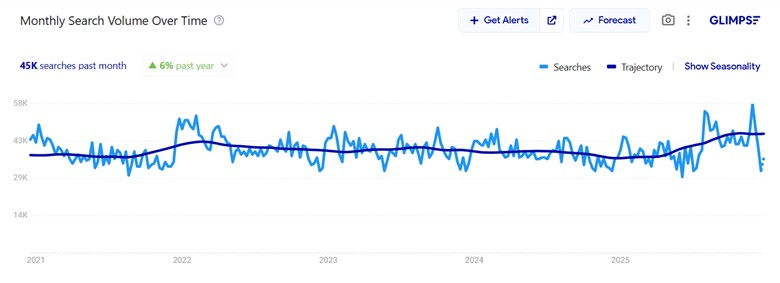
Glimpse adds real context to Google Trends by overlaying estimated search volume directly into the Trends interface, something Google Trends itself doesn’t provide. Normally, Trends only shows relative interest on a 0–100 scale, which makes it hard to tell whether a topic represents hundreds of searches or tens of thousands.
There’s even a “People Also Search” expansion layer, which turns a single Google Trends topic into a structured list of related, real search queries. Instead of just showing trend interest over time, Glimpse surfaces closely related keywords people actively search for, organized into tabs like All, Questions, Attributes, and Brands.
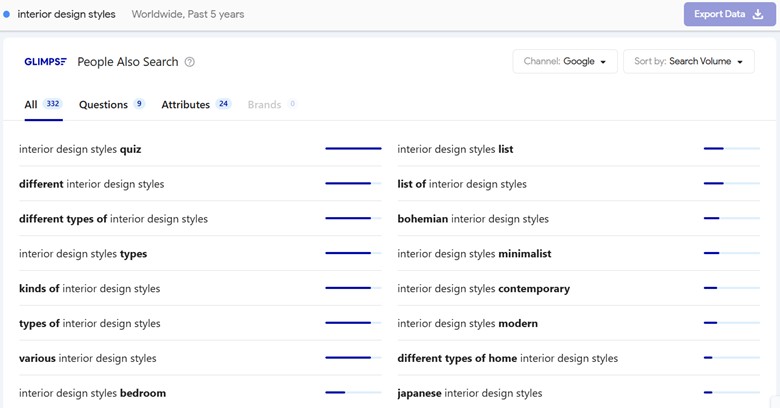
In practice, this section helps you move from trend discovery to content and keyword planning by revealing long-tail variations, common modifiers, and adjacent topics you can realistically target, all without leaving the Google Trends interface.
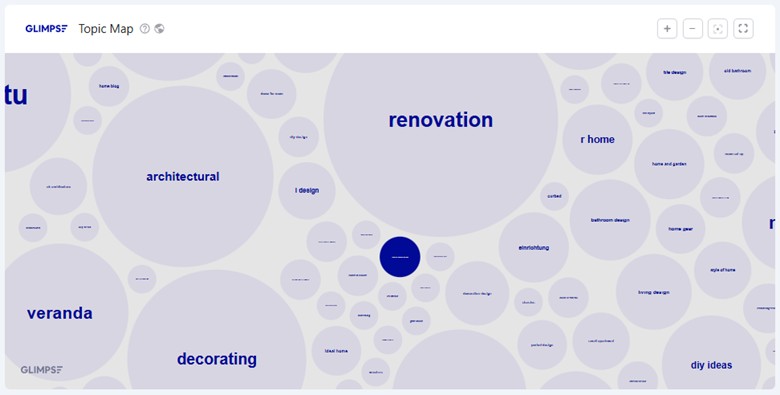
There’s even a Topic Map, which is a handy way to explore related topics visually. Larger bubbles highlight high-interest themes while smaller ones reveal supporting topics you can build content around.
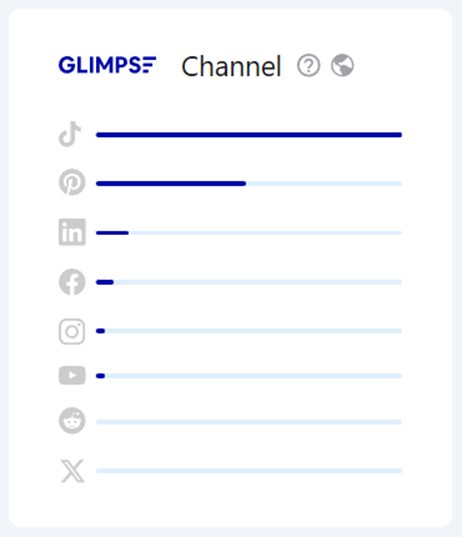
Another neat section is the Channel breakdown, highlighting where audience attention is actually coming from by comparing interest levels across different platforms. Instead of guessing where to publish, you can quickly see whether a topic resonates more on visual platforms, social feeds, or traditional search, keeping content aligned with actual demand.
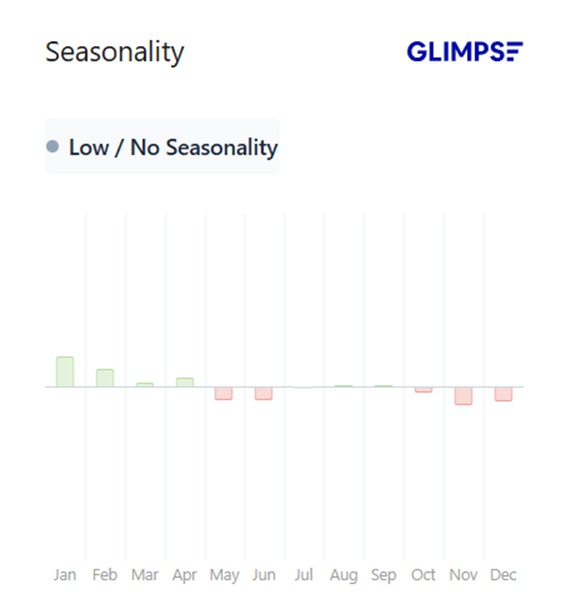
You can also plan the timing of your content using the Seasonality section, which shows exactly when interest spikes and drops throughout the year. This makes it easier to schedule posts, refresh old content, or launch campaigns at the right time.
Google Trends vs Glimpse: Verdict
Because Glimpse is built specifically to enhance Google Trends, it naturally feels more useful. You keep the same familiar Trends experience, but with added depth that helps turn trend discovery into strategic decision-making.
Subscribing to Glimpse makes the most sense if your role depends on spotting demand early and acting on it before markets get crowded. This includes content strategists planning editorial calendars months ahead, SEO professionals validating emerging topics, product marketers researching new angles, founders testing product ideas, and ecommerce teams deciding which categories or products to invest in next.
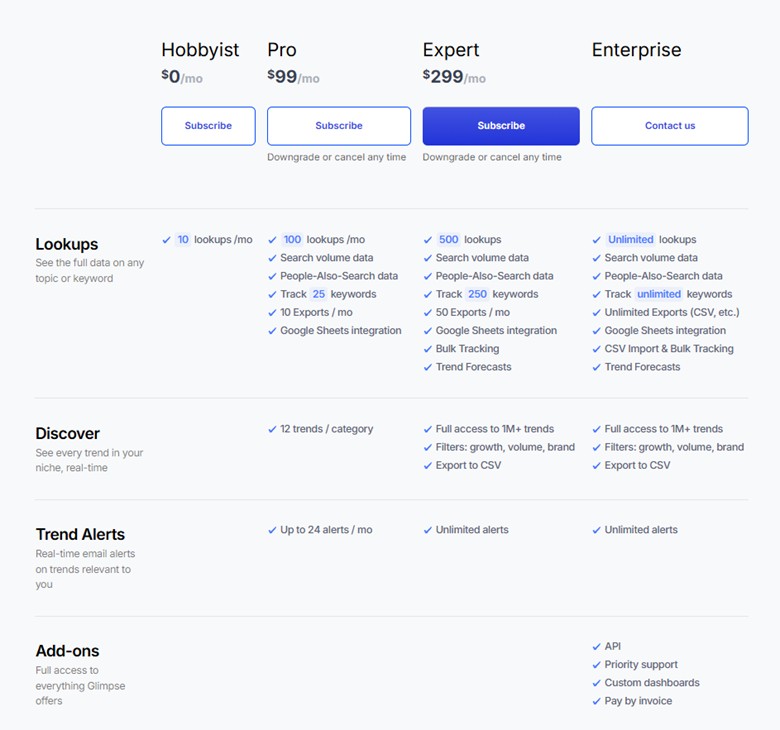
To fully access the Discover Trends section and the Tracking Dashboard, you need the Pro plan which starts at $99 per month.
9. Treendly
Plans start at: Free (Pro Plan at $99)
Free Trial: With Free limited version

Whether you’re into ecommerce, investing, or content creation, there’s something worth exploring in Treendly that can help you stay ahead of the curve. You can explore Product Trends, Company Trends, and Concept Trends, all within a clean and straightforward interface.
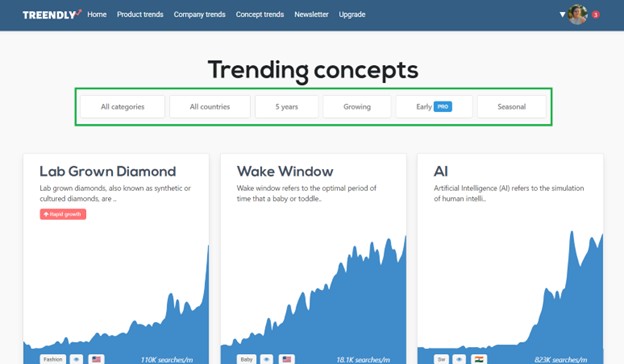
Treendly doesn’t have the full analytical depth of other Trends platforms, but its long-term industry trend tracking and simple UI make it approachable and efficient.
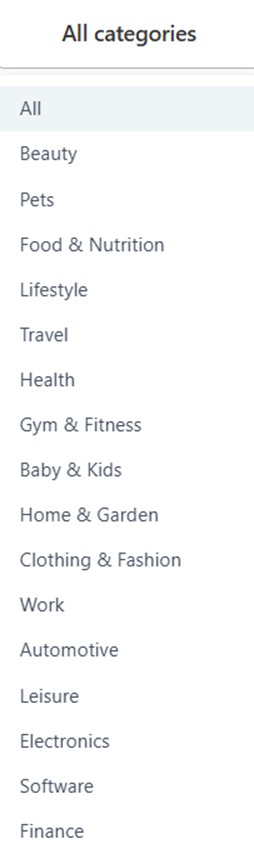
You can choose filters based on category, timeline, and trend type.
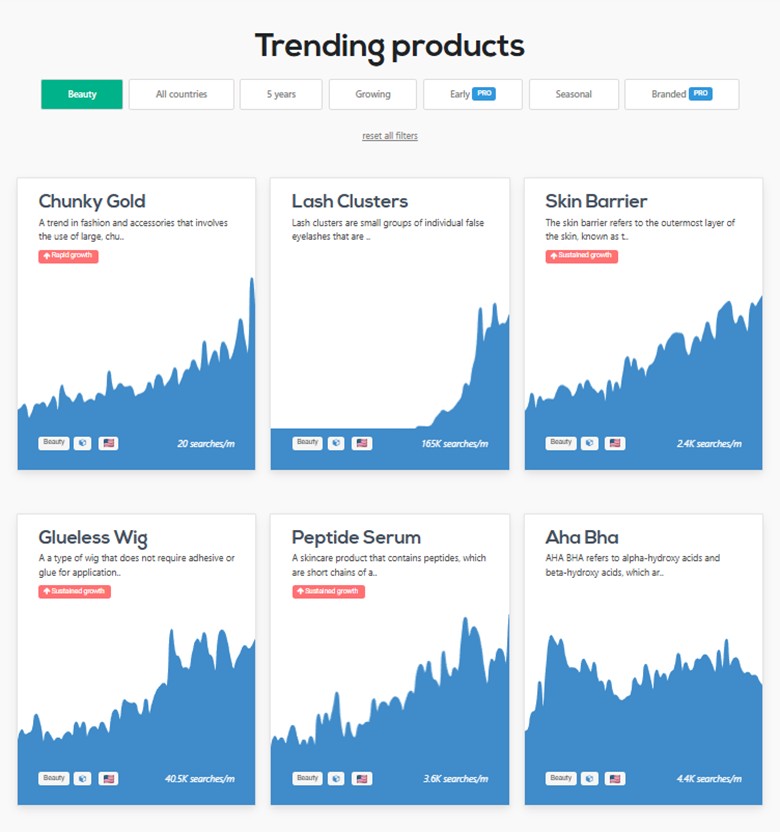
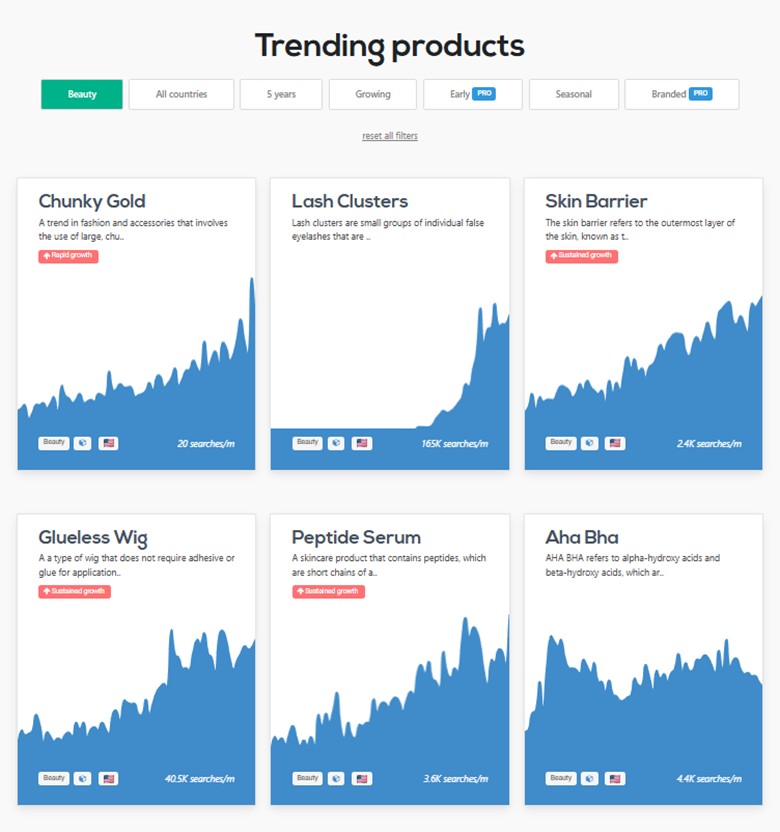
You can also see helpful indicators showing whether the trend is in Rapid Growth, Sustained Growth, or Decline. You can immediately see the graphs showing the historical trend trajectory of each item plus the current monthly search volume.
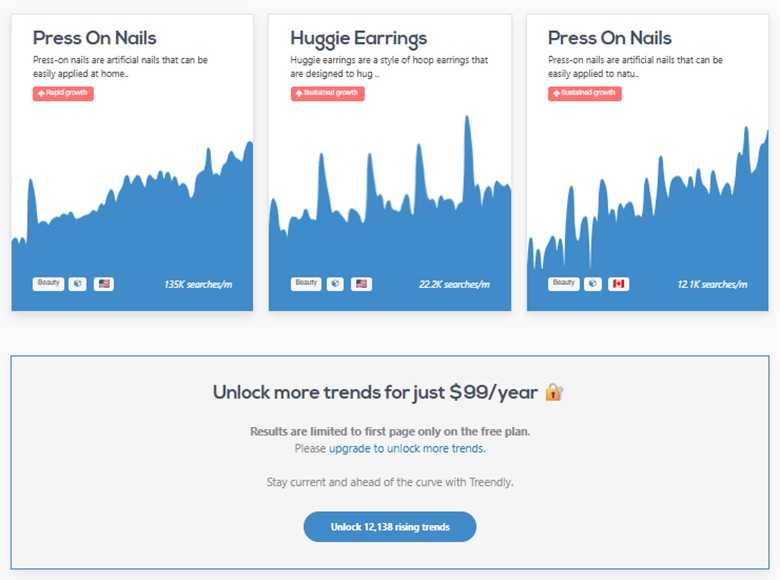
Just take note that unlocking the full trends list and filtering trend types and countries are all locked behind the paywall.
Google Trends vs Treendly: Verdict
Treendly has flown under the radar compared to better-funded tools like Exploding Topics and Glimpse, partly due to its higher entry price. But if your business is making money and you’re serious about trend-driven decision-making, Treendly can be well worth the investment.
Takeaway
In business and digital marketing, timing is key. Jump in too early and you might be betting on a fad. Get in too late, and you’re competing in an already crowded space. Using Google Trends or its alternatives helps you act in the narrow window where interest meets opportunity. In the end, the real advantage comes from validating trends with demand, competition, and feasibility.